
Move an Android Meet Viewer Into the Call Without Losing the Handoff
Prepare invitations, rehearse the Android role switch, and keep a moderator fallback so a live-stream viewer can contribute without interrupting the event.
Published October 19, 2026
An Android user watching a Google Meet live stream can move into the main meeting to speak if they have the required invitation and the role-switching feature is available. For an internal event, the useful preparation is not simply telling the guest to find a button. Confirm their access, rehearse the transition on their actual device and give the moderator a fallback if the switch fails.
Google’s October 13 announcement says the Android rollout begins October 19, 2026 and may take more than fifteen days. The feature is for viewers invited to both the live stream and main meeting, with existing access rules still applying. Do not promise that every guest will see it on the first rollout day.
This guide is for internal communications, operations and training leads running an event with a guest who listens on an Android phone before contributing. It proposes a rehearsal and handoff process; it is not a report of our own event test. For a small interactive workshop where everybody needs to speak throughout, invite people into an ordinary meeting rather than adding a streaming transition without a clear reason.
Separate watching from contributing
A live-stream viewer and a main-meeting participant have different roles. Watching successfully does not prove that the person can turn on their microphone in the main call. A guest who is expected to contribute needs the appropriate invitation and must join with the intended account.
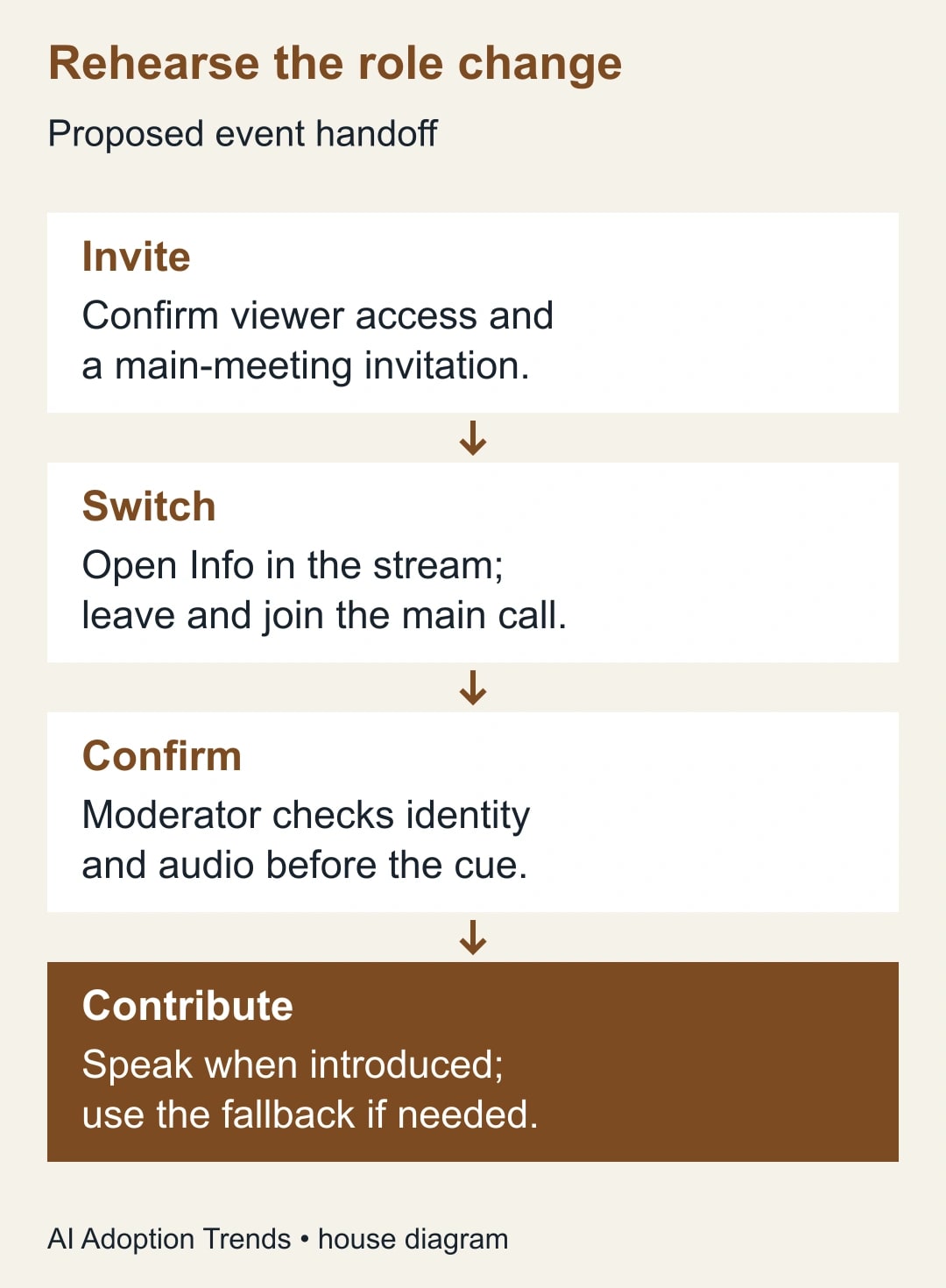
Google’s Android viewer instructions describe moving through the stream’s Info page, choosing Leave and join the call, confirming the departure and joining from the main call’s green room. The page describes this route for an invited contributor in an adaptive meeting. Check that your event type supports the documented path before relying on it.
The interface change reduces switching effort; it does not grant new speaking rights to every viewer. It also does not replace the organizer’s responsibility to decide who should be in the main meeting. Keep the main-meeting invitation limited to the people who need to contribute, and follow your organization’s existing event access policy.
The announcement’s broad availability statement should not be read as universal entitlement to create every type of live stream. Hosting and viewing depend on the event, account and Workspace configuration. Confirm the actual organizer’s setup rather than choosing a plan from one rollout sentence.
Assign three clear roles
Name the organizer, moderator and guest contributor. The organizer owns the event configuration and invitations. The moderator owns the live handoff: checking that the guest is ready, cueing the transition and deciding when to use the fallback. The guest owns their device preparation and the specific contribution they are making.
For a larger event, name a separate person to watch the audience experience. A moderator who is listening in the main call may not know whether viewers can hear the guest clearly. For a small internal session, one colleague can perform that audience check during rehearsal and stay available during the handoff.
Write the guest’s job as a concrete output. For example: explain one five-minute customer-support workflow and answer one question. Avoid a vague instruction to join when needed. A clear contribution makes it possible to prepare backup notes and lets the moderator keep the event moving if the guest’s connection fails.
Choose a communication channel for the handoff that both moderator and guest can use. Keep the cue short and unambiguous. Do not depend on the guest noticing their name in a busy audience conversation while simultaneously navigating the phone. The rehearsal should prove how they will receive the cue.
Prepare invitations and equipment before event day
Confirm the guest’s account address and send the appropriate main-meeting invitation as well as the stream access they need. Ask them to use the same account during the rehearsal. A person switching between a personal account and a work account can see a different access result even on the same phone.
Have the guest check their Android Meet app, network connection, battery and audio equipment. Use a quiet stationary location for the contribution. A mobile interface does not make it sensible to navigate event controls while driving or moving through a noisy workplace. If they cannot contribute from a stable location, use a recorded or moderator-read alternative.
Keep a copy of the approved speaking notes with the moderator. If slides or a demonstration are required, decide who will present them. An organizer at a computer can handle the visual material while the mobile guest speaks. That arrangement is often easier to rehearse than making the guest manage screen sharing and role switching at the same time.
Google’s host guidance says mobile devices cannot schedule, start or stop a Meet live stream. Keep those controls with the organizer on a computer. The Android contributor’s job is participation, not taking over the entire broadcast operation.
No additional purchase should be assumed for the handoff itself. Confirm that the organizer already has the required streaming capability and the guest has an eligible access path. The main practical cost is preparation: rehearsal time, a moderator and a backup contribution. If those costs exceed the value of the mobile handoff, simplify the event.
Run a rehearsal that can fail usefully
Use a harmless test event with the same organizer, account arrangement and device roles planned for the real session. Invite the guest through the intended route. Have them begin as a viewer, then follow the documented switch into the main call. Do not count a direct join to the main meeting as a successful test of the viewer-to-contributor transition.
Record whether the entry point is visible. If it is absent, check the invitation, signed-in account, event type and rollout availability. Do not widen event access blindly to make a control appear. Keep the supported main-meeting join route as a fallback and ask the Workspace administrator to inspect any policy issue that remains unclear.
Once the guest reaches the main call, have the moderator verify their identity and ask for a short audio check before introducing them. Confirm the microphone state and make sure a second device in the same room is not producing echo. Ask the audience checker whether the contribution is audible in the stream.
Time the whole handoff, from cue to accepted contribution. Also record what the guest found confusing. The aim is a usable event process, not a speed competition. If the switch takes longer than the agenda allows, move it earlier, have the guest join the main call from the start, or use the backup format.
Rehearse one failure deliberately. For example, tell the guest to remain unavailable for the first cue and have the moderator introduce the backup notes. The event should continue without improvising an access workaround in front of the audience. Keep the test harmless and make the exercise clear to everyone involved.
Use a short live handoff script
The moderator’s internal cue can be: Please move into the main call now; stay muted until I confirm you are here. After checking the guest, the moderator introduces the contribution and invites them to speak. The wording is a proposed script, not a Meet feature or an automatic notification.
Give the guest a clear end cue too. They should know whether to remain in the main meeting for questions or return to watching through the event’s supported route. Do not invent a one-tap reverse switch without confirming it in your environment. The operating plan should describe only the controls and paths that your rehearsal established.
If the guest cannot join, the moderator uses the agreed fallback rather than repeatedly announcing technical difficulty. Read the approved summary, present the guest’s example, or move to the next item and return later. The guest can continue working with the organizer privately while the audience receives useful material.
Stop troubleshooting live when it threatens the event’s main purpose. A contribution can be rescheduled; a rushed permission change or an accidentally open microphone may create a larger problem. The moderator should have authority to make that call without waiting for a group discussion.
Worked example: a twenty-minute training segment
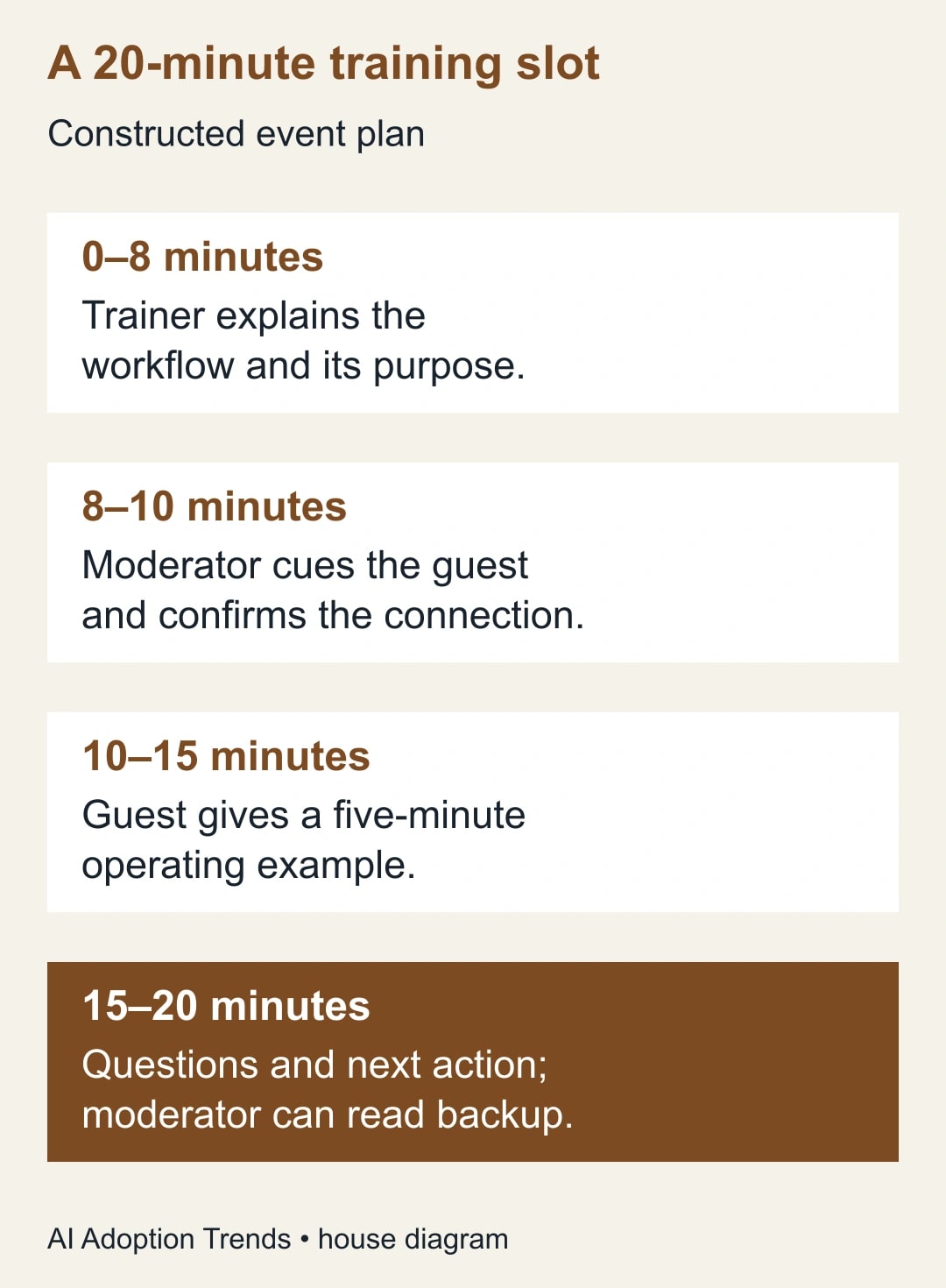
Consider a constructed internal training session about handling a customer escalation. The trainer has eight minutes to explain the process. A remote supervisor watching on Android will then give a five-minute example. The team reserves minutes eight through ten for the handoff, minutes ten through fifteen for the example, and the final five minutes for questions and the next action.
That plan totals twenty minutes: eight plus two plus five plus five. The two-minute handoff allowance is an editorial planning assumption, not a product performance claim. The rehearsal determines whether it is realistic for the guest’s device, account and connection.
The moderator holds a short backup example with three facts: the signal that triggered escalation, the person who owned the decision and the evidence recorded at completion. If the guest is not ready by the agreed cutoff, the moderator reads that example and keeps the question period. The session still teaches the intended workflow.
After rehearsal, suppose the guest takes seventy seconds to move into the main meeting and confirm audio. That is a hypothetical observation used to illustrate planning. The team would still allow margin and test the audience sound; it would not advertise a guaranteed seventy-second transition or assume the production event will behave identically.
The training owner measures success by whether viewers understand the escalation decision and know the next action. A smooth transition helps, but it is not the learning outcome. This prevents the event report from celebrating an interface feature while overlooking whether the material was useful.
Copy this contributor handoff card
- Event and role: identify the guest’s contribution and whether they start as a viewer or participant.
- Access: confirm the intended account, stream access and main-meeting invitation.
- Device: record the actual Android device and app used in rehearsal, plus the audio arrangement.
- Cue: name the moderator, communication channel and time to begin the transition.
- Acceptance: moderator confirms identity and audio; audience checker confirms the stream experience.
- Fallback: attach approved notes or a recording, name who presents them and define when to switch plans.
- Exit: specify whether the guest stays for questions and the verified route for any later role change.
Keep this card short enough to read on a phone. Send it before the rehearsal and revise it with the guest’s own observations. Avoid filling it with administrator terminology that the guest cannot act on during a live event.
Check the event after the contribution
Record whether the guest joined as planned, whether viewers heard the contribution, how much time the handoff consumed and whether the fallback was used. Separate device, invitation, rollout and process problems. A missing feature during an extended rollout is different from a guest using the wrong account or a moderator forgetting the cue.
Keep technical notes free of unnecessary personal information. The purpose is to improve the next event, not to distribute account details or screenshots of private notifications. Retain recordings and attendance information according to the organization’s existing practice.
If AI helps draft follow-up material, review it against the actual accepted contribution and audience questions. Do not let a generated summary claim that the guest demonstrated something the moderator only described from backup notes. The Meet follow-up guide explains the separate post-meeting workflow, while the training-video guide can help prepare a reusable fallback.
Your next action is to run one rehearsal with the actual guest account and Android phone. If the transition is available and dependable enough for the event, add it to the handoff card. If it is not, keep the contribution and change the joining plan. The audience needs a useful session more than it needs a demonstration of a new control.
Weekly Newsletter
AI Adoption Weekly
New research, field guides, training studies, and tool decisions for operators.
No spam. Unsubscribe anytime.
Related Comparisons
Calculator
AI seat cost calculator
List price × headcount. You enter the hours and the operating assumptions.