
Turn an SOP Into a Useful Training Video With Google Vids
Turn a procedure into a reviewed script, preserve exceptions, and test whether learners can do the task before releasing a Google Vids lesson.
Published October 14, 2026

Google Vids can turn a procedure document into a first video draft. To make that draft useful for training, check that it preserves the actions, exceptions, and escalation points a new colleague needs. Approve the script before polishing the visuals, then ask someone unfamiliar with the task to perform a practice case. A fluent voiceover is not evidence that the lesson works.
On September 2, 2026, Google announced video summaries from Google Docs, PDFs, and Word files, with generated scripts, narration, and visuals. That lowers the effort of producing a starting draft. It does not remove the instructional work of deciding what a learner must do. Google's launch notice describes the capability, rather than a measured improvement in training outcomes.
This workflow is for a team lead who owns a written standard operating procedure, or SOP, and wants a short lesson for a recurring office task. It works best when the procedure is already correct and someone can review the video. It is a poor shortcut for an undocumented process, a rapidly changing policy, or physical work that requires supervised practice.
Pick one action a learner can demonstrate
Choose a narrow result: “Route a customer delivery-change request to the correct owner,” for example. Avoid “Understand our customer service process.” The first can be tested with a case; the second invites a general summary that sounds complete while omitting the decision.
Before opening Vids, write down the starting input, the final output, the normal route, and the point where the employee must stop and ask. Identify the procedure owner who can resolve an ambiguous instruction. If two managers disagree about the correct route, resolve that disagreement in the written procedure first. Video production should not conceal an unfinished operating decision.
As checked October 14, Google's release notice lists eligible Business and Enterprise editions, including Starter, alongside other eligible plans. The current Help page says an eligible Workspace or Google AI plan is required. Verify access and language support in your account before planning a training deadline. Current video-summary instructions link to those plan and language details.
The practical costs include source cleanup, script review, visual correction, learner testing, and later updates. Any subscription charge sits beside those costs. A reasonable first experiment is one procedure and a small learner group; do not commission a library before you know what review each lesson needs. Use existing approved company assets when possible, and keep private customer data out of demonstration files.
Prepare a teaching copy of the procedure
Make a copy clearly marked for training production. Preserve the source URL, owner, effective date, and version in the first section. Do not silently simplify the actual operating procedure while preparing a video. The source remains the authoritative place for the complete instructions.
Remove irrelevant history, duplicate introductions, and comments that are not approved instructions. Replace real names and account details with clearly fictional examples. Keep decision-changing conditions intact: deadlines, approval roles, exceptions, and the information a requester must supply. Highlight them in your production notes so the reviewer knows what must survive summarization.
For each step, write an observable action and the evidence of completion. “Check the request” is too vague. “Compare the requested delivery date with the order's shipping status, then record the result in the request” gives both the action and the expected output. If the employee needs a particular screen, arrange an authorized capture of that screen with sample data; an invented interface should not stand in for the real system.
Keep the teaching copy short enough to serve one lesson. If a procedure contains five independent decisions, produce separate lessons or a written reference with a brief introduction. Cutting a long process into a short video by removing exceptions creates a dangerous kind of simplicity: the learner becomes confident precisely where the job becomes difficult.
Build a script that keeps the exception visible
Consider a constructed customer-service example. The approved procedure says that an employee may request a delivery-date change only while an order has not shipped. The employee must record the order identifier and the requested date. A missing identifier requires clarification. A shipped order goes to the logistics lead; the employee must not promise a new date. This is a sample business rule, not advice about any particular company's obligations.
A weak summary might become: “Find the order, update the delivery date, and confirm the change.” It is short, but it turns a request into a completed change and removes the shipped-order exception. The review needs to catch both errors before a voice is generated.
Use a five-scene plan. Scene one states the job and shows the incoming request. Scene two identifies the two required inputs. Scene three compares shipping status with the permitted route. Scene four shows the normal request and the shipped-order escalation side by side. Scene five asks the learner to choose a route for a new example and points to the current procedure.
For the normal case, show fictional order A-104, not shipped, with a requested date of October 22. The employee records a change request for the authorized owner; the video must not imply that a customer promise is already approved. For the exception, show A-105 as shipped and route it to the logistics lead. For the missing-input case, omit the order identifier and ask the learner to request it before proceeding.
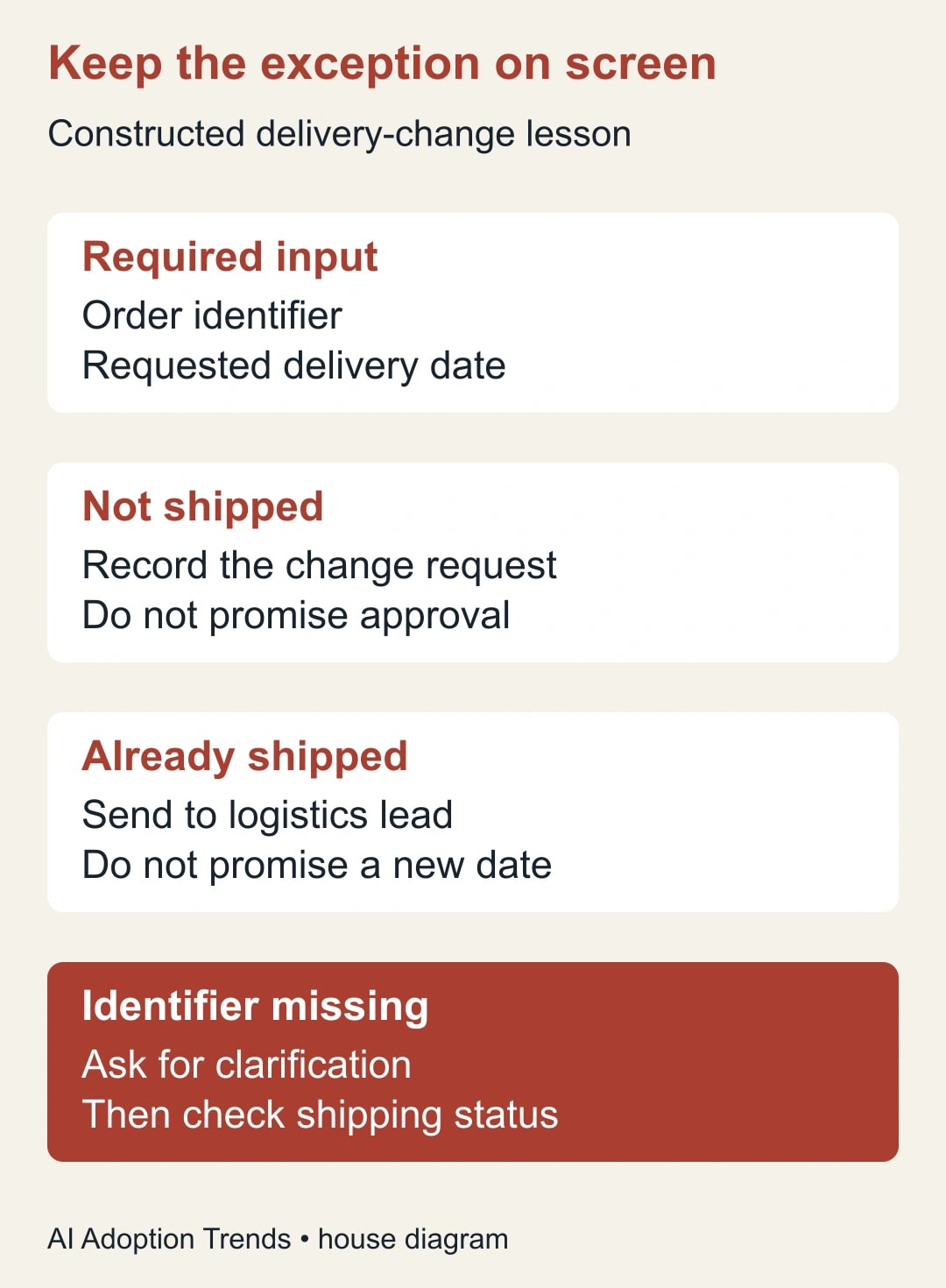
The scene plan is your coverage checklist. The document-to-video tool may draft a different arrangement. That is acceptable if every required action and stop point remains clear. Reject a beautiful draft that teaches the wrong action.
Generate the draft, then inspect the script
Google's current instructions describe opening Vids, choosing File and Convert Docs, selecting a supported file, and reviewing the generated script before generation. Each script section becomes a scene, and text can be edited there. You can choose a voice, generate the video, then edit, share, or export it. Follow the current Vids steps; menu wording and availability may change.
Treat script review as required in your process even if the interface allows you to skip it. Read it against the teaching copy line by line. Mark each sentence as an instruction, explanation, example, or transition. Instructions need a source. Examples need a clear fictional label. Transitions should not introduce new promises or missing steps.
Here is an adaptable review brief for the person checking the script: “Check this lesson against procedure version [version], owned by [owner]. The learner must produce [output] from [input]. Confirm that every required action, exception, approval, and escalation is present. Flag any stronger promise than the source permits. Identify terms a new starter would not understand. List corrections by scene, and do not approve the lesson until the procedure owner resolves them.”
This brief is a human review artifact; it does not assume Vids has a dedicated field for every instruction. You can use it in a separate review document. Record the final approved script there so later visual edits do not obscure what was agreed.
Make the visuals teach the action
Choose visuals according to the learner's task. A decision diagram is useful for selecting between a normal route and an exception. An authorized, current screenshot can show where to enter a request. A short screen recording can demonstrate a sequence that static images would make confusing. Generic footage of colleagues talking rarely explains where the employee should click or when they should stop.
Review generated visuals for implied facts. An illustration of a truck leaving a warehouse may be harmless context; a fabricated order screen showing a green “approved” state can teach a false system behavior. Replace any visual that could be mistaken for evidence or an actual interface. Label conceptual illustrations and constructed examples plainly.
Listen to the whole narration while watching. Check names, abbreviations, dates, and pauses around the exception. A correct written sentence can become unclear when spoken quickly. Expand necessary shorthand on first use and remove background music if it competes with the instruction.
Test the result on the device employees will use. Critical text should remain readable at that size. Provide a checked text transcript and the current procedure alongside the video, and verify captions wherever your delivery method supports them. Do not place the only explanation of the exception in audio or rely on red and green alone. The lesson should remain understandable when someone cannot hear the narration or distinguish the colors.
Test whether a new colleague can use it
Recruit a few people who did not write the procedure. Give each the same three fictional requests: normal, shipped, and missing identifier. Ask them to describe or perform the next action in a safe practice environment. Avoid coaching during the attempt; note where they hesitate and what they believe the video told them.
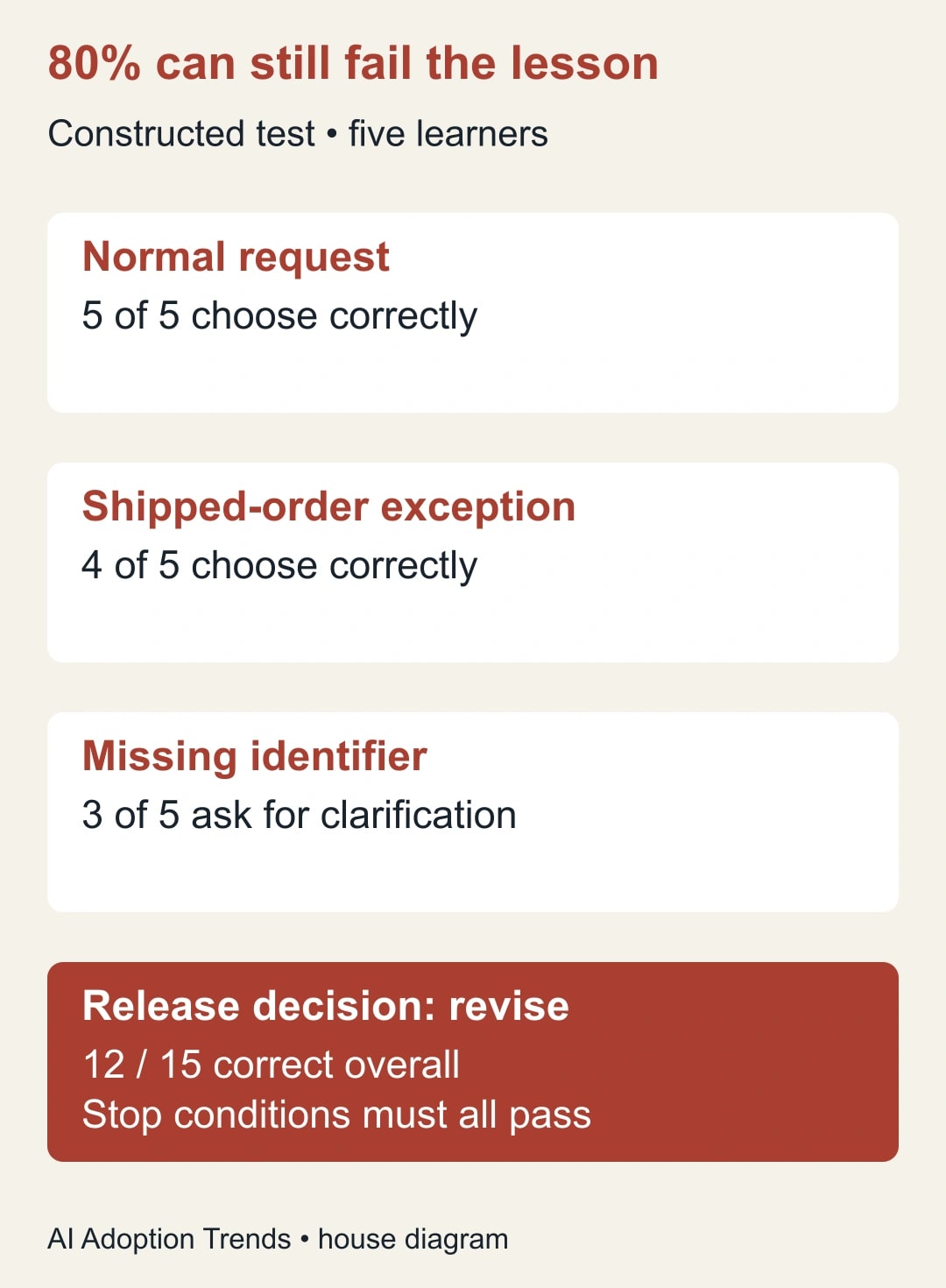
For a constructed five-person test, there are 15 case attempts. Suppose all five handle the normal request correctly, four handle the shipped order correctly, and three ask for the missing identifier. That is 12 correct attempts out of 15, or 80%. The combined figure hides the weakness: two people acted without the required identifier, and one treated a shipped order as routine.
Under a proposed release rule that all five must handle both stop conditions correctly, the lesson fails. Rewrite the relevant scenes, then test with fresh cases and, where practical, different learners. Reusing the same examples can measure recall of the test rather than understanding of the process. Small trials detect obvious defects; they do not establish a reliable organization-wide success rate.
Also measure how long the task takes and whether learners can find the written procedure afterward. A lesson can be accurate but hard to retrieve when needed. Put it beside the work instructions employees already use, not in a separate folder that only the training team remembers.
Keep a release record that survives the next update
Use one row per lesson in a simple register. Include lesson title, procedure URL and version, owner, approved script location, video location, reviewer, approval date, learner-test result, and next review trigger. A review trigger can be a changed form, system screen, business rule, or owner. It is more useful than relying only on an annual reminder.
When the source changes, compare the affected instructions with the script and visuals. If a change alters what the learner should do, mark the old lesson as superseded and direct viewers to the current written procedure until a replacement passes review. Preserve the previous release for internal change history where your normal retention rules allow it; do not leave two apparently current lessons side by side.
Use this release checklist before sharing with the wider team:
- The source owner approved the exact script and the current source version is linked.
- Normal, exception, and missing-input cases each have an explicit action.
- Screens and examples are accurate, authorized, and free of real private customer details.
- Narration, transcript, and captions agree on the important instructions.
- Intended learners can open the video and the procedure on their actual device.
- Practice results meet the preselected rule, and a named owner can withdraw the lesson.
Decide whether the production method is worth keeping
Track total production and correction minutes for the first lesson, not just generation time. Then record supervisor help requests and task errors during a short supervised rollout. Compare with the previous teaching approach using similarly difficult work. A reduced number of repeated explanations may justify another lesson; a high correction burden may favor a written job aid instead.
Do not convert every minute of supervisor time released into cash savings. The immediate benefit may be more time for coaching or customer work. A budget saving needs a separate change in spending. The strongest early evidence is simpler: learners take the right next action without inventing a promise or skipping a stop condition.
Use the four-week training plan for one business team to place the lesson inside practice and manager review. Your next step is to choose one procedure and write its exception scene before generating the video. If that scene is hard to explain, the procedure needs attention first.
Weekly Newsletter
AI Adoption Weekly
New research, field guides, training studies, and tool decisions for operators.
No spam. Unsubscribe anytime.
Related Comparisons
Calculator
AI seat cost calculator
List price × headcount. You enter the hours and the operating assumptions.