
Test Gemini Drive Labels Before They Trigger Restrictions
Pilot automatic Drive classification with a separate label, a human comparison set, coverage checks, and a clear decision before enforcement.
Published October 14, 2026

Before using Gemini's automatic Drive labels to trigger restrictions, test whether it classifies your documents correctly. Start with a dedicated pilot label that has no enforcement attached, a clearly limited group of file owners, and a human-reviewed comparison set. Count sensitive files it misses as carefully as ordinary files it flags. A high acceptance rate alone cannot tell you whether the system found the documents people never reviewed.
Google opened Gemini-based Drive classification to beta on August 28, 2026, and highlighted it again in its October feature roundup. Administrators describe categories in plain language; Gemini evaluates files and applies labels. This changes the setup work compared with Google's custom classification models, which require labeled training examples. It does not remove the need to test the categories against your own documents. Google's beta announcement is the source for the feature, not evidence of accuracy in your organization.
This guide is for a Workspace administrator and business data owner considering a small classification trial. The operating method and numerical example below are editorial proposals. They are not a Google-recommended sample size, a compliance certification, or a reported customer result.
Make sure this is the problem you need to solve
Classification labels describe a file, such as whether it contains internal or confidential information. Separate rules can use that description to control an action. Data loss prevention, or DLP, refers here to rules that help stop sensitive information from being shared in an unwanted way. Applying a label and enforcing a sharing restriction are different steps.
This distinction matters when a team says it wants AI to “secure Drive.” A label pilot can establish whether one category is recognized. It cannot establish that every access path is appropriate, that every document has been scanned, or that all relevant restrictions are configured. Write the intended downstream use before beginning: perhaps identify confidential proposal drafts for review, rather than automatically change everyone's sharing permissions.
As checked October 14, Google's beta announcement lists Enterprise Plus, Frontline Plus, and Google AI Pro for Education. Current admin documentation also describes additional eligible add-ons. Confirm your exact license, administrator privileges, and file eligibility before allocating implementation time. Do not assume a standard business subscription includes this beta. Google's current classification setup guide is the place to check your edition and prerequisites.
Skip the trial if nobody owns the classification policy, if existing restrictions are already being bypassed, or if the business cannot explain what each category means. Fix those conditions first. A small organization with a handful of sensitive folders may get more value from a manual review and clear ownership than from a new automatic classifier.
Write the category boundary before the instruction
Choose one business collection with a real owner: sales proposals, for example. Avoid starting with all files across finance, people operations, engineering, and customer support. Those teams use different language and face different consequences when a file is mislabeled.
Ask the owner to define each category with an inclusion, an exclusion, and a confusing example. In a constructed pilot, “Confidential proposal” could mean an unapproved customer-specific offer containing nonpublic scope or negotiated terms. A publicly released service brochure is excluded. A blank proposal template is the confusing example: it may contain the word confidential without containing an actual offer.
The instruction should explain that difference. A draft might say: “Classify a file as Confidential proposal when its content includes a customer-specific offer with nonpublic scope or negotiated commercial terms. Do not select this category merely because a blank template contains the heading or a brochure discusses proposals generally. Treat actual draft offers as confidential even if they lack a confidentiality heading. Apply the organization's other category definitions to the remaining content.”
Adapt that text to your approved policy and label options. It is not a complete classification policy, and it should not instruct a model to invent an “uncertain” label that does not exist. Keep ambiguous examples in a separate human review list. Where policy is unclear, the owner must settle the meaning before the administrator changes the instruction.
Separate the trial from existing enforcement
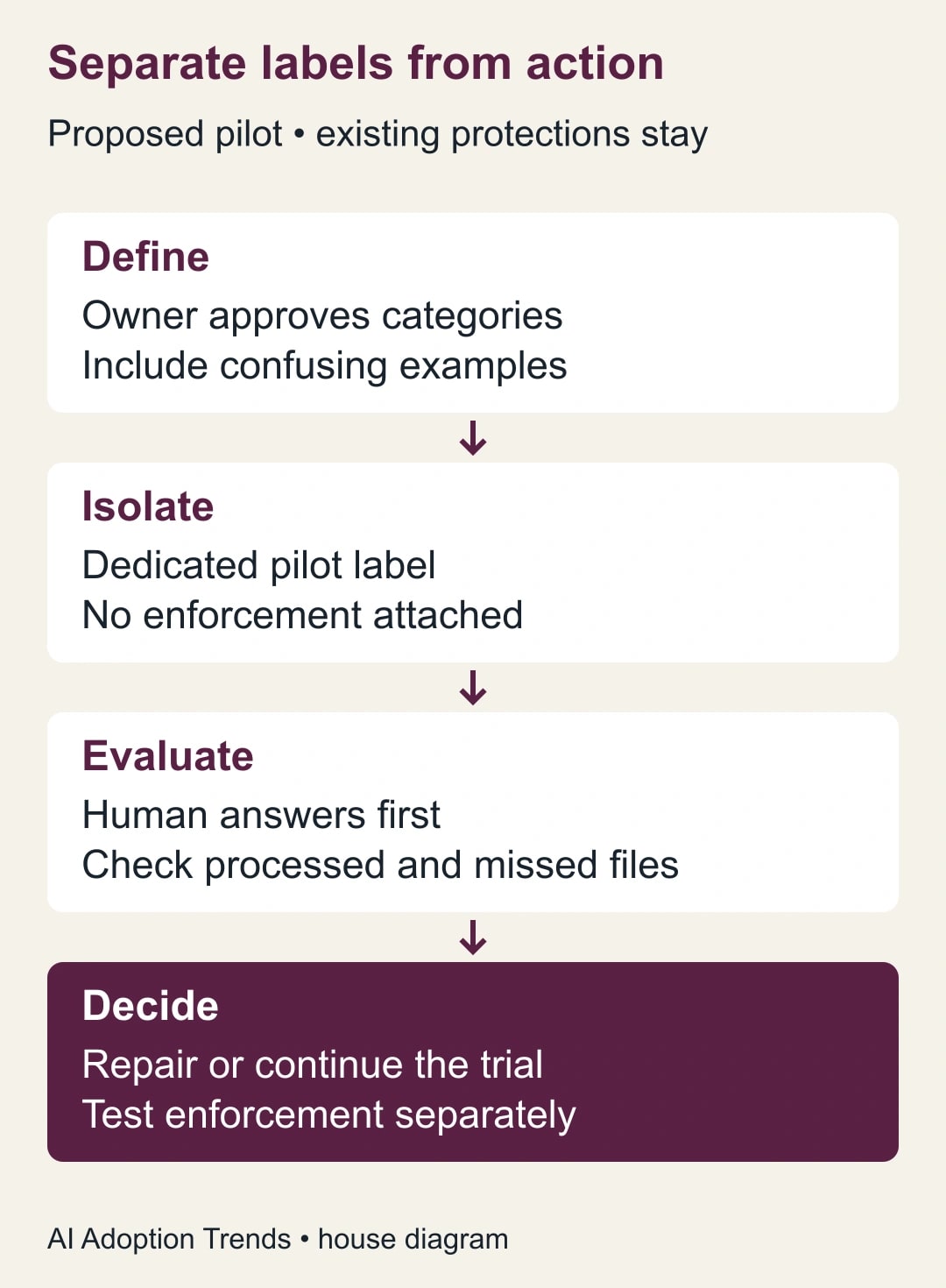
Create a dedicated pilot label only after checking whether any existing rule, application, retention process, or report will react to it. The point is to observe classification without accidentally changing live access. Do not disable existing protections to make the trial easier. Use approved copies or a designated test collection when you cannot isolate the labeling effect safely.
Record the existing labels and sharing state for the trial files. Have the administrator verify the intended ownership scope, including shared drives. A folder name in your planning notes is not proof that the admin setting limits evaluation to that folder. Confirm the actual scope controls in the current console and document which owners and drives are included.
The relevant console area is Security, Access and data control, Data classification, then Use Gemini. Google's setup guide describes selecting a label, writing instructions for its options, choosing eligible automatic options, and configuring the owner scope. Review the scope before enabling anything; a broad default is not your pilot plan. Use Google's current setup sequence for the exact controls.
Name three responsibilities. The administrator configures and records the scope. The business owner decides the correct category. A second reviewer resolves disagreements and checks the results without relying on the model's answer. In a small team, one person can perform more than one role, but the classification decision should still receive an independent second look.
Build a comparison set that can expose misses
Select a manageable set of representative files before reviewing the automatic results. Include clearly sensitive content, clearly ordinary content, and difficult cases. Use formats and document patterns the business actually handles. Keep the inventory in an approved location, because the review notes themselves may reveal sensitive details.
For an exploratory trial, 100 documents can make the arithmetic easy to inspect. This is a proposed working sample, not a guarantee of statistical confidence or a vendor requirement. A collection with many document types, languages, or consequential edge cases will need more coverage. Do not treat a small, hand-picked sample as an estimate of all of Drive.
Have the reviewers assign the expected category before viewing Gemini's result. Record the file identifier, owner, document type, expected label, reason, and any disagreement. Resolve disagreements against the written policy. If people cannot agree on the answer, mark the case unresolved and repair the policy instead of counting either model result as correct.
Keep some documents aside for a fresh check after revising instructions. Otherwise you can tune a prompt to the same examples until the score looks good without learning whether it generalizes. A revised instruction should improve the failure pattern on new cases as well as the examples that prompted the edit.
Count coverage before accuracy
A missing label can mean the file was classified as an option you did not enable, is outside scope, has not been processed, or was affected by another rule. Keep “no observed result” separate from “correctly classified as ordinary.” Without that separation, an incomplete scan can look reassuring.
Google says existing-file scans can take one to two weeks, and inactive-file scanning for Gemini instructions must be enabled separately. Its guide also explains that user-applied labels can take precedence over automatic classification; accepting or changing an automatic label makes it user-applied. Preserve those distinctions in your test record. See scan timing and label precedence.
This means your review timetable must follow observed processing, not a promise to finish tomorrow. Record how many eligible sample files have a result you can evaluate. Investigate missing outcomes before calculating accuracy. Do not infer that changing an instruction will necessarily overwrite every previously reviewed label.
For each evaluated file, compare the actual label with the human answer and note the likely cause of an error. Was the decisive passage in an appendix? Did a blank form look like a completed proposal? Did the instruction rely on a heading that real files often omit? Those observations are more actionable than a single percentage.
Read the numbers like a business owner
Suppose a constructed sample contains 40 confidential proposals and 60 ordinary files, all processed and independently reviewed. The classifier marks 36 confidential proposals correctly, misses four, and incorrectly marks six ordinary files as confidential. It correctly leaves 54 ordinary files outside the confidential category.
That produces 90 correct classifications out of 100. But the missed-sensitive-file rate is four out of 40, or 10%. Of the 42 files flagged confidential, 36 really belong there: about 86%. Those two measures answer different questions. The first reveals sensitive material missed; the second indicates how much unnecessary review a flag creates.
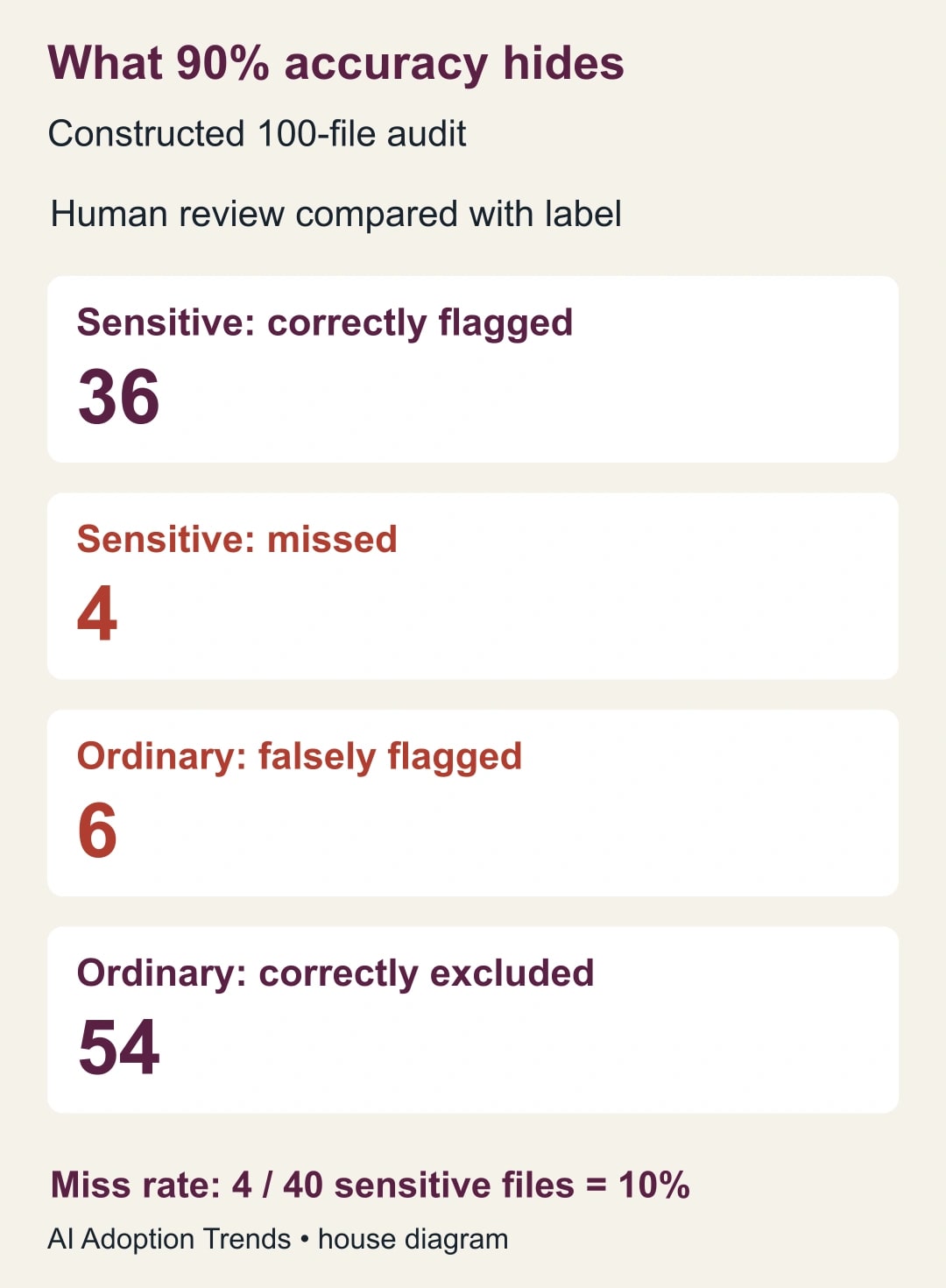
If only the 42 flagged files had been reviewed, the team might celebrate that most flags were useful and never discover the four missed proposals. This is why a comparison set includes files the system did not flag. A user acceptance dashboard is useful operational feedback, but it does not replace that broader audit.
Do not approve restrictive automation from this constructed result. Under a proposed pilot rule, any missed high-consequence example stops expansion until the owner understands it and a new test succeeds. Your organization must set the actual acceptable error levels for each intended action. A label used to suggest a review has a different consequence from one used to block urgent customer work.
Repair the cause, then test a fresh set
Change one meaningful instruction at a time. If the misses are draft proposals without the expected heading, describe their content rather than adding another exact keyword. If ordinary brochures are flagged because they mention negotiated pricing generally, strengthen the distinction between general discussion and a customer-specific offer.
Keep the old instruction text, the changed passage, the reason, and the new evaluation results. Ask the administrator how the revised configuration will process the intended test files, particularly where people have already accepted labels. Preserve the original comparison results so the second run cannot quietly replace the evidence of the first.
If the policy remains ambiguous after two review sessions, stop prompt tuning and return the decision to the business owner. If supported file types or the configured scope leave important material unexamined, maintain a manual route for that material. The classifier should not become the only protection for content it has not reliably evaluated.
To stop an unsuccessful pilot, pause its automatic application through the current admin controls and review what labels already exist. Stopping future labeling is not the same as reversing prior changes. Avoid deleting the configuration as a casual reset: Google's guide warns that deletion has irreversible effects and separate choices about existing labels. Record the recovery action and confirm that the prior protections still operate.
Keep a pilot worksheet and a separate enforcement decision
Use these fields for the trial record. They make it possible to explain both what the test found and what it did not cover.
- Business purpose, data owner, administrator, second reviewer, and exact label definitions.
- License and scope checked, included owners or drives, excluded content, and existing rules reviewed.
- Instruction version, sample selection method, unresolved human disagreements, and held-out examples.
- Files expected, files processed, missing results, correct labels, false flags, and sensitive files missed.
- Correction time, review workload, proposed stop rule, and recovery record.
- Decision: continue a limited trial, revise, stop, or prepare a separate enforcement proposal.
Estimate costs from the work you actually perform. If two reviewers each spend two minutes on 100 files, their combined review time is 400 minutes, or six hours and 40 minutes. That is a constructed planning allowance before administration and disagreements. Add any license difference and ongoing sampling time. Do not call the automatic labels free merely because the software is already licensed.
Only after the classification trial is useful should you consider a downstream restriction. Define the exact action, exceptions, support route, and rollback with the responsible security and business owners. Test that action separately; correct labels do not prove the rule behaves correctly.
For questions about the service and its data access, use the AI vendor security review questions. For this trial, start with ten documents that your team finds genuinely difficult to classify. If people cannot explain the boundary consistently, that is the most valuable finding to fix before enabling automatic labels.
Weekly Newsletter
AI Adoption Weekly
New research, field guides, training studies, and tool decisions for operators.
No spam. Unsubscribe anytime.
Related Comparisons
Calculator
AI seat cost calculator
List price × headcount. You enter the hours and the operating assumptions.