
Turn Google Chat Messages Into Trello Tasks People Can Act On
Use Trello for Google Workspace to capture Chat requests, then check the owner, scope, source and deadline before treating a card as assigned work.
Published October 19, 2026

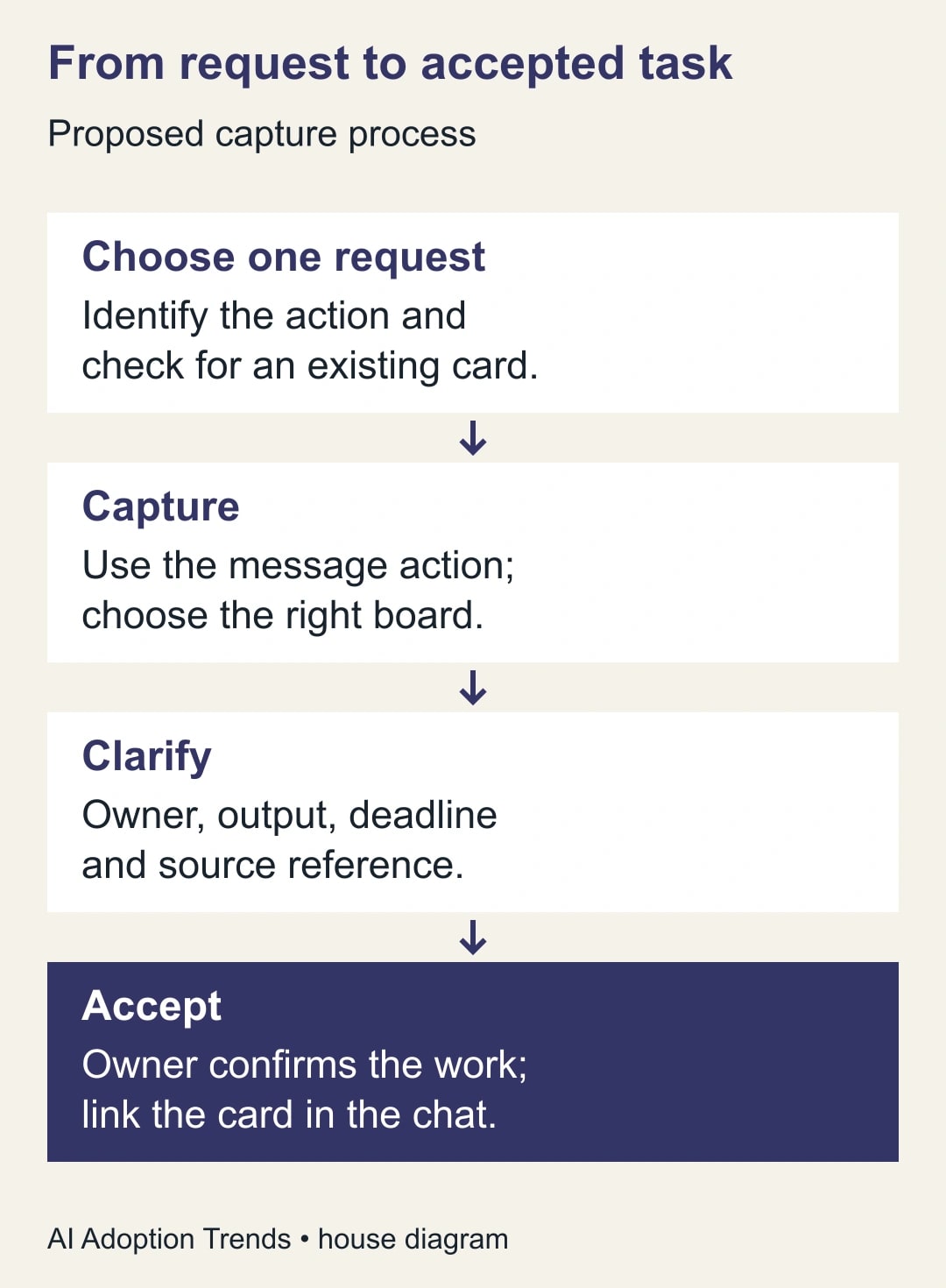
To turn a Google Chat request into useful Trello work, capture one actionable message with Trello for Google Workspace, choose the correct board and list, then check the task's scope, owner, deadline and source. Finish by getting the owner to accept the work and putting the card link back in the conversation. A card created successfully can still be an incomplete handoff.
Google announced the refreshed Trello integration on October 6. It extends the Gmail experience to Google Chat, is described as available now, and requires a Trello account. Existing Gmail add-on users do not need to reinstall or reauthorize that existing experience. Chat use still involves adding the app and signing in. Product details here were checked October 18, 2026.
This is useful for a project lead whose team already works in Chat and manages commitments in Trello. Skip the integration if your organization requires requests in a different system or if nobody maintains the destination board. Faster capture will not fix an abandoned queue. The workflow below is our proposed operating method; the examples are constructed, not claims from a customer deployment.
Choose the task before choosing the button
Start with a specific request, not the busiest thread. A useful task has a result somebody can recognize: revise a paragraph, investigate a failed import, confirm a delivery date or prepare a decision brief. “Discuss pricing” may need a conversation before it deserves a card. “Replace the old pricing paragraph with the approved copy” is much closer to executable work.
Read enough surrounding messages to identify corrections. A request may have started as urgent and later been postponed. Another colleague may already have accepted it. An AI-generated summary of the first message can miss both facts. The person capturing the task should check the latest state before creating another item.
Search the intended board for an existing card covering the same result. If one exists, update that card through the normal process instead of creating a parallel assignment. Put the new request or source link into the existing record with a short explanation of what changed. This avoids dividing comments, approvals and progress across two places.
Define the unit of work narrowly enough to assign. A thread asking for revised copy, legal review and publication might require one coordinated card with explicit stages, or separate tasks with different owners. Choose according to how your team actually works. Do not let the length of a chat message determine the structure of the project.
Confirm the integration and destination
You need access to the source conversation, an authorized Trello account, permission to add cards to the destination board, and any required approval for the Workspace app. Before using a real customer request, use an innocuous internal example to verify which account, board and list the integration will use.
There are similarly named Trello integrations. Atlassian's older Google Chat integration is for board alerts and explicitly does not support creating cards from messages. The capture feature belongs to Trello for Google Workspace. If the only behavior you see is notifications about board activity, check the app rather than assuming the message action is broken.
In Atlassian's Workspace integration instructions, the Chat route is to add Trello to the chat or space, open a message's More actions menu, and choose Create card from message. The same documentation offers a direct-message command route. Start with message capture for this workflow because the source request is the item you want to preserve.
AI summaries are a separate consideration. Atlassian says the add-on's AI features are available on paid Trello plans: Standard, Premium and Enterprise. Do not upgrade just to test whether the handoff itself works. Check current account entitlement and costs before buying, and include the human review time when judging value. Capturing a task and paying for AI assistance are different decisions.
Write the missing instructions before assigning work
Choose the destination deliberately. A client-facing board may have a different audience from an internal Chat space. A copied description can disclose more than a link, while a source link can fail for people who were not members of the original conversation. Both issues need a check before the card is shared.
Once created, open the card in Trello and review its title and description. Atlassian's card editing guidance describes editing the description and adding labels, attachments, dates and other details. Use those ordinary controls to finish the task rather than treating the captured text as final.
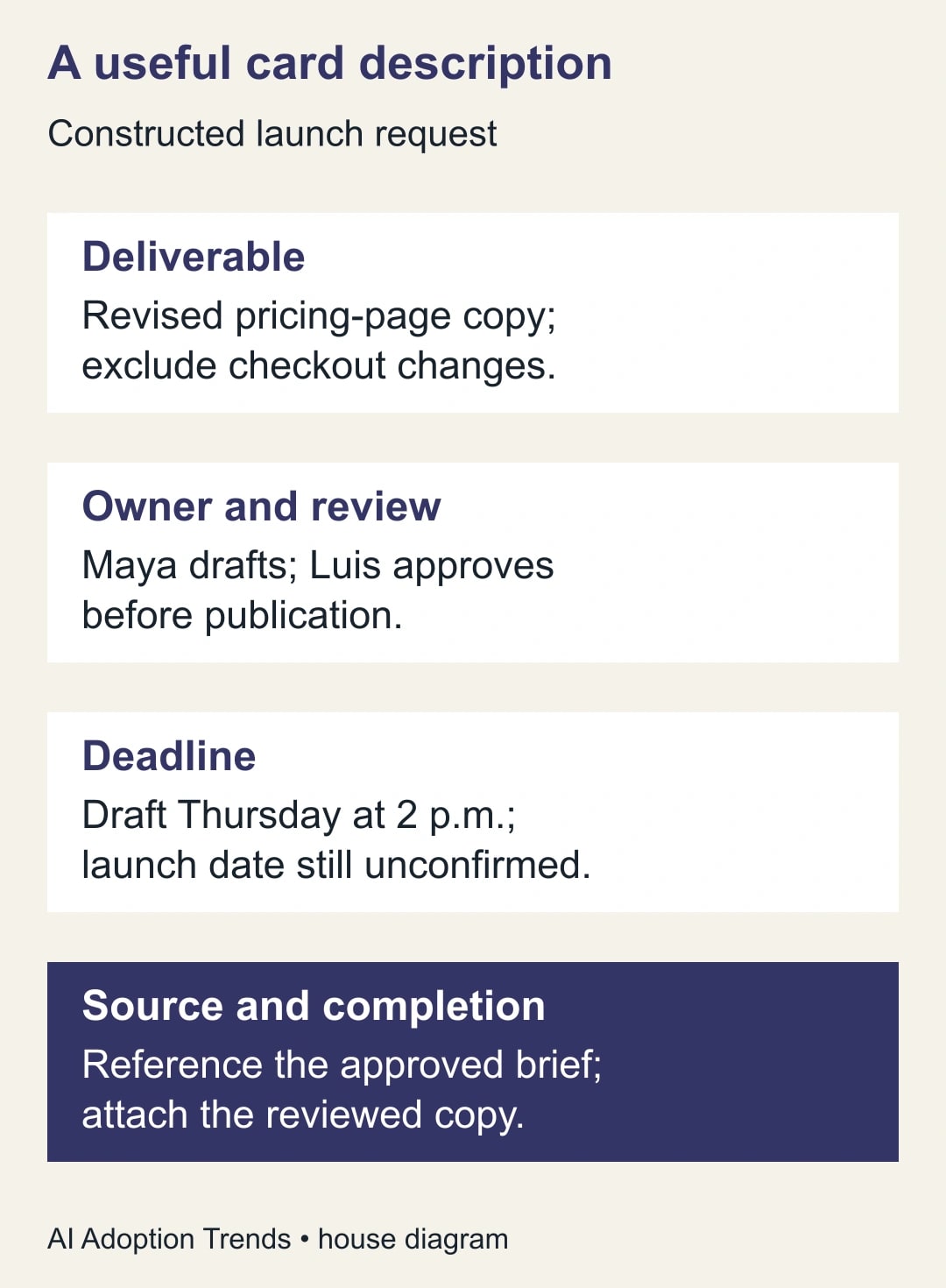
Write the title as an action with an object. “Revise pricing-page comparison paragraph” is more useful than “Pricing update.” In the description, state the expected output, what is outside scope and where the approved source lives. Keep the conditions from the conversation: a suggested launch date is not a confirmed deadline, and a request to draft is not approval to publish.
Assign a responsible owner according to the team's normal process. If several people must contribute, make the coordination responsibility clear instead of leaving everyone to assume someone else will begin. Record the reviewer separately when approval is required. The reviewer should know what evidence they need before marking the task complete.
Ask the owner to confirm the work, deadline and missing inputs. This can be a short comment, a board convention or a direct acknowledgement. The important part is the observable acceptance. A notification sent to someone does not establish that they understand or can meet the commitment.
Finally, put the card link in the original conversation with a concise status. For example: “Captured as the pricing-copy task. Maya is drafting; Luis reviews. Thursday is the draft deadline, and the launch date is still open.” Now the conversation points to the work record instead of becoming a competing status system.
A launch request with two different dates
Consider a constructed marketing example. At 9 a.m., a manager posts: “Can we update the pricing page for Friday's launch?” At 9:20, the product lead adds: “We need the comparison paragraph only. Checkout pricing is unchanged.” At 10:10, the launch owner says: “Friday is provisional; send a draft Thursday at 2 p.m. for review.”
Capturing only the first message could produce a misleading card: “Update pricing page by Friday.” That wording leaves the scope too broad, skips the draft review and turns a provisional launch date into a commitment. An attractive AI title does not repair the missing context.
The project lead first checks for an existing pricing-copy card. Finding none in this example, they capture the relevant request and revise the description. The output is one revised comparison paragraph. Checkout changes are excluded. Maya owns the draft; Luis approves the copy. The draft is due Thursday at 2 p.m., and publication remains dependent on a confirmed launch decision.
The card references the approved brief and identifies the latest clarifying messages. The team avoids copying a confidential pricing negotiation that happened elsewhere in the thread. Maya confirms she has the source material. Luis confirms he can review Thursday afternoon. The task now describes work the team can actually perform.
On Thursday, Maya attaches the draft and marks it ready for review. Luis requests one change, which stays on the same card. When the launch moves to Monday, the owner updates the publication note rather than creating another pricing task. A single record preserves the decision history and prevents two people from editing different versions.
Use this task brief when the capture is too thin
- Action and output: what specific result should the owner deliver, and in what format?
- Scope: what is included, and which adjacent work is explicitly excluded?
- Owner and reviewer: who does the work, and who has authority to accept it?
- Timing: distinguish draft deadline, review deadline and any conditional launch date.
- Inputs: link the approved brief, source material or relevant message; test access for the owner.
- Completion evidence: name the file, decision or verified result that will show the work is done.
- Open questions: state what is unknown and who will resolve it before work proceeds.
For a team using AI to improve captured descriptions, an adaptable prompt is: “Using only the supplied request and its clarifications, draft a task brief with action, output, scope, owner, reviewer, deadlines, dependencies and open questions. Keep proposed dates conditional. Do not invent an owner, approval or missing fact. Mark missing fields as unresolved. Preserve any restriction on what may be changed.”
Run that prompt only in an approved tool with approved source material. The resulting brief still needs comparison with the conversation. If the prompt takes longer to prepare and check than writing a six-line card, write the card directly. The goal is a better handoff, not maximizing AI use.
Diagnose the common failures
If Create card from message is missing, verify the correct integration, sign-in and organizational app policy. Do not install similarly named apps repeatedly. Ask the administrator or board owner to resolve the account and permission issue, then repeat the test with a harmless message.
If the card lands on the wrong board, stop further captures until the destination is understood. Review whether information reached an unintended audience and follow the organization's correction process. Moving a card later may restore organization, but it does not undo information someone already saw.
If the summary loses a condition, correct the card before assignment. Compare the final brief with the latest relevant messages, not merely the first message. For repeated failures, turn off AI summarization through the integration's documented settings and use a manually written brief while the team evaluates whether the feature adds value.
If duplicate cards appear, identify the canonical work record and tell the involved owners where updates belong. Resolve duplicates through normal board procedures without discarding unique comments or evidence. The person coordinating the request should make that decision; an automated cleanup should not guess which commitment matters.
If nobody accepts the task, leave it in an intake state rather than pretending it is active work. The project lead must assign capacity or negotiate the deadline. A task-creation automation cannot supply the judgment needed to decide which request displaces another.
Measure accepted handoffs for one week
Try a small proposed pilot in one internal Chat space and one maintained board. Pick a person to check captured cards each day. Record eligible requests, cards created, duplicate captures, missing-input corrections and accepted tasks. A count of new cards alone can reward clutter.
For illustration, suppose twenty requests produce eighteen cards, two of which duplicate existing work. Sixteen distinct cards remain; fourteen have an owner, complete inputs and an acknowledged deadline. The useful completion measure is fourteen accepted handoffs out of twenty requests, or 70%. It is not eighteen successes merely because eighteen cards were created. These are hypothetical inputs, not a predicted response rate.
Also compare the effort required. If manual capture took four minutes and the new process takes two minutes to capture plus three to repair, it has increased work. Count review and clarification time. Time released through a better process is staff capacity; it becomes cash savings only if an actual cost changes.
Pause the pilot if it exposes information to the wrong audience, repeatedly creates duplicate commitments or produces more repair work than it removes. Continue only when the owner acceptance and completion evidence improve. The next useful step is one real, low-risk request captured and checked end to end, followed by the client feedback and approval handoff guide when the task needs external review.
Weekly Newsletter
AI Adoption Weekly
New research, field guides, training studies, and tool decisions for operators.
No spam. Unsubscribe anytime.
Related Comparisons
Calculator
AI seat cost calculator
List price × headcount. You enter the hours and the operating assumptions.