
Transfer Team Calendars Before a Google Workspace User Leaves
Google’s calendar lifecycle change makes ownership part of offboarding. Inventory team calendars, transfer ownership, and verify access before account removal.
Published October 19, 2026

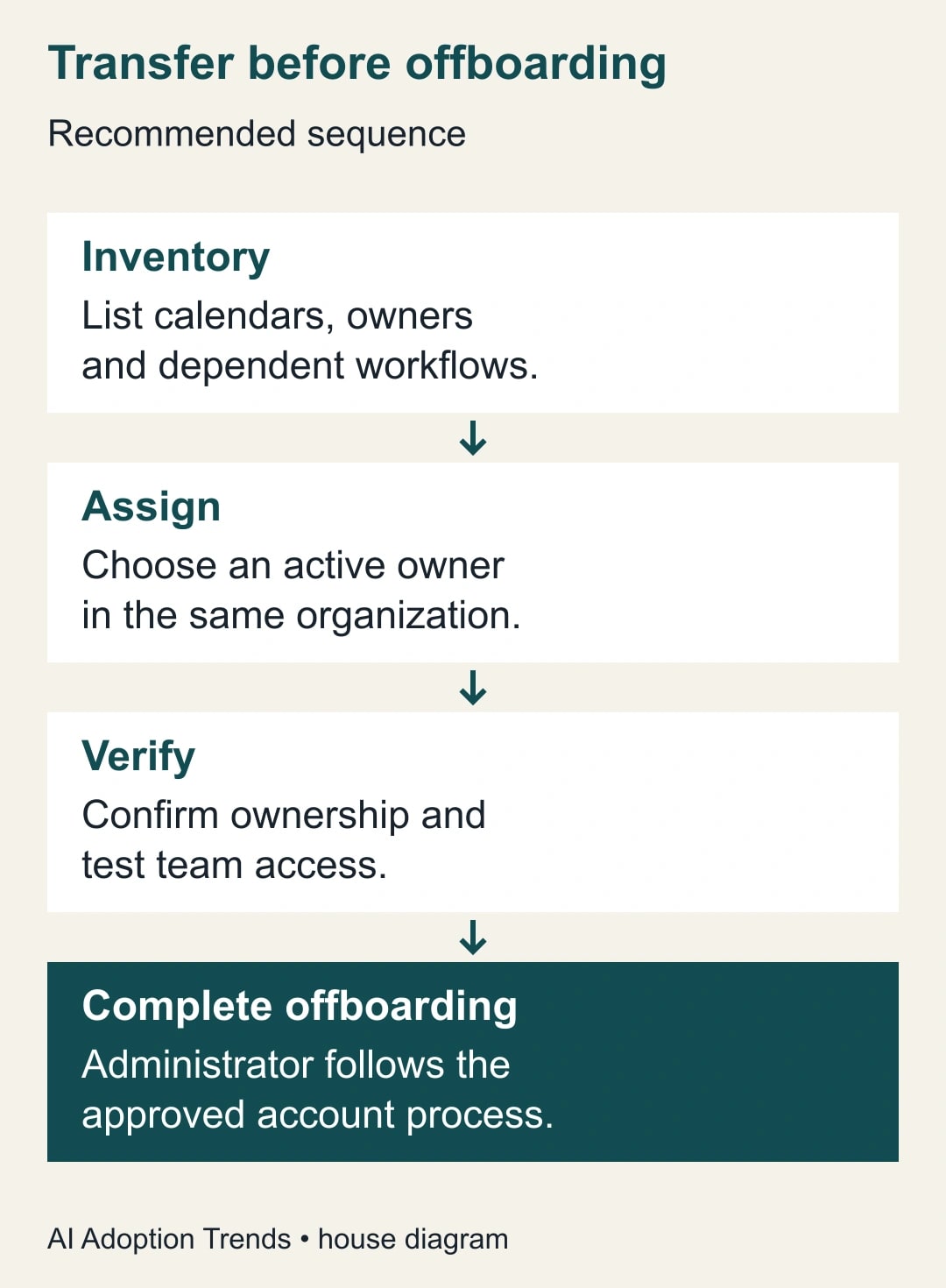
Before a Google Workspace employee leaves, identify the secondary calendars they own, transfer the calendars the team still needs, and verify the transfer before the account is suspended or deleted. Sharing a calendar with another colleague is not enough. The practical test is whether an active person actually owns it and the team can still use it.
Google's October 5 calendar lifecycle announcement makes this an immediate offboarding issue. For non-personal Workspace accounts, owned secondary calendars follow the account: deletion removes them and suspension suspends them. Google says ownership should change first. The extended rollout began October 5 and can take longer than 15 days. These details were checked October 18, 2026; do not use rollout timing as a reason to postpone a needed handoff.
This guide is for an operations lead working with a Workspace administrator. It covers team-created calendars such as project milestones, editorial schedules and duty rosters. It is not a replacement for the organization's account-removal process, and transferring a primary calendar is a different problem. The proposed checklist below is an operating method, not a report of a migration we performed.
Start with the calendar that would hurt to lose
A calendar can be shared widely and still depend on one person's account. The name on the sidebar may describe a department, which makes the dependency easy to miss. Ask a concrete question: if this person's account stopped working tomorrow, which schedules would the team need for its next day of work?
Have the departing employee and team lead list those schedules together. Include calendars that feed a website, booking process or automation, even when few people open them directly. A calendar used by a workflow deserves a named business owner just as much as a calendar used by twenty colleagues. AI scheduling tools do not remove that ownership dependency.
For each calendar, record its name, identifier, current owner, purpose, users and continuing need. Names alone are weak evidence because teams often reuse them. Record the calendar identifier available in its settings so the administrator can distinguish the live schedule from an old copy. Keep the inventory inside the organization's approved working location.
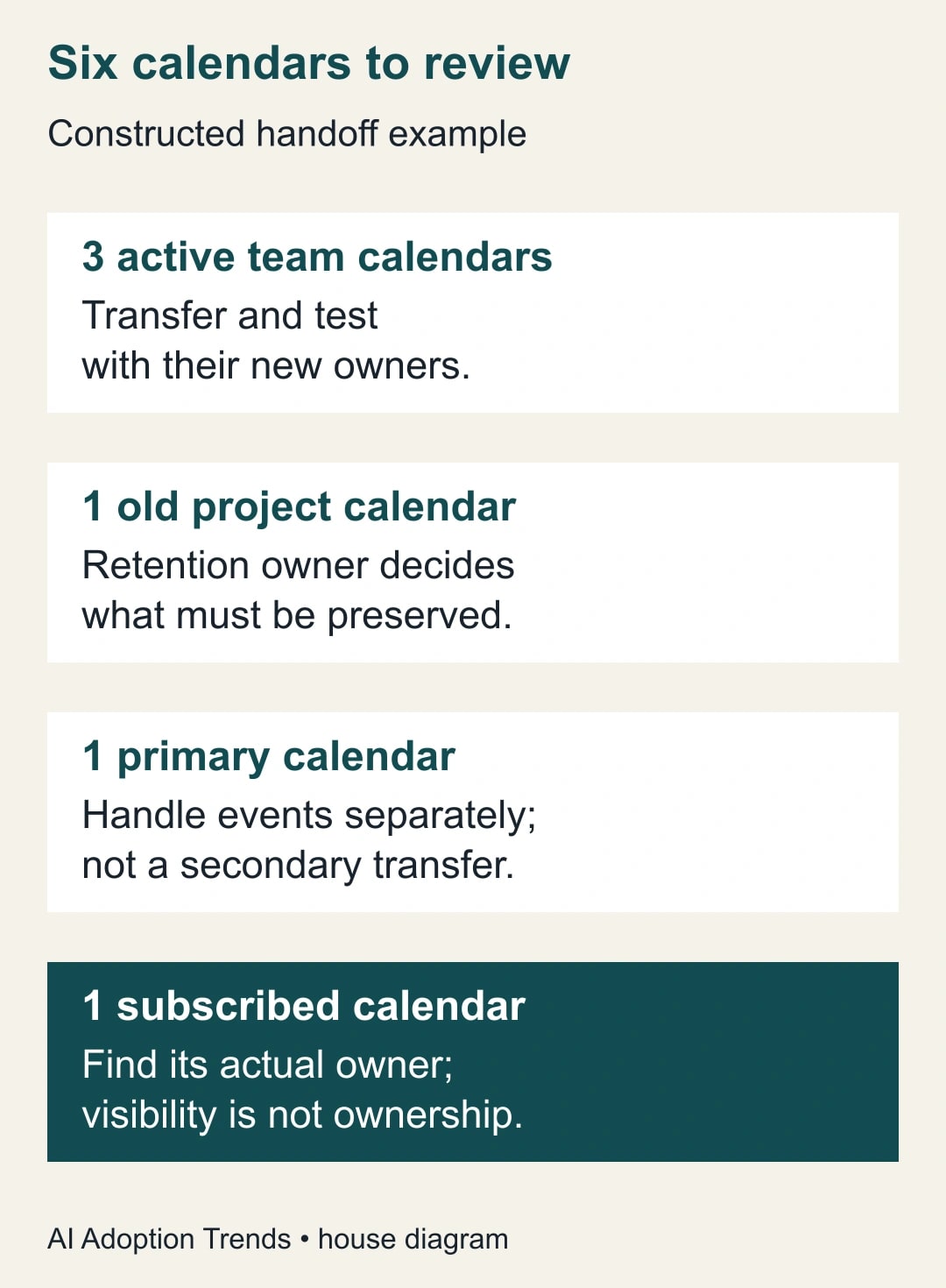
Do not turn this exercise into an indiscriminate transfer of everything visible in the employee's sidebar. A subscribed calendar may belong to somebody else. An old project calendar may need retention review rather than continued operation. A primary calendar contains a person's events and needs its own treatment. Classifying those cases first prevents an overly broad change.
Agree who can receive the responsibility
Choose a continuing user whose role fits the work and who will accept responsibility for access and updates. Avoid selecting the nearest available colleague just to complete the ticket. A good recipient can answer who should edit the schedule, which integrations use it, and who takes over if they later leave.
The handoff needs the current owner or an appropriately privileged administrator, an eligible recipient and time for verification. For work or school accounts, the receiving owner must be in the same organization. Google's user transfer instructions distinguish secondary calendars from primary calendars and explain the owner acceptance step. Check those instructions against the actual account before beginning.
There is no reason to buy an AI scheduling tool to solve this ownership task. Budget staff time for discovery, transfer, verification and exception handling. If an administrator or outside support provider charges for the work, include that service cost. Do not convert estimated hours avoided into claimed cash savings unless a real expense changes.
Make the recipient's acceptance practical: give them the calendar's purpose and the next important date. A message saying “you now own six calendars” leaves too much ambiguity. “You own the installation rota; dispatch uses it every morning; the next customer visit is Tuesday” makes the duty understandable.
Use the right transfer route
For a cooperative owner transferring a specific calendar, use Google Calendar on a computer. Open that calendar's Settings and sharing, find the intended recipient under Shared with, and choose Transfer ownership. The recipient must complete the acceptance. Google's user help says the original owner remains owner until acceptance and gives the recipient 60 days; an offboarding deadline is a reason to finish sooner, not to wait out that window.
An administrator can instead use the documented secondary-calendar transfer operation. In the Admin console, go to Apps, Google Workspace, Calendar, then Event and Secondary calendar management and Secondary calendar transfer. Enter the source and destination users and review the scope before submitting. This route transfers all secondary calendars from the source user to the recipient, so it may be too broad for a mixed inventory.
Google's administrator instructions require the Manage Calendars privilege and a recipient in the same organization. They also say calendars transfer one at a time, so a large transfer can take substantial time. A submitted operation is therefore a starting point for verification, not the last line of the offboarding ticket.
Keep secondary-calendar transfer separate from transferring or cancelling events. The Admin console exposes related operations near one another, but they solve different problems. The same help page explicitly says the event-transfer path does not transfer secondary calendars. Ask the administrator to name the operation they are completing in the ticket.
If the available screens or permissions differ from the instructions, stop at that mismatch. Record the account type, calendar identifier and operation attempted. Ask the Workspace administrator to resolve the route. Do not try to simulate a transfer by copying events into a newly created calendar without first understanding the consequences for subscribers and connected workflows.
Verify ownership and actual use
The receiving owner should open the transferred calendar and confirm their role. The team lead should then check that ordinary users can perform their intended work. Use a small, approved test event rather than modifying a customer appointment simply to see what happens. Remove the test through the team's normal process afterward.
Check three different things: ownership, access and dependencies. Ownership establishes responsibility. Access establishes that the right people can see or edit the schedule. Dependencies establish that the other tools using the calendar still behave as intended. Passing one does not prove the others.
A useful dependency test is the next scheduled action. If a roster feeds a morning reminder, inspect the reminder at its next normal run or use the automation's approved test path. If a calendar is embedded on an internal page, check that page as an ordinary reader. Avoid making a calendar public just to get a failed integration working.
Meeting details deserve a separate check when they matter. Test the relevant room booking, conferencing link and invitation context rather than assuming a visible event means the entire meeting works. Google's transfer help notes that meeting policy behavior can change with ownership. The right acceptance test is the business activity, not merely the appearance of a calendar tile.
Record who checked each item, when they checked it and what they saw. A screenshot of the owner field may be useful, but it should not contain unrelated private appointments. A short ticket entry can be sufficient: calendar identifier, verified owner, permitted-user check and dependency result.
Work through a six-calendar departure
Consider a constructed example. An operations coordinator is leaving on Friday and has six calendars visible in their work account. Three are active team calendars: an installation rota, an editorial schedule and a project milestone calendar. One is a finished project archive. One is their primary calendar. One is a subscribed industry-events calendar owned elsewhere.
The team lead initially requests “transfer all six.” The inventory changes that request. The three active secondary calendars need continuing ownership. The archive needs a retention decision. The primary calendar's future meetings need separate review. The subscribed calendar's visibility does not establish ownership, so the team records its actual owner and checks whether anyone else needs the subscription.
The three active calendars are assigned to their respective operational leads. Two recipients accept the user-initiated transfers on Wednesday. The editorial calendar's intended recipient cannot accept, so that item stays open and the administrator resolves the eligibility issue. The coordinator's account is not treated as ready for routine offboarding merely because two of three transfers worked.
On Thursday, the editorial transfer is verified. The installation rota passes an ordinary dispatcher access test, but its reminder workflow fails because a separate connection still belongs to the departing employee. That is a second dependency to repair through the authorized automation process. Calendar ownership alone did not complete the business handoff.
The evidence now shows three active calendars transferred, three recipient checks completed and one automation connection requiring attention. Those are useful counts. Reporting “six calendars migrated” would conceal the different treatments and the unresolved dependency. None of these numbers is a claimed customer result; they illustrate how to describe completion accurately.
Keep exceptions visible without delaying urgent security work
Routine planned departures allow time for a transfer before suspension. Urgent security incidents may not. Do not delay an emergency access restriction just to finish this checklist. The security owner should take the necessary account action, and the administrator should manage the resulting calendar incident through the organization's recovery process.
If the user was already deleted or suspended, do not promise that a calendar can be restored. Record the account state, timing and affected calendars, then consult the administrator and current Google recovery guidance. The business lead should arrange an approved temporary way to coordinate critical work while the administrator assesses recovery. A copied list of next appointments may help continuity, but it is not proof that invitations, permissions or integrations were restored.
If no suitable recipient exists, escalate the ownership decision to the department lead. Creating an unmanaged shared login merely moves the problem. If an archive's retention requirement is unclear, the responsible records owner should decide before deletion. These are business decisions that an AI assistant should surface, not silently resolve.
Copy this handoff record
- Calendar name and identifier: record both so a similarly named copy is not mistaken for the original.
- Classification: active secondary calendar, archive needing a decision, primary-calendar events, or subscribed calendar owned elsewhere.
- Business purpose: who uses it, the next important event and what would fail if it disappeared.
- Ownership: current owner, approved recipient, transfer route and actual completion evidence.
- Access: named tester, intended permission and result from an ordinary user account.
- Dependencies: connected reminder, booking page or automation; test result and remaining owner.
- Exception: what is unresolved, who decides, and the deadline before routine account removal.
- Completion: administrator and business owner agree that the calendar work is finished, with separate account actions tracked elsewhere.
Review this record at the next departure rather than rebuilding the process each time. Measure the number of active secondary calendars without a continuing owner, failed dependency checks and emergency calendar incidents. For a planned departure, the proposed stop rule is simple: do not mark calendar handoff complete while an active calendar lacks verified ownership or an essential dependency remains unexplained.
Start with the next employee departure and one calendar the team relies on. Build its inventory entry, choose the recipient and test the handoff. Then use the calendar and task safeguards guide to review what any connected assistant is allowed to change.
Weekly Newsletter
AI Adoption Weekly
New research, field guides, training studies, and tool decisions for operators.
No spam. Unsubscribe anytime.
Related Comparisons
Calculator
AI seat cost calculator
List price × headcount. You enter the hours and the operating assumptions.