
Google Meet Next Steps: Check the Follow-Up Before Work Moves
Test Google Meet post-meeting routines with an owner, an eligibility check, and a review of tasks and email drafts before relying on them.
Published October 16, 2026

Use Google Meet's post-meeting next steps to prepare follow-up work, then reconcile the result against what people actually agreed. Before turning on a routine, identify who owns the output and whether the setting applies to one meeting, a recurring series, or a wider set of meetings. A successful run is only evidence that the automation ran.
The most useful first trial is a small meeting whose action list is easy to check. A host can compare the resulting draft or tasks with a human-reviewed record, correct mistakes, and decide whether the routine saves effort. Starting with every meeting makes it much harder to distinguish a missing feature, an unclear commitment and a faulty workflow.
This guide is for client-service leads, project managers and meeting hosts using an approved Google Workspace account. Skip automatic follow-through where the meeting requires a specialist recordkeeping process, has unresolved recording permissions, or cannot tolerate a mistaken assignment. You can still take authorized notes and use your existing task process. The method below is a proposed pilot, not a report of a product test.
The October release creates a useful starting point
Google's October 12 announcement introduces routines to draft follow-up email and add action items to Google Tasks. The post-call screen is the entry point. Rapid Release began October 5 with an extended rollout that can exceed 15 days. Listed editions include Business Standard and Plus, Enterprise Standard and Plus, and Google AI Pro for Education. Access is still subject to account settings and availability.
That is a capability announcement, not proof that a particular team can use both routines in every meeting. Before budgeting a rollout, ask your Workspace administrator to verify the edition, release track and relevant settings. Record the result in the pilot brief. If a control is absent, preserve the normal follow-up process rather than repeatedly changing settings in the hope of making it appear.
Do not buy extra licenses before confirming the actual workflow. The budget should include any incremental subscription cost, configuration time, review time and maintenance. When existing entitlements cover the trial, the subscription increment may be zero; staff effort still exists. Measure the complete process from meeting end to accepted actions, including correction of generated work.
Use the detailed eligibility rules
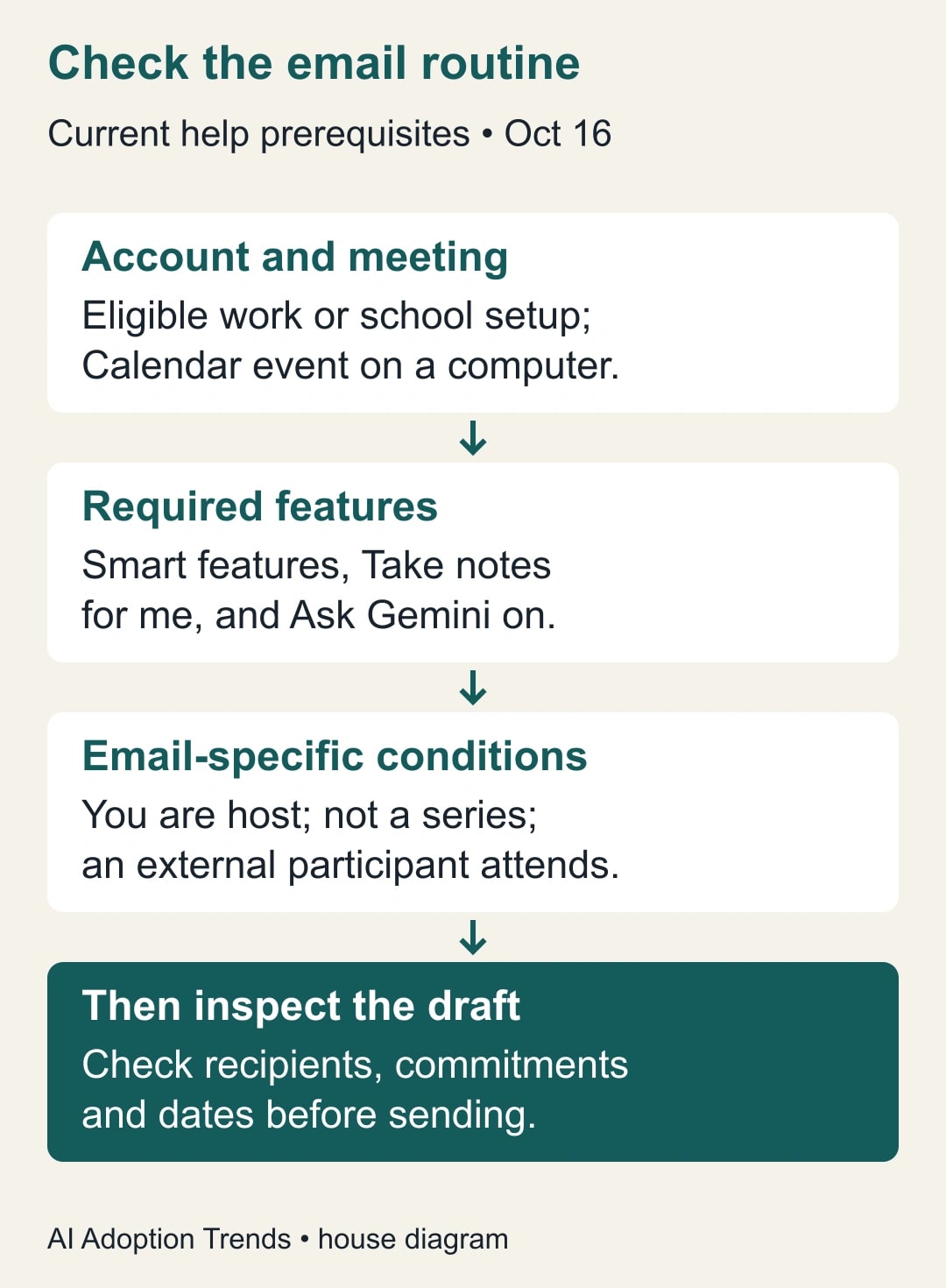
The current Meet help page, checked October 16, requires a work or school setup, a Calendar meeting on a computer, smart features, Take notes for me, and Ask Gemini. For email drafting, it additionally specifies that you are the host, the meeting is not recurring, and at least one participant is external. Treat those detailed conditions as the operating checklist rather than assuming the broader launch description promises email drafts for every recurring call.
Separate two questions in the trial brief: “Can this meeting use the routine?” and “Would the result be useful?” An internal weekly meeting may have excellent notes but fail the email-specific eligibility conditions. A qualifying external meeting may produce an email that still needs substantial judgment. Neither situation is solved by asking participants to alter the meeting artificially.
Choose an actual business task, such as producing a reviewed recap after a one-off client planning call. Decide whether the routine is supposed to help the host remember commitments, prepare a customer-facing message, or create personal reminders. These are different outputs. A personal reminder does not establish that another employee accepted responsibility for the work.
Establish the answer key before the call ends
In the final minutes of the meeting, read back the actions that matter. For each, name the owner, deliverable, date and dependency. Ask the owner to correct the record. This human agreement is the pilot's reference list. It also improves ordinary meetings, which is why the trial should compare automation against a reasonably organized baseline rather than against complete disorder.
Use language that distinguishes a commitment from a possibility. “We could send a revised estimate” is not equivalent to “Priya will send the revised estimate by Thursday.” Likewise, “the customer would prefer a Monday launch” is a request, not a delivery promise. Mark unresolved decisions explicitly and give the clarification work to a named person.
Keep the reference list where the team already tracks decisions. Link to the authorized notes rather than creating an uncontrolled duplicate recording. A meeting identifier, date and source link are usually enough to locate the evidence. The reviewer should be able to trace a disputed action without searching every conversation the team has ever had.
Before the first trial, agree on who may receive the recap. The participant list is a useful starting point, but it is not a distribution policy. A customer, contractor and internal commercial lead can attend the same call while requiring different follow-up details. The host decides what the external version should contain and what belongs in an internal task.
Turn on one routine and inspect the result
After the meeting, look for the routines section and choose the next step relevant to the trial. Verify the scope before enabling it. Google's help explains that recurring-meeting activation can affect future meetings in the series; it also documents turning routines off through Meet or Workspace Studio. They can be enabled or disabled rather than edited as ordinary custom flows.
For the email path, locate the generated draft and leave it unsent while reviewing. Compare the recipient list, dates, decisions, attachments or links, and the wording of each commitment with the reference list. Remove material inappropriate for the audience. If a date is missing, do not fill it with a plausible estimate unless the responsible person approves that estimate.
For the task path, inspect the destination and each resulting action. Confirm what account received the task and how the person responsible will learn about it. Do not assume an item in the host's task list has been assigned to a colleague or entered into the company's project system. If a separate handoff is required, keep that handoff explicit and verify acceptance.
Finally, reconcile the outputs with the reference list. Mark every agreed action as correctly represented, corrected, missing, duplicated, or intentionally excluded with a reason. Keep unresolved differences visible. This checkpoint is what turns a convenient automation into an operating process someone can own.
A worked example: eight agreed actions, seven generated tasks
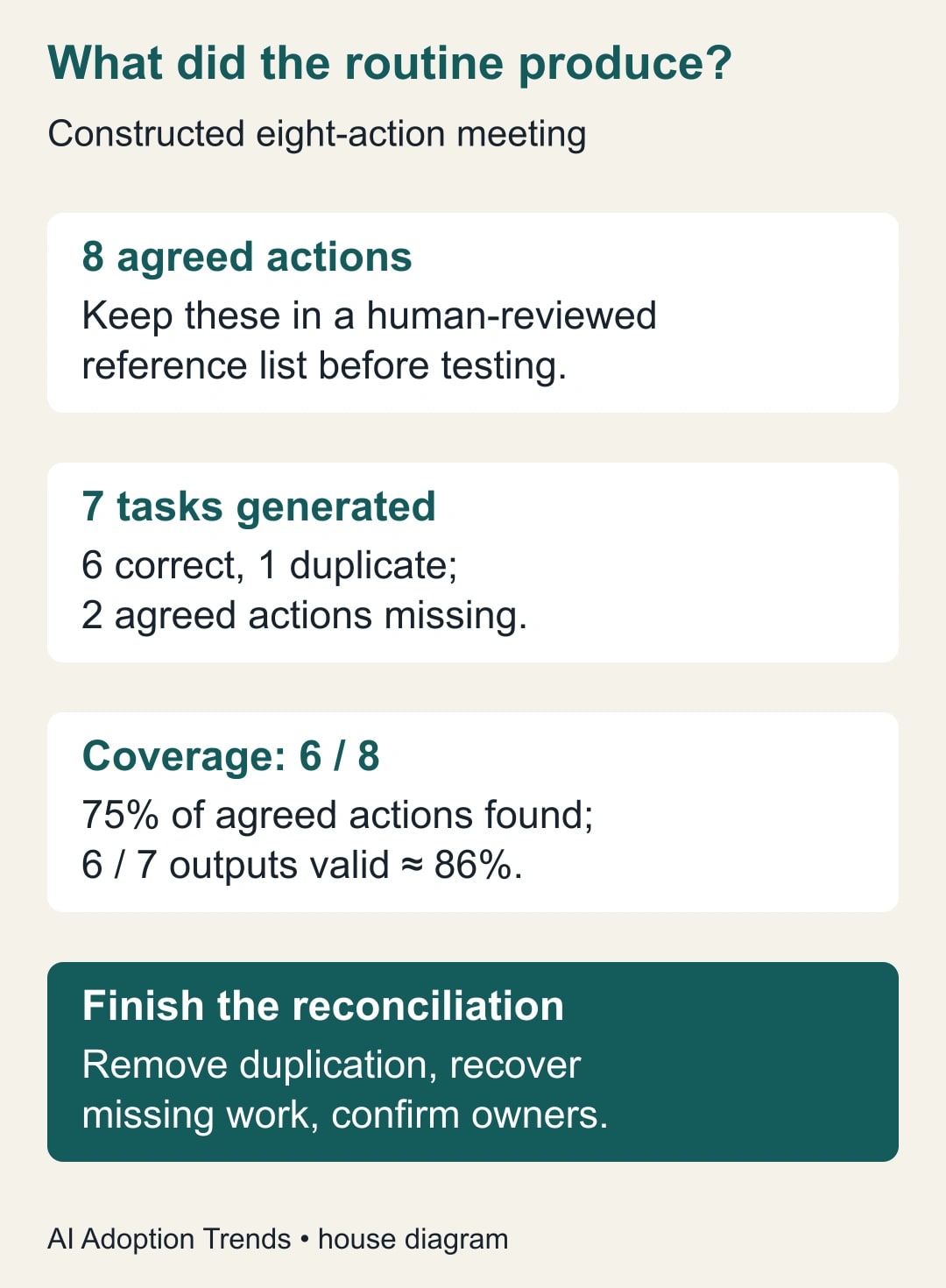
In a constructed client planning call, the team agrees on eight actions. Two belong to the client, three to delivery, two to the account lead and one to finance. The routine produces seven task entries: six are correct representations, while one duplicates another action. Two agreed actions are absent. These are invented test numbers, not measured Google performance.
Counting seven entries against eight actions would suggest only one gap. Reconciliation finds a different picture: six of eight agreed actions are covered, or 75%. Six of seven generated entries are valid, approximately 86%. Two actions need recovery and one duplicate needs removal or consolidation. Neither percentage tells you whether the right person has accepted the work.
Suppose one missing item is a client data dependency due Tuesday. Sending a recap without it would make Friday's delivery date look unconditional. The reviewer restores the dependency, asks the client owner to confirm it, and states that delivery timing will be confirmed after the data is received. The repair changes the business promise, not just the task count.
The duplicate concerns an internal review that already exists in the project tracker. The host links the meeting record to that existing task rather than creating another assignment. The finance action remains internal and is omitted from the customer email with an explicit reason in the review log. All eight actions now have a disposition, even though the customer sees fewer than eight items.
A reusable meeting-to-work worksheet
Use this as the pilot record for each meeting. It can be a short document or columns in the existing project tracker. Avoid collecting full transcripts when links and a few verified facts are sufficient for the review.
- Meeting identity: date, Calendar event, host, meeting type and approved notes location.
- Routine eligibility: verified edition and settings; email-specific conditions if using the email path.
- Routine scope: one-off meeting, series or wider scope; person authorized to change it.
- Agreed actions: exact deliverable, accepted owner, due date, dependency and completion evidence.
- Generated outputs: draft or task location, review state and any missing, duplicate or incorrect item.
- Audience check: permitted recipients and information that must remain internal.
- Release decision: reviewer, corrections, actual send or accepted task assignment, and timestamp.
- Recovery owner: person responsible if the routine fails or creates inappropriate work.
Do not mark an output accepted simply because its text resembles the notes. Ask the receiving person whether it is actionable. “Review proposal” may be grammatically correct but still omit which version, what decision is needed and when the reviewer must respond. Add those details from verified sources, not from model inference.
Keep the acceptance check proportional. A routine internal reminder may need only a quick owner confirmation. A customer promise should receive a deliberate host review. A decision with financial, contractual or personnel consequences should follow the existing approval process rather than gain authority because it appeared in a meeting recap.
Diagnose failures without creating a second problem
If no suggestion appears, first check eligibility, settings, rollout and whether useful notes were available. The help page says suggestions can vary or be absent. Do not run the meeting again just to create a button. Produce the ordinary follow-up, record the missing routine in the pilot log, and let the administrator investigate availability separately.
If the routine is enabled but no output appears, review its activity in Workspace Studio using the documented activity view. Record the meeting and observed result. Before creating the output manually, check whether a delayed draft or task already exists. Otherwise, the workaround can become the source of duplicate work when the original routine finishes.
If an unsuitable routine affects later meetings, turn it off at the correct scope and confirm the change. Turning it off does not retract email already sent or erase tasks already copied elsewhere. Identify affected outputs, correct them in their destination, and notify the people who relied on them. Keep the recovery record with the pilot evidence.
If notes misstate a commitment, fix the source record and the downstream output. Do not merely polish the generated email. A corrected email with an incorrect task list leaves two competing versions of the meeting. The host should name which record governs and make the correction visible to the relevant participants.
Measure accepted follow-through
Track elapsed time from meeting end to reviewed output, human handling minutes, action coverage, duplicate rate, recipient corrections and owner acceptance. Distinguish a missing agreed action from an action that was intentionally excluded from a particular audience. Record setup effort separately so the first meeting's learning cost does not disappear from the case.
For a small trial, choose a few meetings of the same type and review every consequential commitment. Proposed stop rules might include any unapproved external commitment, wrong recipient, or unresolved disagreement about ownership. These are suggested controls, not product guarantees. Expand only when the team can explain the failures and the total process is better than its normal method.
Time released is capacity. It becomes a cash saving only if the business changes actual spending. A host who gains fifteen minutes may use it for customer preparation; that can be worthwhile without pretending the payroll bill fell. Report the operational benefit in the terms the manager can verify.
Start with one eligible meeting and the worksheet above. If your larger decision is whether a meeting tool should capture notes or manage follow-through, use the meeting notes versus follow-through comparison. For this routine, the immediate success condition is simpler: every agreed action reaches the right owner with the right meaning.
Weekly Newsletter
AI Adoption Weekly
New research, field guides, training studies, and tool decisions for operators.
No spam. Unsubscribe anytime.
Related Comparisons
Calculator
AI seat cost calculator
List price × headcount. You enter the hours and the operating assumptions.