
Gmail AI Inbox: Find the Work Its To-Do List Misses
Use Gmail AI Inbox for triage while checking its blind spots. Includes an omission test, a daily review worksheet, and a worked example.
Published October 16, 2026

Use Gmail AI Inbox to decide what to inspect first, then check a separate list of outstanding commitments before you decide the day is under control. Its suggested to-dos can help you find work. They cannot establish that every obligation has been found, assigned, or completed.
That distinction matters for an account manager whose next action might sit in a purchase-order attachment, a delegated mailbox, or a conversation already snoozed until Monday. A tidy priority screen is useful only if the team knows which work lives outside it. The practical goal is a dependable daily review, not an empty generated list.
This guide is for people managing an individual business inbox with an approved Gmail setup. Skip this as the primary queue for a shared service desk, delegated mailbox, or attachment-heavy approval process. Keep the existing system of record for those jobs. The workflow below is an editorial recommendation, with a constructed example; it is not a claim from a hands-on performance test.
What is arriving, and what to check first
Google's October 15 announcement extends AI Inbox to eligible Workspace users in the US using US English. Rapid Release rollout began October 12; Scheduled Release is due to start October 26, with visibility taking up to 15 days. Starter and Education editions follow later. The feature presents suggested to-dos and topic summaries; seeing a release announcement does not mean it is available in your account today.
Before testing, write down the account, edition, release track and person responsible for inbox management. Confirm that the feature is visible and your organization's settings permit it. Do not change account privacy or smart-feature settings just to make an experiment work without the normal internal approval. If your edition is not ready, use the same review worksheet manually and revisit the feature when it appears.
The main cost to measure is review effort. An eligible subscription does not make checking sources free. Record the current time spent finding and organizing work, then compare it with time spent inspecting suggestions plus completing the independent sweep. Include setup and correction time. Do not assign a subscription saving unless an actual paid service is retired.
Draw the boundary around what it can find
Google's AI Inbox help page says the feature draws from Primary-tab messages, excludes archived, deleted, muted and snoozed messages, and does not support attachments, delegated inboxes or encrypted emails. It requires relevant smart features. Initial results can take up to seven days. These limits were checked October 16, 2026; the help page labels the feature beta.
Translate those product limits into a work map. The question is not whether an excluded item is important to Gmail. It is whether it creates an obligation for your business. A signed order in an attachment may be more consequential than a visible request to schedule coffee. Your map should name the source and person who will check it, without moving sensitive records into a different system merely for convenience.
For example, an account manager might own incoming customer conversations, a delivery coordinator might own accepted work orders, and a finance colleague might own invoice disputes. Each person maintains their own queue. The account manager's daily review links to those queues where permitted; it does not copy every record into email or ask AI Inbox to replace the other owners.
Write a one-sentence boundary: “We use suggestions to prioritize my incoming customer email; the order register, finance queue and delegated mailbox remain separately reviewed.” Put it beside the review checklist. That sentence prevents an informal productivity experiment from quietly becoming the company's only control over customer promises.
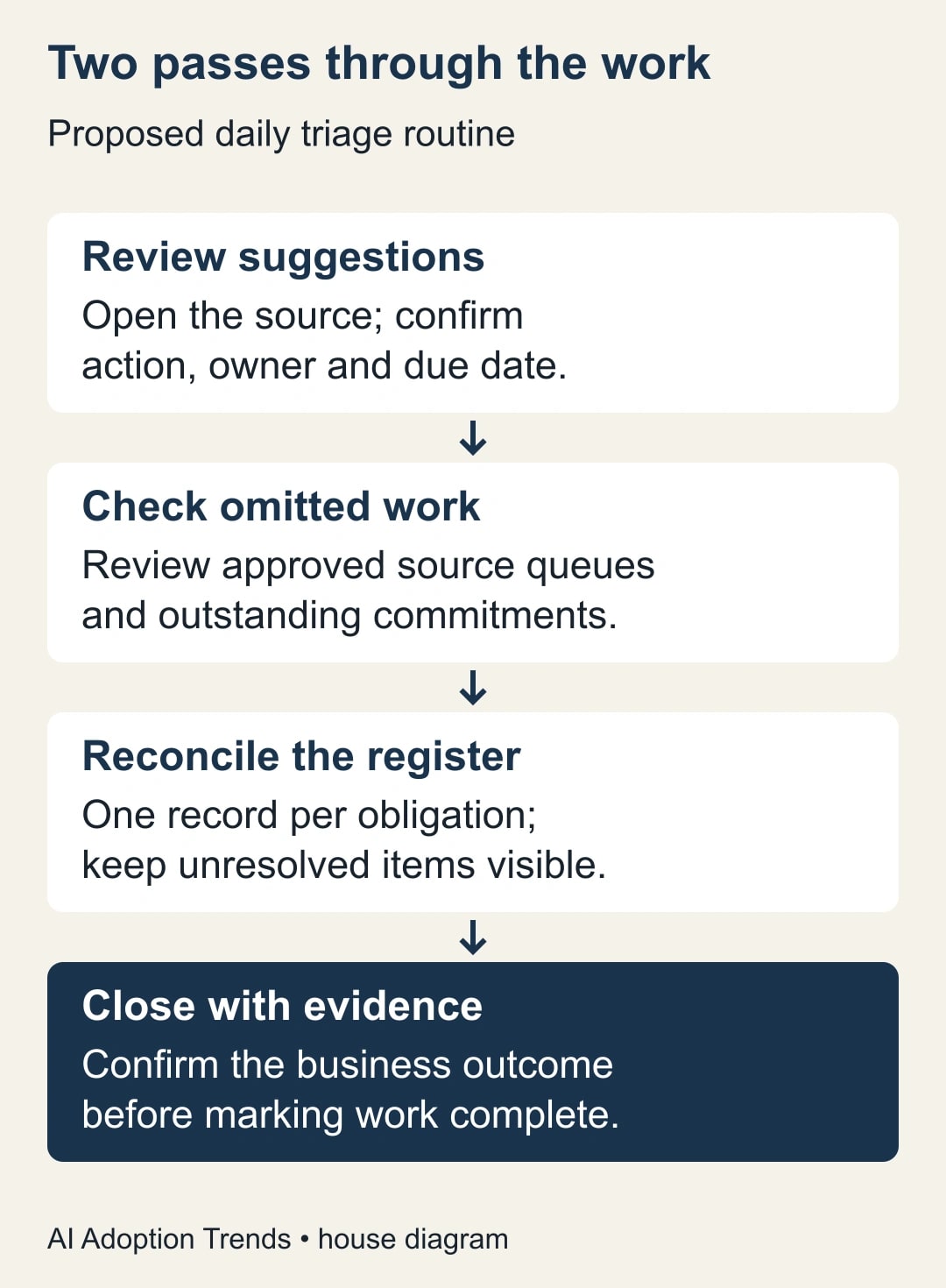
Pass one: turn a suggestion into a verified obligation
Start with a small, ordinary day. Open a suggested item and follow its source to the actual conversation. Find the most recent relevant instruction. Confirm what must happen, who has agreed to do it, when it is due, and what evidence would show completion. A request from a customer is evidence of what the customer wants; it is not automatically an accepted commitment.
Watch for changes that reverse an earlier message. “Please send Friday” can be superseded by “Hold until procurement confirms.” A topic summary may be convenient for orientation, but the action owner needs the current decision. If the thread contains conflicting dates, preserve the conflict and ask the person who can resolve it. Do not choose whichever date makes the generated sentence cleaner.
Add a verified obligation to the team's normal task register, or match it to an existing record. Use a source link and a clear action, such as “Confirm whether the revised delivery date is acceptable,” rather than “Follow up with customer.” The output of this pass is a reviewed work record. It is not a sent email, approved discount or changed delivery date.
Leave ambiguous items in a visible review queue with an owner and next check. An unresolved obligation is manageable when someone is responsible for clarifying it. It becomes dangerous when “not enough information” is treated as “nothing to do.” Keep the distinction between not actionable yet and not required at all.
Pass two: look for work the suggestions did not show
Review the sources named in your boundary statement. Begin with the outstanding commitment register, since overdue promises may not arrive as new email today. Then inspect the other approved queues, attachment-dependent requests and temporarily deferred work. This is a separate procedure; repeating the same AI-generated view twice does not test its completeness.
During a trial, have a colleague inspect a small sample without seeing the suggestions first. Give them the same definition of an obligation and the same time cutoff. Their independent list is an answer key for the sample. Resolve disagreements by reading the source and consulting the work owner, rather than treating either person's first list as infallible.
Keep the sample practical. Choose one client account or a bounded date range that the reviewer is authorized to access. Include ordinary requests, a changed deadline, an attachment-dependent item and a message that requires no action. Do not manufacture confidential incidents or send dummy commitments to real customers. A sanitized historical set can test the procedure without changing live work.
The checkpoint is reconciliation: every verified obligation in the sample has one disposition. It is recorded, already completed with evidence, awaiting clarification, assigned elsewhere with acceptance, or outside scope with a reason. “Not shown in the suggestions” is a finding about the tool, not a valid final disposition for the work.
A worked example: twelve suggestions, twenty obligations
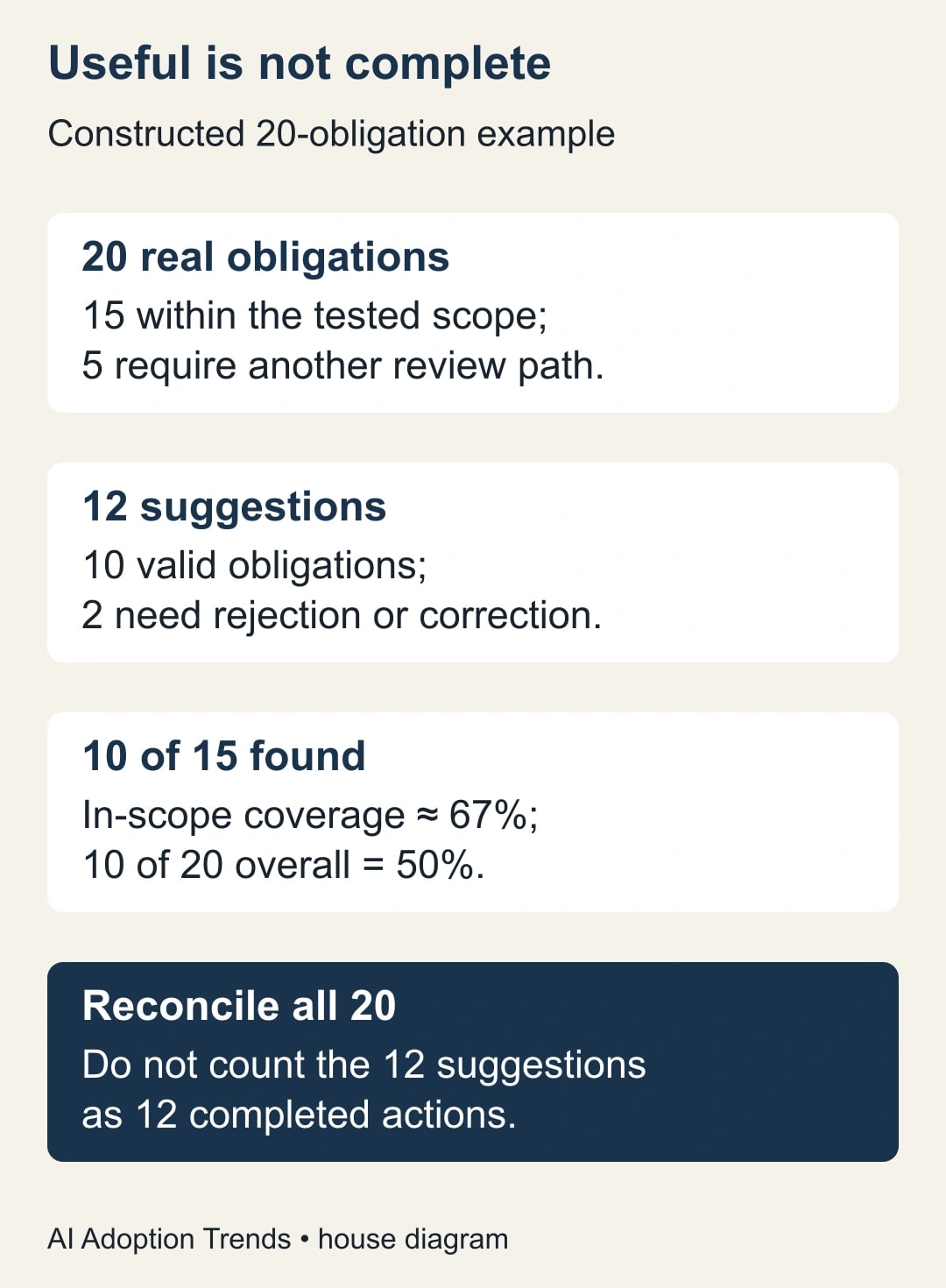
Consider a constructed review of a project manager's Monday workload. Human review establishes 20 genuine obligations across the approved sources. Fifteen are within the scope being tested for AI Inbox. Five depend on other review paths, such as attachment contents or delegated-mailbox work. These are invented planning numbers, not Google performance results.
The feature shows 12 suggestions. Ten correspond to genuine obligations; two are no longer actionable. Of the 15 in-scope obligations, it has surfaced ten, leaving five to find through the independent review. The other five obligations were outside the tested scope from the outset. The team has found ten valid items, not completed ten actions.
Three measures explain the situation. Suggestion accuracy is 10 divided by 12, about 83%. In-scope coverage is 10 divided by 15, about 67%. Coverage of the manager's complete workload is 10 divided by 20, or 50%. The first number describes whether suggestions are useful. The last describes how much of the actual work they cover. They should never share an unlabeled “accuracy” heading.
Suppose reviewing the ten valid suggestions takes seven minutes, rejecting stale items takes three minutes, and the independent sweep takes twelve. Compare the full 22-minute process with the old process on similar work, including recording and correction. Do not subtract seven minutes from a baseline while ignoring the review that made the result usable.
Copy this daily review worksheet
Use one row per obligation in your existing tracker. Keep the source link restricted to the people who may see the underlying message. The worksheet is a proposed operating aid, not an extra repository for confidential email bodies.
- Source and cutoff: link to the conversation or approved record; note the review date and latest relevant message.
- Required action: a specific verb and outcome, separated from a customer's unaccepted request.
- Accountable owner: the person who accepts the action, plus the person who can resolve a disagreement.
- Due date: confirmed date and timezone where relevant, or “unconfirmed” with a clarification owner.
- Discovery path: AI suggestion, independent inbox review, attachment review, or another named queue.
- Existing task match: record identifier if this obligation is already tracked; avoid creating a duplicate.
- Current state: open, awaiting clarification, assigned and accepted, or completed with evidence.
- Next check: when and by whom the item will be reviewed if it remains unresolved.
At the end of the review, count obligations rather than messages. One thread may contain three actions; five messages may concern the same action. Preserve separate actions when they have different owners or completion criteria. Merge duplicate references only after confirming they concern the same promise.
Recover from the common failure paths
If a suggested task is stale, inspect the later message that changed it. Correct the team's work register first, then use the available feedback controls on the suggestion. Removing an item from a generated view does not notify everyone who acted on the earlier version. If a colleague already started the obsolete work, the owner must tell them what changed.
If an important item is missing, identify whether it was outside the documented scope or a missed in-scope item. The remedy differs. Outside-scope work needs a separate review path. An in-scope miss belongs in the trial results and may justify reducing reliance on suggestions. Do not broaden inbox access or reverse deliberate filing practices solely to improve a test score.
If the view appears empty or outdated, check account selection, connection, availability and the documented initial-generation delay before diagnosing a workflow failure. Continue the ordinary review while investigating. An empty screen is not evidence that there are no obligations. Assign a retry time so troubleshooting does not consume the entire morning.
If duplicate tasks appear, pause automatic copying into downstream tools. Compare source identifiers and the action text, then designate one authoritative task. Keep the original evidence links. This guide does not assume AI Inbox provides a deduplication system for your project tool; the receiving workflow needs its own check.
Decide whether to keep using it
Run a short trial on one defined work stream and review it with the accountable manager. Track valid suggestions, missed obligations, stale items, duplicated tasks and total review time. Break out outside-scope obligations so a product limitation is not confused with a failed extraction. Also report complete workload coverage, because the manager still owns that wider result.
Choose the acceptance rule before reviewing results. For an ordinary internal workflow, you might require every sampled deadline and owner to be verified, no customer commitment sent without review, and a reduction in total handling time. Those are proposed trial rules, not universal benchmarks. A high-consequence queue may need controls that make this feature a poor primary interface.
Stop expansion after a missed obligation changes a customer outcome, or when staff begin treating suggestions as authorization. Restore the prior review procedure, repair the affected work and determine whether the boundary or the tool failed. Keep any time released separate from cash savings: faster triage does not reduce payroll by itself.
Your next action is to list tomorrow's independent review sources before opening AI Inbox. Then use the Gmail thread-to-project-brief guide when a verified conversation needs to become a fuller handoff. A useful priority view should make that work easier to find, while the business retains a complete account of what it owes.
Weekly Newsletter
AI Adoption Weekly
New research, field guides, training studies, and tool decisions for operators.
No spam. Unsubscribe anytime.
Related Comparisons
Calculator
AI seat cost calculator
List price × headcount. You enter the hours and the operating assumptions.