
ChatGPT for Word Is Arriving by Default. Decide Who May Use It Before October 1.
ChatGPT for Word can draft and revise inside the document. The practical decision is which files, users, approvals, and costs belong inside that new path.
Published September 24, 2026

A contract manager opens Word to compare two versions of a renewal. An assistant in the sidebar can summarize, rewrite, and adjust formatting without leaving the document. That is useful. It also means the document itself—not a pasted excerpt in a separate chat—is now the unit of work to govern. OpenAI says ChatGPT for Word is available for Business workspaces and Word access is scheduled to be enabled by default on October 1, 2026. The decision window is this week.
What is actually changing
OpenAI’s September 17 Business release notes say the Word add-in can draft from notes, summarize a document, revise selected text, and change headings and formatting from a sidebar. A ChatGPT workspace administrator can turn Word access on or off, and a Microsoft 365 administrator must also allow the add-in. The same notes say usage is token-priced at the model’s application programming interface rates and draws from a shared allowance for eligible premium features. The October 1 default applies to Word access in the ChatGPT workspace; it is not a claim that every Microsoft 365 tenant will automatically install the add-in.
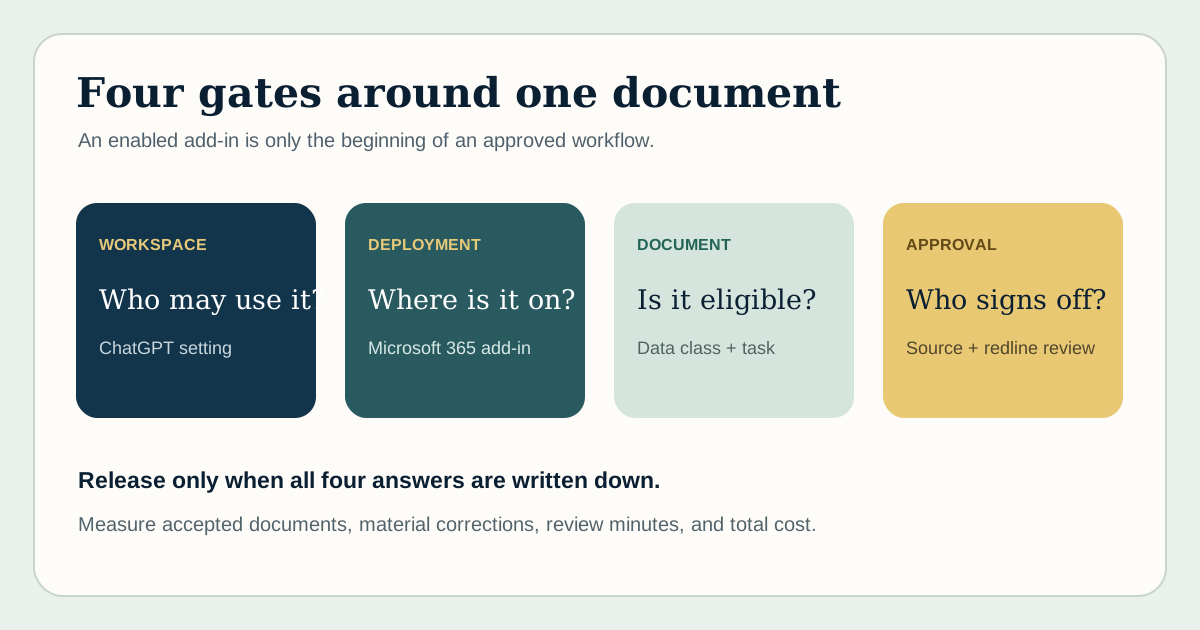
That distinction matters. There are two administrative doors and a third operating decision. OpenAI controls whether the workspace permits Word access. Microsoft 365 controls whether the add-in is deployed or available to users. The business still decides which documents and actions belong in a pilot. A green toggle at either door is not a document policy.
Map documents before assigning users
Start with three document classes: routine internal work, sensitive but reviewable work, and restricted work that should stay out until the data and legal owners approve. A sales proposal may be in the first class. A customer contract with confidential pricing may be in the second. A board paper or privileged legal analysis may be in the third. These are example classifications, not claims about the add-in’s technical access. Use your own data policy and contract terms.
For each class, write the allowed task. “Summarize the approved version for an internal meeting” is narrower than “redraft the agreement.” Keep source documents, approved templates, and review rules clear. Test whether the assistant preserves definitions, numbers, citations, tracked changes, and the difference between a client promise and an internal note. The output should go to the same human approver who would have signed the document before the add-in existed.
- Confirm the ChatGPT workspace setting and the Microsoft 365 add-in deployment for a small named group.
- List eligible document types and explicit exclusions; include external sharing and retention rules.
- Select a fixed set of documents with known answers, especially long or contradictory versions.
- Measure first-pass acceptance, material edits, review minutes, and cost per accepted document.
- Keep a rollback path: remove access, preserve the original file, and record what the human changed.
The failure case is a plausible redline
The dangerous output is rarely a page of nonsense. It is a clean paragraph that quietly changes an obligation, omits a carve-out, or carries a number from an old draft. A reviewer who trusts the tone can miss the change. Build test cases around the clauses that matter: payment terms, limitation of liability, renewal dates, defined terms, and conflicting exhibits. Ask the reviewer to identify the exact source passage for each material statement.
Microsoft’s own add-in guidance recommends a phased rollout and supports user or group targeting through its administration tools. That gives a practical deployment pattern: start with a small group, inspect document-level outcomes, then widen access by class of work. A broad installation may be administratively easy; reversing a bad contractual decision is not.
The budget question is cost per accepted document
Do not forecast value from the number of Word users. Count eligible documents, how often the feature is used, model and token costs, review time, and rework. If a four-minute summary causes twelve minutes of source checking, it may still be worthwhile for a high-value legal question, but not for routine status notes. The same shared allowance may cover other premium work, so track what the Word rollout displaces or adds.
A week-one release gate
By September 30, the IT owner should know the two admin settings, the legal or records owner should approve document classes, and one business team should have a 20-document replay set. Approve wider use only if material errors do not rise, review effort falls or quality improves, and the team can show exactly how to stop or correct a bad output. If those items are not ready, keep access limited while the test runs. There is no prize for being first to leave a sidebar on.
The useful promise of ChatGPT in Word is less copying between tools and a shorter route from draft to approved document. The test is whether the approved document is better or cheaper to produce without losing its source of truth. That is the business outcome to watch after October 1.
Primary sources
- OpenAI: ChatGPT Business release notes — September 17 Word feature, two admin controls, October 1 default, and usage pricing.
- Microsoft: centralized deployment FAQ — Group targeting, add-in administration, and rollout timing.
- Microsoft: deploy Office add-ins — Official phased rollout guidance.
Put this to work
- Practical AI governance training — Build an owner, approval path, and incident process.
- AI business-case worksheet — Measure accepted documents and review cost.
Weekly Newsletter
AI Adoption Weekly
New research, field guides, training studies, and tool decisions for operators.
No spam. Unsubscribe anytime.
Related Comparisons
Calculator
AI seat cost calculator
List price × headcount. You enter the hours and the operating assumptions.