
Fix Power Query Formula.Firewall Errors Without Guessing
Separate privacy-level errors from query-reference problems, check the current runtime, and verify the report totals before calling the refresh repaired.
Published October 15, 2026

When Power Query reports a Formula.Firewall error, first identify whether it is objecting to source privacy levels or to the way queries depend on one another. Then check the product and version where the refresh runs. Do not begin by marking confidential sources Public or turning off privacy checks across the workbook.
This matters because advice written for older Power BI Desktop versions can now be misleading. Microsoft says its July 2026 release introduced a setting, enabled by default, that permits certain query-reference patterns when source privacy levels are compatible. That change does not remove the privacy firewall. Microsoft explains the newer partition behavior. Product guidance in this article was checked October 15, 2026.
The method below is for analysts and reporting owners working in Excel for Windows or Power BI Desktop. It helps separate a configuration mistake from a data-sharing decision that belongs to the source owner. It is a diagnostic workflow and a constructed example, not a claim that one query pattern fixes every connector or environment.
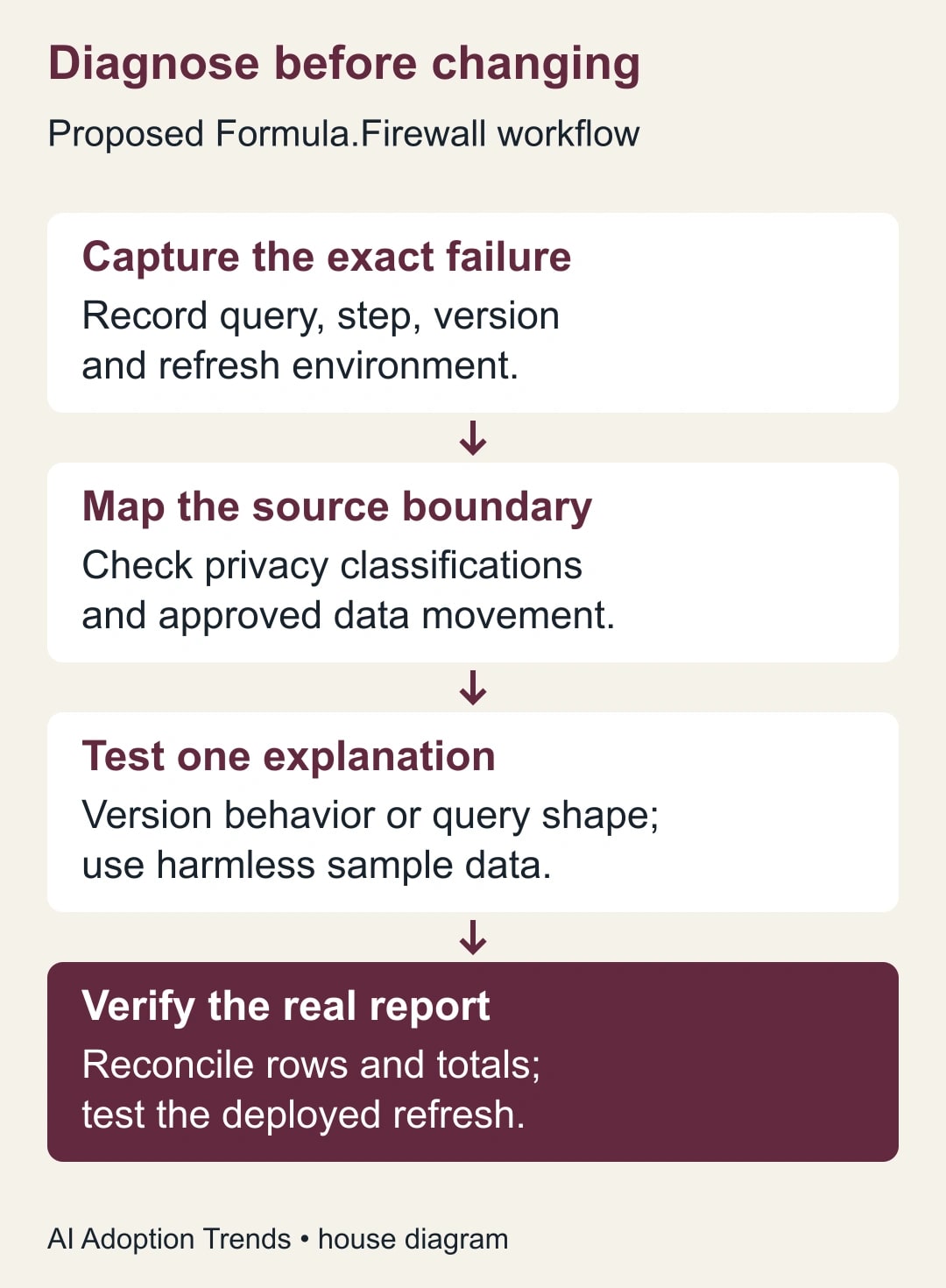
Capture the failure before changing the file
Save a working copy and record the complete error, failing query and step, application version, and refresh environment. Note whether the failure occurs in the editor preview, a full desktop refresh, or a scheduled refresh after publication. Those are different observations. “It worked on my laptop” is not enough evidence for a scheduled report.
Write down the last successful refresh and the changes since then. A new source, changed path, revised credential, merged query, or software update can narrow the investigation. Also record the report's business deadline and who may authorize using the last verified result. Do not silently distribute stale numbers while repairing the refresh.
Assign an analyst to reproduce the issue, a data owner to approve source classifications and transfers, and a report owner to accept the corrected output. Small teams may combine the roles, but the decisions remain distinct. The person who knows how to remove an error message may not be the person authorized to send forecast data to another service.
Skip this guide if the error is actually an expired credential, missing file, unsupported connector, or invalid column name. Capture that exact failure and follow the relevant source's recovery process. A privacy setting is unlikely to repair a file that no longer exists, and changing several settings at once makes the real cause harder to establish.
Read the message as a choice between two investigations
Microsoft documents one Formula.Firewall family involving incompatible privacy levels and another involving a query that references other queries while directly accessing a source. The firewall exists to prevent unintended movement of data between sources during query evaluation. “Query folding” means pushing transformations to a source system, which can change where data is processed. Read Microsoft's explanation of the data privacy firewall.
For a privacy-level message, start with the source inventory and the intended direction of data movement. For a query-reference message, inspect the dependency chain and the runtime's supported behavior. A workbook can contain both problems. Fixing the first visible error does not establish that the next combination is safe or correct.
Avoid treating the message as a verdict about the sensitivity of the final chart. A chart showing only totals can still be built from detailed source records. Review what enters the query and where intermediate data may go, not just the fields visible in the finished report.
Make a two-minute source map
For each source, write its location, owner, fields used, current privacy classification, and approved destination. Include small lookup tables and parameters that look harmless. A list of customer identifiers used to filter a public service request can reveal business information even if the response itself is public.
Microsoft defines Private, Organizational, and Public privacy levels, with None as another available setting. The labels control isolation behavior; they are not a substitute for permission to share data. Its documentation also notes that Excel for Mac does not currently support privacy levels. Do not transplant Windows instructions to that environment. Review Microsoft's privacy-level definitions and application-specific controls.
In Excel for Windows, inspect Data, Get Data, Data Source Settings, then the relevant source's permissions and privacy level. In Power BI Desktop, use its Data source settings and Edit Permissions. Check the settings associated with the actual source location used by the query. Similar-looking paths or endpoints can represent different entries.
Ask the data owner a concrete question: “May these forecast rows be evaluated with this external lookup, and where may the combined result be stored?” That is more useful than asking whether the report is “internal.” If the owner cannot answer, stop at a synthetic reproduction and keep live source data out of the experiment.
Check the version before applying an old workaround
For Power BI Desktop, record whether the July 2026-or-later partition setting is available and enabled under Global Preview features. Microsoft says the newer behavior allows the relevant mixed-reference pattern when privacy levels are compatible, and aligns with service behavior. An older post insisting that such a pattern can never work may no longer describe your installation. The current setting documentation includes the conditions and remaining limits.
Do not assume the same setting exists in Excel, or that enabling it makes incompatible sources compatible. If your organization controls application updates or preview settings, ask the administrator to confirm the supported configuration. Record that answer in the incident notes so the next analyst does not repeat the same investigation.
If the relevant behavior is already enabled and the error remains, return to the actual source classifications and dependency chain. Changing the version is a hypothesis to test, not a universal remedy. A source that should remain isolated still needs an approved design for combining its data.
Reproduce the shape with harmless sample data
Create tiny synthetic inputs with the same column names and types, but no real customer or financial details. Preserve the sequence of source access, references, and combination steps that produces the failure. The objective is to isolate the query shape, not to recreate the entire reporting model.
For a simple model, make one source-access query per input and a separate combination query that references those prepared inputs. Keep source-access steps visible and avoid adding another connector call inside the combination step during this test. This is one diagnostic refactoring to try; privacy compatibility and the runtime still determine whether it works. Do not scatter buffering functions or duplicate code throughout the file without understanding the effect.
Refresh each input independently first. Record whether it loads, its row count, and its expected column types. Then refresh the combination. If the input fails alone, investigate that source before changing the join. If only the combination fails, you have a smaller, clearer case for the analyst or administrator to inspect.
Once the synthetic reproduction behaves as expected, restore the approved source connections in the working copy and refresh again. A successful harmless example proves only that the query shape can work under those conditions. It does not prove that the real classifications, permissions, data volume, or deployment environment match.
A constructed example: forecasts and regional categories
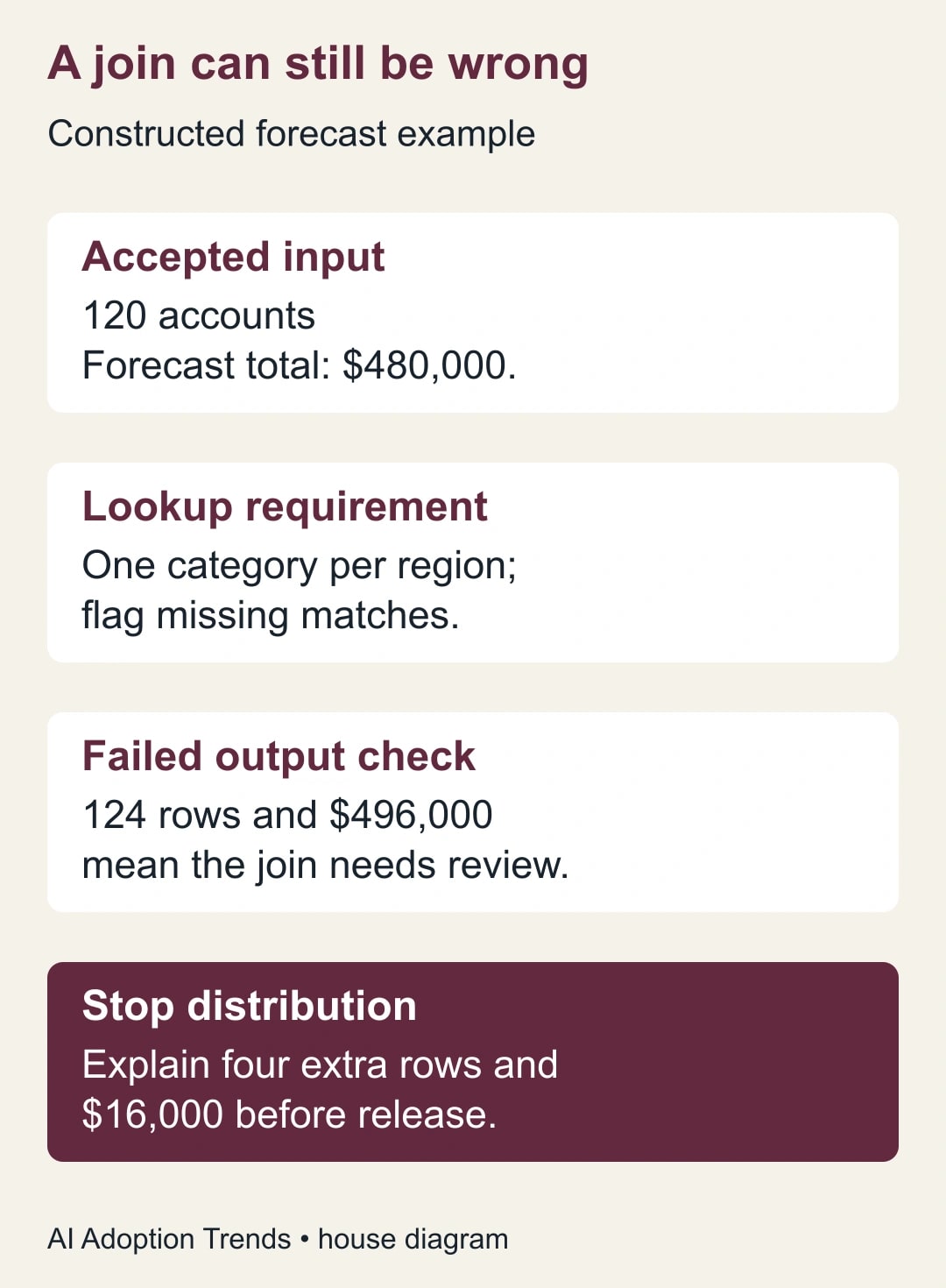
Imagine an analyst combines a confidential sales forecast with a public table of regional categories. The forecast contains 120 rows, one per account, with a region code and expected revenue. The category table contains one intended row per region. The business wants revenue grouped by category; it does not need to send account names to the public source.
The analyst's source map should make that direction explicit: retrieve the public categories into the approved reporting environment, then combine them with the protected forecast there. Whether the implementation actually preserves the intended boundary needs review against the connector and runtime. A neat flowchart is not evidence that execution follows it.
Start with six fictional accounts and three fictional regions. Give each region exactly one category. A left join keeps every forecast row and adds the matching category where one exists. With six input accounts and unique region keys, the expected output is six rows. Add a fourth region code to one account to test the missing-match path. It should remain visible as unresolved rather than disappearing from the report.
Now deliberately duplicate one region in the lookup. If two accounts use that region, each can acquire two matches, producing eight output rows instead of six. This is a data-quality defect independent of the firewall. Removing the privacy error would not make the doubled totals acceptable. Add a uniqueness check on the lookup key before using the full dataset.
For the full fictional forecast, suppose the 120 rows total $480,000 before the join. The accepted output must still represent those same 120 accounts and $480,000, with unmatched categories separately identified. If the output contains 124 rows and $496,000, stop distribution and inspect duplicated matches. The extra $16,000 is an error to explain, not a newly discovered opportunity.
Use a repair worksheet that a colleague can repeat
Keep this worksheet with the report's maintenance notes. It should describe the final supported configuration, not only the sequence of buttons someone tried during the incident.
- Failure: complete message, query, step, and first observed date.
- Runtime: application, version, refresh location, and relevant setting state.
- Sources: owner, location, fields, privacy level, and approved data movement.
- Reproduction: harmless inputs and the smallest failing dependency chain.
- Proposed change: one change, its reason, and the result that would support it.
- Output checks: source rows, lookup uniqueness, unmatched keys, and total reconciliation.
- Deployment check: actual scheduled refresh result and the identity used there.
- Acceptance: report owner, verified timestamp, known limits, and rollback file.
When asking an administrator for help, send the worksheet and a sanitized reproduction through an approved channel. Avoid copying a full workbook into a public forum. An error message can contain paths or source names that also deserve review before sharing. A small reproducible example usually makes the technical conversation easier anyway.
Test the real refresh environment
After a desktop repair, run the actual refresh route the report depends on. Verify source access, identity, paths, and the resulting data. Microsoft's privacy guidance warns that ignoring privacy levels in Desktop does not carry over as a universal solution for published semantic models. A semantic model is the prepared data structure used by a Power BI report. See the desktop and service privacy considerations.
Compare a known period and a few known records with the accepted baseline. Record row counts, unmatched keys, totals, refresh time, and the source timestamps. A successful status message proves that processing completed; it does not prove that the correct month's file was loaded or that every row was included.
For the first release after repair, have the report owner inspect one business-critical view and the reconciliation evidence. Keep the previous verified output available with its date clearly labeled. If the new refresh fails, use that agreed fallback rather than silently substituting a partial result.
Decide whether to repair locally or redesign the data path
Budget an initial hour for diagnosis and a separate review of any proposed data movement. Those are suggested limits for a modest report, not a promise for a complex model. If the query cannot be explained after that first pass, escalate with the reproduction rather than spending the afternoon trying random combinations of privacy flags.
A one-off report may justify a controlled manual import of an approved lookup, provided the owner records its date and refresh responsibility. A recurring report with frequent source changes may need an approved intermediate dataset maintained by the data team. That adds ownership and maintenance cost, but can make the boundary explicit. Do not move data into a new service merely because it removes the error.
Measure the repair by accurate scheduled refreshes and reproducible maintenance, not the disappearance of the warning. Stop if the proposed fix requires misclassifying a source, exposes data to an unapproved destination, or produces totals you cannot reconcile. Once the data is reliable, our capacity-planning guide for Sheets shows how to turn a clean operational dataset into a decision rather than another dashboard. Start today by saving the exact error and drawing the source map; those two artifacts determine the next useful action.
Weekly Newsletter
AI Adoption Weekly
New research, field guides, training studies, and tool decisions for operators.
No spam. Unsubscribe anytime.
Related Comparisons
Calculator
AI seat cost calculator
List price × headcount. You enter the hours and the operating assumptions.