
Fix Outdated Notion AI Answers by Checking the Source
Diagnose stale sources, missing connector content, and unsupported answers. Use a source register and a practical test pack before trusting the result.
Published October 14, 2026

If Notion AI gives an outdated answer, open its cited source before rewriting the prompt. Determine whether the source itself is obsolete, the current source is missing from search, or the answer misread material it could access. Repairing the wrong layer wastes time: a better prompt cannot update an abandoned policy page or include a file outside the connector's scope.
Start with one recurring question that matters to the team, such as where a customer change request should go. Keep the answer in human review while you investigate. Record the question, the exact response, its citations, the asking user's access, and the correct source version. Then make one change at a time and test with fresh wording.
This guide is for a knowledge owner, operations lead, or workspace administrator using Notion AI to answer internal business questions. It provides a diagnosis sequence, a source register, and a small evaluation method. It does not assume that every incorrect answer is caused by indexing, and it does not promise that verified pages make AI answers correct.
Check what search was allowed to use
As checked October 14, 2026, Notion's enterprise search documentation describes answers across workspace content, connected apps, and the web, with controls for selecting sources. It lists Business and Enterprise availability. Start by recording which sources were selected when the bad answer appeared. A question about internal procedure can receive an unhelpful general answer if the intended internal material was not in scope. Notion's enterprise search guide explains the current controls.
Repeat the question with the relevant page or approved source explicitly selected where the interface supports it. For an internal-policy test, exclude unrelated web results. Keep the question otherwise the same. If the answer improves only after narrowing the source, you have learned something useful about retrieval, but you have not yet repaired the ordinary experience for colleagues who ask the broad question.
Notion also notes that some manually selected models cannot use workspace and connected-app information in the same way as its source-aware search. Check the mode and source controls rather than assuming every chat route has the same access. Use the supported internal-search route for this diagnosis, and keep a record of the selection so the next test is comparable.
Do not expand permissions to make an answer appear. A missing confidential source may be working as intended for that user. Test with an authorized user and ask the source owner to decide what the requesting team should be able to see. Search quality is not a reason to grant broad access to unrelated files.
Sort the failure into three practical categories
First, the cited page is wrong or outdated. Open it and compare its effective date, owner, and instructions with the approved procedure. If it still tells staff to send requests to a retired queue, the AI may be accurately repeating bad information. Fix the source and its competing copies.
Second, the correct page exists but is not available to this search. Check the user's ability to open it, the selected sources, connector status, file eligibility, and time since the update. A link preview or embedded file is not proof that the AI connector indexed its contents. Diagnose the connection separately from the ordinary ability to click a link.
Third, the correct page is available and cited, but the answer is wrong. Read the relevant passage rather than trusting the citation badge. The answer may have omitted a condition, combined two procedures, or treated an example as the rule. Tightening the source and asking for the exact supporting passage may help, but preserve human review until the error is resolved.
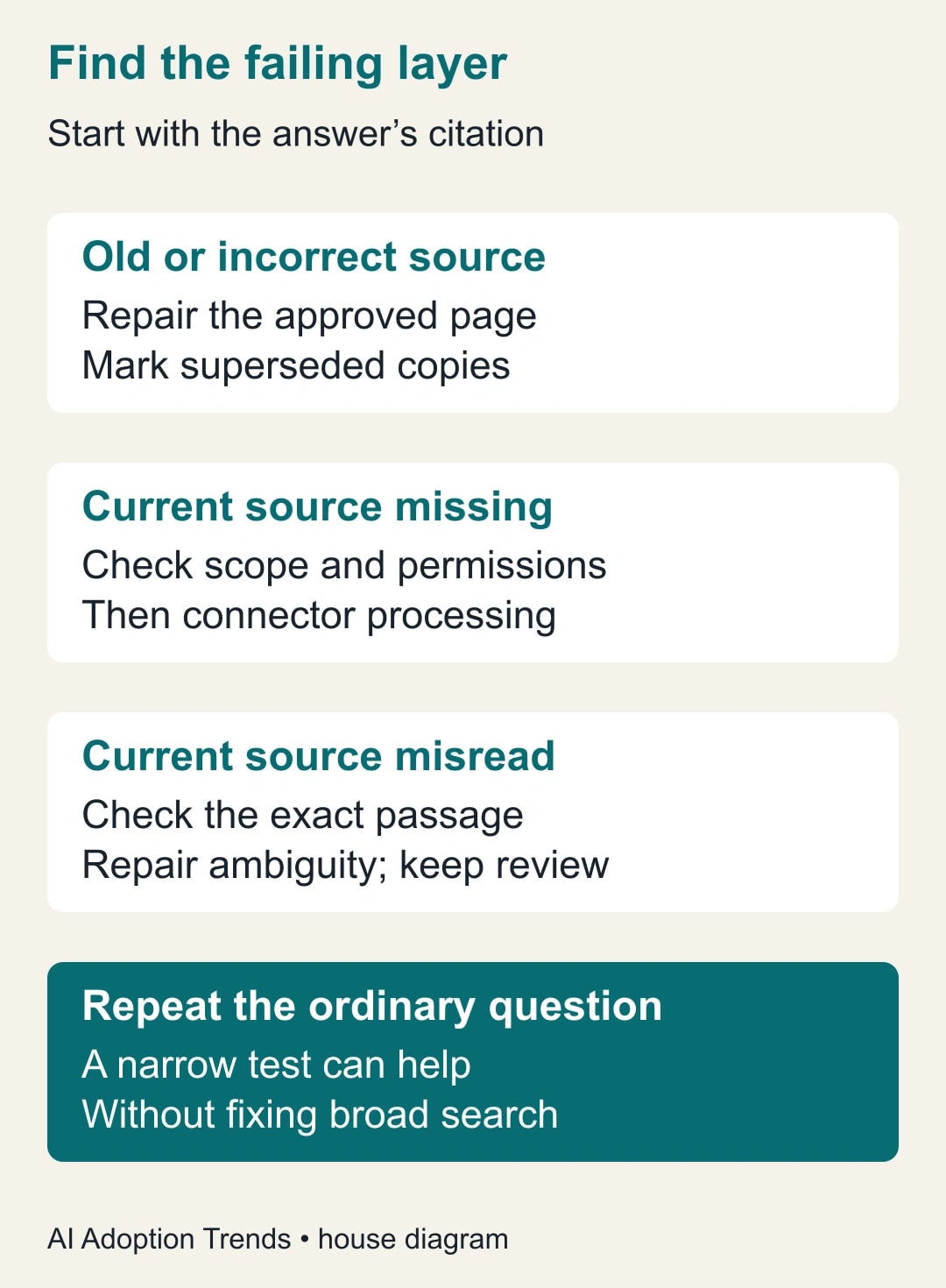
Record a provisional category and the evidence for it. If you are unsure, keep the case open. “AI hallucination” is too broad a label to tell the owner whether to revise a page, investigate a connector, or change how answers are used.
Establish one current answer without erasing history
Choose one owner-approved page for each recurring decision. Put the purpose, intended team, effective date, owner, and escalation route near the top. State the current rule in ordinary language before examples and background. Link related procedures rather than copying large sections that will drift separately.
Find the older pages and duplicate exports that answer the same question. Mark superseded material clearly and link to the replacement where your retention process permits. Do not delete historical records simply to improve search. Preserve them with an unmistakable historical status and ask the administrator how the approved search scope should treat them.
A page title such as “Process notes final v3” is hard for a colleague or a search system to interpret. A title such as “Delivery-change requests: current routing procedure” tells the reader the job. Add version information in the body and register. Keep the familiar terms employees actually use, including the old queue name in a short superseded note if it helps people find the correction.
Notion's verified-page features can support this maintenance. Its documentation describes page owners, verification periods, and reminders when verification expires. Some verification options depend on plan. Use them to make a human review responsibility visible, not as proof that the AI will always select or interpret that page correctly. Notion explains wikis and verified pages.
Use a source register the team can maintain
Create one row per decision, rather than one row for every document in the company. The register should tell a new owner where the current answer lives and what change would make it unsafe to reuse.
- Decision: the actual question employees need answered.
- Current source: approved URL, title, version, and effective date.
- Owner and reviewer: who maintains it and who can resolve a disputed answer.
- Audience: who should be able to use it and any restricted details kept elsewhere.
- Related old material: superseded URLs, exports, and correction status.
- Review trigger: changed policy, system, owner, or a chosen review date.
- Test cases: ordinary question, exception, missing input, and conflicting-source example.
Start with the ten questions that create the most repeated interruptions. That is an editorial starting suggestion, not a platform limit. If nobody can name those questions, ask the people who answer them each week before organizing the entire wiki. A small register with real ownership is more useful than a broad content inventory nobody maintains.
Include a visible way for employees to report a wrong answer with its citation. Ask for the question and source link rather than a vague “the AI is bad” message. Keep private information in the approved internal reporting route. The owner can then reproduce the problem without collecting unrelated chat history.
Investigate a Drive source without repeatedly reconnecting it
If the current procedure lives in Google Drive, inspect the actual Notion AI connector settings with the administrator. Notion's current documentation says the Drive connector requires a Business or Enterprise Notion workspace, a paid Google Workspace plan, and appropriate administrative roles. Selected users, groups, and shared-drive settings affect which files are available. Check the Drive connector requirements.
The same guide says initial synchronization commonly takes about 36 hours and can take longer in large organizations; new content is described as syncing roughly hourly. These are provider expectations, not a service guarantee for your file. Record the update time and observed connector state, and use the authoritative document directly while a current answer is unavailable.
Before disconnecting and reconnecting, check a known eligible file with simple text, the intended ownership scope, and the asking user's permissions. Record whether that control file appears. If the control works but the procedure does not, inspect the specific file's format, size, ownership, and sharing route against the current documentation. If neither appears after the expected setup period, collect the evidence for the administrator or support.
Avoid “fixing” the issue by making the document public or installing the connector across everyone without review. That changes the access decision rather than explaining the failure. Keep the investigation limited to the authorized scope and preserve the existing connection configuration for diagnosis.
Work through a stale-policy example
Consider a constructed operations team that changed delivery-request routing on October 1. The old page says every request goes to a general service queue. The approved October page says unshipped orders go to the order team, shipped orders go to logistics, and missing order identifiers require clarification before routing.
A colleague asks, “Where do I send a delivery change?” Notion AI answers with the general service queue and cites the old page. The first repair is to mark that page superseded, link the new procedure, and make the new page's opening rule explicit. Rewriting the question to mention October might hide the problem for one user while leaving everyone else's ordinary question broken.
Next, the owner tests the same question with the current page selected. If it correctly distinguishes shipping status, the source can support the answer. The owner then tests the ordinary broader search again after the updated material is available. If the old route still appears, the case remains open; a successful narrow test does not justify declaring the general problem solved.
Finally, ask an incomplete question: “Can I change this customer's date?” The desired behavior is to ask for the order identifier and shipping status, or direct the employee to the procedure. It should not invent those facts. That case checks whether the answer respects the information the job requires, not just whether it can quote the latest page.
Test the answer and its evidence separately
Build a small test set before making changes. For this example, use five ordinary questions, five shipped-order exceptions, five missing-input questions, and five questions that mention the old queue or otherwise invite confusion. The 20 cases are a proposed diagnostic pack, not a representative sample of every question employees might ask.
Score each answer on two checks: does it give the correct next action, and does its citation actually support that action? Mark unsupported correct answers separately. They may be lucky or based on general knowledge rather than the approved business rule. Also record whether the user can open the cited source.
Suppose a constructed first run gives the correct action on 16 of 20 cases, and 14 of the 20 answers are both correct and supported by current citations. That is 80% action accuracy and 70% jointly correct-and-supported answers. Calling the system “80% reliable” would hide the evidence problem. Two incorrect actions on shipped orders could be more consequential than several harmless wording differences.
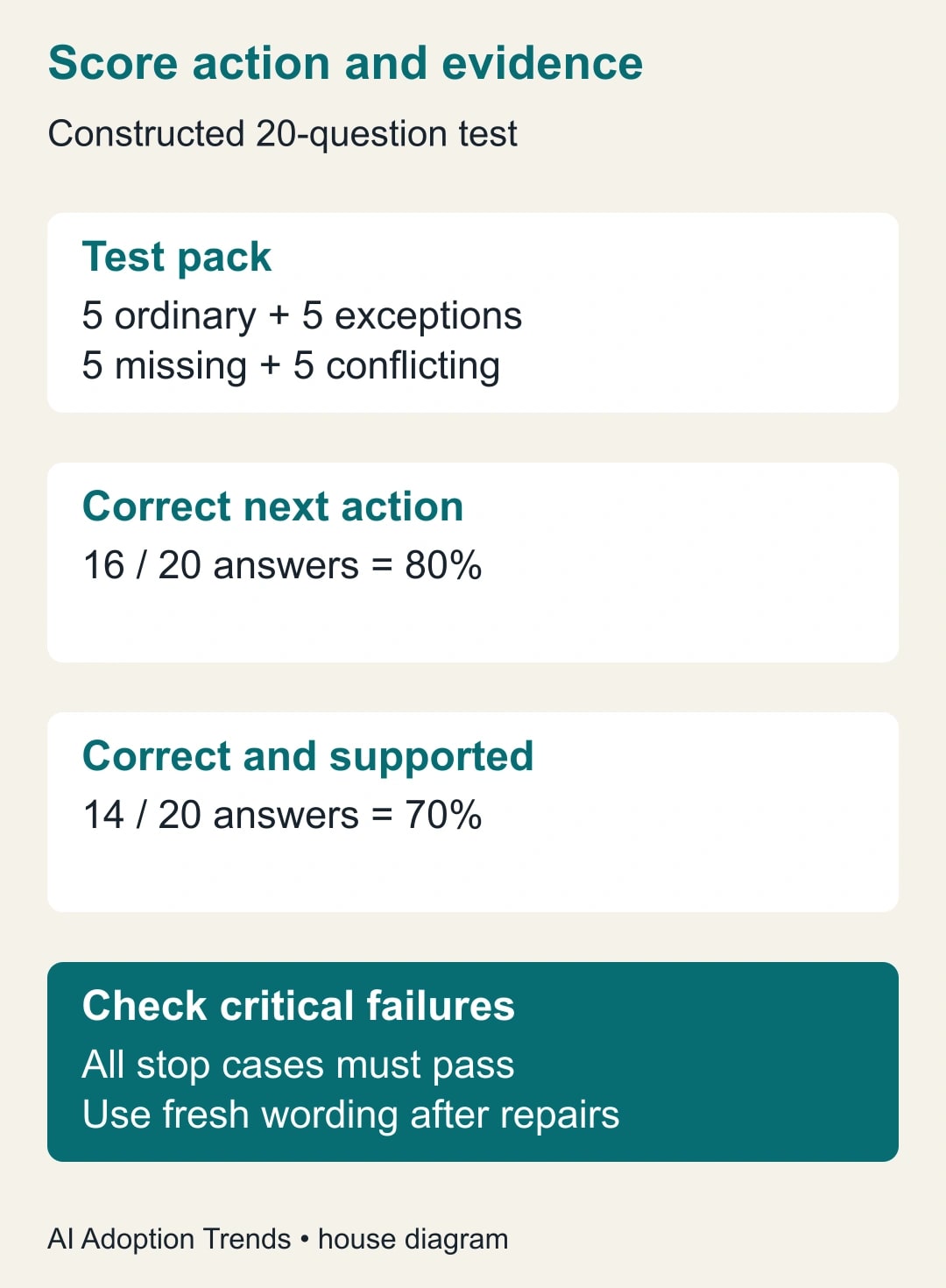
Set the acceptance rule before looking at the result. For a limited assisted-use trial, a team might require every stop-condition case to ask for missing information or escalate correctly, and every accepted answer to cite the current procedure. Those are proposed operational rules, not a universal benchmark. Keep human review for actions that carry customer or financial consequences.
After a repair, use fresh wording and new sample values while preserving the same underlying decisions. Test as an ordinary authorized user, not only as the administrator. An admin-only success can hide the permission or source-selection problem that affects the team.
Make a usable fallback and a sensible cost decision
Publish the current procedure link beside the question-entry point or in the team's normal help channel. Tell employees which owner can resolve an uncertain answer. If a response cites a superseded source or cannot support a consequential action, the employee should use the procedure and ask that owner rather than keep prompting until a preferred answer appears.
For the first two weeks, track corrected source pages, failed test cases, help requests, and minutes spent checking answers. Include the knowledge owner's maintenance time and any incremental plan cost. If AI saves a colleague three minutes finding a page but requires five minutes of verification, that task has become slower. If the trial releases time, treat it as capacity until an actual spending decision produces cash savings.
Pause expansion when the owner cannot keep the source current, the same critical error persists after repair, or access behavior cannot be explained. Preserve the useful cleanup work even if the AI route is not yet worth using. Better source ownership benefits ordinary search and direct reading too.
The team AI training plan can help turn this into a repeatable habit: ask, inspect the source, act within authority, and report errors. Start with one bad answer today. Its citation will usually give you a more useful next step than another adjective in the prompt.
Weekly Newsletter
AI Adoption Weekly
New research, field guides, training studies, and tool decisions for operators.
No spam. Unsubscribe anytime.
Related Comparisons
Calculator
AI seat cost calculator
List price × headcount. You enter the hours and the operating assumptions.