
Make Incomplete Executions: Recover the Work Before Clearing the Queue
Reconcile source records, failed runs, and destination outcomes before retrying Make incomplete executions. Includes a recovery worksheet and worked example.
Published October 15, 2026

Before retrying a backlog of Make incomplete executions, reconcile the affected business records. Establish what already happened in the destination app, what still needs to happen, and which input is valid now. Then recover one representative run and inspect the result before processing the rest. A green execution status is useful evidence, but it is not proof that an order, invoice, or customer notification is correct.
An incomplete execution is a saved unfinished run of a Make scenario, its term for an automation workflow. Make says storage of incomplete executions is disabled by default and must be enabled in scenario settings; storage capacity depends on the account's usage allowance. Make's introduction explains the feature. Product behavior in this guide was checked October 15, 2026. The recovery method and example below are our proposed operating procedure, not results from a customer test.
Put a business owner beside the scenario owner
This guide fits an operations lead responsible for a workflow that creates or updates business records, with a colleague who can inspect the Make scenario. It is especially useful after a service outage, invalid input, or configuration change leaves several runs unfinished. The goal is to restore correct work while retaining enough evidence to explain the incident.
The scenario owner diagnoses the failed module, a step in the automation. The business owner decides whether the original action is still required. A finance owner may need to confirm whether an invoice was already issued; a customer-success owner may know that an order was cancelled during the outage. The automation builder should not make those business decisions from an error code alone.
Skip bulk recovery while the underlying system is still unstable or the affected records cannot be identified. Use a controlled manual process for urgent items and record what you do. Otherwise those manual actions can become a second source of duplication when automation resumes.
Preserve the evidence and stop uncontrolled repetition
Record the incident window, scenario identity, incomplete execution identifiers, failed modules, and any destination record identifiers already returned. Preserve the relevant history according to your organization's retention and access rules. Do not export unnecessary customer payloads into a shared incident document; a reference to an approved source is often enough.
Decide whether new incoming work must pause, queue, or continue under manual supervision. Pausing a workflow can protect an order-sensitive process, but it also creates a new backlog. Name the person who will handle urgent arrivals and tell them where to record completion. Avoid toggling settings during the incident without recording what changed and when.
Make's Process data in order setting makes runs sequential and can hold later work behind an unresolved execution. Its settings also govern incomplete-execution storage, whether data is discarded when storage is full, and whether updated variable values are used during recovery. These choices change the incident's consequences. Review the current scenario settings before deciding that the queue represents every affected item.
Reconcile three lists, not just the error tab
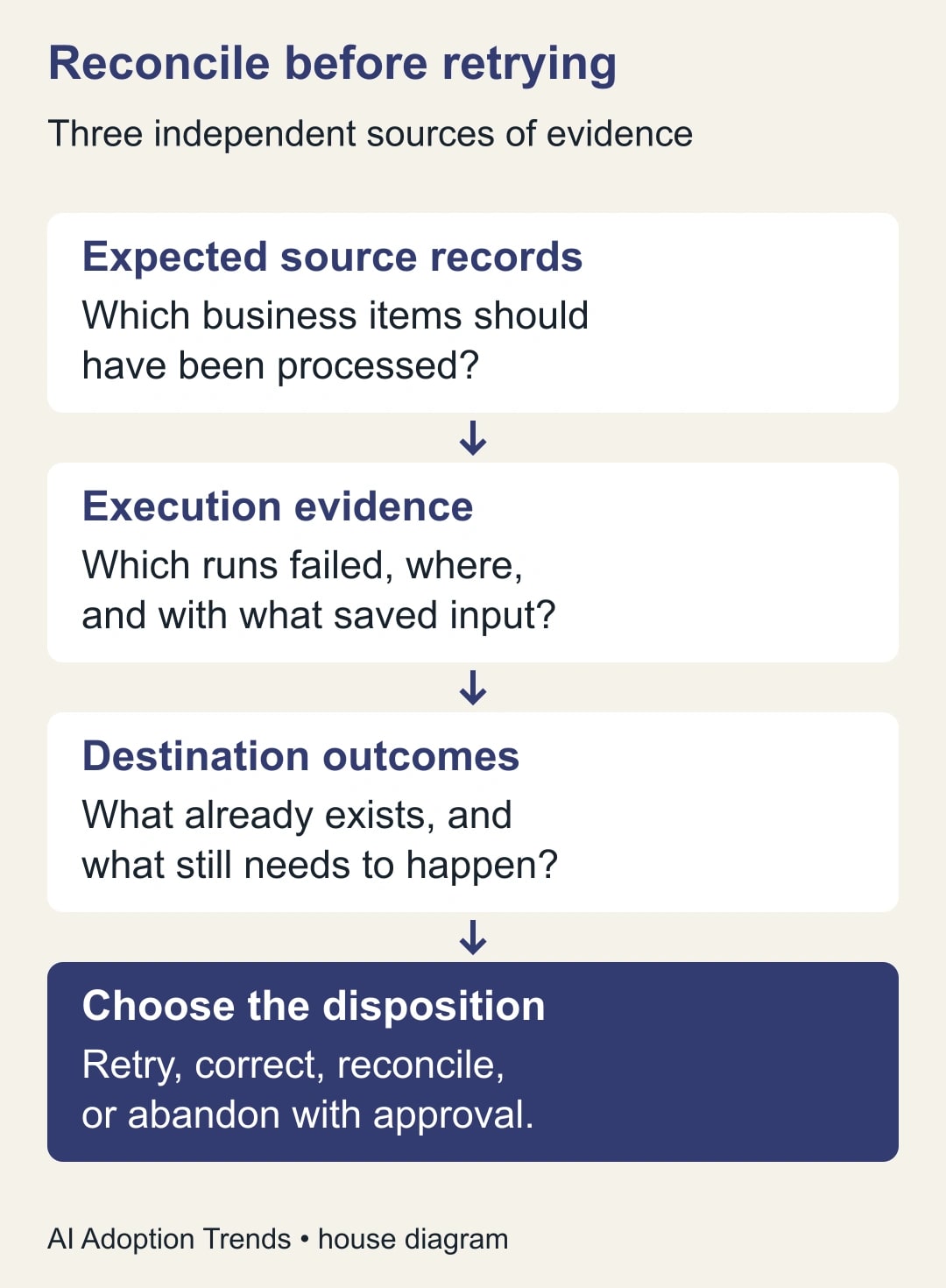
Build three lists for the incident window: expected source records, Make execution evidence, and actual destination outcomes. Use a stable business identifier shared across the systems, such as an order number. A person's email address is often a poor identifier because the same customer can place several orders.
For each source record, identify the required outcome and whether it exists. Then attach the Make execution identifier and error state. If the destination already contains the intended record, investigate before retrying the step that creates it. A network failure can leave uncertainty about whether an external service accepted a request even when the caller did not receive a useful response.
Do not assume absence from the incomplete-execution tab means success. Make documents exceptions, including many first-module failures, runs exceeding their allowed duration, and storage-related cases. The precise configuration matters. Read the errors that do not create incomplete executions. This is why the source list must be independent of Make's saved-run list.
Choose one of four recovery decisions
For each affected business record, choose a decision before touching the retry controls. The same error code can lead to different decisions if the customer's state has changed since the original run.
- Retry after repair: the action is still required, the input is valid, the cause is addressed, and no conflicting destination effect exists.
- Correct then resume: the action is still required, but a field, mapping, permission, or approved input must change first.
- Reconcile an existing outcome: the destination already contains some or all of the required work; determine the remaining action without repeating completed effects.
- Abandon with approval: the action is obsolete, cancelled, or replaced by documented manual work; retain the business reason and evidence before removing recovery state.
An unknown outcome is not a fifth permission to retry. It is a reason to investigate the destination, contact its owner, or hold the item. For consequential actions, such as issuing a customer document or changing an order, uncertainty should remain visible until someone resolves it.
Separate technical retryability from business validity. A timeout may be technically retryable while the underlying order has been cancelled. Conversely, a bad field may require manual correction even though the customer is still waiting for the original service. Your log needs both the cause and the disposition.
A constructed example: 30 orders after an outage
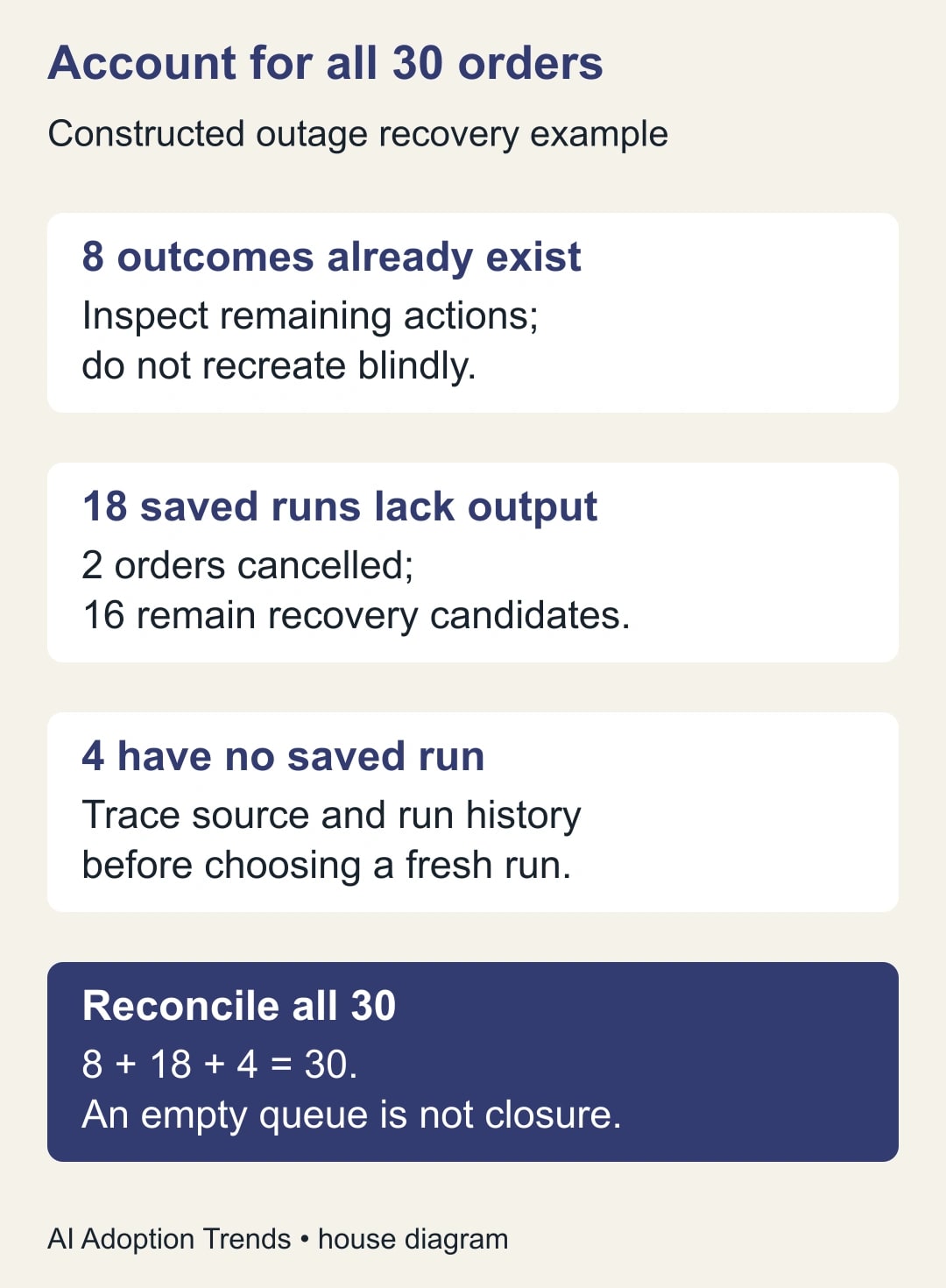
Imagine a fictional workflow that reads approved orders, creates a fulfillment record, and notifies an internal coordinator. During an outage window, the source system shows 30 eligible orders. Make shows 26 saved incomplete executions. A check of the destination finds that eight of those 26 already have fulfillment records, while 18 do not. Four expected orders have no saved incomplete execution and need separate investigation.
The reconciliation is 30 expected orders equals eight existing destination records, 18 saved runs without the required record, and four items missing from the saved-run list. These are constructed counts. They illustrate why clicking “retry all 26” would not be a complete recovery plan, even if every retry eventually showed success.
The business owner checks the 18 pending orders and finds that two were cancelled. That leaves 16 candidates for recovery after the cause is fixed. The eight existing records need inspection of any remaining steps, such as whether the internal notification occurred. The four missing items must be traced through source and run history before deciding whether a controlled fresh run is appropriate.
Assign a disposition to all 30. Do not close the incident after recovering the 16 straightforward cases. The eight existing outcomes, two cancellations, and four missing runs are the part that requires judgment. A recovery count that excludes them would flatter the automation while leaving the business queue unresolved.
Inspect the point where execution resumes
Make's manual resolution procedure opens the failed execution, lets you correct the relevant module, and reruns from the module that caused the incomplete execution using its original input. A later failure can create another incomplete execution at a different module. The recovery is therefore not simply a fresh run from the first step. Make documents manual resolution and retry states.
Before resuming, inspect what the failed module will receive and what it may change. Confirm whether the original payload is still valid. Also check the scenario's setting for updated variable values: a routing destination or configuration value may have changed since the original attempt. Record whether the recovery uses the original or current business rule, and have its owner approve that choice when the difference matters.
For the fictional orders, suppose the shipping destination was corrected after the outage. The original saved input could still contain the old destination. Do not assume a retry will reread the entire source record. Compare the stored input with the approved current record, then choose the supported correction or a controlled replacement process. Keep the original order identifier attached to the resolution evidence.
Avoid assuming that a rollback reverses every external effect. A message already sent or a record already created in another app needs explicit reconciliation. Treat an undo claim as something to verify for the particular connector and action, rather than a property of automation in general.
Recover a small sample before the full queue
Choose one representative item from each recovery category that will actually be resumed. Test with a non-production equivalent where available; otherwise obtain the responsible owner's approval for the specific live recovery. Observe the destination after the run, not just the Make status. Confirm the expected record count, content, owner, and downstream notification state.
For the first item, write down the expected change before executing it. “One fulfillment record for order X, no duplicate record, one internal notification if still required” is testable. “The scenario works” is not. If the actual outcome differs, stop the batch and investigate before multiplying the mistake.
Once a category passes, process a small group within the destination service's capacity. Watch for renewed errors and newly created incomplete executions. Do not keep retrying rapidly when the cause remains unresolved. If the service is limiting requests, use its documented limit and the scenario owner's supported recovery approach rather than guessing a faster retry interval.
Keep a recovery worksheet with the business record
Use this worksheet as a small incident table in the team's existing system. It is meant to make the decision auditable without collecting a second copy of sensitive payloads.
- Business identifier and expected outcome.
- Source timestamp and current source status.
- Make execution identifier, failed module, and error category.
- Destination record identifier and verified current outcome.
- Disposition: retry, correct, reconcile, or abandon.
- Input decision: original values or approved updated values, with reason.
- Owner, next action, and deadline for unresolved items.
- Recovery result, destination check, and any new execution identifier.
- Closure evidence and the person who accepted it.
For the four missing orders in the example, the worksheet may initially say “no saved execution found; source trigger investigation assigned.” That is a useful honest state. Do not manufacture an execution identifier or mark the item complete simply because the incomplete-execution tab is empty.
Deletion deserves particular care. Make says deleted incomplete executions cannot be restored. Keep the approved cancellation or replacement evidence and confirm that no remaining action depends on the saved state before removing it. The management guide describes deletion and its consequence. Clearing a queue should be the result of decisions already made, not the method for making them.
Count the cost of recovery and the work still waiting
Budget diagnosis, business review, destination checks, and any extra usage from retries. For a constructed example, six minutes of reconciliation per affected order across 30 orders consumes 180 minutes. Add 45 minutes for diagnosing the cause and 30 minutes for final checks: the incident requires 255 minutes, or four hours and 15 minutes, before any separate customer service work.
If normal automation saves three minutes per order, those 30 orders represent only 90 minutes of routine released capacity. That does not mean automation is a bad choice; it means the incident cost belongs in the operating calculation. Compare recovery effort across the full period, including successful orders, and keep released staff capacity separate from a reduction in spending.
Track the age of the oldest unresolved business item, not only the number of incomplete executions. A queue shrinking from 20 to two can still contain the two most important customers. Report outcomes by business category and owner so the team can prioritize the remaining consequences.
Close only after the source and destination agree
The incident is ready to close when every expected source record has an accepted disposition, the destination checks match those decisions, and new incoming work is handled correctly. Restore the intended scheduling behavior deliberately and verify one new end-to-end item. Document the preventive change, such as input validation, storage monitoring, or a clearer ownership rule.
Pause recovery if the destination effect remains unknown, retries create new unintended records, or the business owner cannot confirm that the original action is still wanted. For a related but different problem, use our guide to preventing duplicate records in Zapier. Here, the next useful move is to reconcile one failed business item from source to destination before deciding what the rest of the queue should do.
Weekly Newsletter
AI Adoption Weekly
New research, field guides, training studies, and tool decisions for operators.
No spam. Unsubscribe anytime.
Related Comparisons
Calculator
AI seat cost calculator
List price × headcount. You enter the hours and the operating assumptions.