
Zapier Creating Duplicate Records? Trace the Event First
Trace duplicate records to their runs, separate event and customer identifiers, test concurrent arrivals, and check uncertain outcomes before replaying.
Published October 14, 2026

When Zapier creates duplicate customer records, start by tracing two copies back to their runs. Compare the trigger event, the action inputs, and the destination record identifiers before changing the workflow. The cause may be repeated events, two active Zaps, a loop, a fixed test value, or a timeout that happened after the destination had already created the record. Each needs a different repair.
Do not begin by bulk-deleting the extra records or replaying every failed run. Preserve the evidence, pause the affected creation route if it is still causing damage, and keep incoming work in a recoverable queue. Then repair one cause and test with fictional records before reopening the route.
This guide is for an operations owner whose Zap connects a form, sales inbox, or other source to a customer relationship management system, or CRM. It assumes you can inspect Zap History and the destination records. The examples are constructed and the prevention patterns are design recommendations, not a claim that every CRM or Zapier action supports the same controls.
Understand what Zapier's duplicate check covers
As checked October 14, 2026, Zapier's documentation says polling triggers track unique identifiers to avoid processing the same item repeatedly within one Zap. That check is local to the Zap: two Zaps using the same trigger can both run. The documentation also distinguishes instant triggers from that polling deduplication process. Do not treat a trigger's built-in behavior as a promise that the destination will contain exactly one customer record. Zapier explains trigger deduplication here.
The destination action has its own behavior. An app might create another record, reject it, update an existing one, or ignore the request. A workflow that was safe with one action can become unsafe after someone substitutes a different action or adds a second route. Check the actual action and its documented matching rules.
This is why an AI step that cleans a company name is not a duplicate-prevention strategy. “Acme Limited” and “ACME Ltd” might be the same company, but a generated name is not a stable record identifier. Keep the source identifiers available even if AI helps summarize or categorize the incoming request.
Preserve one duplicate pair and its history
Pick a recent pair you can explain. Record both destination identifiers, creation times, creator or integration identity, and the fields that appear identical. Then find the corresponding Zap runs and note the trigger identifiers, timestamps, action names, action inputs, returned destination identifiers, and any error or replay.
Use an internal worksheet rather than copying customer details into a public support post. The investigation usually needs record identifiers and timing, not a full customer message. If you need vendor support, follow your normal process for sharing the minimum necessary evidence.
Ask what “duplicate” means for this object. Two submissions from the same person might belong to one contact but two separate service requests. Two orders from one customer are normally different orders. Define the object and the intended uniqueness rule before merging anything. Otherwise a cleanup can destroy legitimate history while the automation continues to behave exactly as configured.
Also name the incident owner and the person who can authorize a pause. If the route generates invoices, sends messages, or allocates work downstream, include those owners in the recovery plan. This article addresses record creation; consequential downstream actions need their own review before replay or reversal.
Follow the evidence to the likely cause
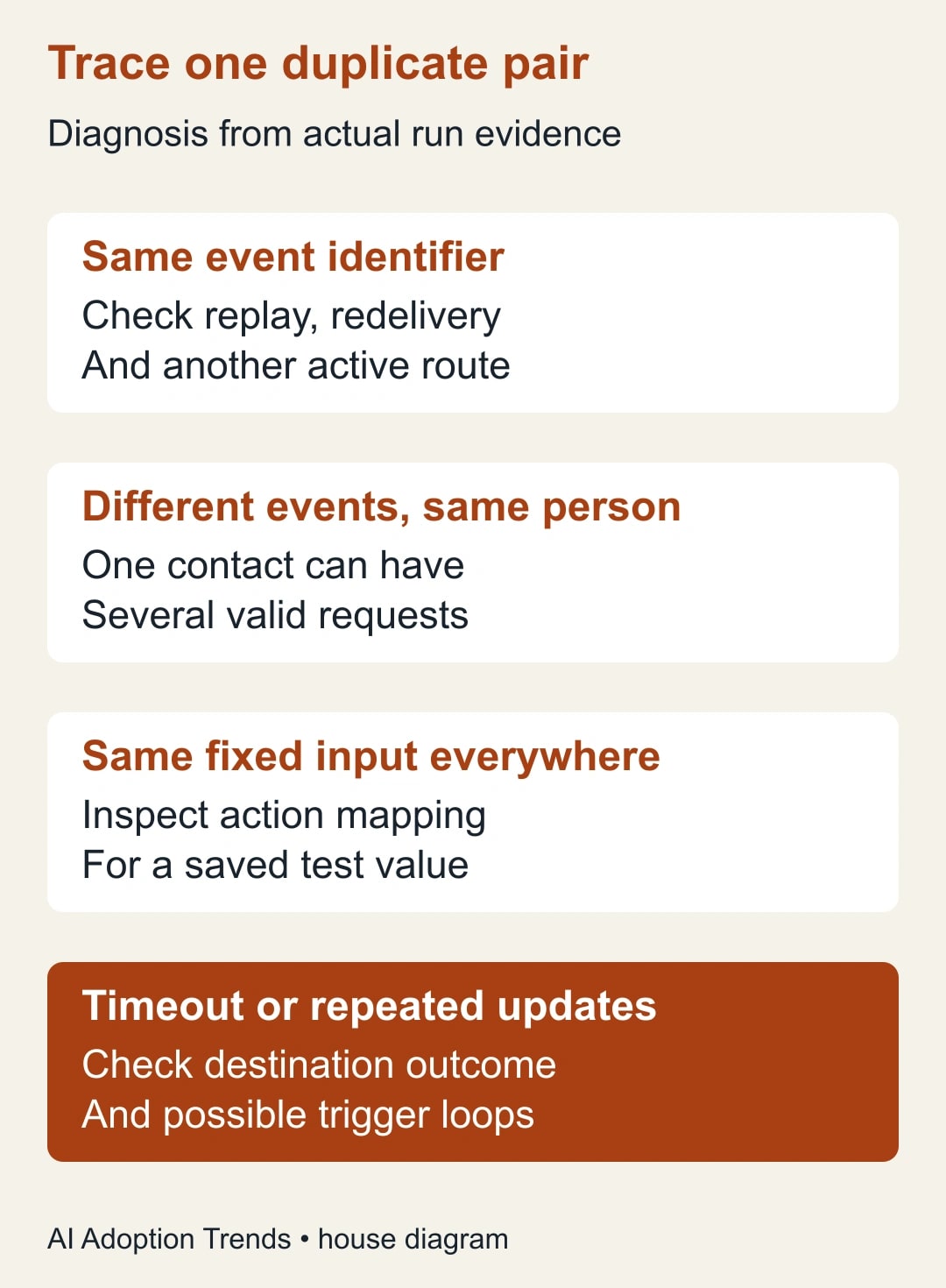
If the trigger event identifier is the same in both runs, look for a replay, repeated delivery, or a second automation consuming the same event. If the event identifiers differ but the customer identifier is the same, you may be looking at two legitimate submissions that should update one contact rather than create two contacts.
If multiple customers produce records with the same email or company name, inspect the action mapping for a fixed test value. A value typed into an action during setup can remain unchanged even though the trigger varies. Compare the actual input shown in each run with the intended dynamic field.
If records arrive at a regular interval after an update, inspect whether the workflow writes to a field that triggers itself or another Zap. Map the route from trigger to action and back to any watched source. You need an explicit rule for which changes are eligible, not a hope that the loop stops by itself.
If two records appear almost simultaneously, inspect every active route that can create that object, including an old copy of the Zap, a native app integration, and a manual import. A fix inside one Zap cannot stop another integration from creating the same record.
Zapier's own troubleshooting guide identifies broad triggers, duplicated Zaps, loops, static values, and timeout-related retries among causes to investigate. Use Zapier's duplicate-data diagnosis alongside the actual run evidence. Those causes are possibilities, not a diagnosis of your account.
Separate the event from the customer
Keep two identifiers when the source provides them. The event identifier answers whether this particular submission has already been handled. The business identifier answers which existing customer or object should receive the update. One cannot reliably substitute for the other.
For example, event E-781 might be a new request from customer C-42. Processing E-781 twice should not create two requests. A later event E-782 from C-42 might be a valid new request while still belonging to the same customer record. Blocking every later event from C-42 would prevent duplicates by losing legitimate business.
Prefer a stable source or destination identifier over a name. Email can be a fallback only when the business accepts its limitations: shared inboxes, changed addresses, aliases, and multiple records with the same address. Write down the fallback rule and send ambiguous matches to a person. Do not automatically merge records because an AI summary says they look similar.
Save the destination identifier returned by a successful creation where your approved workflow can retrieve it later. If a later step fails, that identifier can help the operator inspect what already happened instead of repeating the entire creation route.
Choose the smallest reliable prevention pattern
For a straightforward route, use the destination's supported search-and-update or find-or-create action if it matches your business rule. Search by the approved key. Update one unambiguous match. Create only when no match exists. Route multiple matches or a missing key to review. Test the app's real behavior; action names alone do not establish what fields are matched.
A search followed by create still has a race condition: two runs can search before either has created the record, and both can then create it. A race condition is simply two operations reaching the same decision before either sees the other's result. If simultaneous arrivals are plausible, ask whether the destination supports an atomic upsert or a uniqueness constraint. An upsert creates or updates as one protected operation; a uniqueness constraint rejects a second record with the same protected key.
Those protections depend on the destination and the action available to you. Do not assume adding a spreadsheet lookup makes the whole workflow atomic. A “processed events” sheet can help an operator investigate replays, but two concurrent runs may both see an empty row before either writes it.
If your tools cannot enforce uniqueness for a consequential route, reduce the automation's authority. Have it prepare a review item, or use an approved queue and a single controlled processor designed by someone responsible for the integration. That is a useful boundary for a business owner to set without pretending a few extra no-code steps solve every concurrency problem.
Treat a timeout as an unknown outcome
A timeout means the caller did not receive the expected response in time. It does not necessarily mean the destination did nothing. Before replaying, search the destination using the event or business identifier and inspect creation history. If the intended record exists, reconcile the run and continue only the missing work through a supported recovery route.
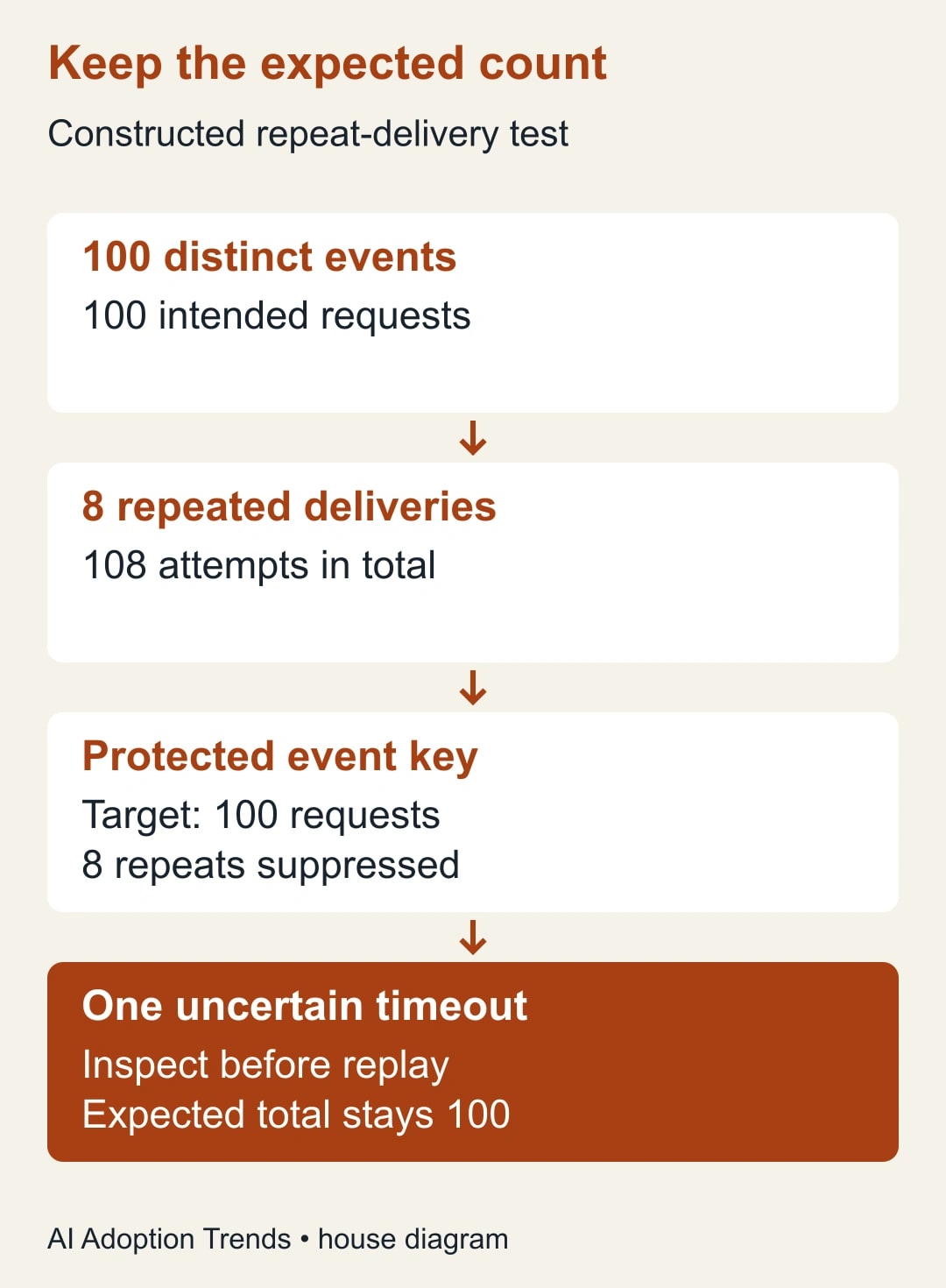
In a constructed example, a form sends 100 distinct events. Eight arrive twice, giving 108 delivery attempts. If every attempt blindly creates a record, the destination could end up with 108 records for 100 intended requests. A protected event key would aim to accept 100 and suppress eight repeated attempts, while retaining evidence of the suppression.
Now suppose one accepted creation times out before returning its identifier. That is a separate recovery problem. Replaying the creation without checking could produce a 109th record. The expected result of the recovery test is still 100 intended requests, with the uncertain creation resolved by inspecting the destination. These are hypothetical counts, not observed Zapier failure rates.
The practical lesson is to distinguish “failed before creation,” “created successfully,” and “outcome unknown.” Use the third state when the evidence is incomplete. It gives the operator a reason to investigate instead of choosing between an automatic duplicate and a silently dropped request.
Run a test pack before reopening the route
Use a test environment or clearly marked fictional records that cannot trigger real customer messages or billing. Keep the same object definitions and key rules as production. Have a second person check the results against the expected destination state.
- Send one new event for a new customer: expect the intended contact and request, with identifiers recorded.
- Send the same event again: expect no second request and a visible explanation of the repeated event.
- Send a new event for the same customer: expect the existing contact and the legitimate new request.
- Submit two events close together: verify the destination protection or the chosen review route.
- Omit the key or create an ambiguous match: expect a review item, not a guessed merge.
- Simulate or safely reproduce an uncertain action result: inspect the destination before recovery.
- Update a record created by the workflow: confirm that the update does not start an unwanted loop.
Write the expected counts before running the pack. “No errors in Zap History” is insufficient when the destination contains the wrong number of records. Inspect the destination and any downstream effects as well as the run status.
Clean up existing duplicates with an owner
After preventing new duplicates, create a review list for existing pairs. The record owner chooses which identifier survives and checks linked notes, deals, tickets, subscriptions, or other relationships. Use the destination's supported merge or recovery process where appropriate. Preserve an export or other approved recovery evidence before making changes.
Do not treat matching names as enough to delete a record. A company can have several legitimate contacts, and a customer can have several legitimate requests. Where the correct relationship is unclear, leave the case for manual resolution and record why. A slower accurate cleanup is better than making the reports tidy by discarding history.
Reconcile any messages or assignments that were already triggered. Removing a duplicate record does not unsend an email or cancel a task in another system. Keep these effects visible in the incident record so the business owner can decide what follow-up is necessary.
Measure the repair and control its cost
For the next week, record source events, destination objects expected, objects created, repeated events suppressed, ambiguous matches, and unresolved outcomes. The numbers should reconcile. Investigate missing records as seriously as extra ones; an overly broad filter can make duplicate counts look excellent by dropping valid work.
Track task usage and operator minutes. Extra searches, review steps, or queues may change your plan usage and maintenance burden. Check your actual Zapier plan and destination limits before expanding the design rather than assuming every prevention step is free. If a task that used to take six minutes of cleanup now takes two, four minutes have been released; that is not automatically a payroll saving.
Keep the route paused or restricted if it still creates duplicates in the repeated-event or concurrent-event tests, if missing keys are silently ignored, or if nobody can reconcile unknown outcomes. Reopen only the verified route and watch its first live cases.
For the wider platform choice, see the Zapier and Make decision guide. For today's repair, take one duplicate pair, preserve its run evidence, and identify whether the repeated thing is an event, a customer, or a second automation. That answer determines the fix.
Weekly Newsletter
AI Adoption Weekly
New research, field guides, training studies, and tool decisions for operators.
No spam. Unsubscribe anytime.
Related Comparisons
Calculator
AI seat cost calculator
List price × headcount. You enter the hours and the operating assumptions.