
Power Automate Approval Timed Out? Recover Without Duplicate Actions
Separate the request from the failed flow, check for an existing decision or action, and give stalled approvals a safe recovery path.
Published October 13, 2026

A timed-out Power Automate approval is an unresolved business request. It is not an approval, a rejection, or proof that nobody answered. Before resubmitting the flow, check the request record, the approval record, and any action that may already have happened. Then assign the next decision to a named owner. That order prevents a recovery attempt from creating a second order, notice, or conflicting decision.
This guide is for an operations manager and the colleague who maintains their approval flow. It covers ordinary internal document or purchase-request approvals, with a constructed example and a reusable recovery record. It is not a replacement for your organization's financial authority rules. If the process can release money or change a consequential customer record, keep those actions behind the existing authorized review while you repair it.
Microsoft's cloud-flow limits specify a maximum run duration of 30 days, including pending approval steps. A shorter action timeout may also apply. Increasing a wait does not remove the overall run limit. The useful design question is where the request's status lives when that particular run has ended. Documentation in this guide was checked on October 13, 2026.
Separate the request, the approval, and the flow run
The business request is the thing somebody needs decided: a supplier proposal, a document revision, or an equipment purchase. The approval record captures the question sent to an approver and the response. The flow run is the execution that moves through the software steps. Those three records can be related without having the same lifetime or status.
Keep a durable request record in the system your team already governs, such as an appropriate SharePoint list or Dataverse table. Durable means it remains available after a single flow run ends. Give it a unique request ID, version, owner, current status, submitted date, deadline, approval ID, decision, decision time, and downstream action reference. The precise fields depend on the process, but a title alone is not a reliable identifier.
Version matters when the request changes. An approval of a $600 proposal should not authorize a later $900 revision simply because both use the same request title. Record which version was reviewed and require a new decision when the change exceeds your organization's rules. Let the business owner define that rule; do not let the automation infer it from the size of the edit.
Diagnose the failed run without creating another one
Open the failed run in the approved Power Automate environment and note which action timed out. Record the run ID, action name, start time, and relevant error. Then inspect the linked approval and business request. Was there a response? Was it received after the waiting action ended? Did an update to the request succeed even though a later notification failed? These are different incidents with different repairs.
Ask the current approver whether the request is still valid only after checking the records. Avoid sending a fresh approval automatically just because an email looks unanswered. A person may have responded through another supported surface, or the request may already have been withdrawn. Microsoft's approval tutorial describes responses through email, the approvals center, and the app. Use the stored decision rather than treating one inbox as the whole history.
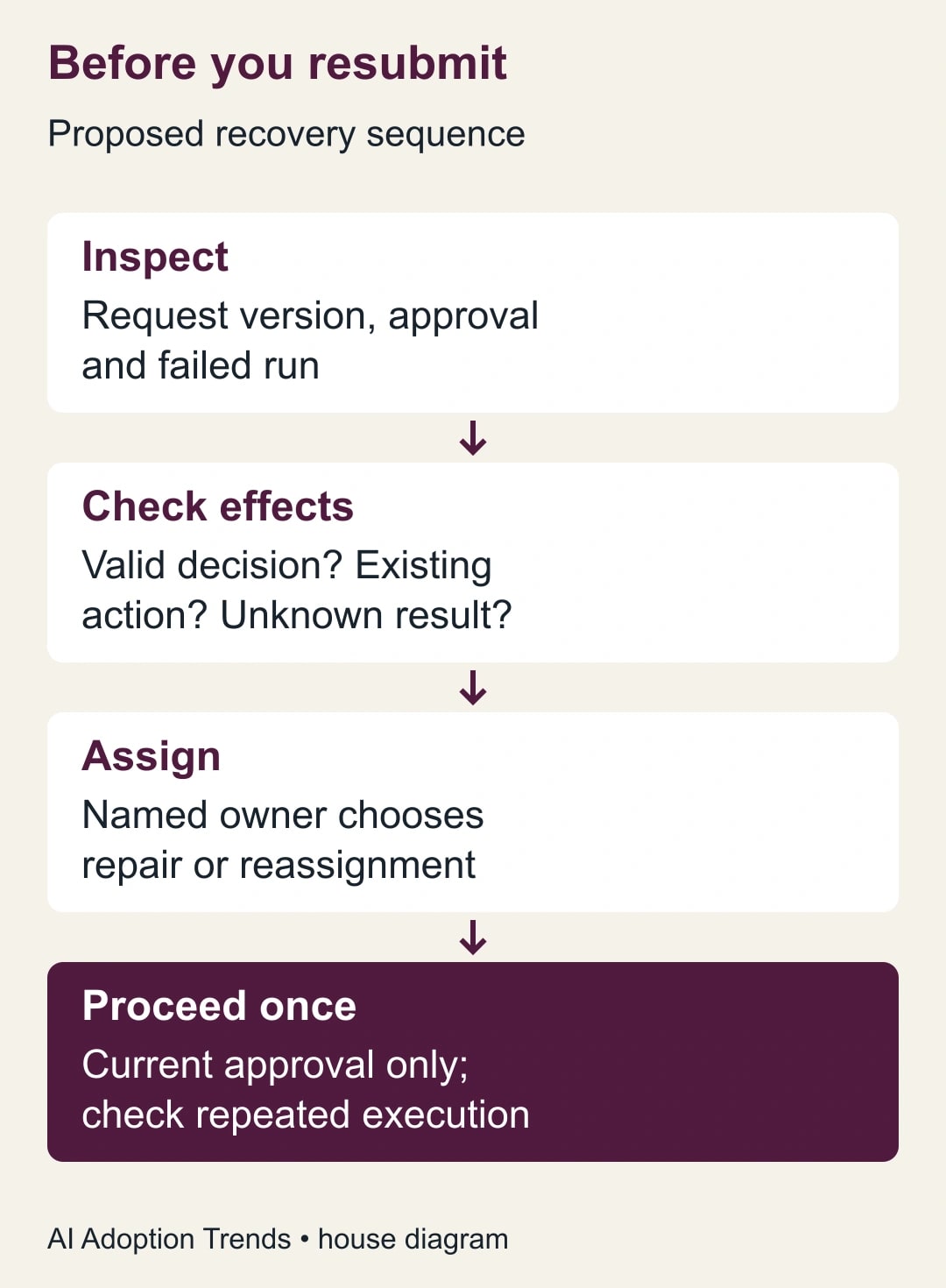
Do not click Resubmit as the first diagnostic step. A rerun can repeat actions that succeeded before the failure. Inspect the destination system for an existing action reference, such as an already-created order draft or sent notice. If the status cannot be established, put the request into a manual-review state and have the owner resolve the ambiguity before any consequential action proceeds.
Set a business deadline before the technical limit
Decide how long an approver should take for this class of work. A routine internal request might have a two-business-day target and a named backup; a negotiation may legitimately take weeks. Those are proposed operating choices, not Microsoft defaults. A technical timeout expressed as elapsed hours is not automatically the same as a business-day deadline that excludes weekends and holidays.
Write the rule in language both the manager and flow maintainer understand: “If no valid decision exists by the due date, mark the request Awaiting reassignment and notify the operations coordinator. Do not mark it approved. The coordinator confirms that the request is current and assigns the authorized backup.” Then implement that rule using the supported settings and branches in your designer.
Microsoft's Power Automate error reference recommends an explicit timeout and a branch for non-responses. In the designer, the maintainer should configure the recovery action to run after a timeout and test that path. This guide deliberately does not prescribe one duration string for every process. The duration must fit the agreed calendar and the remaining lifetime of the run.
Treat technical failure separately from silence. An unavailable connection or an invalid approver is not evidence that the person ignored the request. Route those incidents to the flow owner, keep the business owner informed, and preserve the original due date and evidence. Otherwise a broken connection can masquerade as a slow employee in management reports.
Work through an expired equipment request
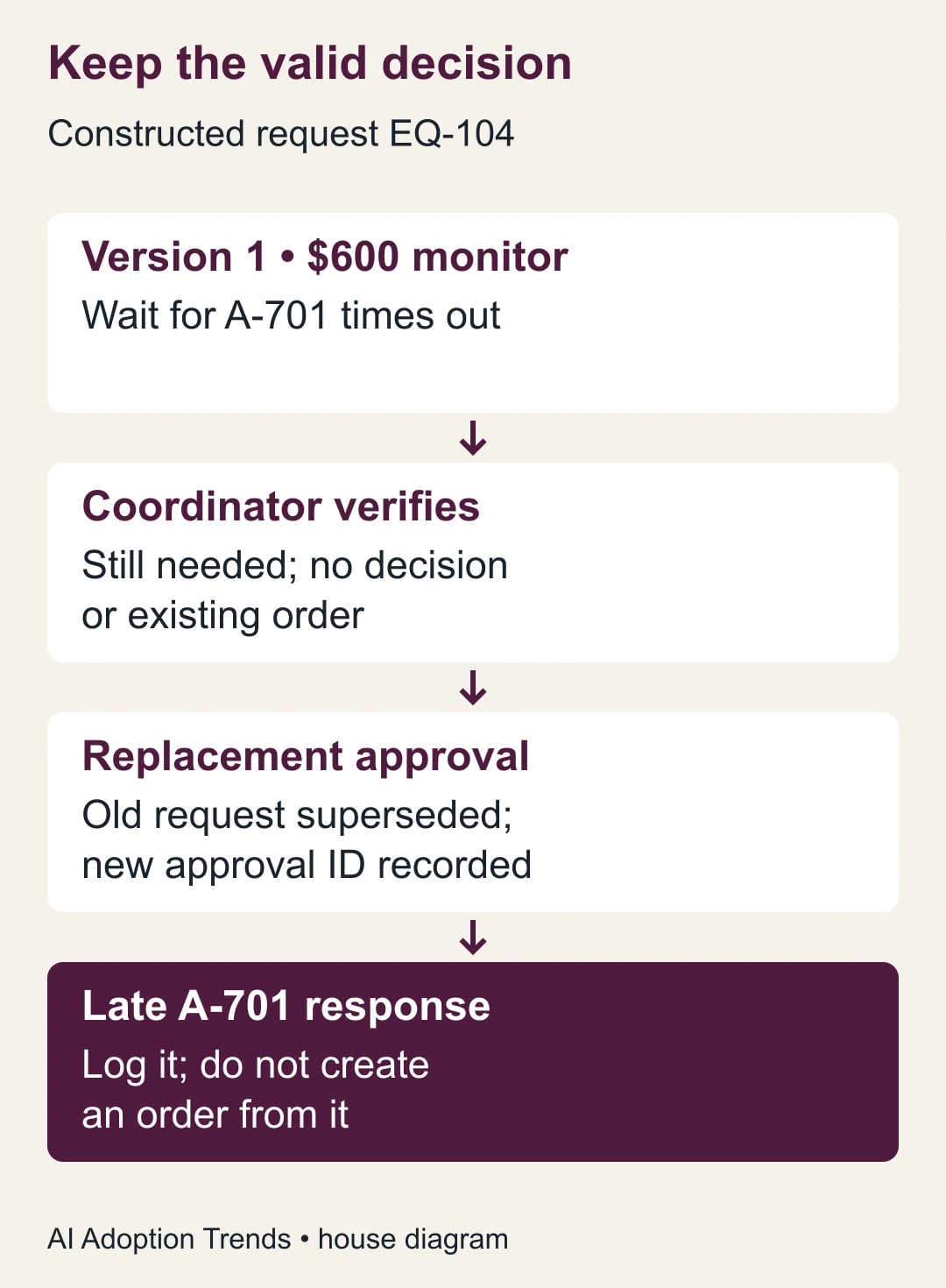
In this constructed example, request EQ-104 asks for a $600 monitor, version 1. A department manager receives approval A-701. The request remains unanswered beyond the team's agreed deadline. The waiting action times out and a recovery branch marks EQ-104 Awaiting reassignment. It records A-701, the failed run reference, and the deadline, then notifies the operations coordinator. No order is created.
The coordinator checks that the monitor is still needed and that no valid decision or order exists. The approved backup receives a replacement request linked to EQ-104 version 1. The old request is cancelled where the supported action permits it, or explicitly marked superseded in the business record. The maintainer verifies how the old approval behaves rather than assuming a timed-out flow cancelled every associated record.
Suppose the original manager later clicks Approve. The response handler must compare the approval ID and request version with the currently valid request state. A response to superseded A-701 should be recorded for explanation but must not initiate the order. The replacement approval can proceed only through the current authorized path. This is our recommended control design, not a claim that every template implements it automatically.
Now suppose the replacement approval succeeds but the order-draft action returns an uncertain network result. Do not create another order immediately. Check the destination for EQ-104's action reference. If the first draft exists, link it and continue from that state. If the result is unknown, hold for manual review. The absence of a success message is not proof that the destination did nothing.
Prevent duplicate effects, not just duplicate notifications
Before a downstream action, check the durable request record for a completed action reference and the approved version. Save the reference once the action is confirmed. Where the destination supports a unique request key or another mechanism that rejects repeated submissions, use it. The technical term idempotency means repeating a request has the same effect as performing it once; ask the maintainer whether the actual destination supports that behavior.
A simple “check then create” sequence can still fail if two runs execute at the same time and both see no prior action. The maintainer must address that race using supported concurrency controls, a unique constraint, or a destination operation that safely recognizes repeats. A spreadsheet status cell alone is not a guarantee against simultaneous execution. Keep manual approval of the downstream action until this behavior is demonstrated.
Test late responses, retries, and simultaneous triggers in a non-production copy or with a destination that cannot create real commitments. Use clear test labels and permitted synthetic records. Confirm that each test leaves one final business state, one authorized decision, and at most one intended downstream effect. A successful happy-path test says little about recovery after a partial failure.
Use a different pattern for genuinely long approvals
If the business process can exceed 30 days, do not make one flow wait indefinitely. Microsoft's approval tutorial describes storing approvals in Dataverse and using two flows: one to create the request and another to handle responses. That allows the business process to continue after the original run times out. The response-handling path still needs to verify the current request, version, and authorization before acting.
Have the Power Platform administrator review the design and licenses before rebuilding it. Microsoft's licensing FAQ is the starting point for confirming which users, processes, and connectors need coverage. Do not assume an existing Microsoft 365 entitlement covers every Dataverse or premium-connector design. Obtain the applicable cost for your tenant instead of using an unrelated advertised entry price.
A long-running architecture is unnecessary for a routine decision that should finish in a day. First ask whether the delay reflects missing information, unclear authority, or an absent backup. Fixing the operating rule may be cheaper than adding more flows. The correct system should preserve a legitimate long wait, not normalize a queue nobody owns.
Give the operator a one-page recovery record
Use the following fields for each unresolved incident. They can live in the request record or an approved incident log. Link the original evidence rather than copying entire sensitive documents into notification messages.
- Identity: request ID, version, submitted amount or scope, business owner, and current approver. Example: EQ-104, version 1, $600 monitor, operations coordinator, department manager.
- Execution: approval ID, run ID, failed action, timeout or error time, and last confirmed successful step.
- Business state: still needed, withdrawn, already decided, or unknown; valid decision evidence; and any existing downstream action reference.
- Recovery decision: wait, reassign, cancel, repair connection, or manual review; authorized owner; next deadline; and reason.
- Closure: final valid decision, action reference, requester notification, reviewer, and whether a late response or retry was safely rejected.
This record should let a colleague resume the investigation without rereading every email. It also prevents the flow maintainer from becoming the person who silently decides business outcomes. The maintainer repairs execution; the authorized business owner decides whether a request should proceed. Keep that distinction visible in the notification and the log.
Test the failure paths before returning to live work
Build a short acceptance pack. Include an ordinary approval, a rejection, no response, an approver on leave, a withdrawn request, a changed request version, a late response to the old approval, a duplicate trigger, and a downstream action that succeeds before its acknowledgement is lost. For each case, write the expected request status, person notified, and permitted downstream action before running the test.
The operations owner and maintainer should review the resulting records together. Check that the user-facing message matches reality: “Your request needs a new approver” is different from “Your request was rejected.” Confirm that a notification failure is retried without recreating the business action. Keep evidence of the tested version so later changes to a flow do not inherit an approval they have not earned.
Stop the rollout for a duplicate commitment, a late response that changes a superseded request, or a request marked approved without a valid authorized decision. Return affected requests to manual handling and inspect related runs for the same defect. A low incident count does not make an authority failure acceptable. Repair and rerun the relevant pack before resuming automation.
Measure the queue and decide whether AI helps
Track unresolved requests past their business deadline, time to reassignment, duplicate effects, and requester contacts asking for status. Also record the team's total handling time. A constructed baseline of ten stalled requests at 15 minutes each costs 150 minutes of staff time; reducing investigation to eight minutes each releases 70 minutes. It does not reduce the supplier bill or create cash savings unless an actual expense changes.
AI may help summarize a long approval history into the recovery record, provided a reviewer checks the summary against the underlying events. Give it sanitized records and ask it to separate observed states from unknowns. Do not let it infer approval from a friendly comment or invent the last successful step. Deterministic status checks and authority rules should control the action; a fluent summary is supporting material.
Start with one timed-out request and complete the recovery record before resubmitting anything. Then use the site's Power Automate licensing guide to frame the cost conversation, and the stop, trace, repair guide for broader recovery habits. The target is a request that always has a known owner and a defensible next step, even when the software run has ended.
Weekly Newsletter
AI Adoption Weekly
New research, field guides, training studies, and tool decisions for operators.
No spam. Unsubscribe anytime.
Related Comparisons
Calculator
AI seat cost calculator
List price × headcount. You enter the hours and the operating assumptions.