
Reclaim Tasks Not on Your Calendar? Check These Three Things
In Reclaim 2.0, tasks and calendar time are separate. Diagnose missing tasks, missing work blocks, and mismatched task filters before changing priorities.
Published October 15, 2026

If a task is missing from your Reclaim calendar, check which version you are using before trying to repair the schedule. In Reclaim 2.0, tasks do not automatically become individual calendar events. The product can recommend tasks within protected work time instead. You may need a work block, not a different task priority.
Reclaim's current task documentation describes that separation between the work list and the time reserved to do it. Check the version in your profile; instructions for the older product can lead you toward controls or behavior that no longer apply. Read the Reclaim 2.0 task overview. This guide uses documentation checked October 15, 2026 and proposes a diagnostic routine, not a claim from a hands-on product test.
First decide what is actually missing
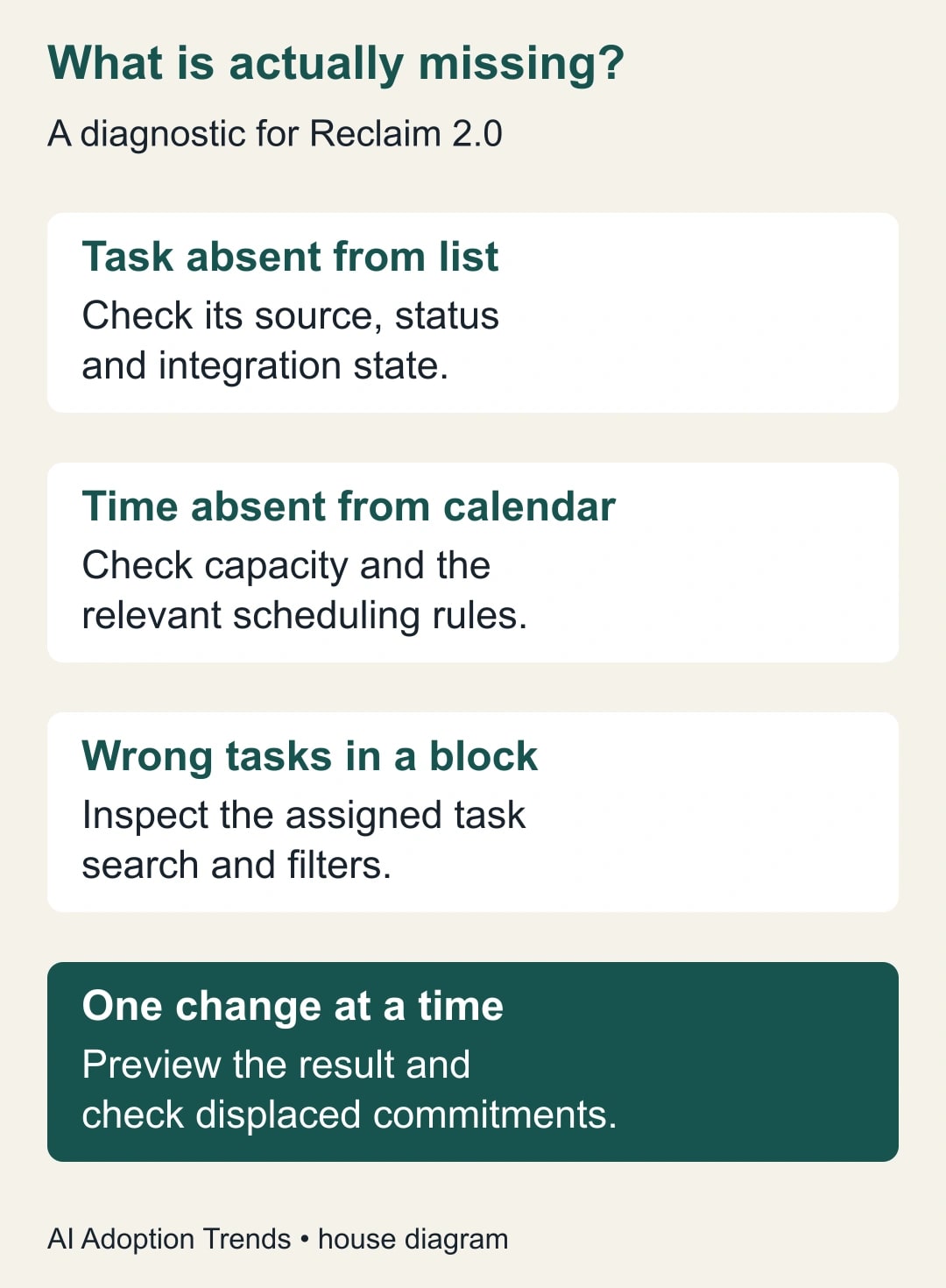
There are three different problems: a task is absent from the task list, work time is absent from the calendar, or an existing work block is not showing the tasks you expected. Write down which one you can observe. Changing scheduling rules will not necessarily repair a task that never arrived from its source application.
This guide is for managers and individual contributors who already use Reclaim and need a realistic week for proposals, analysis, reporting, or other focused work. It is not a recommendation to migrate project management into a calendar. Keep the system that owns assignments and deadlines authoritative, and use the calendar to make the time tradeoffs visible.
Skip the diagnostic if the actual problem is an unapproved deadline or a workload that nobody can fit into the available week. Those require a conversation with the person assigning the work. An assistant can help expose a conflict, but it cannot create another six hours on Thursday or decide which customer should wait.
Separate task context from protected time
In Reclaim 2.0, task details help the product decide what work to surface, while Focus Time and Habit agents can reserve time. An agent here is a scheduling feature with rules about how to place work on the calendar. The task overview also describes asking Reclaim Chat for work blocks and reviewing proposed changes in Preview Mode before applying them. See the current task and work-block behavior.
For a task that is missing entirely, first inspect the authoritative task application and then Reclaim's task list. Confirm the item exists, belongs to the intended account or project, and has the expected status. If it should come through an integration, check that specific integration's current documentation and connection state. Do not create a second task immediately; that can hide the sync problem and leave two owners or deadlines later.
For a task that exists but lacks calendar space, inspect the relevant work block or scheduling agent. For a block that exists but shows the wrong work, inspect the assigned task search or filter. Record the problem in those terms before escalating to support: “Task exists; expected reporting block absent” is far more useful than “Reclaim lost my work.”
Count usable capacity before changing priorities
Take the coming week and subtract fixed commitments from the hours you actually intend to work. Include preparation, breaks, and operational duties that your calendar may not show. Then examine the shape of the remaining time. Four 15-minute gaps are not automatically interchangeable with one uninterrupted hour of analysis.
Create a small capacity worksheet: work hours, fixed meetings, other committed work, realistic reserve, remaining hours, and the minimum useful session for the task. The reserve is an explicit planning choice for interruptions and uncertainty. It should not be silently counted as available time when explaining a deadline to someone else.
Name the person who may change each constraint. You can move your own research block; you may not be able to move a customer meeting. A team lead may adjust a delivery date; a calendar assistant should not infer permission to do so. This ownership map stops the troubleshooting process from turning into a series of unauthorized calendar changes.
A constructed example: seven hours of work and four hours of space
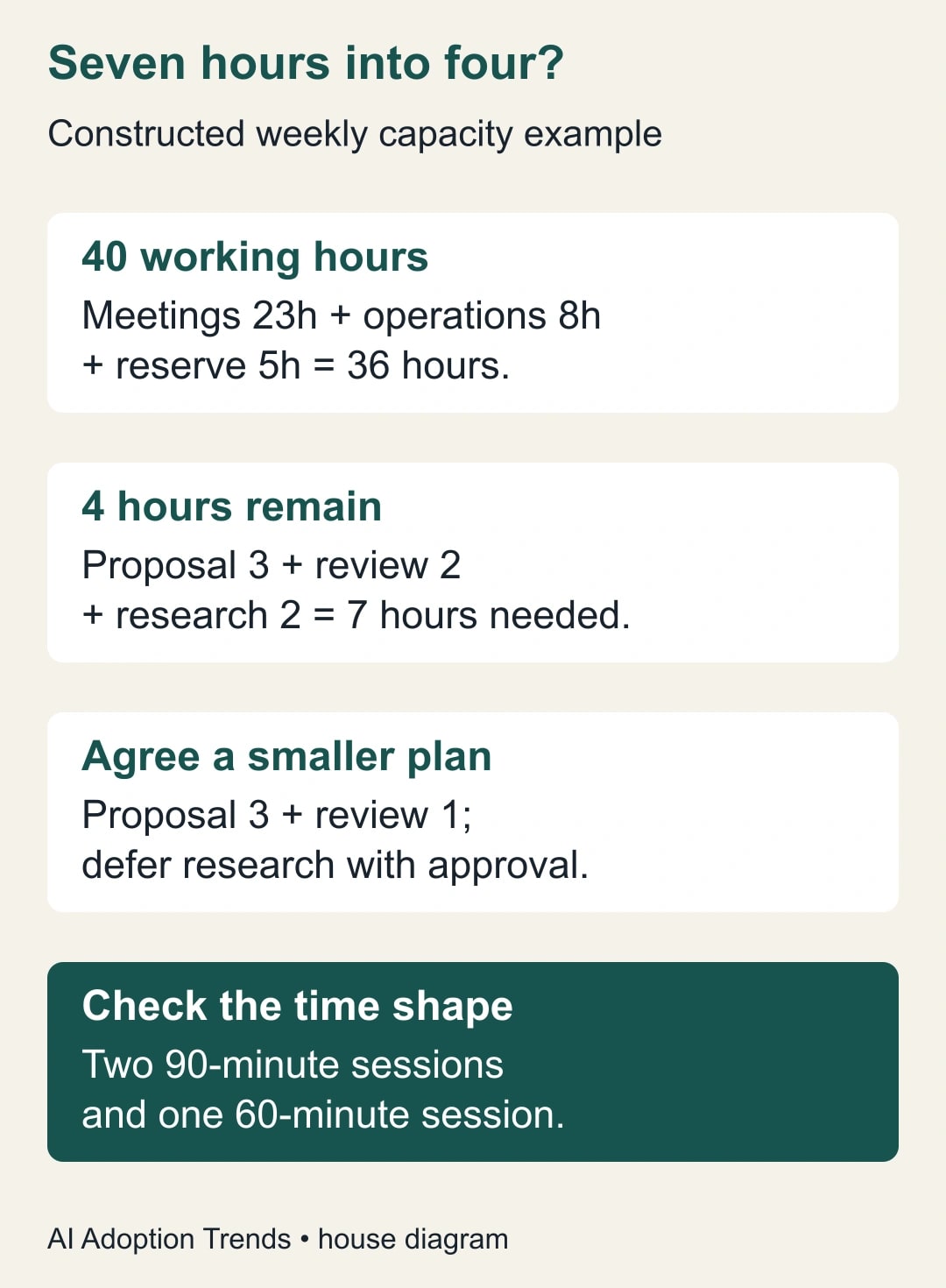
Imagine a project manager with a 40-hour week. Fixed meetings consume 23 hours, recurring operational duties consume eight, and a five-hour reserve covers expected interruptions. That leaves four hours for focused project work: 40 minus 23 minus eight minus five. These are fictional planning numbers, not a Reclaim performance result.
The manager has a three-hour proposal, a two-hour forecast review, and two hours of research, totaling seven hours. The shortage is three hours. Raising all three tasks to the highest priority does not close that gap. The manager must defer work, reduce scope with the owner's agreement, move an existing commitment, or accept a revised deadline.
Suppose the proposal must be finished this week, the forecast review can be reduced to a one-hour exception check with approval, and research can wait. The revised demand is four hours. The manager protects two 90-minute proposal sessions and one 60-minute review session. The calendar now reflects an explicit business decision rather than a silent promise to complete seven hours in four.
Even this plan needs a shape check. If the available four hours consist only of short gaps, the two 90-minute sessions still do not fit. The owner must move a commitment or choose a different work plan. A total-hours calculation is necessary, but it is not sufficient to prove that the schedule is usable.
Diagnose a missing Habit as a constraint problem
A Habit is useful for a recurring activity that can move within limits, such as weekly planning or routine reporting. Reclaim's 2.0 Habit guidance describes a permitted window, a minimum duration, and previewing the impact before committing changes. Under pressure, a Habit may move, shorten, disappear, or remain as a visible conflict depending on settings. Review the Habit Agent rules.
Start with one missing occurrence. Write the intended duration and the allowed days and hours on paper. Compare that window with the actual calendar. If a 60-minute routine is allowed only from 10 to 11 and a fixed meeting occupies 10:30 to 11, the original requirement cannot fit. That is a conflict in the inputs, not proof that the scheduler is malfunctioning.
Change only a constraint that the work genuinely allows. A routine report might move to the afternoon; preparation for a morning customer meeting cannot. A 60-minute activity might have a useful 30-minute version, but only if its owner can name what the shorter version accomplishes. Do not reduce the duration simply to make a block appear.
After a change, inspect the preview and the resulting calendar. Check whether another important activity was displaced and whether the new placement still meets the job's timing requirement. Keep the original rule in your notes so you can reverse the experiment if it produces an unacceptable week.
Check competing priorities without making everything critical
Reclaim 2.0 uses four priority levels and orders agents within each level. Its documentation also gives Focus Time special behavior: the agent is placed at Low priority while scheduled Focus Time events receive High priority protection. Scheduling Links can compete for flexible time according to their priority. Read the current priority rules.
The practical implication is to inspect the actual competing item. A missing work block and a work block later displaced by a booking are different events. Check when the conflict appeared, which agent or booking caused it, and whether the settings reflect the business's intended ordering. Do not assume that moving a task's priority changes every calendar rule around it.
Pick a small set of commitments that deserve the strongest protection and give flexible work room to move. If every activity is declared critical, the label no longer communicates which one should yield. Have the manager decide that order in business terms: customer delivery before optional research, or a mandatory preparation session before a nonessential internal discussion.
Regular meetings deserve a separate conversation. Reclaim says non-Reclaim events are Critical by default and are not simply moved by an agent. Do not treat an accepted invitation as movable because a task is urgent. Agree the change with the meeting owner, then update the calendar deliberately.
Make the task list match the purpose of the block
Once time exists, verify that the work shown during it is relevant. For example, a reporting routine should surface reporting work rather than a general backlog of sales follow-ups. Inspect the source, project, keyword, or due-date filter supported by the specific task assignment. Start with a simple filter that you can explain and test against known tasks.
Choose three known items: one that should appear, one that should be excluded, and one borderline case. Compare the expected list with what the block actually shows. A filter that matches only a word in the title can miss a relevant task with different wording. Fix the task metadata or the filter deliberately rather than assuming that an AI recommendation establishes completeness.
Keep assignment and completion in the authoritative work system. If the team relies on that system for status, verify how completion is represented there after the work is done. A calendar block ending does not mean its tasks are finished. Record unfinished work honestly and decide where it goes next.
Use a ten-minute diagnostic worksheet
For one missing item, capture the following fields. This is an operating worksheet, not a list of product settings that every account must expose.
- Observed problem: missing task, missing time, or wrong tasks in an existing block.
- Version and source: current Reclaim version and the application that owns the work.
- Work definition: outcome, owner, deadline, estimated effort, and minimum useful session.
- Available time: actual free windows after fixed work and a chosen reserve.
- Scheduling rules: relevant agent, allowed window, duration, and competing commitments.
- Task selection: expected source or filter, plus one inclusion and one exclusion test.
- Proposed change: one adjustment and who may authorize it.
- Expected result: specific block or task behavior to verify in the preview and calendar.
- Outcome: observed result, displaced work, and whether to keep or reverse the change.
If the item still cannot be explained, give support that concise record and a sanitized screenshot of the relevant state. Avoid sending an entire private calendar when one redacted example will do. The worksheet should make it clear whether the issue is product behavior, integration state, or an impossible set of requirements.
Measure completed work, not the number of colored blocks
Run a one-week trial with one recurring routine and one substantial task. Record planned minutes, protected minutes that actually remained available, minutes used, and whether the intended output was completed. Note interruptions and overruns. These observations tell you whether the task estimate, scheduling rule, or work environment needs adjustment.
For a constructed example, three planned 60-minute blocks provide 180 minutes. If meetings consume 30 minutes of one block and an urgent call consumes 20 of another, only 130 minutes remain. Completing a task estimated at 180 minutes is now unlikely unless the estimate was generous. Do not blame a recommendation system for the missing 50 minutes without examining the changes that removed them.
Budget a short setup and review session using your existing account before considering a plan change. Check the current account's available features and billing terms if a missing capability becomes relevant; this guide does not rely on a quoted subscription price. Released planning time is staff capacity, not a cash saving unless a real spending decision follows.
Stop changing settings when the remaining problem is insufficient capacity, disputed priorities, or a task estimate that repeatedly fails. Bring those facts to the manager who can change the work. Our Reclaim tool profile provides the broader product context; this diagnostic starts with a simpler action: identify whether the missing thing is the task, the time, or the connection between them.
Weekly Newsletter
AI Adoption Weekly
New research, field guides, training studies, and tool decisions for operators.
No spam. Unsubscribe anytime.
Related Comparisons
Calculator
AI seat cost calculator
List price × headcount. You enter the hours and the operating assumptions.