
Google Sheets Zap Delayed? Measure Where the Wait Happens
Separate Google Sheets trigger waiting time from Zap action time, test a complete request, and choose a response target the workflow can meet.
Published October 21, 2026

A Google Sheets trigger labeled instant can still take a few minutes to start a Zap. Before rebuilding the automation, measure the gap between the source row being ready, the Zap starting, and the destination action finishing. Those are three different delays, and each needs a different repair.
This guide is for a sales or service operations owner using Sheets to collect requests and Zapier to move them into a work queue. It covers delayed work that eventually arrives, and how to distinguish it from work that never triggered. It does not recommend Sheets for emergency dispatch, payment authorization, or any workflow whose consequences depend on an untested delivery-time guarantee.
You need access to the sheet, the Zap's trigger configuration and history, and the destination queue. Use a harmless test destination with customer messages disabled. Set aside enough time to observe several complete runs, including review and cleanup. Existing plan limits, successful action tasks, and connected-app costs still apply; a test that writes records is real automation work even when the records are synthetic.
Understand what the provider actually promises
Zapier's Google Sheets trigger guidance, checked October 21, 2026, says these triggers combine polling and instant methods and can take about three minutes. Polling means checking the source periodically for new data. An instant trigger generally receives an event from the source, but the label does not establish an end-to-end response guarantee.
That documentation gives a useful starting explanation for a short wait. It does not prove that any longer delay is normal, that every run will finish within three minutes, or that a paid upgrade will remove the delay. Diagnose the particular event before spending money or promising a customer a faster service level.
Write your actual requirement separately. “A new request reaches the internal queue within ten minutes during staffed hours” is testable. “Instant automation” is not precise enough for an operating agreement. Include when the clock starts: a partially typed row is different from a completed, eligible request. Also state whether the requirement covers queue creation or a human's first response.
If the business needs a reliably shorter response than the observed process provides, change the intake design or add a monitored manual route. A faster plan is only useful if it changes the specific limiting step. Measure the current process first so the buying decision is about the job rather than the trigger's name.
Record three timestamps for one request
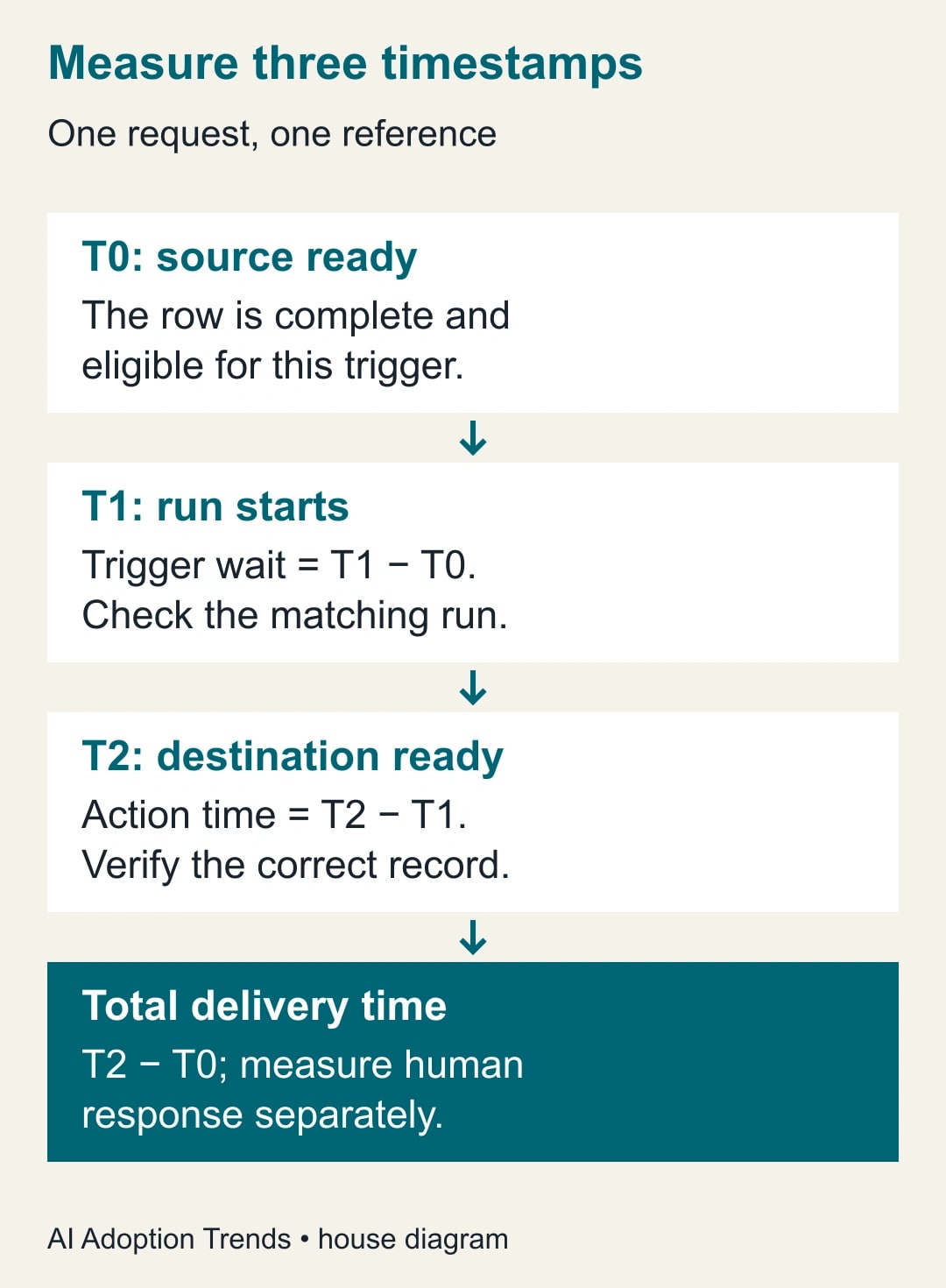
Choose one synthetic request with a unique reference such as TEST-042. Record T0 when the row becomes complete and eligible under your trigger's rules. Record T1 when its Zap run begins in history. Record T2 when the intended destination record is successfully available. Use one time zone and preserve seconds if the interfaces expose them.
The trigger wait is T1 minus T0. The action time is T2 minus T1. Total delivery time is T2 minus T0. If you also care about a person's response, record T3 separately. Do not call the entire interval automation latency when most of it is an unstaffed inbox waiting for someone to pick up the request.
Keep the unique request reference in the source and destination so the observations refer to the same event. Do not identify runs only by similar customer names or the row number, because sorting can move rows. Avoid putting sensitive customer details into diagnostic notes when a reference and timestamps are enough.
Use the right test for the configured trigger
Open the Zap and read the exact trigger event, selected spreadsheet, worksheet, and any relevant column setting. A new-row trigger and an updated-row trigger are different contracts. Create a new test event that satisfies the configured event; editing an old row is not automatically a test of new-row detection. Preserve the current setup before changing it.
Make the test row complete before the workflow is expected to act on it. If users enter a name first and an email later, the automation may encounter an incomplete record. Establish a deliberate readiness rule in the workflow design and test it. Do not assume that a colored cell or a human habit is a condition Zapier understands.
Wait for the documented trigger behavior while watching history. If a run appears, inspect its trigger data and subsequent steps. If no run appears, check eligibility, source selection, and whether the Zap is on before testing downstream actions. A successful editor test using a retrieved sample does not alone prove that the next live event will trigger and finish.
When a run exists, classify its state before touching the source row again. A delayed run, a held run, and an errored action need different handling. Repeatedly editing the source can create more events while the original is still progressing. Look for the destination reference before trying another execution of work that may already have succeeded.
A worked example: delay is mostly before the Zap
The following five observations are constructed to show the calculation, not measured Zapier performance. Request A becomes eligible at 09:00:00, starts at 09:02:30, and finishes at 09:02:50. Request B takes 130 seconds to trigger and 25 seconds in actions. Request C takes 170 and 20 seconds. Request D takes 145 and 30 seconds. Request E takes 160 and 20 seconds.
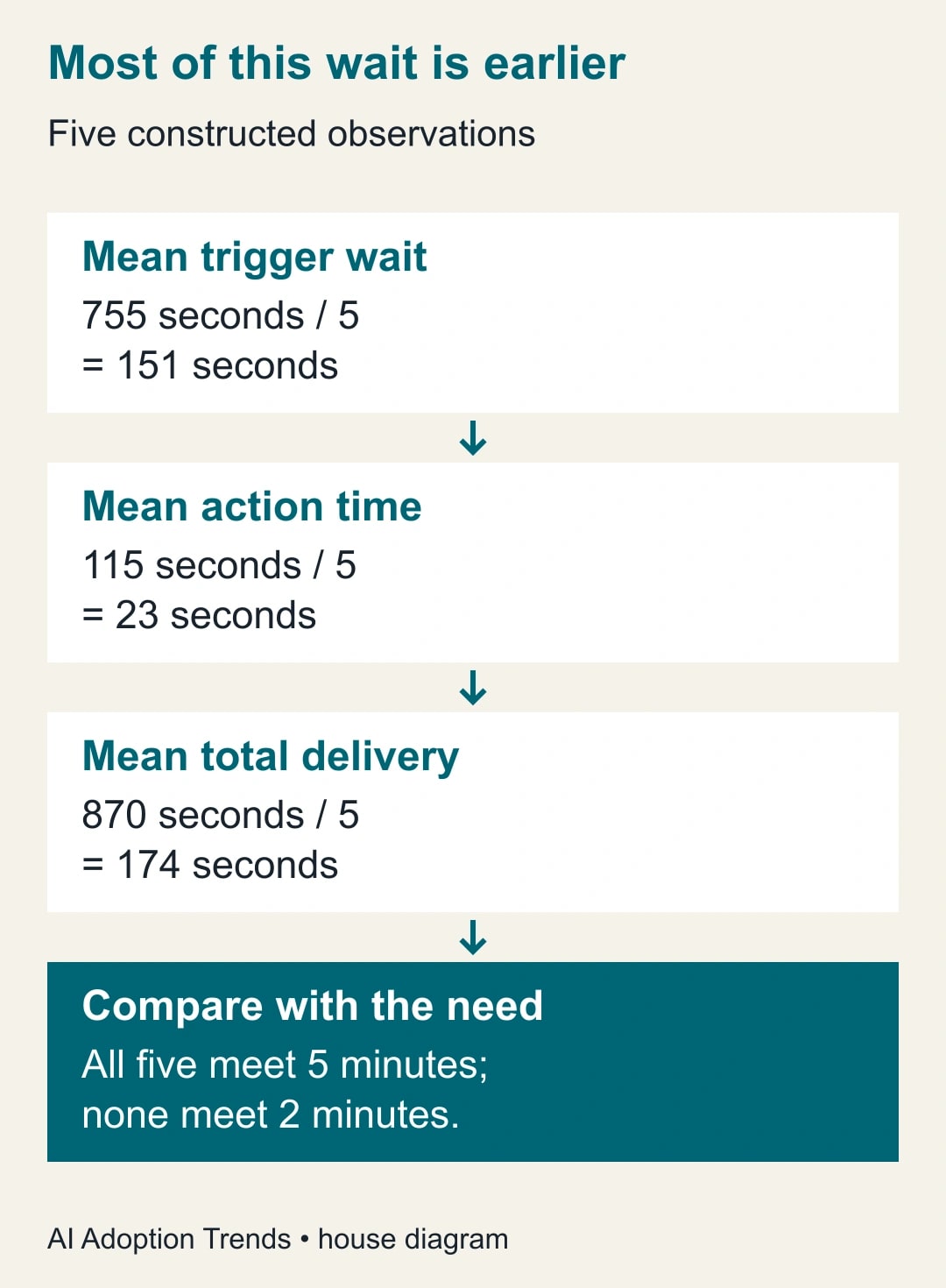
The total delivery times are 170, 155, 190, 175, and 180 seconds. Together they total 870 seconds, giving an average of 174 seconds, or two minutes 54 seconds. The median is 175 seconds and the longest observed run is 190 seconds. Five examples are far too few to establish a dependable worst-case guarantee.
The trigger waits total 755 seconds, averaging 151 seconds. Actions total 115 seconds, averaging 23 seconds. In this illustration, reducing a destination step by five seconds would improve the average total by five seconds. It would not remove the roughly two-and-a-half-minute trigger wait. That distinction keeps the team from optimizing the wrong part of the process.
Against a five-minute internal queue target, all five illustrative requests pass. Against a two-minute target, all fail. Neither result says whether the target itself is appropriate. The service owner must decide how quickly a request needs to be visible, what happens when it is late, and who receives an exception. The sample turns that conversation into a concrete decision.
Now suppose a sixth request starts after 150 seconds but spends 12 minutes in a configured Delay step. That is a different issue: the workflow deliberately pauses after triggering. Review the purpose of the delay before removing it. It may exist to wait for another system or restrict sending hours. A technical change should not silently discard a business rule.
Separate waiting, held work, and failed work
If the Zap has started but an action is slow, inspect the specific step and connected app. Rate limits restrict how many requests a service accepts over time. Zapier states that its own limits and connected-app limits are separate in its Zap limits documentation. The error's source matters; changing the polling interval does not necessarily repair a downstream app limit.
If history says the run is held, stop treating it as an ordinary three-minute delay. Inspect the reason and the destination before replaying it. A task allowance or flood-protection hold creates a backlog that needs reconciliation. Use the held-run recovery guide for that branch instead of adding more source events to force activity.
If the action failed after creating something downstream, a retry can repeat part of the work. Search by the request reference and record what already exists. The duplicate-record diagnostic explains how to trace the event and avoid treating every duplicate as a matching-rule problem.
If a row never appears in history, do not start by increasing destination capacity. Verify the source event and selected worksheet first. Compare a known successful row with the missing row under the trigger's actual rules. Capture the smallest reproducible example and its timestamps for support if configuration and eligibility are correct but the event still does not arrive.
Decide whether to adjust, redesign, or accept the delay
For ordinary polling triggers, Zapier documents controls for polling intervals and manual polling, with availability depending on plan. It separately describes Delay and Schedule steps. Read the timing controls for the exact trigger before applying a general polling instruction to Google Sheets' mixed behavior.
Accept the current design when observed delivery fits the business requirement, late work is visible, and the team has a recovery owner. A request queue used several times an hour may not need a more complex intake system simply because a few minutes feel slow during an editor test. Document the expected wait so colleagues do not create duplicates while checking whether it worked.
Adjust the design when there is a confirmed unnecessary delay or a polling setting that genuinely governs the trigger. Change one variable, preserve the earlier timing record, and repeat the same test cases. Check destination correctness as well as speed. A faster run that sends incomplete information is not an improvement.
Consider a different intake route when the requirement is tighter than the current mechanism can demonstrate. Zapier's Sheets article suggests evaluating another spreadsheet app, including Zapier Tables, for instant triggering. Treat that as a provider option to test, not a promise that migration solves every delay. Include permissions, staff behavior, recovery, and integration costs in the comparison.
If a human can reliably process a small urgent queue faster than the proposed automation, keep that route during the pilot. Specify how manually handled requests are marked so the later automated run does not duplicate the action. The owner of the queue must be able to see which path handled each request.
Reuse this timing and acceptance sheet
- Request reference: one unique ID carried from source through destination.
- Trigger contract: exact event, spreadsheet, worksheet, readiness rule, and whether the Zap is enabled.
- T0: when the source record was complete and eligible; include time zone.
- T1: when the corresponding Zap run began; retain the run link or reference.
- T2: when the expected destination record became available; retain its reference.
- Result: correct, incomplete, duplicated, held, failed, or missing; do not record only elapsed time.
- Requirement: acceptable delivery interval, staffed hours, and who handles late requests.
- Decision: keep, change one setting, investigate the source, or trial another intake path.
Use several normal operating periods, including the busiest expected period, before making a service promise. Keep unusual failures in the record; excluding them makes the average look attractive while concealing the work that hurts users. Report the count meeting the target and the count needing intervention alongside typical delivery time.
Give the process an owner and a visible fallback
Assign a source owner to maintain the sheet's structure, an automation owner to inspect history, and a service owner to decide when late work needs manual action. One person can fill several roles, but the responsibilities should be explicit. A backup should know where to find the last successful request and how to pause external sends safely.
Measure staff time across observation, exception handling, and reconciliation. If monitoring takes more effort than the manual work it replaced, simplify the process before expanding it. Released minutes are available capacity, not cash savings unless a spending decision follows. Do not calculate value from trigger speed alone when the customer still waits for human review.
Your next step is one complete test request, with its three timestamps and destination evidence. If most time passes before the run starts, investigate the trigger. If it passes after the start, investigate the steps. If no correct destination record appears, resolve that failure before trying to make the process faster.
Weekly Newsletter
AI Adoption Weekly
New research, field guides, training studies, and tool decisions for operators.
No spam. Unsubscribe anytime.
Related Comparisons
Calculator
AI seat cost calculator
List price × headcount. You enter the hours and the operating assumptions.