
Edit Markdown in Google Docs Without Losing the Instructions
Test Google Docs Markdown editing with a controlled change, exact-value checks, and a round trip into the tool that uses the approved file.
Published October 21, 2026

Google Docs can now edit a Markdown file while keeping it a Markdown file. For a team maintaining operating instructions that both people and AI tools read, that is useful—but the first job is a round-trip test. Check that the edited file still means the same thing when it reaches the tool that will consume it.
Google announced native Markdown editing and Drive previews on October 5, 2026, with a gradual rollout starting that day. The announcement, checked October 21, says the feature is available to Workspace and personal Google accounts. This guide turns that change into a controlled process for maintaining a small operating document.
It is for an operations lead, agency manager, or team administrator whose colleagues prefer a visual editor while another workflow needs .md text files. It is not a recommendation to replace a software repository's review process or move secrets into a shared document. If layout, tracked approval, or specialized markup is essential to your downstream tool, test those requirements before changing the editing route.
You need a representative source file, permission to use the chosen Drive folder, two reviewers, and the actual destination tool or a safe test copy of it. No separate AI purchase is required for the editing test. Include the time spent checking the exported result and resolving differences when assessing whether the new route is easier.
Start with the document's job
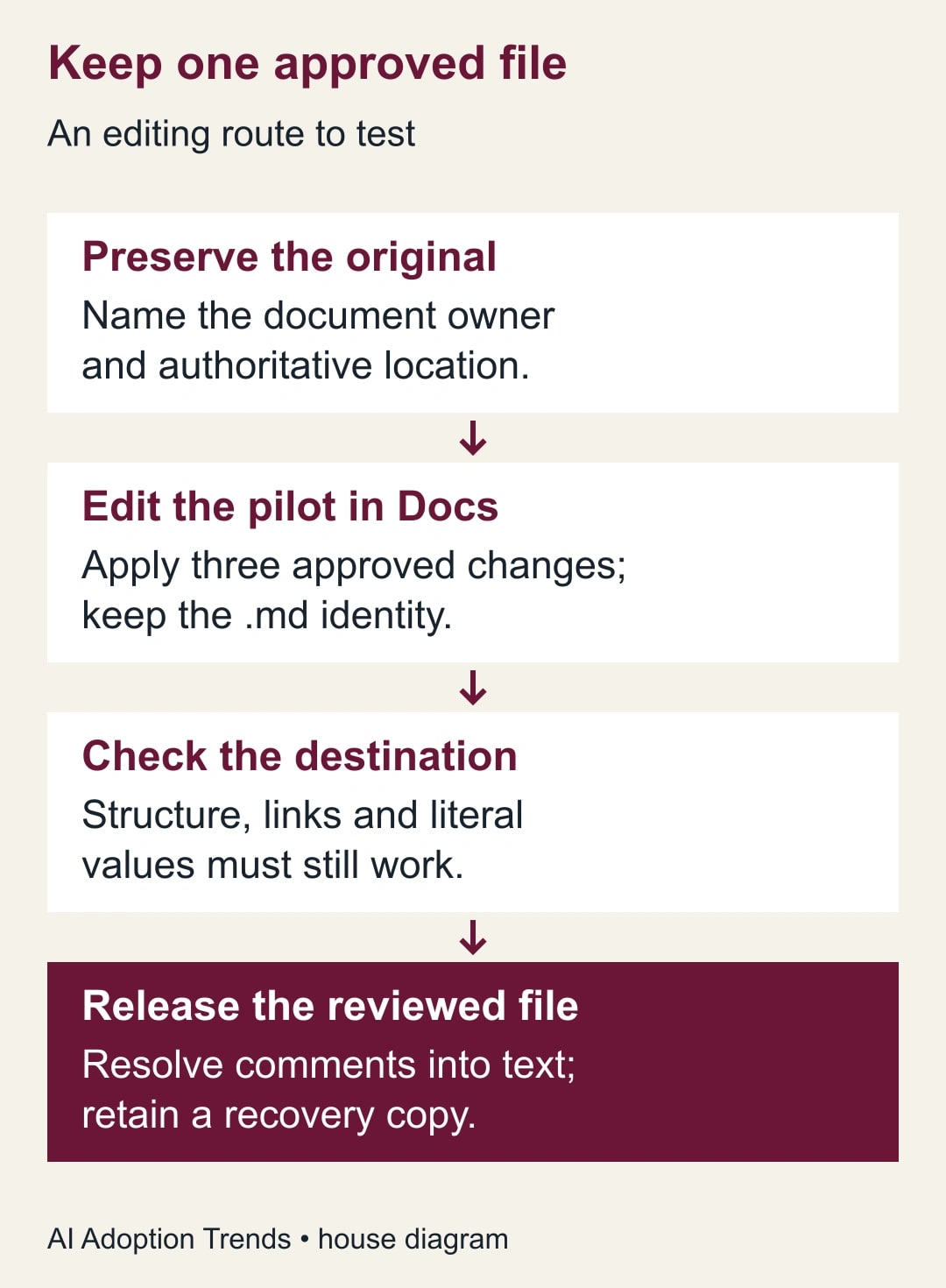
Markdown is plain text with conventions for headings, lists, links, and other structure. A visual editor makes that structure easier for some people to work with, but it does not decide which version is authoritative. Before uploading anything, name the document owner and the place from which the operational workflow reads its approved version.
For example, a client-onboarding checklist may be edited in Drive but copied into an approved knowledge folder only after review. A release instruction used by an automated process may need a reviewed repository change instead. Both are reasonable designs. What fails is leaving two editable copies with no rule for deciding which one the team should trust.
Write the publication rule in one sentence: “Mina owns onboarding.md; the reviewed file in the Operations Approved folder is the only version used for live work.” This is a constructed example, not a Google feature. A folder name alone does not enforce approval. Use your organization's actual access and review process to make the rule true.
Choose one document whose structure represents the harder parts of your normal work. Include a nested checklist, two links, a short table, and any literal examples that must remain unchanged. A file containing only a heading and a paragraph can pass while concealing the problems that will affect a more important procedure.
Keep the first test small and reversible
Save an unchanged original and create a clearly labeled pilot copy. Keep confidential content out of the pilot unless the organization has approved this account and location for it. Use synthetic names and references where the structural test does not require real client information. The purpose is to test editing and reuse, not to broaden document access.
Google's Markdown editing instructions describe uploading the file to Drive and opening it in Docs. The .md tag beside the title identifies Markdown Mode. Drive's preview offers Markdown and rendered views. Verify that the pilot remains an .md file before colleagues begin editing; creating a separate native Doc is a different workflow.
Ask the first reviewer to make three purposeful edits: clarify one step, change one link to an approved destination, and add one checklist item. Ask the second reviewer to confirm the intended meaning in the visual view. Keep a short change request containing exactly those edits so you can distinguish planned changes from unintended ones afterward.
Do not let the pilot become a broad rewrite. A controlled test needs a known expected result. If reviewers improve ten other sections while trying the editor, save that work separately for later review. First establish that the editing route preserves the structures and literal values the operational process depends on.
Test meaning, not just appearance
The rendered view should make the procedure readable, but some instructions depend on exact text. A required folder path, a product code, an example command, or a link target can be wrong even when the page looks polished. Inspect those values in the resulting Markdown as well as the visual document.
Google documents limitations in Markdown Mode: smart chips become text or links, HTML becomes plain text, and font color, highlighting, and alignment do not survive as rich formatting. Those limitations mean that “red means do not run” is a poor instruction in a portable operating file. Put the warning and its condition into words that remain meaningful without color.
Treat any syntax beyond ordinary Markdown as an explicit test case. If the destination expects a special table form, a front-matter block, or custom directives, use its own validator or preview. This guide makes no claim that every Markdown extension is preserved. Compatibility belongs to the particular editor-and-destination pair the team actually uses.
Check links by destination, not just their visible labels. A label can say “approved policy” while pointing to a draft or a page the next reader cannot access. Test as an intended reader with appropriate access. Do not make a document public merely to avoid a permissions problem discovered during the pilot.
Work through a client-onboarding change
Here is a constructed example. A 12-step onboarding file contains six links, a four-row responsibility table, and two literal folder paths. The requested changes are to add an owner to step four, replace one outdated link, and insert a stop condition before client material is uploaded. The expected output is 13 steps, still six links, four responsibility rows, and two unchanged paths.
After editing, the reviewer counts 13 steps and six links. That is necessary but insufficient. They compare the new stop condition with the change request, confirm the replacement link's destination, and inspect both paths character by character. One path now contains a space where an underscore was required. The document is held despite passing the simple counts.
The owner repairs that path and repeats the downstream check. The second reviewer opens the procedure in the tool that consumes the .md file and walks through the steps without performing client uploads. They confirm that the stop condition appears before the upload instruction and that the table still associates each task with the intended role.
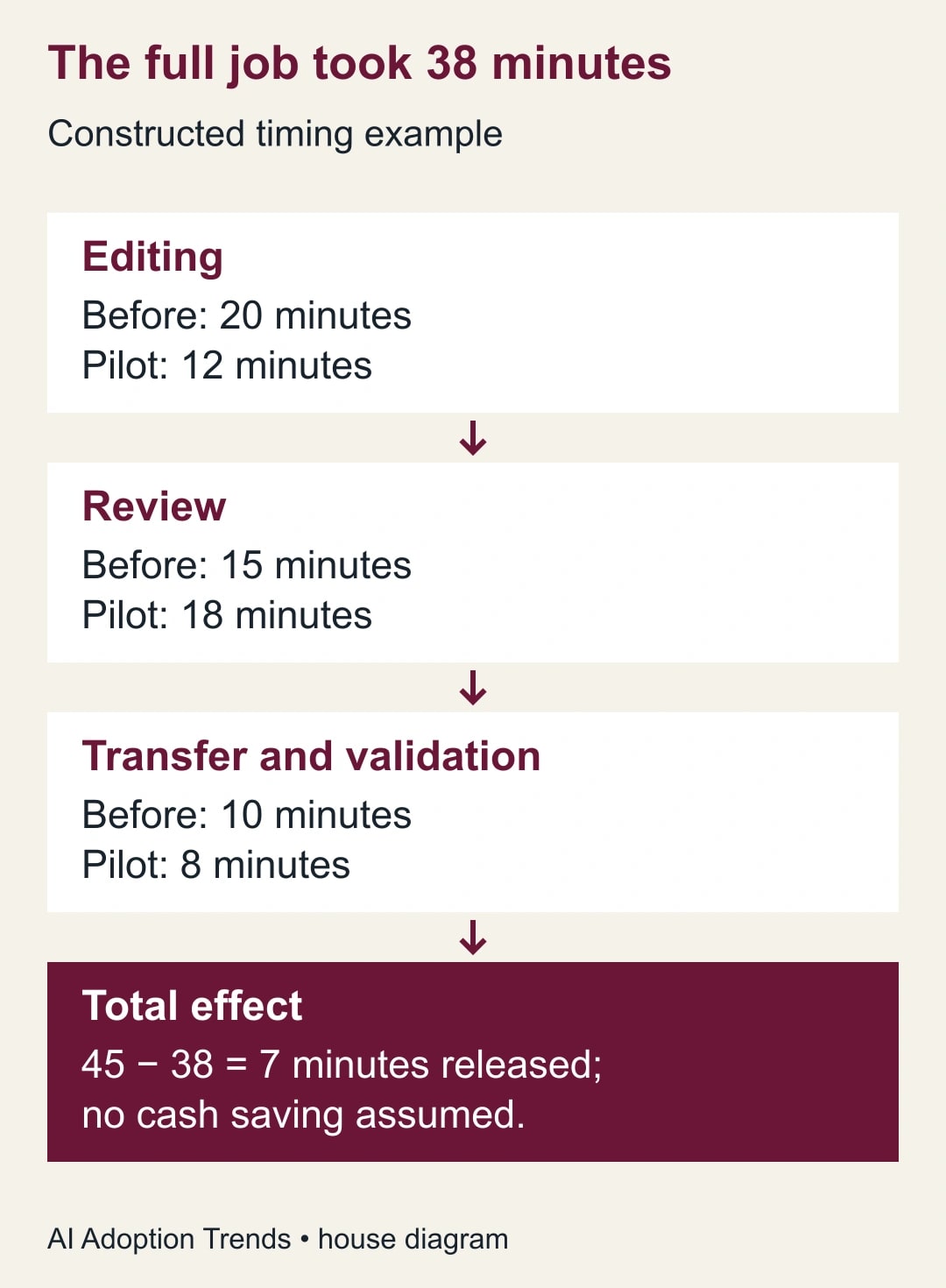
Suppose the old update process took 20 minutes to edit, 15 minutes to review, and 10 minutes to transfer, for 45 minutes total. In the illustrative pilot, editing takes 12 minutes, review takes 18, and transfer plus validation takes eight, for 38 minutes. The net reduction is seven minutes, not the eight-minute improvement in editing alone.
That seven-minute result would represent released capacity if reproduced in real work. It is not a customer result or cash saving. If later documents take longer to validate because they contain specialized markup, the average may reverse. Record the full workflow for several ordinary revisions before expanding the method to the entire procedure library.
Keep comments from becoming invisible instructions
A reviewer may add a comment that changes how a step should be performed. Resolve that decision into the approved document text before handing it to an automated consumer. Do not assume that another tool reads the editor's comment layer or understands an unresolved discussion. The operational file must contain the instruction that has actually been approved.
Keep the distinction between discussion and procedure visible. “Should we ask finance first?” is a review question. “Get finance approval before sending the refund request” is an instruction, but only after the owner has agreed to it. An AI tool should not infer which unresolved comment represents the company's policy.
Google's help page describes collaboration and comment preservation, but that does not establish how your destination handles every review element. Test the consuming tool. If it ignores comments, that may be acceptable provided the approved procedure is complete without them. If comments are required evidence, preserve them in the authorized review record rather than depending on an untested file conversion.
For a team using AI to suggest edits, give it the change request and the current approved text. Ask it to identify proposed changes separately from the final draft. A useful prompt is: “Apply only these three approved changes. List any other issue you notice separately. Preserve literal paths and identifiers. Do not turn reviewer questions into instructions.” A person still compares the result with the request.
Use a release checklist with clear pass conditions
- Identity: the file retains the expected name, extension, owner, and approved storage location.
- Requested changes: each requested revision is present; unrelated wording has not changed without review.
- Structure: headings, ordered steps, nested items, tables, and literal examples work in the destination.
- References: each changed link reaches the intended source; required readers can access it.
- Exact values: paths, codes, dates, quantities, and stop conditions match the approved change request.
- Review: unresolved questions are settled or explicitly held outside the released procedure.
- Handoff: the consuming tool receives the reviewed file, and the previous approved version remains recoverable.
This is an acceptance checklist rather than a demand to perform every possible test on every paragraph. Adapt it to the document's consequences. A brainstorming note needs less control than an instruction that changes customer records. Preserve the checks that protect the actual work, especially the ones that found a defect in the pilot.
Recover from a mismatch before distributing the file
If the file's meaning changes unexpectedly, stop the handoff and compare it with the unchanged original. Google's help page points to version history for restoring prior content. Keep your own approved copy and review record as well, so recovery does not depend on remembering which intermediate edit was trustworthy.
For a broken table, determine whether the destination expects a format that the visual editor did not preserve. A short list may serve the same business purpose more reliably, but changing the format is an editorial decision to review. Do not flatten a responsibility table into ambiguous prose simply to make a validator stop complaining.
For a missing link or literal path, repair the specific value and rerun the affected checks. For a broad rewrite that reviewers did not request, revert to the last trusted version and apply the smaller change again. If the same structure repeatedly fails, keep that document in its existing editor and reserve Docs for simpler files.
If a bad version already reached the destination, identify the versions and workflows that used it. Replace the approved file through the normal release route and tell the responsible operators what changed. Do not delete the evidence of the error. A short correction record helps the team determine whether any downstream work needs attention.
Decide whether the new editing route is worth keeping
After several revisions, compare total time from change request to accepted file. Track unintended changes, link failures, destination rendering problems, and reviewer effort. A visual editor can make participation easier while increasing validation work; the net effect matters more than how pleasant the first edit felt.
Keep the workflow when colleagues can make useful changes, reviewers can check them, and the destination consistently receives the intended procedure. Stop expanding it if specialized structures keep breaking or ownership becomes unclear. The feature's availability is a reason to test a different editing route, not a reason to migrate every document at once.
Choose one representative .md file, preserve its original, and run three approved edits through the full round trip. Once the editing route is reliable, use the Markdown handoff guide to improve what the file tells the next person or AI session. The two jobs are related: first preserve the document, then make its instructions worth preserving.
Weekly Newsletter
AI Adoption Weekly
New research, field guides, training studies, and tool decisions for operators.
No spam. Unsubscribe anytime.
Related Comparisons
Calculator
AI seat cost calculator
List price × headcount. You enter the hours and the operating assumptions.