
Quick Tips: Use Markdown Files to Pass Work Between AI Agents, Teammates, and Future You
Write the first Markdown handoff note yourself, then let an AI assistant update it after each completed task. Here is the repeatable pattern and 15 business uses worth trying.
Published September 26, 2026

Imagine a marketing manager asks an AI assistant to research a campaign on Monday. The first draft leaves the launch date blank because it is not approved. On Wednesday, a second assistant writes the brief and confidently fills in a date from an old planning deck. By Friday, the designer is building around the wrong deadline. A small Markdown handoff file could have carried the essential fact forward: the date is still open, who owns it, and what may be drafted in the meantime.
Markdown is plain text with simple marks for headings, lists, and links. A file ending in .md opens in ordinary text editors and is easy for many AI tools to read when given access. You do not need to become a developer. The business skill is writing a handoff another person could use without calling you first.
First, understand what the file does—and does not do
The file is a shared note, not a message bus. Saving HANDOFF.md does not automatically notify another agent, change its instructions, or give it permission to see the file. The next person or agent must be told to read it, have access to its location, and check that it is current. Different products handle project files and memory differently; confirm the behavior in the tool you use.
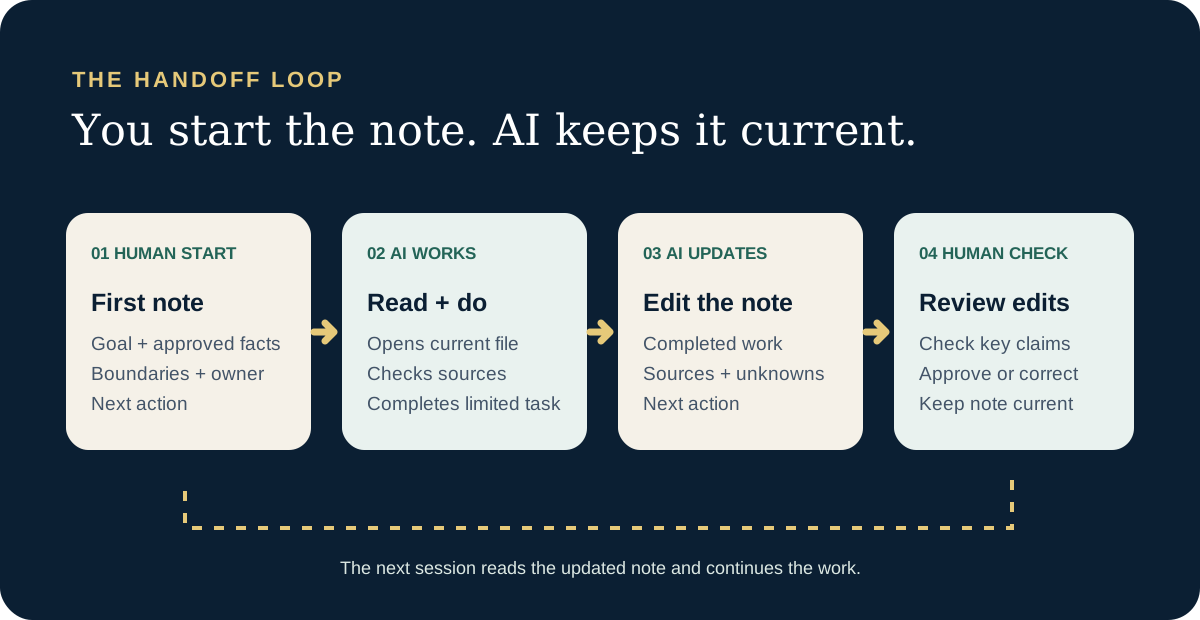
The powerful version is a living note. You write the first one by hand, setting the goal, approved facts, boundaries, and owner. After that, an AI assistant with access to the file can update it at the end of each completed task: what changed, what evidence supports it, what remains open, and what comes next. The next worker reads that current note instead of reconstructing the previous chat. A person still checks consequential changes against the real source.
Write the first note yourself
Create HANDOFF.md in an approved project folder. The filename is an example, not a universal command. For the first version, resist asking AI to invent a project history. Only you know which decisions are truly approved. Use headings so a colleague and an AI assistant can find the important parts quickly.
# Customer workshop handoff

Updated: 2026-09-25
Owner: Maya, events lead
Status: Draft plan; not approved for customers

## Goal
Prepare a two-hour customer workshop for 40 people.

## Confirmed facts
- Capacity: 40 people
- Format: one demonstration and one hands-on activity
- Source: approved planning brief, link here

## Decisions made
- Draft an agenda before writing the invitation.
- A person approves every customer-facing claim.

## Still unknown
- Date, venue, accessibility plan, price, registration link

## Next action
Draft a 120-word invitation using only confirmed facts.
Leave placeholders for unknown details.

## Stop if
A draft invents a date, price, venue, or promise.
This example is fictional. Notice what it does not contain: a customer list, private credentials, a claim that the invitation is approved, or a false memory of a decision. It distinguishes a confirmed fact from a proposed next step. That small distinction prevents a lot of expensive cleanup.
Then have AI update the note after the work
Once the first note is accurate, give an AI assistant permission to read and edit that file in the approved workspace. Ask it to complete a defined task and update the note before it finishes. This turns the file into a compact project memory that improves with the work. It is especially useful when a different agent takes the next step or you return days later.
The update should be small and factual. A draft invitation is not an approved invitation; a suggested price is not a signed price. The assistant should add a verified decision only when it can point to the owner or source that approved it. Otherwise it belongs under “Still unknown” or “Proposed.” Have the assistant tell you what it changed so you can scan the update without rereading the whole file.
Read HANDOFF.md before starting. Complete only the next action.
When the task is done, update HANDOFF.md yourself:
- Change the Updated date and Status.
- Record what you completed and link the output.
- Add newly confirmed facts with their source.
- Keep unapproved ideas under Still unknown or Proposed.
- Replace Next action with the next concrete step.
- Keep the note short; do not paste our chat transcript.
Finally, tell me exactly what you changed in the file.
If you cannot edit the file, say so and give me a proposed update.
Do not mark a decision approved or take an external action for me.
The four-step rhythm
- Pick one approved home for HANDOFF.md. The next assistant must be able to read it, and it needs write access if you want it to maintain the note. A chat tool that only sees a pasted copy cannot update the original file.
- Write version one yourself. Put the goal, owner, confirmed facts, decisions, open questions, next action, and stop condition at the top. Link a consequential fact to its source.
- For each session, tell the assistant to read the current file, perform one limited task, then edit the note to reflect completed work. Ask for a short summary of the changes it made.
- Review important changes. Check any new claim, approval, date, price, or customer promise against its source. Correct the note when needed. The next session then starts from a current record rather than a stale chat.
For recurring work, keep a standing project note for stable instructions and a separate handoff note for today’s state. Some agent products support special project-instruction files such as AGENTS.md or CLAUDE.md, but those conventions are product-specific and can change. A plain HANDOFF.md is useful even without a special filename, as long as the next worker is explicitly directed to read it. Some chat tools flatten Markdown formatting when a file is pasted; check that the headings, lists, and links survive before relying on the pasted version.
15 business situations for an AI-maintained handoff note
In each example, a person starts the note with the goal and boundaries; an assistant can add factual progress after its work. These are illustrative handoffs, not claims that a tool can safely complete every task alone. Each assumes an approved workspace and a person responsible for the final result.
Customer and revenue work
- Use case 1
Sales research to account brief
An account executive starts ACCOUNT-NOTES.md with the target and research boundaries. A research assistant adds public company facts, source links, and unanswered questions. The executive reads the updated note before drafting outreach, so an unverified “recent expansion” claim does not become a sales email.
- Use case 2
Discovery call to proposal
A salesperson records the buyer’s stated problem, decision date, and promises actually made in PROPOSAL-HANDOFF.md. A proposal assistant may draft structure but must leave pricing and delivery commitments to the deal owner.
- Use case 3
Lead routing exception
Marketing writes ROUTING-DECISION.md when a lead does not fit the ordinary territory rule. Sales operations sees the reason and owner before changing the customer relationship management system, rather than inheriting a mysterious manual override.
- Use case 4
Customer support to product
Support collects five recurring complaints in ISSUE-PATTERN.md, each linked to an approved ticket and with private details removed. Product can separate a real pattern from a memorable anecdote before prioritizing a fix.
- Use case 5
Renewal risk
A customer-success manager keeps RENEWAL-HANDOFF.md with confirmed usage issues, promised follow-ups, and who owns them. A later assistant can prepare a meeting agenda without inventing an executive sponsor or a discount.
Operations, finance, and people
- Use case 6
Month-end close
An analyst records which account reconciliations are complete, which source ledger was used, and what remains in CLOSE-STATUS.md. The next analyst can resume work without treating an unresolved variance as approved or reconciling the wrong month.
- Use case 7
Procurement comparison
A buyer puts vendor requirements, verified prices as of a date, and open contract questions in VENDOR-OPTIONS.md. A second agent drafts a comparison table; legal and procurement still approve the terms. The note keeps a quoted pilot price from being passed off as a signed annual rate.
- Use case 8
Event planning shift change
The morning coordinator updates EVENT-RUN-OF-SHOW.md with confirmed timing, speaker contacts held in the approved system, and unresolved venue questions. The evening coordinator knows which details may go into attendee copy—and does not promise parking before the venue confirms it.
- Use case 9
Hiring handoff
A recruiter writes INTERVIEW-PLAN.md with job-related competencies, approved questions, and next steps—without sensitive applicant notes. Interviewers use the same standard instead of asking one candidate a different set of questions; a person makes the employment decision.
- Use case 10
Policy rollout
An operations owner maintains POLICY-CHANGE.md with the official policy link, effective date, affected teams, and unanswered implementation questions. Training staff can draft a plain-language guide without quietly changing the rule or teaching yesterday’s effective date.
Product, research, and AI projects
- Use case 11
Product requirement to design
A product manager writes FEATURE-BRIEF.md with the user problem, accepted behavior, and explicit non-goals. A design agent can sketch options without mistaking a brainstorm for an approved requirement.
- Use case 12
Bug investigation between engineers
The first engineer logs reproduction steps, environment, tests run, and what was ruled out in BUG-HANDOFF.md. A later coding agent starts from evidence rather than repeating failed experiments.
- Use case 13
Research to executive memo
A researcher uses CLAIM-LEDGER.md for each material number: claim, original source, date, and what the source actually supports. A writing agent may draft the memo, but an editor can trace every important statement.
- Use case 14
AI pilot between sessions
A project owner keeps PILOT-STATUS.md with the test set, accepted results, review minutes, failure cases, and a pause rule. The next session can compare new results with the same bar instead of moving the goalposts.
- Use case 15
Your own Monday restart
Before closing on Friday, write NEXT-MONDAY.md with the three decisions made, the file or source to open, the one unresolved question, and the first task. It is a kindness to your future self even if no AI tool ever reads it.
One prompt for the next worker
A future session does not necessarily remember the last one. Point it to the current file. If the tool can edit that file, use the standing update instruction above so the new session also leaves a useful handoff behind.
Read the current HANDOFF.md. Tell me what is confirmed,
what is still open, and the next action. If anything looks
stale or conflicts with a linked source, stop and show me.
Then complete only the next action. When done, update
HANDOFF.md with the result, source, remaining questions,
and next step. Show me a short summary of your edits.
For a teammate, the instruction can be even shorter: “The current state and open questions are in HANDOFF.md. Please challenge the facts before sending anything.” The file should save explanation time, not replace a conversation when judgment is needed.
Where this habit faceplants
- The note becomes stale. Put an updated date and owner at the top; review a material fact against its linked source before reuse.
- The assistant turns a draft into a decision. Require a named approval or source before moving a proposal into confirmed facts. Review that move yourself.
- Two files disagree. Choose one current source of truth and record the decision. Do not let an agent silently merge conflicting instructions.
- The note contains secrets or personal information. Keep passwords, API keys, private customer records, and protected employee details in approved systems. A Markdown file inherits the access and retention rules of wherever you save it.
- An assistant treats the note as permission. A file can describe a task; it cannot authorize sending an email, changing a customer record, spending money, or overriding policy. Name the human approver.
- The file turns into a transcript. Keep decisions and evidence; link to the underlying record when needed. If the reader needs ten minutes to find the next action, the handoff is too long.
Try one handoff this week
Pick a recurring task that spans two sessions. Spend ten minutes writing the first note yourself. Let an assistant read it, complete one limited task, and update the file. Open the file and inspect what changed. Then start a new session and ask that assistant to name the next action, the facts it can rely on, and the question that still needs an owner. If it cannot, improve the note or the update instruction. That is the test—not whether an AI model praises your formatting.
Further reading
- AGENTS.md project — An example convention for repository-level agent instructions.
- GitHub Docs: repository custom instructions — How one product finds and uses repository instruction files.
- Anthropic Docs: Claude Code memory — How another product uses project memory files; behavior is tool-specific.
Keep learning
- Adopting AI for Absolute Beginners — Start with safe prompts and review habits.
- AI workflow evaluation training — Test a repeatable team process before expanding it.
- The hidden work behind AI pilots — Budget the human work needed to keep a process reliable.
Weekly Newsletter
AI Adoption Weekly
New research, field guides, training studies, and tool decisions for operators.
No spam. Unsubscribe anytime.
Related Comparisons
Calculator
AI seat cost calculator
List price × headcount. You enter the hours and the operating assumptions.