
Zapier Runs on Hold? Recover the Backlog Without Repeating Work
Diagnose held Zapier runs, estimate remaining task use, and recover a reconciled backlog in small batches without repeating completed work.
Published October 20, 2026

A held Zapier run is a queue item that needs a diagnosis before it needs a replay. Identify why it was held, check which actions already happened, and release a small, reconciled batch only after the cause is fixed.
This matters because “replay everything” can be the wrong recovery plan even when the original hold was a simple task-limit problem. Some runs may have completed earlier steps. A colleague may have handled an urgent item manually. A customer message is not undone merely because a later action failed.
This guide is for the operations owner of a multi-step Zap, Zapier’s name for an automated workflow, who needs to recover ordinary business handoffs such as creating a sales task after a qualified inquiry. It assumes you can inspect Zap history and verify outcomes in the receiving systems. If you cannot check what happened downstream, involve the owner who can before releasing the backlog.
Read the hold reason before choosing a remedy
Zapier’s held-run troubleshooting guide identifies several causes, including task limits, disconnected apps, plan or payment issues, and flood protection. A held run is not automatically an ordinary failed action, and the right remedy depends on the recorded cause.
Open representative affected runs and record the exact reason shown. Group the backlog by cause if it contains more than one. The oldest item, the newest item, and a partially completed item are useful starting points.
Do not upgrade a plan before confirming that capacity is the problem. An expired app connection will still need repair. Equally, reconnecting an app will not create the task capacity required to process a large queue.
The business owner should make one immediate decision: can new work keep arriving safely while recovery is planned? If not, pause or redirect intake through an agreed temporary route. Before disabling an automation, determine how new events will be captured or reconciled; do not assume that turning it back on will retrieve everything missed.
Keep a recovery log with the start time, affected Zap, responsible owner, observed reason, and source window. Preserve unrelated runs and avoid bulk changes while the scope is still unclear.
Count unfinished business outcomes, not just runs
A run count tells you how many executions appear in the queue. It does not tell you how many customer commitments remain unresolved or how many billable actions recovery will require.
For each affected source item, identify the intended final outcome. For a sales inquiry, that might be one correctly assigned follow-up task linked to the inquiry. The useful question is whether that outcome exists and is correct, not whether a status badge eventually turns green.
Build a recovery sheet with these fields:
- Source item ID and event time.
- Zap run ID and recorded hold reason.
- Last completed action and evidence of its output.
- Remaining intended actions and their owners.
- Manual work already performed.
- Recovery decision: replay, repair first, complete manually, or leave resolved.
- Final destination ID, verification time, and reviewer.
Use identifiers rather than names alone. Two inquiries from the same person may be different events; two runs may also refer to the same event. The reconciliation needs enough detail to distinguish them.
If the workflow already uses a unique source ID to prevent repeated creation, confirm that the destination actually stores and checks it. A field named “external ID” is not proof of a working duplicate control.
Separate capacity from the number of queue items
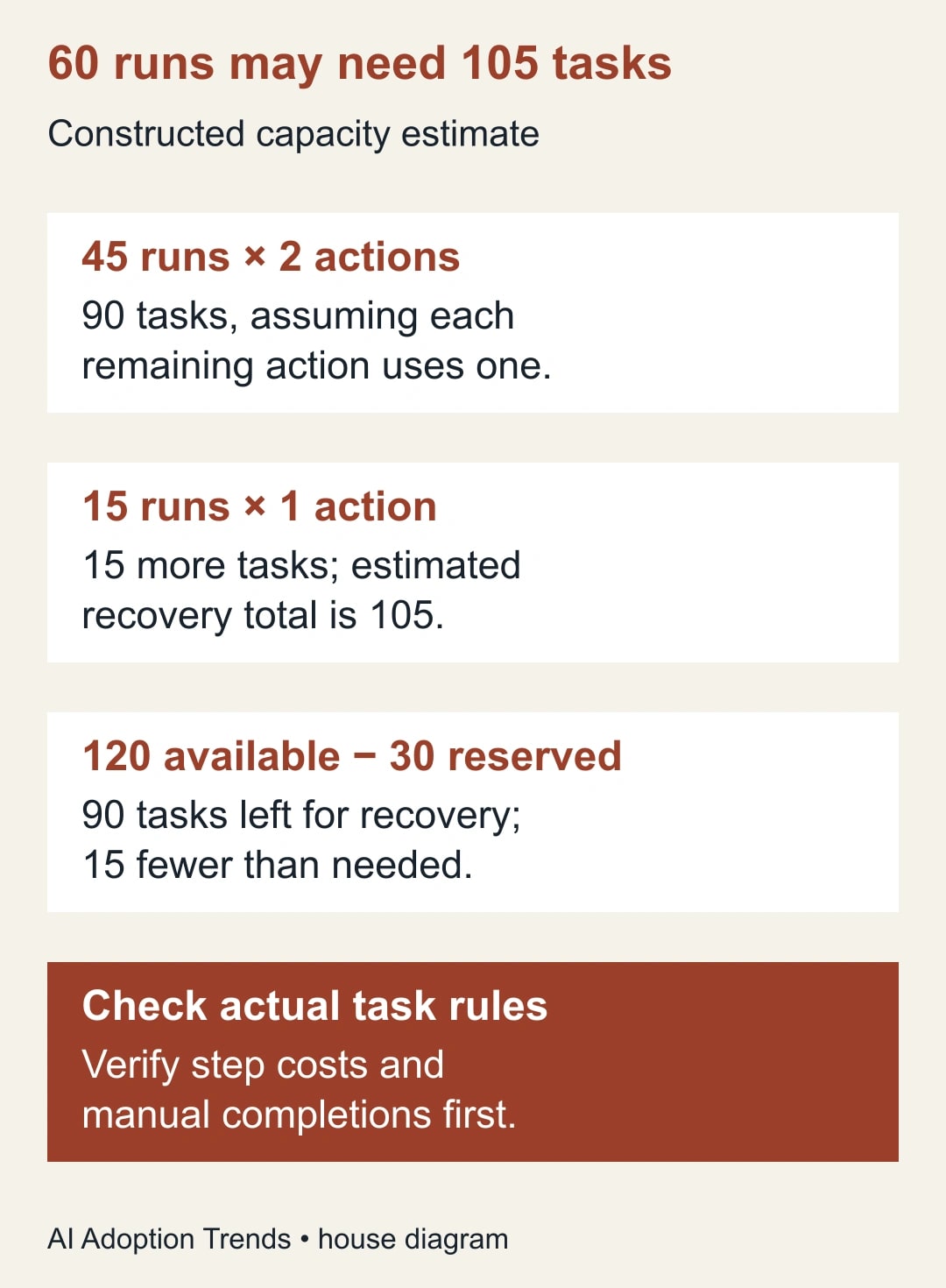
Consider a constructed backlog of 60 held runs. Inspection finds that 45 have two remaining actions, while 15 have one remaining action. Assume, for this example only, that each remaining action consumes one task under the account’s actual task rules.
The estimated recovery requirement is 45 × 2 + 15 × 1 = 105 tasks. It is not 60 tasks. Verify the real task treatment for your steps and plan before using this estimate.
Suppose 120 tasks are available and the owner wants to reserve 30 for normal incoming work. That leaves 90 for recovery, 15 fewer than the estimated 105. The team needs another decision: reduce the recovery scope, wait for capacity under an acceptable service plan, or approve additional paid capacity.
This guide does not assume that buying capacity is the right answer. The urgency of the work, the account’s current terms, and the cost of manual completion all matter. Use the current account billing information for the decision rather than an old price copied from a tutorial.
Now suppose five of the 45 two-action items were completed manually and verified in both destinations. Removing those from the replay candidate list reduces the estimated remaining work by ten tasks, from 105 to 95. That still exceeds the 90-task recovery allowance by five.
Keep the resolved items in the reconciliation sheet with evidence. Removing them from the candidate queue should not erase the explanation for why they were not replayed.
Understand the replay mode before pressing the button
Zapier’s replay documentation distinguishes replay behavior and eligibility. As checked October 20, 2026, it says manually replaying held runs requires a paid plan, automatic replay does not replay held runs, and replay needs sufficient tasks. It also documents a 60-day window from the initial trigger and restrictions when a Zap’s structure changes.
For replay from failed steps, the documentation says previously successful steps are skipped and filters or paths are not rerun. That is a reason to inspect the actual mode and current business state carefully. Do not assume every available replay option behaves the same way.
Before acting, read the controls presented for the specific run. Confirm whether you are resuming unsuccessful work or rerunning a wider sequence. If you cannot establish what will execute, do not use a bulk operation as an experiment.
For the history route, Zapier’s manual replay instructions describe filtering Zap history, selecting the individual runs, choosing Play X, and confirming Replay. Match the selection to your recovery sheet before confirming. The editor’s Entire Zap option runs the whole sequence again, including previously successful steps, so it needs a different reconciliation and task estimate.
A lead might have been qualified when the original run started but withdrawn since then. A replay that does not reconsider the original eligibility logic may still attempt the old action. Check whether the action remains appropriate now.
Similarly, a structural edit made during the incident can change what recovery is possible. Preserve the relevant version information and consult the current replay guidance before rebuilding steps. Avoid making a broad redesign in the middle of a backlog incident unless the existing design is the cause and there is a controlled migration plan.
Repair the cause with the smallest adequate change
For a disconnected app, have the authorized account owner restore the intended connection and verify that it can perform the required action. Use the correct business account and destination. A successful sign-in to a different workspace can create a new problem.
For a capacity hold, record the approved capacity decision and the available amount before the pilot. Include an allowance for new work and unexpected retries. A queue that immediately hits the same limit has not been recovered.
For flood protection or another volume-related hold, inspect whether the burst was legitimate. A loop, a broad import, or a changed trigger can produce far more work than the business intended. Releasing it without checking may multiply the incident.
For plan or payment issues, involve the account owner. Keep the recovery decision separate from changing commercial terms. The operations team needs a known path forward, not a series of speculative purchases.
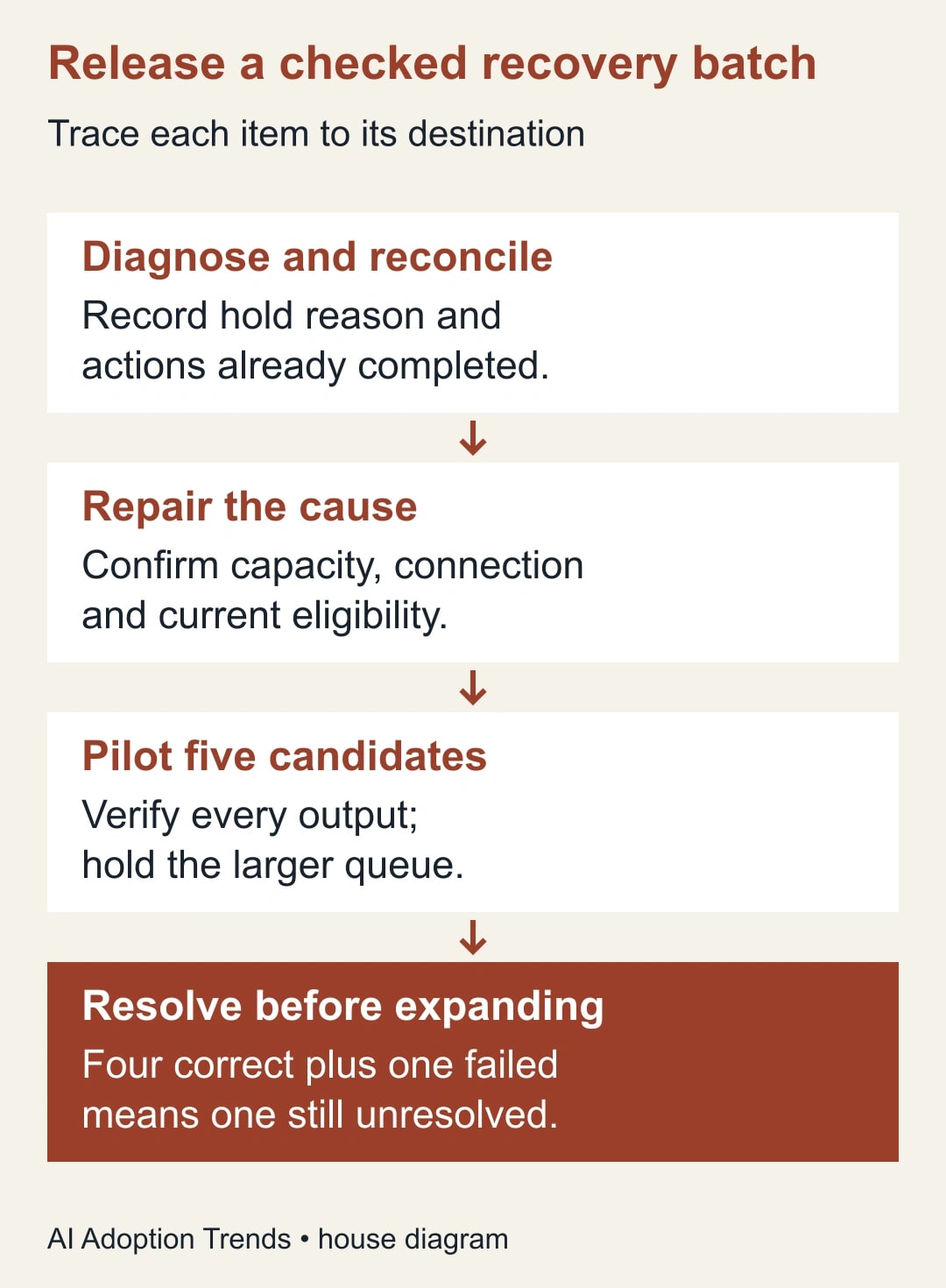
Once the cause is addressed, keep the larger backlog held while testing representative items. Fixing an account condition is evidence that recovery may proceed; it is not evidence that every queued action is still appropriate.
Pilot a batch you can inspect completely
Select five candidates that represent the important cases: an untouched run, a partially completed run, an older item, a typical recent item, and an item whose destination state required investigation. Exclude anything already confirmed complete.
Write the expected outcome for each before replaying. For example: “Create one follow-up task for inquiry Q-1047, assigned to Lee, linked to the existing contact, with no additional contact record.”
Release the candidates through the verified replay route. Then inspect both Zap history and the receiving systems. A completed run may still contain a wrong assignment or an output that the business cannot use.
Suppose four pilot items produce correct outcomes and one fails because the receiving folder is inaccessible. Mark four resolved and one unresolved. Do not count five as recovered because five attempts were made.
Repair the failed item’s cause and check whether any earlier action succeeded during that attempt before retrying. This is where a destination ID in the recovery sheet saves time: the next reviewer can see what already exists.
Release in batches with an explicit stop rule
Choose a batch size small enough for the owner to verify within the available review time. Five may be right for a sensitive customer workflow; a larger batch may be reasonable for low-impact internal records once the pilot has passed.
After each batch, reconcile candidate count, correct outcomes, unresolved items, and task consumption. Compare actual task use with the estimate. If they differ, understand the difference before committing the remaining capacity.
Stop if the wrong destination receives data, duplicate records appear, a customer-facing message is repeated, or the same hold recurs. Stop also if new work changes the available capacity enough to invalidate the plan.
Do not try to compensate for an accidental repeated message by sending another automated explanation to everyone. First identify who was affected and let the responsible business owner decide the response.
Keep one recovery owner in control of the queue. Several helpful colleagues replaying different selections at once can make the record impossible to reconcile. They can help verify outputs, but the release decisions need a shared log.
For a recurring duplicate problem, use our guide to tracing duplicate Zapier records. Backlog recovery and duplicate prevention support each other, but the latter requires fixing the event and destination logic rather than merely clearing held runs.
Close the incident against the original source window
When the visible held queue is empty, reconcile the source items that should have been processed during the incident window. Include items captured through the temporary route and any manually completed work.
Every source item should have a final state: verified automated completion, verified manual completion, intentionally cancelled with a reason, or still unresolved with an owner and deadline. An empty history filter is not proof that all business work was done.
For the constructed 60-item backlog, the five manually completed items remain part of the 60-item accounting. If 54 others are verified and one remains unresolved, the final position is 59 resolved and one open. Do not describe that as a complete recovery.
Record customer or operational effects separately from system status. A task created two days late may be technically complete while the sales owner still needs to address a missed response target.
Measure total unresolved items, oldest unresolved age, repeated outcomes, and recovery task consumption. These measures are more useful than celebrating the number of replay clicks.
Make the next hold easier to handle
Keep the recovery sheet as a reusable incident template. Add the confirmed task treatment of important actions, the destination fields used for reconciliation, and the person authorized to make capacity decisions.
Set a practical review point for rising task use or repeated holds. The exact threshold should reflect your traffic pattern and response obligations. Do not adopt an arbitrary percentage that gives the team no time to act.
If recovery repeatedly costs more effort than the automation saves, revisit the workflow. A constructed example makes the tradeoff plain: an automation releasing 30 minutes a week provides about two hours over four weeks. A three-hour monthly recovery effort would outweigh that time benefit before considering errors or customer effects.
Those hours describe staff capacity, not cash savings. Reliability and response consistency may still justify the workflow, but the owner should make that decision using the full operating cost.
Start now by documenting one held run from source event to destination outcome. Once you can explain what remains unfinished and why, you can build a controlled recovery batch. For a broader incident pattern, our stop, trace, and repair guide provides a useful handoff structure.
Weekly Newsletter
AI Adoption Weekly
New research, field guides, training studies, and tool decisions for operators.
No spam. Unsubscribe anytime.
Related Comparisons
Calculator
AI seat cost calculator
List price × headcount. You enter the hours and the operating assumptions.