
Check Gemini’s BigQuery Sales Answers Before Building the Report
Check Gemini’s BigQuery sales answers against a defined measure, signed credits, record counts, and a trusted total before building a recurring report.
Published October 20, 2026

If your sales team already stores its transactions in BigQuery, Gemini in Google Sheets can help answer a narrow reporting question without another spreadsheet export. Start with a measure that finance has defined, compare the answer with a known total, and only then ask for a reusable report. A conversational answer can reach the right database and still count the wrong thing.
Google announced the new Connected Sheets capability on October 19, 2026. It says Gemini can query the complete connected BigQuery dataset, including records beyond the spreadsheet preview, and propose a report with connected tables and charts. The rollout may take up to 15 days. Business Standard and Plus and Enterprise Standard and Plus are among the eligible editions; check the full announcement and availability list against your account. Facts checked October 20.
The useful first job is a recurring question such as “What did our Northeast region sell last quarter?” The hard part is agreeing whether “sell” means orders booked, invoices issued, or money collected. This guide uses a constructed sales example to show how an operations manager and a data analyst can turn that ambiguity into a checked answer. It is a proposed working method, not a report of a customer trial.
Use this when the data already has an owner
This fits a sales operations manager preparing a regional review, with an analyst who can identify the correct table and reproduce a total. BigQuery is Google's service for querying large datasets. Connected Sheets lets a spreadsheet work with that data without bringing every underlying row into an ordinary worksheet.
Skip this approach if your records are scattered across personal files or nobody can explain how refunds enter the report. An AI conversation will make it easier to generate another number before it makes those records comparable. Fix the source definition first. A small, stable monthly table may also be easier to handle with a normal spreadsheet calculation.
Google's Connected Sheets setup instructions require appropriate Google Cloud and BigQuery access and a project with billing configured. On a computer, use Data, Data connectors, Connect to BigQuery; select the project and approved table or view. A view is a saved query that presents a defined set of records. Connected Sheets runs queries on your behalf and saves results in the spreadsheet. It does not let you change the underlying BigQuery data from Sheets.
Before the pilot, ask the data owner which project pays for the work and how query use will be monitored. Budget for the existing eligible account, database query use, setup, and review time. This guide does not assume a new subscription or a particular query price. Do not repeatedly refresh a large dataset while troubleshooting a definition error. Start with the smallest approved scope that can answer the question.
Write the definition before opening the conversation
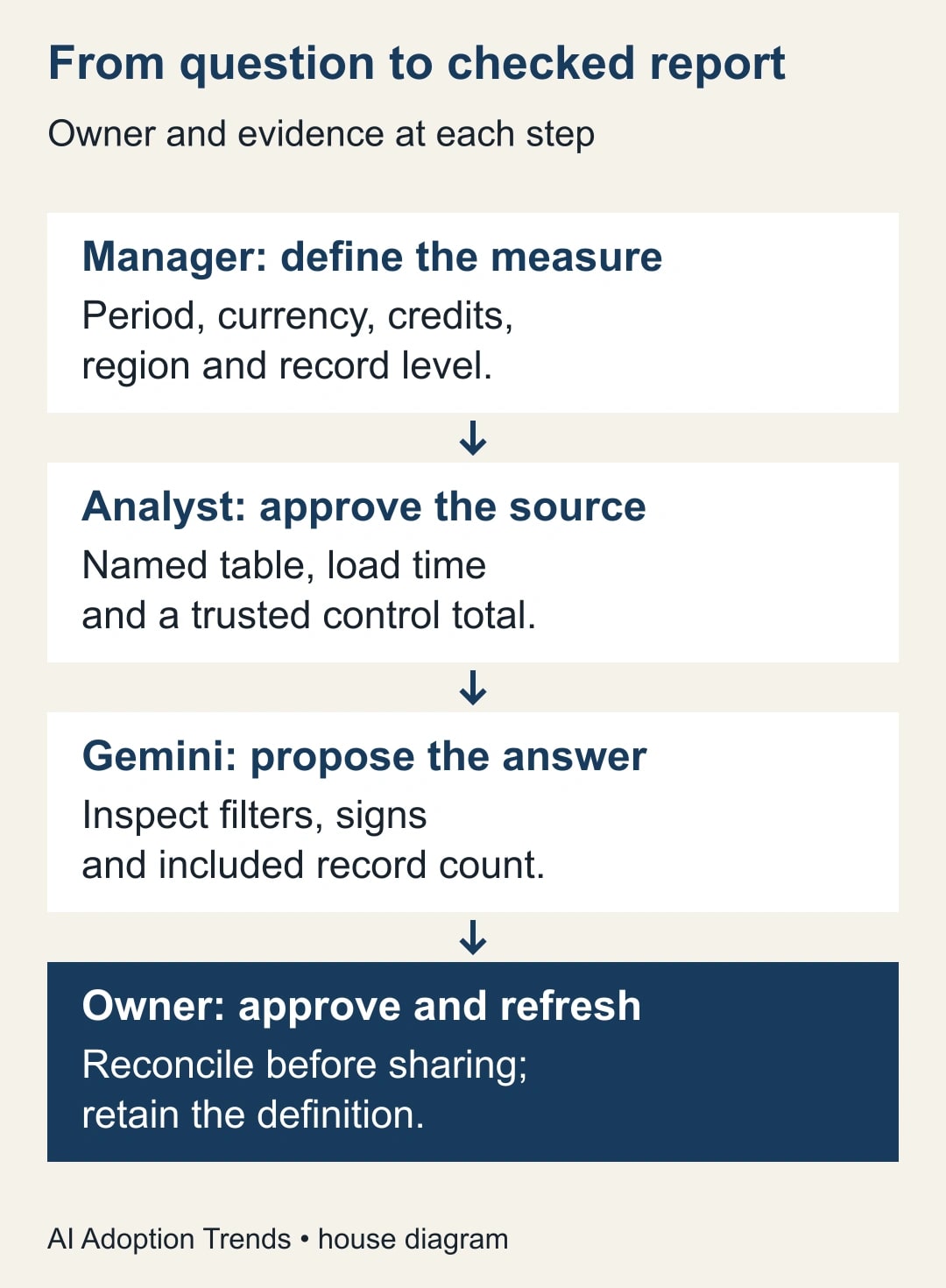
Prepare a one-page reporting brief. The manager owns the business meaning; the analyst maps that meaning to fields. Neither should delegate an unresolved definition to Gemini. If the report is used for financial reporting, finance must approve the measure and the period treatment.
For our example, the brief says: “Report invoiced product sales, excluding sales tax and shipping, less credit notes issued during the quarter. Include posted transactions only. Use invoice or credit-note date in the company's reporting calendar. Report U.S. dollars only. Classify region using the transaction's recorded region, not the customer's current address.”
That is an operational sales measure for this example, not a claim about accounting revenue recognition. Calling it “net invoiced sales” throughout the report makes the distinction visible. If the company instead needs recognized revenue, use its approved accounting dataset and rules.
Copy this worksheet and fill every line before proceeding:
- Decision: what will the regional manager decide from this report?
- Measure: which amounts are added, subtracted, or excluded?
- Period: exact start and end dates, date field, and reporting timezone if timestamps are involved.
- Population: transaction status, geography, currency, and any excluded business units.
- Record level: one row per invoice, invoice line, or adjustment; explain how totals avoid repetition.
- Source: project, dataset, approved table or view, and its owner.
- Check: a trusted total for one closed period and the person who can reproduce it.
- Freshness: last successful data load and the deadline for late adjustments.
The record level deserves special attention. If one invoice contains four product lines, its invoice total may appear on four rows. Adding that repeated total produces a confident answer four times too large for that invoice. The analyst should identify a line-level amount or a correctly aggregated invoice table before the manager asks for a regional result.
Connect one source and ask one answerable question
Have the analyst confirm the connection against the brief. A familiar table name is insufficient if it contains draft orders or a different currency. Record the exact source and data-load time in a notes tab. Preserve the original approved report for comparison, rather than replacing it during the pilot.
Open the Gemini side panel in the connected spreadsheet. Use a question that includes the business definition and requests an explanation of the selection. Google requires permission to query the connected data; access to the spreadsheet alone is not your proof that every query is permitted.
Adapt this prompt: “Using this connected source, calculate net invoiced sales for Northeast for July 1 through September 30, 2026. Use posted invoice-line amounts excluding tax and shipping, and subtract credit notes dated in that same period. Include USD only. Before calculating, identify the fields you intend to use and any missing definition. Show the total, included record count, and the filters applied. Do not substitute booked orders or cash collected.”
Read the proposed interpretation before accepting an attractive result. If the source contains no credit-note field or the model cannot identify the reporting date, stop and ask the analyst to resolve it. Rephrasing “be accurate” does not supply missing information. A usable outcome from this first conversation can be a precise explanation of why the source cannot yet answer the question.
Keep the first response narrow. A comparison with last year, a product ranking, and a regional explanation each introduce another place for definitions to drift. Validate the current-period total before expanding the conversation. This reduces the amount of attractive but unchecked work that the manager has to unwind.
Work the example back to the source
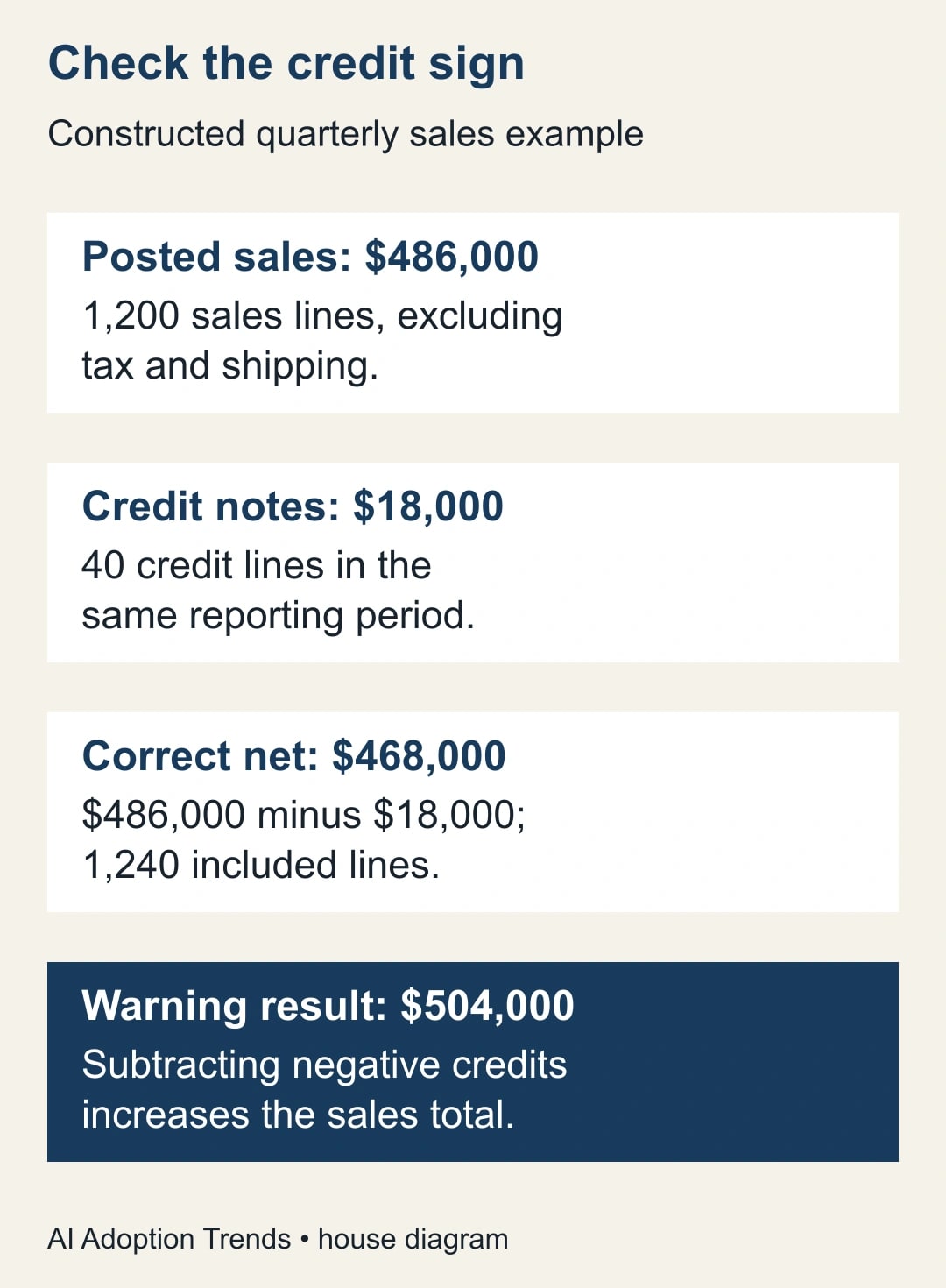
Suppose the approved quarterly extract has 1,200 posted sales lines totaling $486,000 before tax and shipping. There are also 40 posted credit lines totaling $18,000. The agreed measure is $486,000 minus $18,000, or $468,000. These numbers are invented for this example and are not performance claims.
If the answer is $486,000, credits may have been omitted. If it is $504,000, a negative credit amount may have been subtracted instead of added: $486,000 minus negative $18,000 equals $504,000. Both answers look plausible on a large sales chart. Checking the sign convention is more useful than asking for another prose explanation of the trend.
If the source stores credits as negative values, the approved calculation might sum signed amounts. If it stores positive credit magnitudes separately, the approved calculation subtracts them. Do not apply both conventions. Ask the analyst to demonstrate one invoice, one credit, and the combined result from the actual fields.
Reproduce the quarterly total through a trusted existing report or an analyst-written query using the same frozen data snapshot and rules. Agreement with a second Gemini response is not a separate check. Compare the included transaction identifiers as well as the amount when the result matters; two errors can offset in the total.
For an additional diagnostic, split the constructed $468,000 into July $150,000, August $158,000, and September $160,000. Their sum is $468,000. If the headline agrees but the monthly values differ from the approved extract, investigate dates and late adjustments before presenting a trend. A total that agrees cannot certify its breakdown.
The record count also needs a label. In this example there are 1,240 included lines, not 1,240 customers or invoices. Do not let an automatic sentence turn a row count into a customer count. Define a separate customer measure if that is part of the decision.
Turn the checked answer into a report
Once the comparison passes, ask for a report containing the agreed total, month-by-month amounts, regional or product breakdowns that serve the decision, and a short definition note. Ask Gemini to describe its plan first. Review which fields and groupings it will use before it builds additional objects.
A sensible regional review has a small number of questions: what changed, where the change occurred, and which transactions merit investigation. A dozen automatically generated charts can obscure those questions. Ask for a table behind each chart so another person can reconcile it.
Use a separate report tab and retain the definition and validation notes. In our example, the title should say “Northeast net invoiced sales, July–September 2026, USD.” A label of “Revenue growth” would promise an accounting measure and a comparison that the work has not established.
Before using a year-over-year comparison, confirm that the prior-year region rules and credit treatment match. If the business reorganized territories, show that as a break in comparability. You can produce a same-territory analysis, but it needs its own stated method; Gemini should not quietly rewrite last year's customer assignments.
A refreshable report needs a refresh owner. Agree who checks the latest data load, how late adjustments are handled, and who investigates a failed refresh. Include “data through” and “last checked” separately. A report can be refreshed today against a source that has not loaded since Friday.
Catch failures before the meeting
When the answer changes unexpectedly, compare the saved definition, source, filters, and load time before blaming the model. A newly posted credit, changed territory mapping, and a different prompt can produce different results for different reasons. Save enough context to distinguish them.
If Gemini is unavailable, check the account edition, rollout timing, and source query permission. Do not widen the dataset's permissions just to expose a button. The analyst can produce the same defined report through the existing query process while access is resolved.
If a query or refresh fails, keep the last verified report visibly dated. Avoid presenting stale numbers as current because the chart still renders. If a result omits a region or a currency, use a small source-level check to determine whether the records are absent or filtered out.
If a result cannot be reproduced, hold the report. For this pilot, require exact agreement on the defined amount for the same data snapshot, allowing only an explicitly documented display-rounding difference. That is a proposed acceptance rule, not a universal tolerance for every business measure.
Check who can view the resulting spreadsheet as well as who can query BigQuery. The saved report itself may reveal commercially sensitive numbers. Share only the approved report audience and confirm access with a colleague who has the intended viewer role. A database permission review does not replace reviewing the spreadsheet's audience.
Decide whether the new route earns a place
Run the method for two recurring review cycles before replacing the established report. Track preparation time, analyst correction time, mismatched totals, stale reports, and whether managers actually use the result. Count the full path from question to approved answer, not just the seconds until Gemini produces text.
For a constructed comparison, suppose preparation falls from 75 to 35 minutes but validation rises from 15 to 30 minutes. Total work falls from 90 to 65 minutes, releasing 25 minutes per cycle. That is capacity the team may use elsewhere. It is not cash savings unless a real budget expense changes.
Keep the workflow if the repeated question becomes easier without moving unresolved work to the analyst. Stop expanding it if each follow-up needs a new data model or the manager repeatedly changes definitions mid-conversation. In that case, an approved standard report may serve the team better.
The next step is to choose one closed period, write the reporting brief, and obtain its trusted comparison total. If your earlier problem is joining exports before analysis, use the Power Query guide to duplicated rows and inflated totals. If the decision is how to deliver a finished dashboard to another owner, use the Looker Studio ownership and data-access handoff.
Weekly Newsletter
AI Adoption Weekly
New research, field guides, training studies, and tool decisions for operators.
No spam. Unsubscribe anytime.
Related Comparisons
Calculator
AI seat cost calculator
List price × headcount. You enter the hours and the operating assumptions.