
Export a Gemini App to Google Sites: Test It Before Sharing
Pilot a Gemini app exported to Google Sites with known-answer tests, restricted access, mobile checks, and a clear owner before sharing it widely.
Published October 20, 2026

Exporting a Gemini app to Google Sites can shorten the distance between a useful prototype and a small internal tool. Treat the export as the start of a pilot: check the calculation, check who can open it, and check what happens to anything a user enters before sharing it with the team.
Google announced the export option on October 19, 2026. Its stated workflow is to open an interactive app in Gemini, choose Export, and select Google Sites. This creates a new, private Site draft. Publishing and choosing an audience are subsequent steps. The announcement says existing Sites and Drive organization policies apply, and users need permission to create and edit Sites. Availability and account conditions are described in Google’s launch announcement.
That is a useful starting point for a calculator, guided checklist, or simple scenario explorer. It is not evidence that your exported app has a working database, a dependable approval process, or permission to use confidential company data. Those are properties of the particular tool you build and must be checked.
Start with a decision small enough to verify
Imagine an operations manager deciding whether the team can accept another client onboarding project. The team already has a spreadsheet with next week’s available hours. People repeatedly ask the manager to convert those hours into a rough number of projects.
A small estimator could answer: “Given available delivery hours and an agreed allowance for unplanned work, how many standard projects could fit?” It should not promise delivery dates, allocate named employees, or create customer commitments.
This is a constructed example, not a report of a company’s results. It illustrates a useful first pilot because the arithmetic can be checked without trusting the generated code. A manager can also recognize when the standard-project assumption stops being useful.
Choose something else if your real need is to approve purchases, store customer records, manage different employee permissions within the app, or maintain an auditable history of decisions. Those requirements call for a more explicit application design. A familiar Sites address does not settle them.
Give the pilot a named owner and a short scope: one team, one weekly planning meeting, two weeks of use, and no customer information. This makes the result interpretable. If several departments start adapting the tool before anyone verifies it, you will struggle to tell which version produced a disputed answer.
Write the calculation before requesting an interface
For the capacity example, define three inputs: available delivery hours, the percentage reserved for unplanned work, and hours required for one standard project. State the units beside every field.
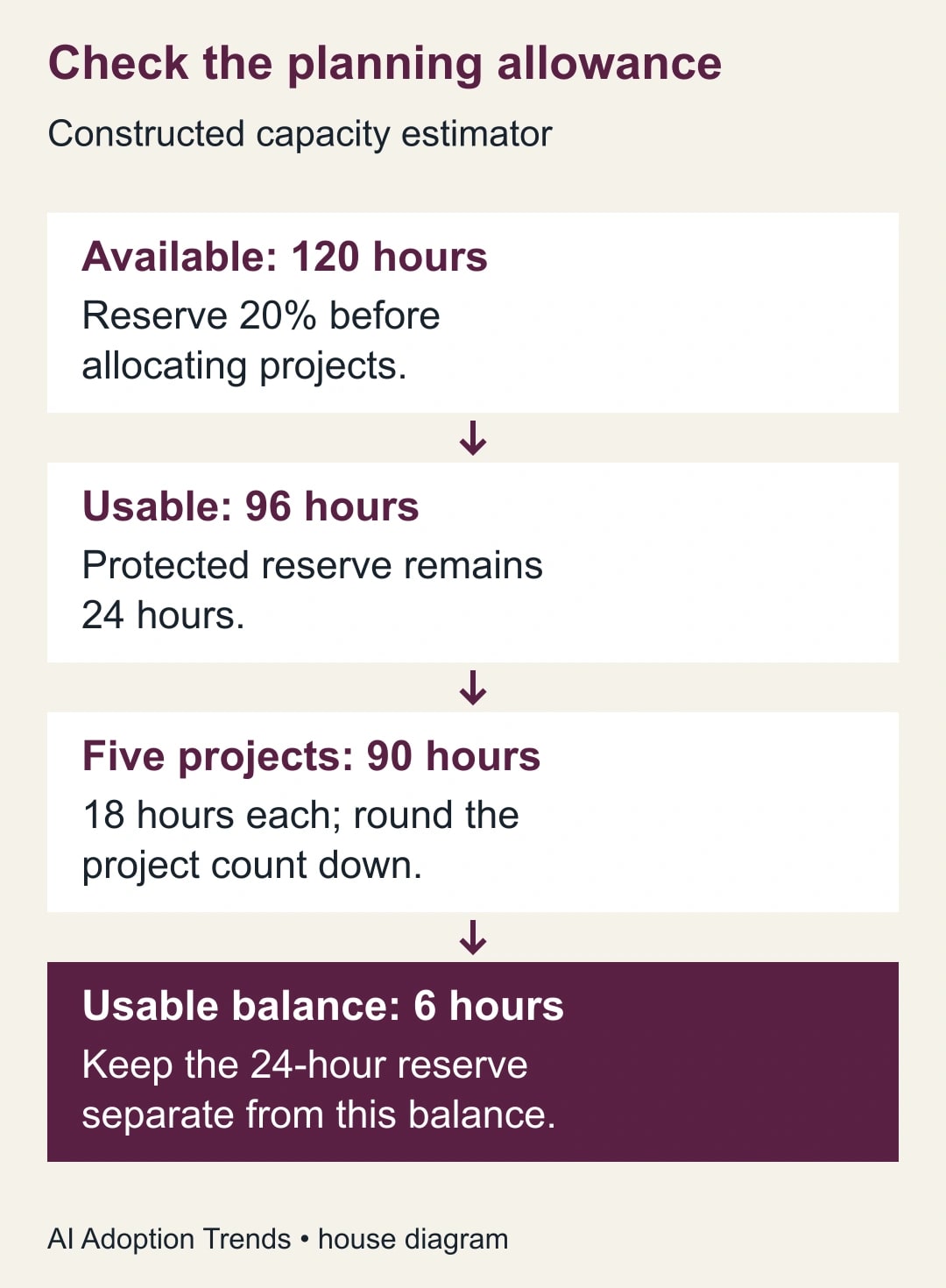
Define the result as whole projects, rounded down. Suppose the team has 120 available hours, reserves 20%, and expects a standard project to take 18 hours. The usable allowance is 120 × 0.80 = 96 hours. Dividing 96 by 18 gives about 5.33, so five whole projects fit. They consume 90 hours and leave six hours within the usable allowance.
The separate 24-hour reserve still exists. Do not label the combined 30 hours “spare capacity”: six hours are unassigned within the plan, while 24 hours are intentionally protected. That distinction is the point of the tool, not an optional explanatory note.
These are proposed planning assumptions, not industry benchmarks. The manager must decide whether 18 hours represents the work being accepted. A complex onboarding project cannot safely inherit that estimate just because its name includes the word “standard.”
Use this adaptable build brief:
- Purpose: estimate whole standard projects that fit within a stated delivery allowance.
- Inputs: available hours, reserve percentage, and positive hours per project; show units and definitions.
- Calculation: available hours × (1 − reserve percentage ÷ 100), divided by hours per project, rounded down.
- Results: whole projects, hours allocated to them, remaining usable hours, and protected reserve hours.
- Validation: reject negative hours, reserve outside 0–100%, and zero or negative hours per project; explain the field to fix.
- Boundary: provide planning guidance only; do not save personal data, send messages, or make bookings.
Ask Gemini to explain its calculation in plain language alongside the interface. Compare that explanation with the brief. If the description and the displayed result disagree, the tool has failed even if one of them happens to be right.
Keep the first export private
Create the prototype with sample inputs. When it is ready for inspection, use the export route Google describes. Open the resulting draft and give it a clear working title, such as “Onboarding capacity estimator — pilot.” Add the owner, the purpose, and the date of the calculation rules.
The business owner should inspect the page before assigning a broader audience. Confirm that instructions, input fields, and results survive the export. Test an actual calculation in the exported version; a working Gemini preview does not prove that the Site behaves identically.
Google’s publish-and-share instructions distinguish the draft from the published site. On a computer, you can preview layouts, publish to a web address, and manage the published audience. For a restricted site, add the intended people or groups with published-viewer access. Available choices can differ for work or school accounts. Google also says its request to keep a public site out of search engines is not guaranteed.
For an internal pilot, use an actual access restriction. A search-engine preference is not an access rule. Record the audience you selected and test it with the specific accounts described below.
Avoid accepting new paid products simply because an export menu is missing. First confirm that you are using the intended account and that Sites is enabled with the necessary creation permissions. Your administrator can confirm organizational restrictions. The launch announcement is not a quote for your organization’s entire licensing and support cost.
Run a small acceptance test with known answers
Prepare the answers yourself before testing the app. Otherwise, it is easy to accept a plausible-looking number and then rationalize it.
For the constructed example, keep a test sheet with these cases:
- Normal case: 120 hours, 20% reserve, 18 hours per project. Expect five projects, 90 allocated hours, six remaining usable hours, and 24 reserve hours.
- Exact boundary: 90 hours, 0% reserve, 18 hours per project. Expect five projects with nothing remaining.
- Just below the boundary: 89 hours, 0% reserve, 18 hours per project. Expect four projects and 17 hours remaining.
- No usable allowance: 120 hours, 100% reserve, 18 hours per project. Expect zero projects and the whole 120 hours protected.
- Invalid input: zero hours per project. Expect a clear validation message, not infinity, an empty result, or a silently substituted value.
- Empty input: remove available hours after calculating a valid case. Expect the old result to stop looking like a current answer.
The just-below-boundary case matters. Rounding 89 ÷ 18 to five would promise work for which the stated plan has insufficient hours. A large green result card can conceal that error more effectively than a plain spreadsheet.
Also test fractional hours if your team uses them. Decide whether 17.5 hours per project is allowed, then make the interface follow that decision consistently. The owner should not have to discover during a planning meeting that decimals are accepted in one field and truncated in another.
Record expected result, actual result, pass or fail, and the version tested. When the prototype changes, rerun the cases. A useful-looking new explanation can arrive alongside an accidental change to rounding or units.
Test the audience and the device, separately
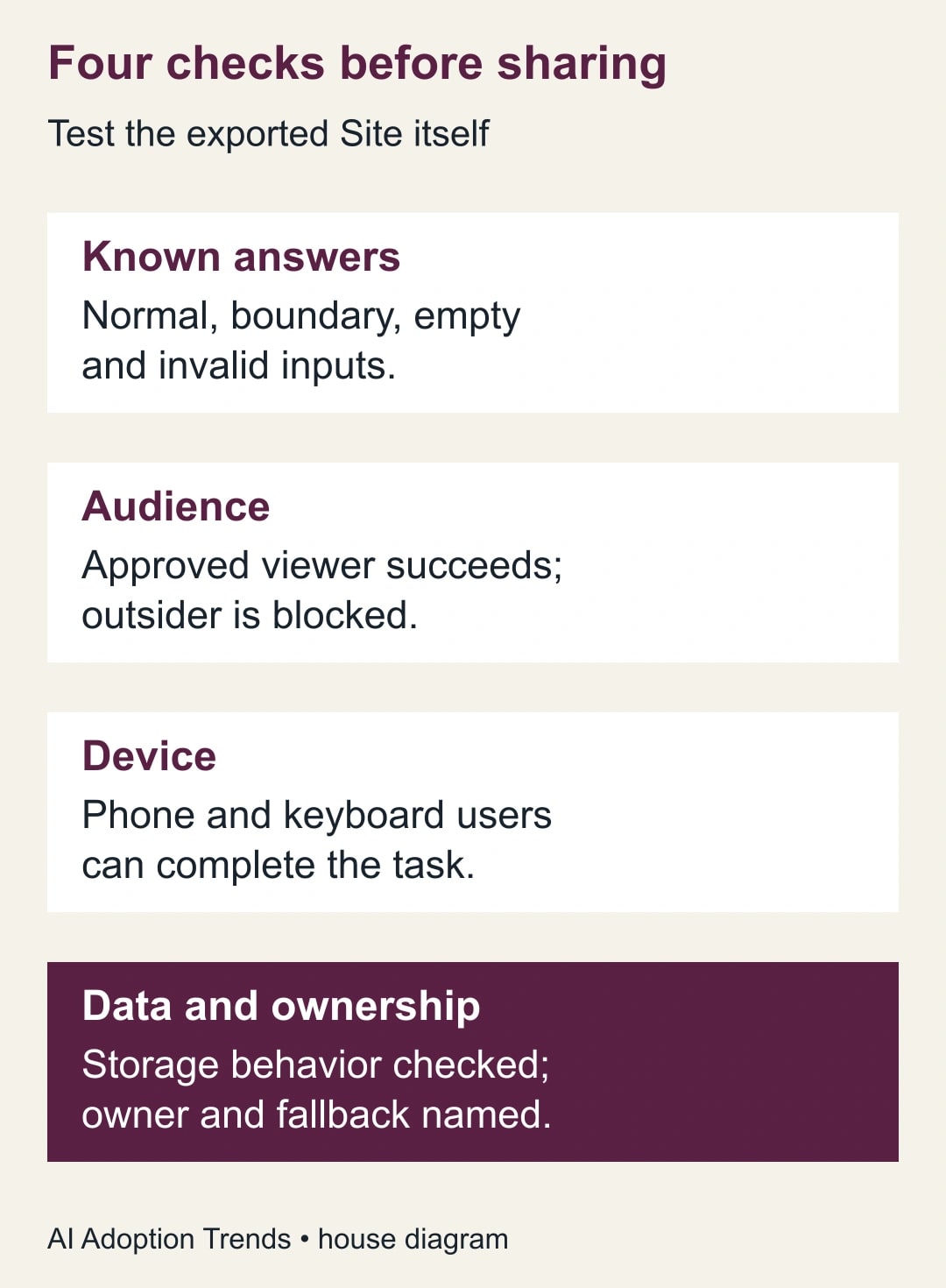
Ask one intended pilot user to open the published pilot link with their ordinary work account. Confirm they can use the tool without receiving editing rights. Then test with an account outside the approved audience, or a signed-out browser where appropriate. Confirm that restricted access actually prevents use.
Do not share your own logged-in screen as proof of access. The owner’s experience tells you very little about the viewer’s permissions.
On a phone, enter the normal case and the invalid case. Check that field labels remain visible while typing, the keyboard suits the input, errors appear near the relevant field, and the result does not extend beyond the screen. Someone should be able to identify the units without scrolling back to the introduction.
Use keyboard navigation on a computer as well. Move through the controls in order and confirm that the active field is visible. A pilot participant who cannot operate the tool reliably should have an alternative route, such as the checked spreadsheet.
These checks are deliberately about the exported result. A generated app that works beautifully in its creation window may still be awkward inside a different page layout. Fix the actual user experience before widening access.
Find out what the tool remembers
Enter harmless sample values, reload the page, and open it in another browser session. Observe whether the fields reset, persist locally, or appear elsewhere. Do not infer a storage design from one observation.
If persistence matters, have the person responsible for the implementation inspect how it works. They should identify where data goes, who can read it, how it is removed, and what happens when access changes. The export announcement does not answer those questions for your custom app.
For this first estimator, a simpler requirement is often better: users enter non-sensitive totals, copy the result into the existing planning record, and treat the tool as disposable calculation assistance. The planning record remains the place where the manager approves the decision.
If a participant pastes customer names into an unexpected free-text field, remove that field from the pilot and correct the instructions. Do not expand the data-handling design merely because the prototype happened to include an inviting text box.
Measure whether it improves the meeting
The pilot succeeds if people reach the right planning decision with less clarification and no misleading capacity promises. Count complete, correct uses, questions caused by unclear labels, and cases that do not fit the standard-project assumption.
A constructed time comparison helps set expectations. Suppose a manager answers eight routine capacity questions per week, taking six minutes each. That is 48 minutes. During the pilot, checking eight tool results takes two minutes each, while maintaining the tool takes 15 minutes: 16 + 15 = 31 minutes. The difference is 17 minutes of staff capacity per week.
That is not a cash saving unless a real spending change follows. It may still be valuable if the tool makes assumptions visible and prevents one avoidable overcommitment. Conversely, a tiny time benefit may not justify ongoing maintenance if the assumptions change constantly.
Stop the pilot if any accepted test case produces a wrong result, an unintended audience gains access, or users begin treating estimates as approved commitments. Return to the spreadsheet while the owner fixes the issue. Keep the error case in the test sheet so it cannot disappear from the next review.
Leave behind a tool someone else can own
Before extending the pilot, save the calculation brief, test cases, owner, approved audience, and a link to the planning record. Include a simple change rule: any change to inputs, rounding, reserve treatment, or storage requires the tests to be rerun.
Ask a colleague who did not build the prototype to use the normal case and explain the result. If they confuse protected reserve with available spare time, improve the labels before adding more features.
For a richer planning model, start with our Google Sheets team capacity planner. If the main problem is who can see the underlying information, use the guide to sharing a report without exposing the whole source.
The next useful step is small: write five known-answer tests for one proposed internal tool. Passing those tests in the exported, restricted Site gives you a reason to invite a pilot group. The existence of a publish button does not.
Weekly Newsletter
AI Adoption Weekly
New research, field guides, training studies, and tool decisions for operators.
No spam. Unsubscribe anytime.
Related Comparisons
Calculator
AI seat cost calculator
List price × headcount. You enter the hours and the operating assumptions.