
Looker Studio Handoff: Transfer Ownership and Check Data Access
Keep reporting working when its owner leaves. Map reports, data sources, credentials and viewer access, then test the handoff before closing it.
Published October 16, 2026

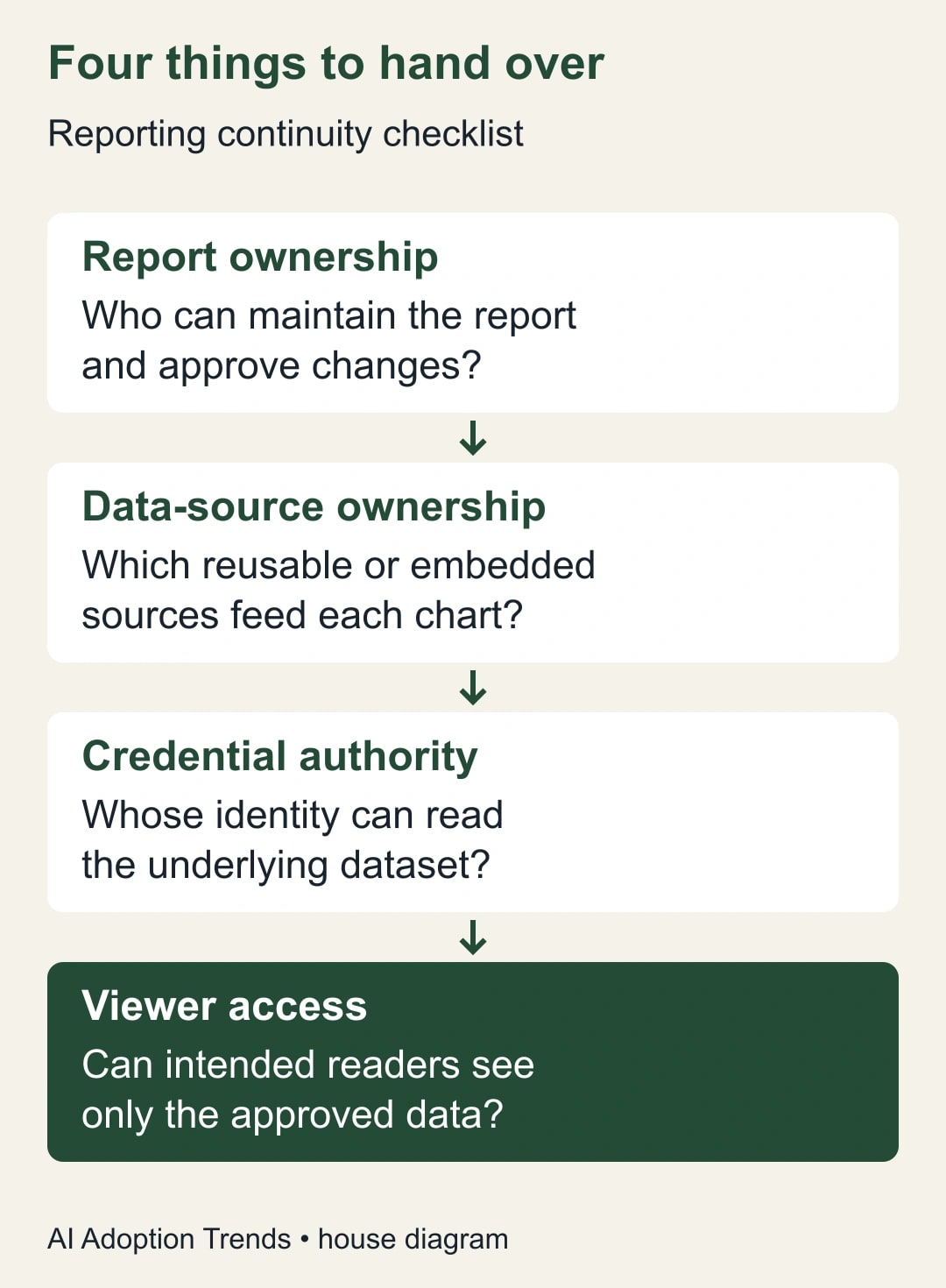
When handing over a Looker Studio report, transfer the reporting assets and separately verify the identity that supplies their data. A new report owner can still depend on the former employee's credentials. The handoff is complete only when the intended owner can maintain the report and the intended viewers can retrieve the correct data without that departing identity.
This guide uses Looker Studio, the name many teams still search for; Google's current documentation uses Data Studio. The practical problem is the same: ownership of a report, ownership of its data sources, authority to read the underlying data, and permission to view the result are separate things. Passing one does not prove the others are ready.
The workflow is for reporting leads, operations managers and administrators coordinating a planned staff change. It is not a universal connector migration script. If an account is already deleted, data is regulated, or the handoff crosses organizations, involve the relevant administrator immediately. The procedure below is an editorial checklist with a constructed example, not a claim that we tested every connector or account configuration.
Why the report can work after an incomplete transfer
Google's ownership guide, checked October 16, 2026, says transferring a data source leaves its credentials intact. The new owner can reconnect it using their credentials. That means a report that still loads immediately after transfer may be using the old authorization. The page also distinguishes organization-owned Pro content, domain transfer limits and file-upload sources that must be recreated rather than transferred.
A successful screen check at the wrong moment can therefore provide false reassurance. The departing account may still be active; a recently loaded result may not exercise every connection; one chart may use a different source from the others. The task is to establish which dependency each test actually covers, then close the remaining ones deliberately.
Plan the work with the identity administrator and the data owner. Do not postpone required account removal just to keep a dashboard alive, and do not revoke credentials opportunistically without understanding their other uses. Agree on a change window, a fallback report and who may authorize changes. If timing is constrained, prioritize continuity for the business-critical decisions first.
Make a dependency map before changing access
List the reports people actually use, who uses them and which decisions they support. Open each report's configuration with an authorized editor and identify its data sources. Distinguish reusable sources from report-specific ones. Record the connector, underlying dataset, credential mode, current owner and proposed new owner for every relevant source.
Do not stop at the report's title. A monthly revenue dashboard may combine a spreadsheet, an analytics property and a third-party advertising connector. Each can have a different owner and authorization path. A change that fixes the spreadsheet can leave the advertising section broken while the top-level report still appears healthy.
Ask the current maintainer about scheduled deliveries, extracted data, calculated fields, blends and manual file uploads. Record the ones actually used rather than assuming every feature applies. A blend combines data from more than one source; it can conceal an unresolved dependency behind a chart that looks like a single number.
Name one business owner for the acceptance decision and one technical maintainer for the change. The business owner decides whether the restored data is useful and timely. The maintainer verifies connections and permissions. Where possible, use an ordinary intended viewer for the final test, because an administrator's broader access can hide a missing viewer permission.
Choose a credential approach the connector supports
Google's data credentials documentation distinguishes Owner's credentials, which can let report viewers see data through the credential owner's authorization, from Viewer's credentials, which require each viewer to have underlying access. It also describes service-account credentials, using a non-human identity. Availability and setup depend on the connector; do not assume every data source supports every mode.
Choose based on the approved audience and operating model. With owner-based authorization, ask what data the report can expose to its viewers and who is responsible for maintaining that access. With viewer-based authorization, ask how each intended viewer will obtain and retain permission to the underlying data. Neither option is automatically the safest or simplest for every report.
A service account may be appropriate where the connector supports it and the organization already manages such identities. It still needs an owner, permissions, maintenance and monitoring. Do not create a shared employee login as a shortcut, and do not distribute passwords or keys through the handoff document. Record the responsible administrator and approved credential location instead.
The cost decision should include connector subscriptions, any Pro entitlement, administrator effort and maintenance. A no-cost report can still depend on a paid connector. A more durable ownership model may reduce recurring handoff work, but do not claim savings until you compare actual costs and the team's operating requirements. Keep the current platform unless there is evidence that a change is necessary.
Transfer the asset, then test the connection separately
For a planned transfer, first confirm the intended new owner has the necessary asset access and is eligible under the account's transfer rules. Google's documented sharing flow uses the person's role menu to make them owner and requires confirmation. Transfer the correct report and reusable sources, not merely a shortcut to a folder containing their links.
Record each completed ownership change in the dependency map. Then have the new maintainer inspect and, where needed, reconnect the source using an approved identity with access to the same intended dataset. This is a separate acceptance step. A changed name in the sharing dialog does not establish that the authorization has changed.
When reconnecting, compare the source identifier, schema and selected fields before accepting the result. A similarly named spreadsheet or analytics property can supply plausible but wrong data. If the connector offers a preview or field-change review, use it. Stop if the new connection changes the meaning of a field or drops a required dimension; resolve that difference before replacing the working source.
Maintain the existing sharing boundary. Do not make a report public or broaden dataset access just to remove an error. An access failure is information about the handoff, not permission to grant everyone access. The data owner should approve any genuine audience change separately from the continuity work.
Test fresh data and the actual audience
Create an acceptance sheet with a small set of known checks for each report. Include a reporting period, expected source identifier, a total that can be independently reconciled, a filter or segment, and the intended viewer. Where appropriate, include a recent harmless record or other freshness signal that proves the report is not merely showing an earlier state.
Test every affected chart or section, not only the first page. Record whether the result is correct, stale, unavailable or outside the viewer's authorized scope. Keep unexpected access separate from missing access: both can be failures. A report that works by exposing more data than intended is not a successful handoff.
Coordinate the final dependency test with the identity administrator. The objective is to verify that the report continues under the approved replacement arrangement as the old access is removed through the normal offboarding process. Do not ask a colleague to share credentials or simulate another person. Use authorized accounts and record who performed each test.
When the report's numbers differ, isolate the cause before changing formulas. Check source selection, date range, filters, refresh state and viewer permissions. If the mismatch is specifically between Google Analytics and the report, use the GA4 and Looker Studio reconciliation guide. A permission handoff should not silently become a redesign of business metrics.
A worked example: six reports, four shared sources
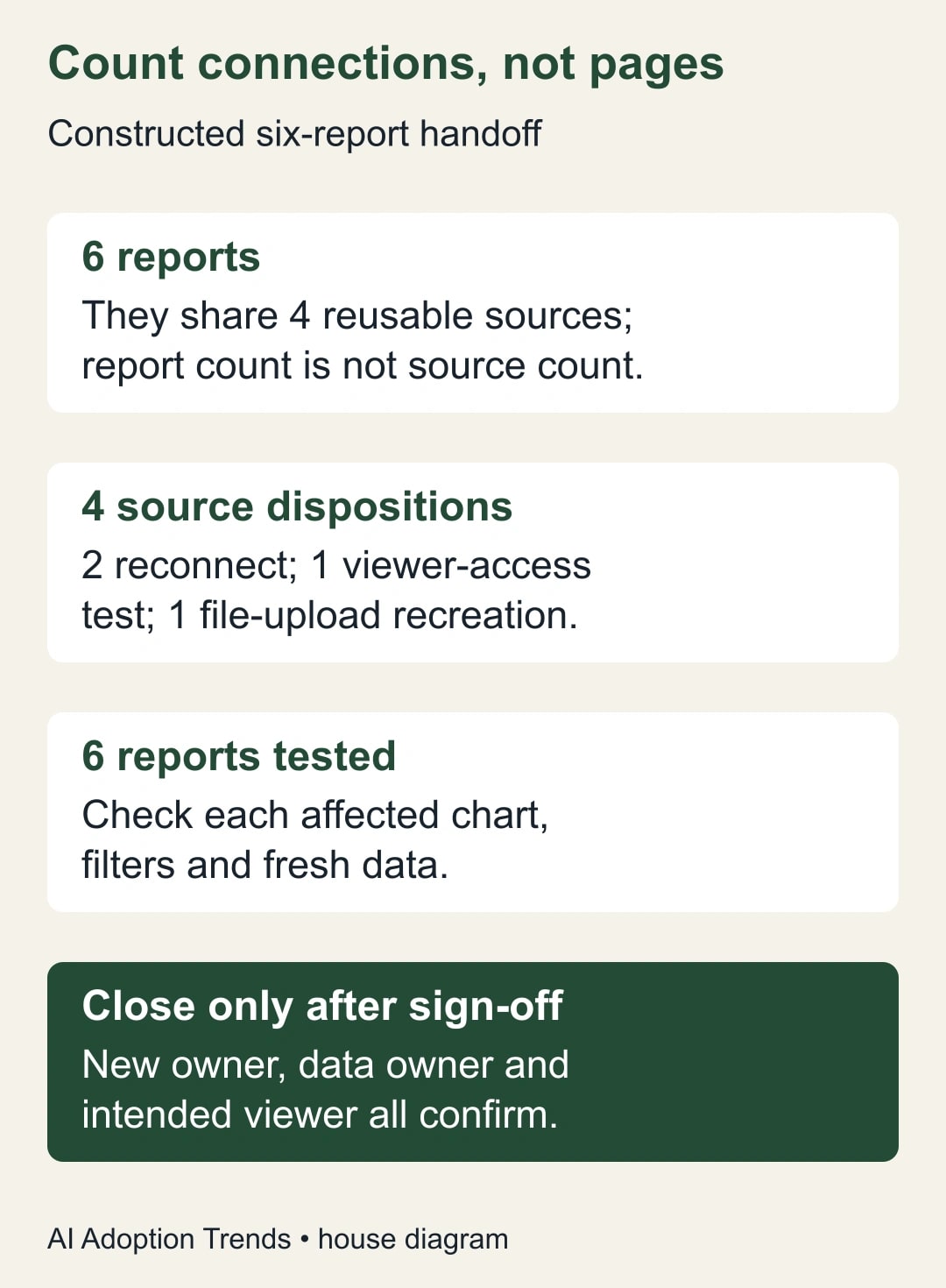
Consider a constructed marketing operations handoff. Six reports use four reusable data sources. Two sources use the departing employee's authorization and need an approved replacement connection. A third uses viewer-based access and needs an audience test. A fourth is a file-upload source that the new owner must recreate under the documented limitation. These are invented operating details, not a Google customer case.
Counting six report transfers would miss the actual workload. The four sources have four dispositions: two reconnections, one viewer-access test and one recreation. The reports still need testing afterward, because a source may feed several reports and different charts may depend on different fields. Source-level success does not eliminate report-level acceptance.
Suppose five reports pass their first checks, but the sixth shows a different campaign total. Inspection finds that the recreated upload used the current month's file while the original report expected a year-to-date dataset. The rows are valid, but the scope is wrong. The maintainer restores the intended source scope and repeats the affected checks before the owner accepts the handoff.
The final record lists all six reports, all four source dispositions and the viewers who tested them. It also identifies the person responsible for next month's file update. Without that last owner, the handoff might work today and fail at the next reporting cycle. Continuity includes the recurring work that keeps the data current.
Reuse this handoff register
Create one source row and link each dependent report to it. Avoid duplicating credential details across report documents. The register should explain responsibility and evidence without containing passwords, access tokens or private keys.
- Report: name, link, business decision, owner and next required delivery date.
- Source: connector, reusable or embedded status, source identifier and dependent reports.
- Ownership: current owner, intended owner, eligibility check and transfer confirmation.
- Authorization: credential mode, responsible identity, approved permissions and reconnection evidence where required.
- Data check: period, expected totals, filters, field definitions and freshness test.
- Audience check: intended viewer, expected access boundary and observed result.
- Maintenance: refresh or upload owner, connector renewal owner and escalation contact.
- Closure: unresolved issues, fallback location, business sign-off and coordinated offboarding status.
Use clear states such as inventoried, transferred, reconnected, tested and accepted. Do not collapse them into a single “done” checkbox. An asset can be transferred and still fail the audience check; a source can connect successfully and still point to the wrong dataset. Separate states make the remaining work visible.
What to do when the handoff breaks
If the new owner cannot transfer or reconnect a source, verify account type, domain rules and connector permissions. Ask the administrator to determine the supported route. Do not repeatedly grant broader roles without a reason. Record the minimum missing capability so the fix can be reviewed and later maintained.
If an account is already deleted, use Google's current administrator recovery guidance immediately. The ownership documentation describes a limited recovery window for no-cost assets. Do not promise that a report can always be recovered or wait for the next reporting cycle to investigate. Preserve the known report links and contact the authorized administrator with the facts.
If reconnecting breaks fields or charts, keep the affected report out of decision use until the discrepancy is understood. Use the approved fallback, clearly labeled with its date and limitations. Repair one dependency at a time and compare with the acceptance sheet. Avoid changing credentials, field definitions and business formulas together; that makes the cause harder to isolate.
If a viewer gains access to information they should not see, treat it as an access incident. Restrict the affected path through the normal process and notify the data owner. Restore the intended boundary before calling the handoff complete. An availability target should never turn an access error into a broader disclosure.
Close the handoff after the next refresh
Agree on a final check at the next meaningful refresh or delivery, not just immediately after the transfer. Confirm that the replacement maintainer can perform routine changes and explain how to recover from a failed refresh. The old owner should not remain the informal support path after their responsibility ends.
Measure reports accepted out of reports in scope, unresolved dependencies, time spent repairing failures and on-time delivery after the transition. Keep those measures separate from a claim that a platform migration is needed. Most handoffs begin with an ownership problem; buying a new reporting tool before mapping it can reproduce the same dependency elsewhere.
Your next action is to identify one business-critical report and list every source behind it. If the map reveals that the current connector cannot support the reporting job, use the reporting-tool alternatives guide to evaluate that distinct decision. First make the current dependency visible; then decide whether it is worth changing.
Weekly Newsletter
AI Adoption Weekly
New research, field guides, training studies, and tool decisions for operators.
No spam. Unsubscribe anytime.
Related Comparisons
Calculator
AI seat cost calculator
List price × headcount. You enter the hours and the operating assumptions.