
Fix Power Query Pivot Errors Without Choosing the Wrong Value
Find duplicate pivot intersections, choose a business rule for competing values and reconcile a supplier comparison before refreshing it.
Published October 27, 2026

When Power Query’s Pivot Column operation fails with Don’t aggregate, inspect the source rows that would occupy the same output cell. The repair is usually to define which value belongs there, or to choose an aggregation that matches the business meaning. Selecting Sum, Minimum or Maximum just to clear the error can produce a neat comparison containing the wrong answer.
Microsoft explains that the non-aggregating option expects one value at each row-and-column intersection. Several source rows competing for that intersection can produce an error. Read Microsoft’s Pivot Column guidance. The practical question is why those rows compete: a copied export, a revised quote and separate billable items require different decisions.
This guide uses a supplier comparison to show how to investigate the conflict, preserve the evidence and release a matrix that means what its reader thinks it means. The example is constructed. It is not a claim about a customer’s savings or a private test of a particular workbook.
Establish what one cell means
This is for procurement, finance and operations owners who turn a long list into a side-by-side comparison. You need the Power Query editor, access to the source records, permission to work on a copy and a business owner who can decide which version or aggregation is valid. Keep the original input available throughout the repair.
Skip this procedure if your problem is a PivotTable that excludes newly added rows. That is a different source-range question. Likewise, a merge that multiplies rows before the pivot needs investigation at the join step. The pivot may be where the problem becomes visible without being where it was introduced.
Write a sentence describing a single intended cell. For example: “The Acme setup cell contains the approved one-time setup price for the selected service package, currency and quote round.” Each qualification matters. Without the package and quote round, two valid quotes may be mistaken for duplicates. Without currency, arithmetic may be meaningless.
Now identify the row key, the column key and the value. In the simplest comparison, Supplier is the row key, Charge type becomes the column headings, and Amount fills the cells. A key is the field, or combination of fields, used to identify the thing being compared. Add package or currency to that key when the business decision requires separate rows.
The repair does not require buying a new reporting platform. Its cost is source investigation, query editing and acceptance review in the tools you already use. Budget the owner’s time as well as the analyst’s. An analyst cannot safely infer whether the newest quote was approved simply because it has the latest date.
Preserve a narrow, inspectable source
Make a working copy of the query or workbook. Record the source file, refresh date and current output before changing the transformation. Keep source identifiers and approval evidence in a staging or audit view, even if those columns should not appear in the final matrix.
Find the step immediately before the pivot. Inspect a failing supplier-and-charge combination there. If the original export had one row but this step has two, trace the earlier transformations. A previous merge, append or repeated file import may be responsible. Do not delete records at the end of the query before understanding that history.
Reduce the investigation to a small example you can read in full. Keep all rows for one affected supplier and one unaffected supplier. Include the fields that distinguish quote versions. This gives you a comparison case and makes it easier to see whether the repair changes records that were already correct.
Use a separate diagnostic query to group by the intended row keys plus the pivoted column, and count the rows in each group. Microsoft documents grouping by multiple fields and operations such as row counts and retaining all rows. Use Group By to inspect the source combinations. Review groups with more than one row before choosing what to do with them.
Keep the grouping diagnostic attached to the definition of the intended cell. If the final matrix is separated by Supplier, Package and Currency, count combinations of those fields plus Charge type. Grouping only by Supplier and Charge type would flag different packages as conflicts even when they belong in different output rows.
Three conflicts that look similar
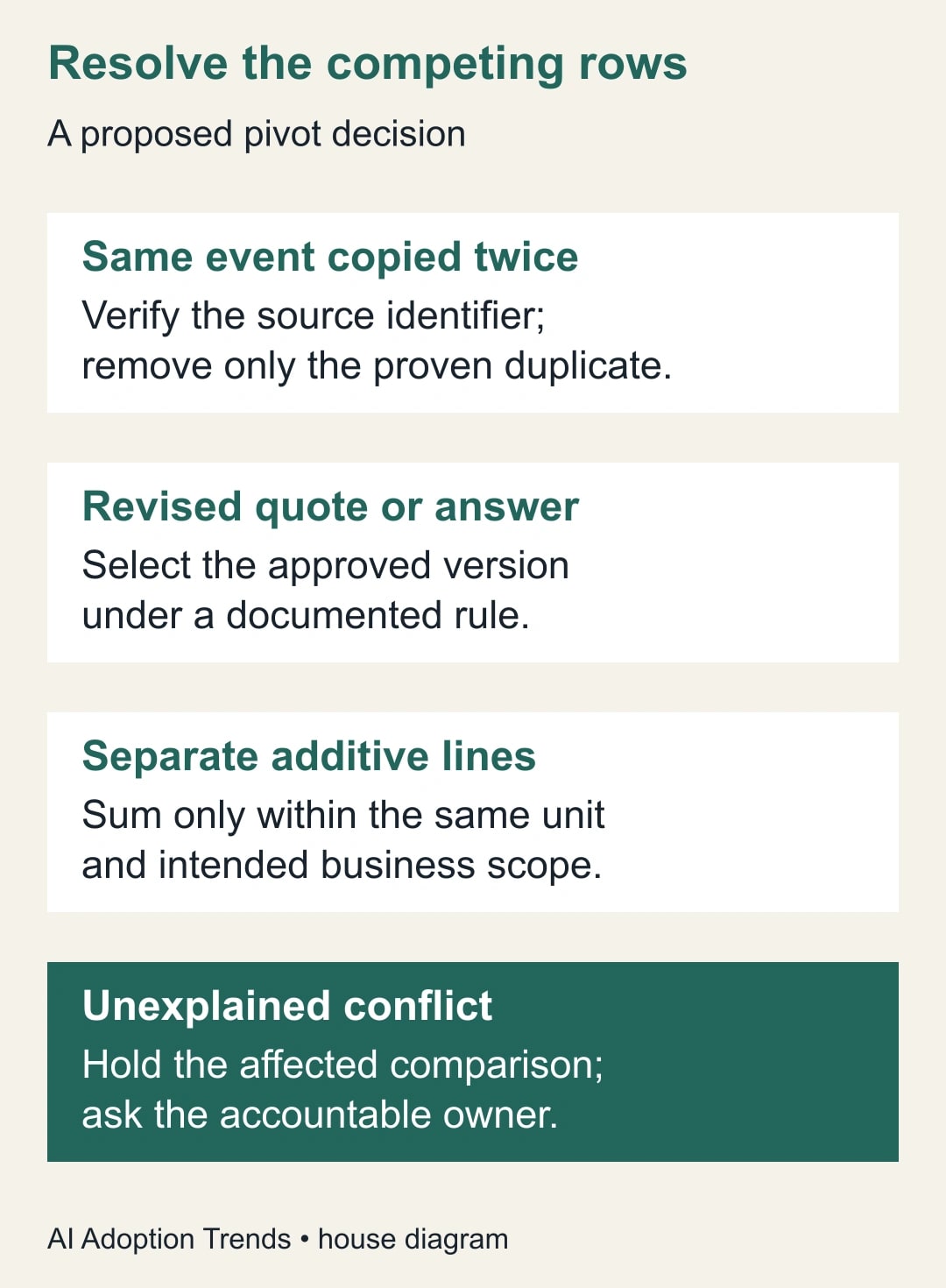
A duplicate export is the same business record included more than once. The evidence should be a stable source identifier or an equivalent traceable match. Two rows with the same supplier and amount are not enough: a supplier can legitimately charge the same amount for two different services.
A revised quote is a different version of the offer. Both source records may be valid historical evidence, but only one may belong in the approved comparison. The selection rule might be the approved revision for the current quote round. It should not silently become “the lowest number,” “the last row” or “whatever Power Query happens to retain.”
Separate additive lines are different charges that the reader intends to total. Two delivery charges for two approved shipments can belong in an aggregate, provided their units, currency and reporting scope agree. A one-time setup price and a monthly subscription do not become a useful total simply because both are numeric.
There is also an unresolved category. If the source cannot explain why the rows differ, hold the affected comparison and ask the owner. A visible exception is more useful than an apparently complete matrix whose selection rule nobody can defend.
Worked example: a revised setup quote
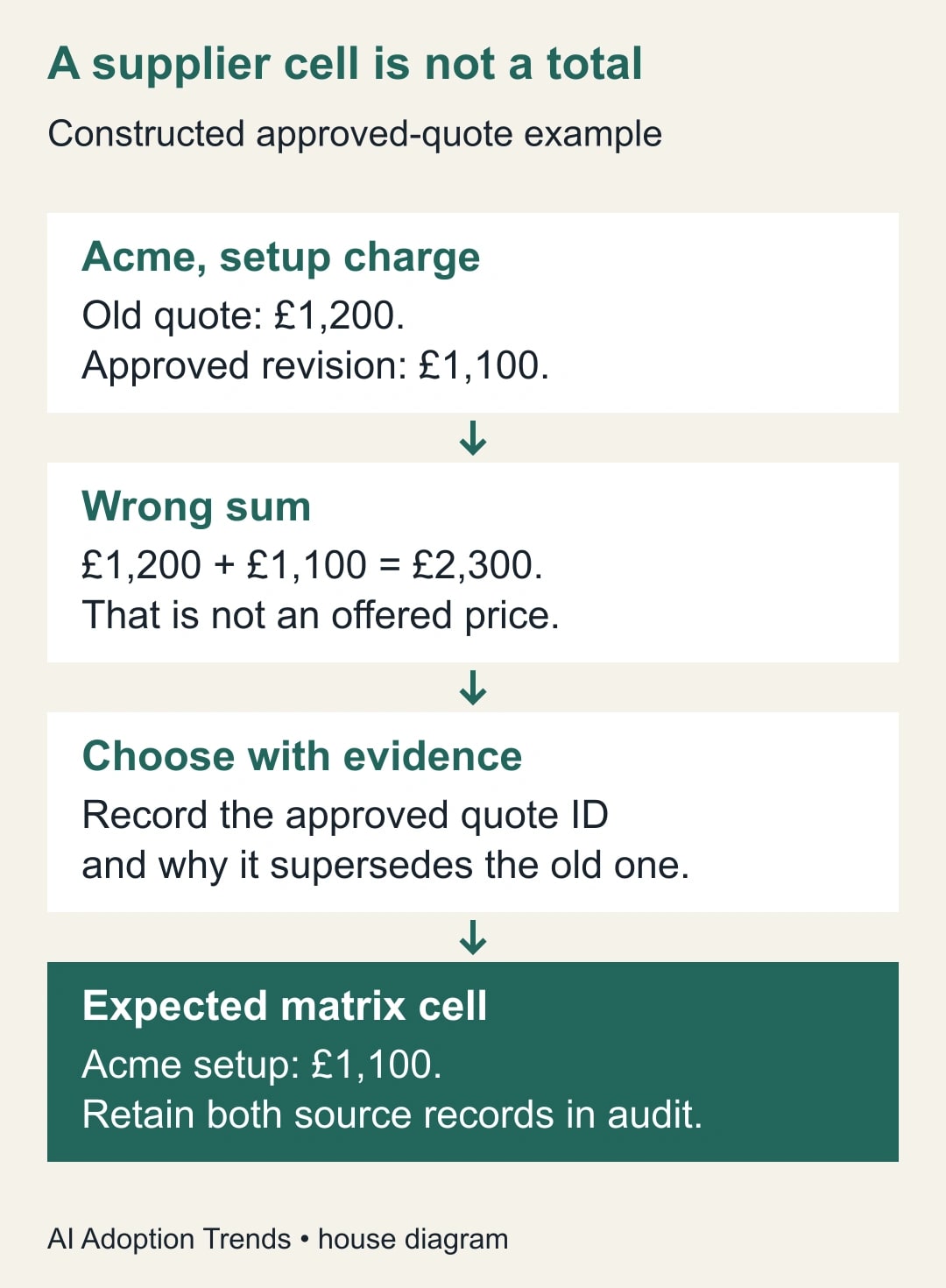
Build a small source with the fields Supplier, Charge type, Amount, Quote ID and Decision. Use one currency, pounds sterling. Acme has a setup quote of £1,200 under Q-101, marked superseded, and an approved revision of £1,100 under Q-102. It also has an approved monthly charge of £300 under Q-102. Beacon has an approved setup charge of £900 and monthly charge of £350 under Q-201.
There are five source rows. Four approved rows belong in the selected comparison. The superseded setup row remains in the audit view but does not compete for the approved Acme setup cell. The intended output has two suppliers and two charge columns: Acme £1,100 setup and £300 monthly; Beacon £900 setup and £350 monthly.
If you discard Quote ID and Decision too early, the Acme setup intersection contains both £1,200 and £1,100. Don’t aggregate has no single value to place there. Switching to Sum produces £2,300, which is not an offered setup price. Switching to Minimum happens to return £1,100 in this example, but it does not encode approval.
To see why Minimum is the wrong rule, change the constructed approved revision to £1,250 while leaving the superseded quote at £1,200. The correct comparison should now use £1,250. A minimum rule would retain the superseded offer and understate the approved setup cost by £50. The error is a selection policy, not a rounding issue.
Filter the working comparison to the approved decision for the chosen quote round. Confirm the four intended rows remain. Then select only the fields needed for this matrix: Supplier, Charge type and Amount, assuming package and currency have already been fixed for this deliberately narrow example. Preserve the richer records separately for traceability.
Pivot Charge type, choose Amount as the value field, and use Don’t aggregate because the accepted input now has one value per intended intersection. Microsoft describes this option in the pivot dialog’s advanced settings. Check the Pivot Column steps. Inspect the resulting cells against the approved source rows rather than accepting a refresh merely because it no longer errors.
Avoid the extra-column trap
Columns left in the input can change what identifies an output row. If you leave a different Quote ID or timestamp on every record, the pivot may split one supplier across several rows. That can make an error disappear while failing to create the comparison you intended.
Microsoft’s Table.Pivot examples show how attribute values become headings and how an optional aggregation resolves multiple values. Review the Table.Pivot examples. Use them to understand the transformation, then apply your own explicit cell definition. A function example using a maximum does not mean the maximum is the correct purchasing decision.
Before pivoting, write down which columns are intended to remain as row identifiers. Remove irrelevant identifiers from the comparison input only after they have served their audit and selection purpose. Do not remove the evidence from the preserved source. This distinction lets you build a clean matrix without losing the ability to explain it.
After pivoting, count output rows and inspect the keys. In the constructed example, two suppliers should produce two comparison rows. Five fragmented rows would fail acceptance even if every visible value were individually correct. A reader should not have to assemble several rows mentally to discover a supplier’s offer.
Decide how to treat missing answers
A missing value and a zero are different statements. A zero setup fee is an offered price. A blank setup cell may mean the supplier did not quote, the row was excluded by mistake, or the approval decision is unresolved. Do not fill every missing cell with zero to make the matrix easier to calculate.
Create a companion completeness check listing the expected supplier-and-charge combinations. For this example there are four expected intersections. Match the approved source against that list and flag any missing combination. The resulting exception should name the supplier, the missing charge type, the person who must resolve it and the effect on the decision.
If a supplier genuinely does not offer a service, record that meaning explicitly in the decision material rather than pretending it is a free option. Keep numeric comparisons separate from the explanation. This is especially important when the matrix feeds an AI summary that might otherwise treat an empty or zero value as a recommendation.
Do not total setup and monthly charges without a stated comparison period. In a constructed first-year comparison with twelve full monthly charges, Acme would be £1,100 + 12 × £300 = £4,700, and Beacon £900 + 12 × £350 = £5,100. These are calculations under a stated assumption, excluding taxes, usage and other charges. They are not the sum of every number in the source export.
A reusable release checklist
Keep this checklist beside the query, with a link to the preserved input and approval decision. It is intended to make the report repeatable when the next quote round arrives.
- Cell definition: state the supplier, package, period, currency and charge meaning.
- Source trace: retain stable record identifiers and the original input snapshot.
- Conflict count: inspect every combination with multiple source rows.
- Resolution: document duplicate removal, approved-version selection, valid aggregation or an unresolved hold.
- Input selection: keep only intended row keys, pivot headings and values in the final pivot input.
- Expected shape: confirm the supplier count and the required charge columns.
- Cell reconciliation: compare each released cell with its approved source record or documented calculation.
- Missing answers: distinguish an absent quote, a true zero and a service not offered.
- Refresh owner: name who checks new conflicts and who can approve a changed rule.
Test the next refresh with an additional revision and an unexpected charge type in a safe copy. The purpose is to see whether the process exposes a changed business situation. A query that works only for the initial five rows is not ready for a recurring purchasing decision.
Know when to stop and ask for a decision
Hold the comparison if there are two approved revisions for the same intended cell, a currency mismatch, an unexplained repeated identifier or a source change that creates new required columns. These are business-data problems. More elaborate query steps cannot establish which offer the supplier actually intends you to accept.
If the matrix is already in circulation, identify the affected suppliers and cells before sending a correction. Preserve the prior version so the buyer can understand whether a ranking or decision changed. Do not silently replace £2,300 with £1,100 and leave the people using the comparison unaware that its meaning has changed.
Measure the repair with counts and traceability: unresolved intersections, missing expected answers, unexplained output rows and cells that fail reconciliation. Refresh duration can be useful, but it is secondary to whether the approved values survived the transformation. A fast report that chooses the wrong quote creates more work downstream.
Start with one failing cell and list every source row that could fill it. Once the business rule is clear, encode it before the pivot and retain the evidence. If the competing rows first appeared after a merge, use the merge-duplicate diagnostic to repair that earlier step instead of masking it with an aggregation.
Weekly Newsletter
AI Adoption Weekly
New research, field guides, training studies, and tool decisions for operators.
No spam. Unsubscribe anytime.
Related Comparisons
Calculator
AI seat cost calculator
List price × headcount. You enter the hours and the operating assumptions.