
Check Recurring Meetings Across Three Google Calendar Time Zones
Use Google Calendar’s three-zone view to check recurring meetings around daylight-saving changes and agree whose working hours take priority.
Published October 27, 2026
Choose whose local time anchors a recurring meeting before you change a calendar setting. Then inspect dated occurrences in all three locations around daylight-saving transitions. Google Calendar’s additional time-zone columns make that comparison easier; they do not decide whose morning or evening the meeting should occupy.
Google announced support for three time zones on Calendar’s web grid in September 2026. Its October 1 rollout update expected Scheduled Release completion by October 22. The feature covers primary, secondary and tertiary zones, with labels, and applies to day, week and custom multi-day views. Check your own account for availability. Read Google’s three-time-zone announcement.
That is useful timing for teams coordinating across regions in late October. A recurring meeting can remain at 9 a.m. for its organizer while moving by an hour for someone else. The right response is to inspect the particular dates and agree on the working-hours tradeoff, not to assume the invitation is broken.
Decide what should stay fixed
This guide is for a coordinator or operations lead arranging regular handoffs between regions. It is especially useful when a meeting involves three offices, a supplier and a customer, or a rotating group of remote colleagues. You need editing access to the event or a cooperative event owner, the participants’ actual locations, and agreement about acceptable working hours.
Skip the recurring-series repair if your problem is simply two duplicate invitations. First find which event is authoritative and who owns it. Similarly, a participant traveling for one week may need a one-occurrence accommodation rather than a new rule for the whole series. Diagnose the business situation before moving everyone’s schedule.
There are at least three reasonable anchors. A customer-facing call may remain fixed in the customer’s local time. An operations handoff may remain fixed to the outgoing shift. A global review may deliberately rotate to distribute inconvenient hours. None of these decisions follows automatically from the organizer’s location.
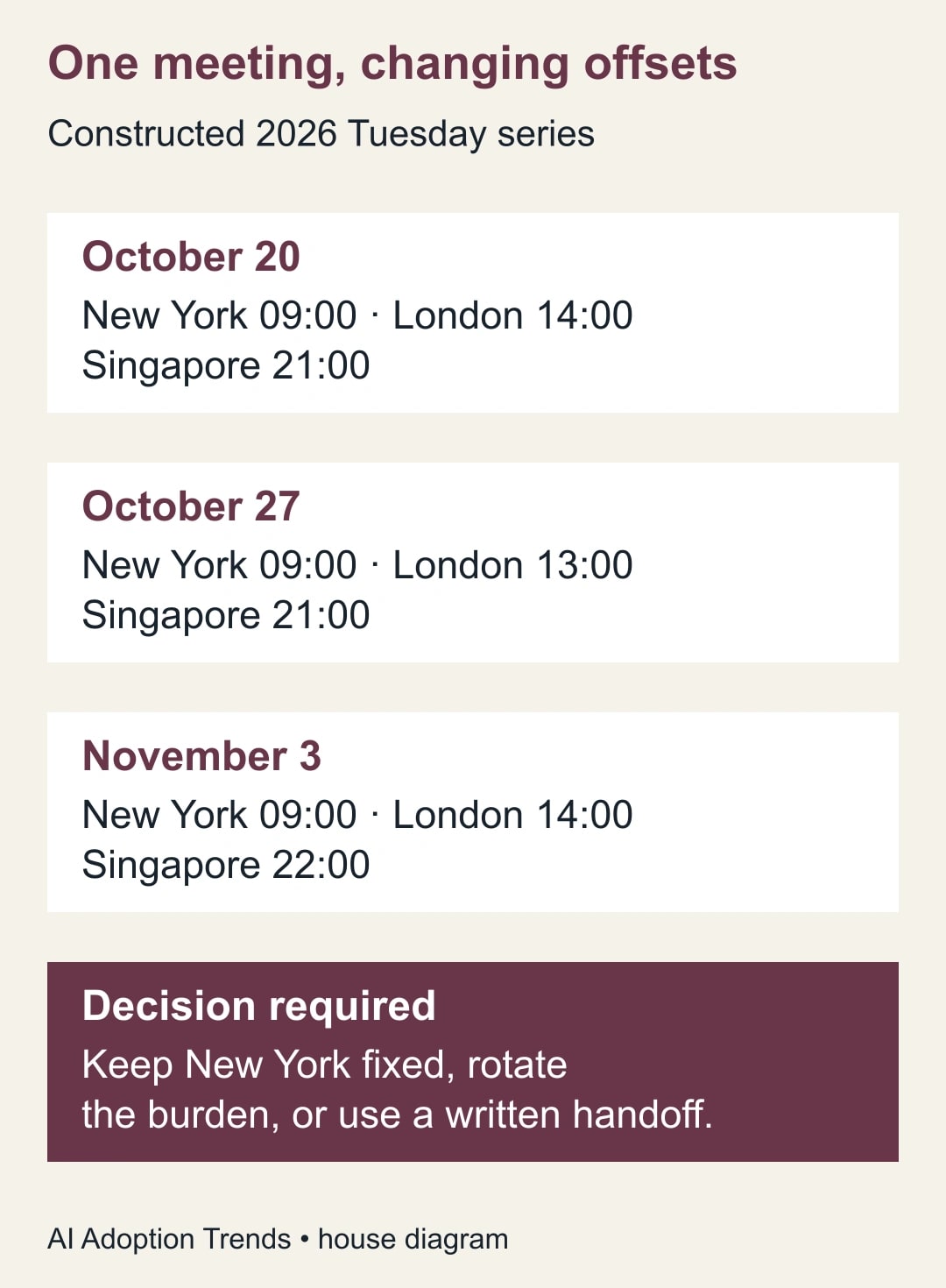
Write the chosen rule in plain language: “Tuesday at 9 a.m. New York time, with the other locations checked around clock changes.” This is more precise than “9 EST” when the team actually means local New York time throughout the year. Named regional zones account for seasonal changes; fixed offsets describe an offset, not a year-round working-hours policy.
The main cost is coordination. Allow time for the event owner to inspect the series and for a representative in each region to confirm it. If an assistant helps propose times, a person must still make the tradeoff about attendance and working hours. Do not claim that adding a third column saves a measured number of hours without observing your own process.
Set up a view that supports the decision
In Calendar on the web, open Settings and the Time zone section. Choose the primary zone and enable the secondary and tertiary displays where available. Select named locations and add short, unmistakable labels. Google’s current help page explains these controls and notes that events appear in invitees’ local time zones. Set up Calendar’s additional zones.
Use labels that identify the actual office or team. “Home,” “Away” and “Other” are difficult to interpret when another coordinator reviews your screen. “New York,” “London” and “Singapore” are meaningful without knowing where the person who configured the view happens to be sitting.
Open a week that includes a relevant transition and locate the meeting. Compare its position against all three labels. Then move to a week before and a week after the transition period. A view of today alone cannot establish what a recurring series will do next month.
Treat these columns as a display aid. Inspect the event’s own date, time and time-zone settings as well. Changing what your calendar displays is not a substitute for checking what the invitation represents. For software-created events, the implementer should inspect the event data rather than relying only on the creator’s default calendar setting.
Google’s Calendar event documentation explains that recurring events require a time zone to expand their occurrences. That is why an integration should preserve the intended regional zone when it creates a series. If an automated scheduling workflow produces unexpected occurrences, give its owner the series and the affected dates to investigate. Read Google’s event and time-zone model.
A worked example: New York, London and Singapore
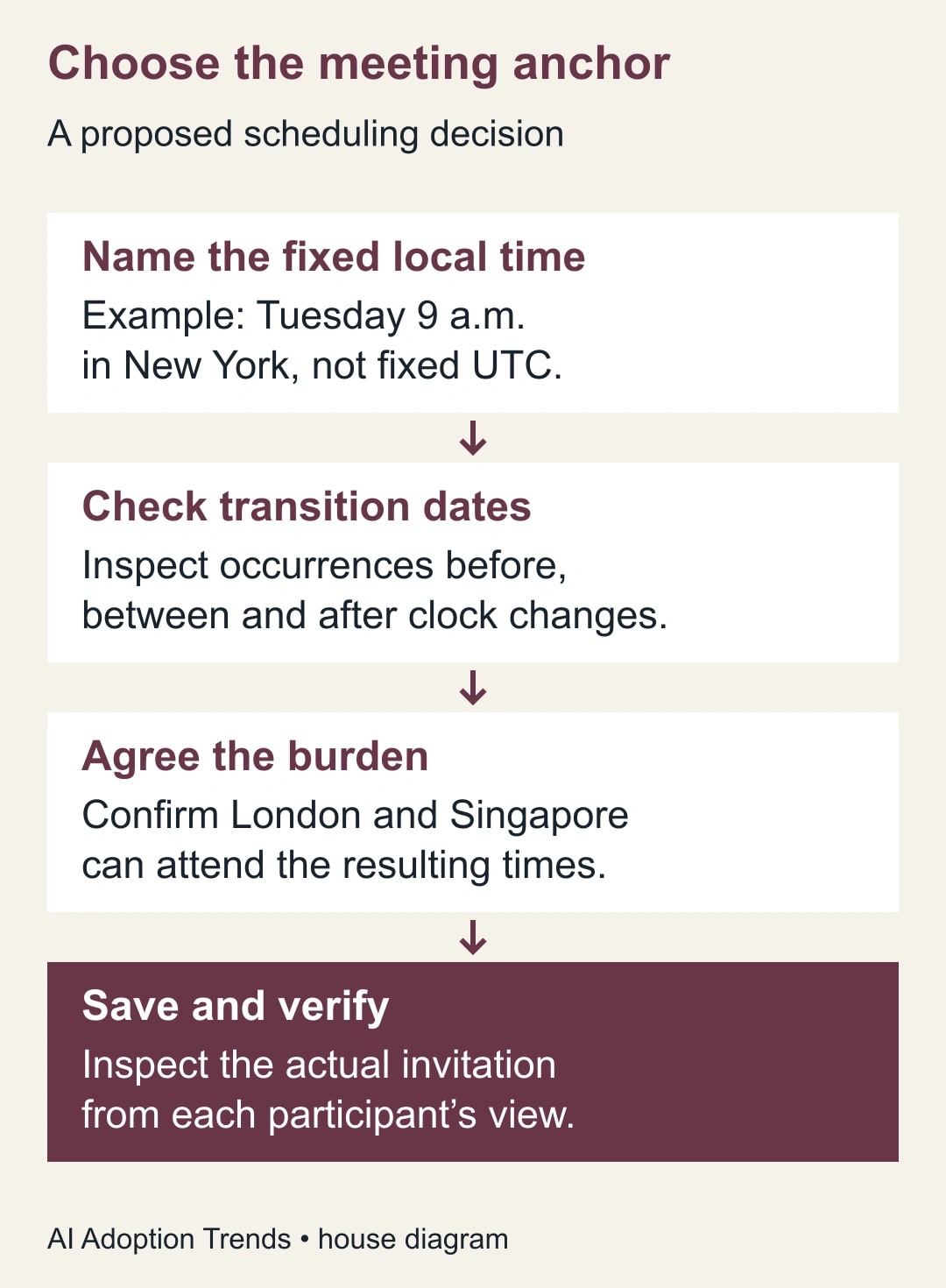
Consider a constructed weekly supplier review anchored at Tuesday 9 a.m. in New York. The participants are in New York, London and Singapore. The meeting lasts 30 minutes. These are calculated examples using the named regional zones America/New_York, Europe/London and Asia/Singapore, not evidence from a private calendar test.
On October 20, 2026, the meeting is at 09:00 in New York, 14:00 in London and 21:00 in Singapore. On October 27 it remains 09:00 in New York and 21:00 in Singapore, but London sees 13:00. On November 3 it is 09:00 in New York, 14:00 in London and 22:00 in Singapore.
The three dates reveal two different burdens. London’s lunch-hour boundary changes during the intervening week. Singapore’s evening becomes an hour later after the New York offset changes. A coordinator who checks only the London column might conclude that the series returns to normal, while missing the later finish for Singapore.
For this example, suppose the Singapore participant has agreed to end live meetings by 21:30. The October 20 and October 27 occurrences fit that agreed boundary exactly. The November 3 occurrence ends at 22:30 and fails it. The calendar can represent the event correctly while the arrangement remains unacceptable to the team.
The owner now has a decision. Moving the November 3 occurrence to 08:00 New York would make it 13:00 London and 21:00 Singapore. That might work if the New York participant agrees to the earlier start. If not, the team could replace that occurrence with a written update and reserve a shorter live call for decisions that cannot wait.
Another option is to rotate the inconvenience over a defined period. Do not quietly move a customer’s standing appointment to make an internal rota more balanced. Identify which commitments are fixed and which participants have discretion. The purpose of the three-zone view is to expose the choice, not to make the choice look costless.
Build a dated acceptance worksheet
Create a small worksheet before editing a long-running series. Use one row for each occurrence you need to inspect. Include the date, anchor location, local start and finish in every participating region, and a pass or fail against the agreed working-hours boundary.
For the constructed example, write three rows for October 20, October 27 and November 3. Mark the final Singapore occurrence as requiring a decision. Add a column for the proposed resolution and another for participant confirmation. This prevents a proposed time from being mistaken for an accepted one.
Here is a reusable checklist for the event owner. It works whether the event is created manually or through an approved scheduling tool.
- Identify the authoritative invitation and the person allowed to change it.
- State the anchor as a named region and local time, or explicitly choose a fixed UTC rule.
- Record each participant’s current location and agreed start and finish boundaries.
- Check an occurrence before, during and after relevant offset changes.
- Include the meeting duration, preparation window and handoff deadline.
- Decide whether a repair affects one occurrence, future occurrences or the entire series.
- Verify the saved invitation with a representative from every affected region.
- Record the next review date and the owner who will check it.
UTC means Coordinated Universal Time, a shared time reference. It is useful for comparing instants, but a fixed UTC meeting can move in local time when a region changes its offset. Use it deliberately when the work calls for it. Do not switch to UTC merely because the notation looks more technical or less ambiguous.
Make one controlled change
Before editing, record the current event and the agreed change. If the event has exceptions, identify them explicitly. A one-off supplier visit, a canceled occurrence and a rescheduled holiday meeting may need different treatment from the regular pattern. Do not assume that applying a broad series edit will preserve every special arrangement as intended.
Use the scope offered by the Calendar interface carefully and read it before saving. Check the selected date immediately after the change, then inspect a later occurrence. Ask a representative in the other regions to confirm the local start and finish they actually see. A screenshot of the organizer’s own view is insufficient when the concern is another participant’s working day.
Keep a short change note in the normal coordination channel: which occurrence or series changed, why, and what each region should expect. The note should match the invitation, not become a competing schedule. If the two disagree, resolve the event first and issue a corrected note.
Do not send a second invitation as an improvised repair unless you also deal with the original. Two plausible events create a different failure: participants may accept different versions. A useful acceptance test includes checking that the authoritative invitation is clear and that any replacement has been explained.
Where AI scheduling assistance helps
An assistant can organize the constraints, list dates to inspect and draft the change note. Give it named regions, specific dates, duration and the people whose working hours matter. Ask for proposed options and an explicit explanation of who takes the inconvenient hour. Treat its conversion as something to verify against the calendar, especially near an offset transition.
A reusable request is: “Prepare options for this recurring meeting using the listed dates, named time zones and working-hours boundaries. Keep the customer’s local time fixed unless an option is explicitly labeled as requiring their approval. Show local start and finish for each region. Flag conflicts and do not send or edit invitations.” Replace the constraints with your actual worksheet.
This prompt is an adaptable planning aid, not a guarantee that a model understands every calendar exception. A person should verify the dates and approve any invitation change. If the scheduling tool cannot show which event or occurrence it will edit, stop and make the change through a process the owner can inspect.
The assistant’s role can be smaller still: summarize the choices after the coordinator has verified them. That avoids spending more time checking generated conversions than it would take to inspect the three calendar columns directly. Use automation where it reduces a real repeated burden, not just because a meeting has several locations.
Detect and recover from a bad change
The clearest failure signal is a participant reporting a different local time from the worksheet. Check the exact occurrence, their location setting, the event’s zone and whether they are viewing the authoritative invitation. Avoid diagnosing the problem from a cropped clock display that omits the date or region.
If the organizer’s intended local time shifts unexpectedly across the series, inspect the anchor rule and involve the integration owner if software created it. If only one occurrence differs, examine that occurrence’s exception. If the event is correct but the hour is unacceptable, reopen the scheduling decision instead of repeatedly changing display settings.
When a wrong change has already been sent, correct the invitation and communicate the correction once through the agreed channel. Ask the affected representatives to confirm the revised occurrence. Keep the failed case in the worksheet so the next coordinator understands why that date requires attention.
Stop the automated repair if it starts changing unrelated events, creates duplicates or cannot distinguish one occurrence from the whole series. Continue the immediate coordination manually. The goal is reliable attendance at an agreed hour, not proving that every scheduling action can be automated.
Measure fewer surprises, not more calendar settings
For the next month, track meetings that required a last-minute time correction, participants who missed a call because of an incorrect conversion, and occurrences outside the agreed working-hours boundaries. A zero in the last category is meaningful only if the boundaries were recorded first.
Also record who bears recurring inconvenience. A meeting can be technically correct every week while repeatedly asking one office to work late. The business owner should review whether the live discussion is valuable enough to justify that burden or whether a written handoff would do the job.
Start with the next recurring meeting that spans three regions. Add the three-zone view, check three dated occurrences and write down the anchor rule. If the event’s owner is leaving, resolve calendar ownership before offboarding so the person responsible for future changes can actually make them.
Weekly Newsletter
AI Adoption Weekly
New research, field guides, training studies, and tool decisions for operators.
No spam. Unsubscribe anytime.
Related Comparisons
Calculator
AI seat cost calculator
List price × headcount. You enter the hours and the operating assumptions.