
Prepare Workspace AI Connections for the November OAuth Change
Identify affected Workspace MCP connections, separate mixed-use clients and test a controlled change before Google’s November enforcement dates.
Published October 27, 2026
If your team uses Google Workspace’s remote Model Context Protocol servers, identify the OAuth client, the application identity used for authorization, behind each connection now. Separate clients that serve AI agents from clients that also serve ordinary application features, then test the affected business job. Changing a setting without knowing which connection uses it is a poor way to protect a working process.
Google’s October 12 announcement says unmarked clients will face rejected Workspace MCP requests starting November 11, 2026. Clients still unmarked by November 12 will remain non-agentic; subsequent MCP use requires a new agentic client and an application update. Ordinary non-agent applications using Workspace’s conventional application programming interfaces (REST APIs) are outside this change. For mixed-use clients, Google directs teams to create a separate agent client. These are Google’s announced requirements, checked October 27. Read the Workspace developer release notes.
The dates make this a near-term maintenance task for an existing pilot. They do not make a case for introducing an AI agent into work that does not need one. The useful outcome is a named owner, a correct connection classification and evidence that the intended work still completes.
Who should use this checklist
This guide is for a business systems owner who can bring together the person responsible for the work and the person responsible for its Google Cloud configuration. It is particularly relevant when a small team has connected an assistant to Drive, Calendar or another Workspace service and now depends on that connection for a recurring task.
Skip the configuration work if you only use an ordinary application and have no evidence that it calls the affected Workspace MCP servers. Ask its owner to confirm the connection type first. An application having an AI feature does not establish which interface every feature uses. Equally, a familiar application name does not establish that all of its connections share one client.
Model Context Protocol, or MCP, is a way for an AI application to discover and call tools supplied by another service. OAuth is the authorization mechanism used to connect the application to a user’s account. An OAuth client identifies the application making that connection; Google’s agentic classification marks it as an AI-agent client. These are separate from the business decision about what the assistant should be allowed to do.
Google’s Drive setup guide lists Developer Preview membership, a Cloud project and an MCP host among its prerequisites. It also distinguishes service enablement, consent configuration, requested scopes and client setup. A scope describes requested access. The guide includes the agent checkbox in client creation. Follow the instructions for your actual host; a callback address from another host’s example is not interchangeable. Check the current Drive MCP setup requirements.
The cost to plan here is the work of inventory, configuration, testing and support. This article does not establish a new subscription price or promise free operation. Check the contracts for the assistant and any managed connector you already use. Do not buy a replacement simply because a connection requires maintenance.
Start with the business job, then identify its connection
Write one sentence describing the job that would fail. For example: “Every Tuesday, the operations lead asks the assistant for a source-linked brief from the approved project folder.” This is more useful than “We use Drive with AI,” because it gives the team a result to test.
Next, locate the configuration with the person who owns it. Record the host, Workspace service, Cloud project, client identifier, environment and configuration owner. Keep secrets out of this register. A client identifier is useful for matching records; a copied credential or access token is not useful in a shared planning document.
Add the source of each answer. A configuration screen, a deployment record or a written vendor response is stronger evidence than somebody remembering how the pilot was built. If the connection is vendor-managed, record that explicitly. Your administrator may not control the vendor’s client, and creating a new client in your own project may have no effect on that service.
Include a consequence and a fallback. For the weekly brief, the fallback could be a human reading a saved list of project documents. For a scheduling assistant, it might be a coordinator approving calendar changes manually. The fallback should preserve the work while the connection is repaired; it need not reproduce every convenience of the assistant.
Classify before changing anything
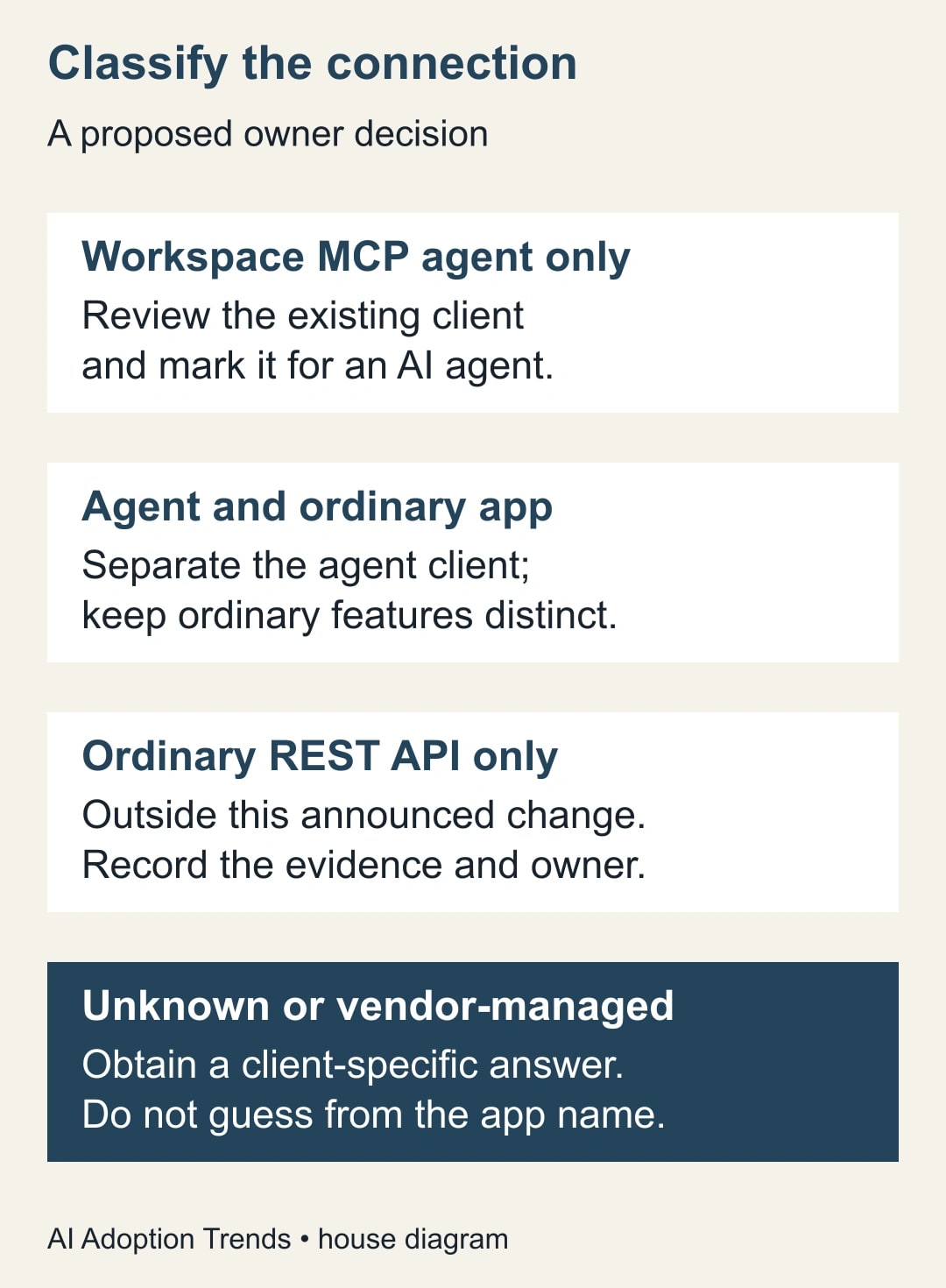
Use four categories in the register: agent-only Workspace MCP, mixed agent and ordinary application use, ordinary REST-only use, and unknown. The first two require an implementation decision. The third requires a recorded reason for being outside scope. The fourth requires an answer from the owner before anyone edits production settings.
For an agent-only connection, the implementer should verify that the client used by the running application is the client being reviewed. A development client with the correct setting tells you little about a production application still using a different identifier. Capture the environment alongside the identifier so the distinction survives a handoff.
For mixed use, make a small dependency list before separating the agent connection. Identify the ordinary features that must continue working, the configuration locations that refer to the current client and the users involved in a controlled test. Do not replace identifiers across an entire application merely because one feature is agentic.
The business owner should approve the intended behavior. The technical owner should choose the host-specific implementation. Neither role should be asked to guess the other’s part. A project manager can decide that the brief must remain read-focused; the implementer must determine whether the selected host and configuration support the required boundary.
A worked example: three connections, two kinds of change
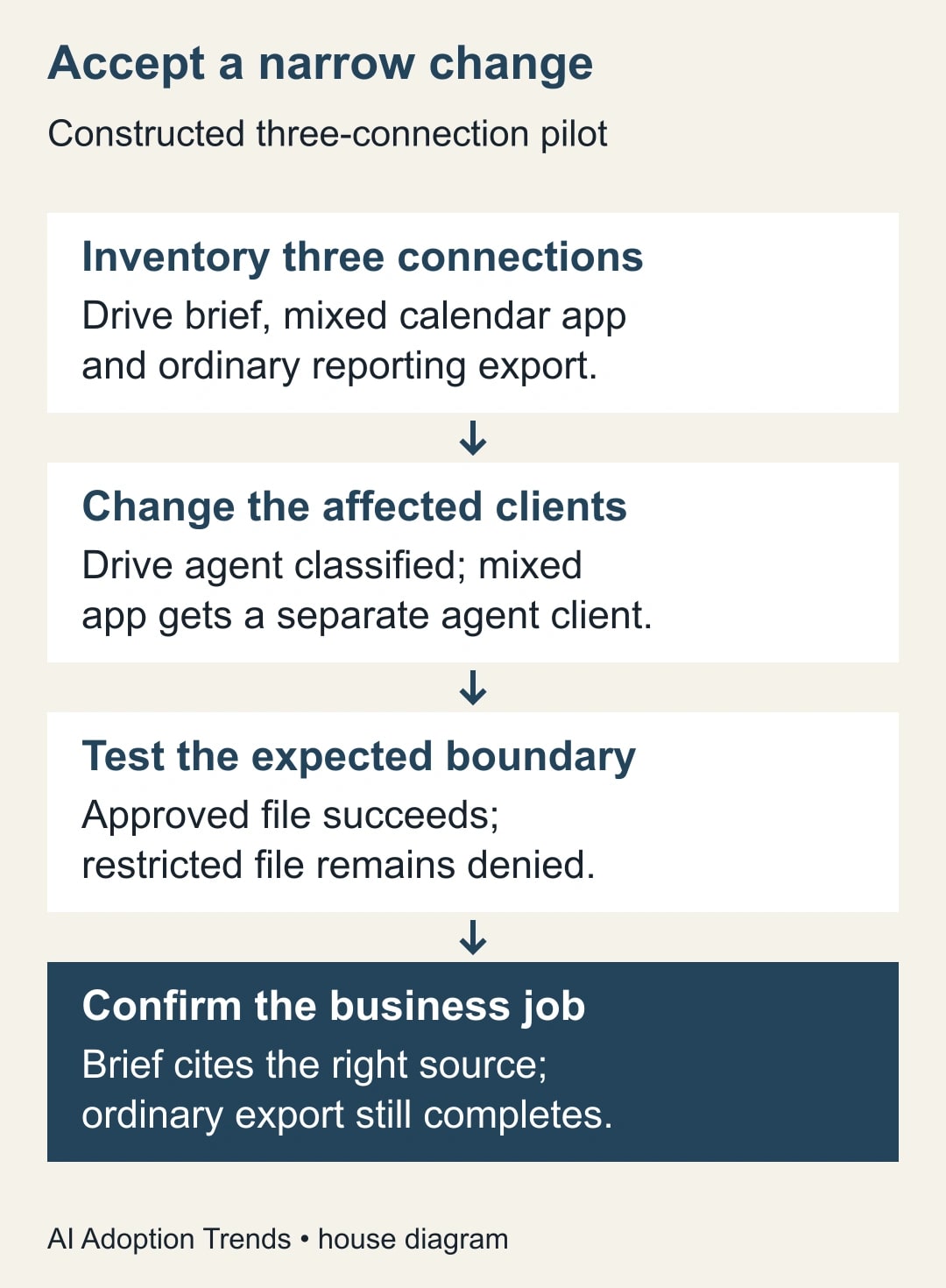
Consider a constructed operations team with three connections. A Drive assistant prepares a project brief. A calendar application has both an AI scheduling feature and ordinary appointment screens. A reporting export uses an ordinary REST integration. These are illustrative systems, not a report of a customer deployment or a private product test.
The register identifies the Drive assistant as agent-only and the calendar application as mixed-use. The export owner confirms the third connection is outside the announced MCP change. The team therefore has two affected connections to address and one ordinary workflow to retain as a regression check. It does not have three interchangeable credentials to replace.
The Drive implementer checks the running client and its classification. The calendar implementer prepares a separate agent client and updates only the agent feature’s configuration. Each change has a named tester and a planned window. The team records the prior configuration in its normal protected configuration system, not in the shared acceptance worksheet.
For the Drive brief, the business owner prepares a harmless test folder containing an approved project note and a deliberately outdated note with a different title. A second test file sits outside the test user’s permission boundary. The acceptance task asks for the current project status with a link to its source. It does not ask the assistant to search every company file.
The expected outcome is specific: the approved note is available, the brief cites the correct source, and the restricted file remains unavailable. If the assistant produces fluent prose from the outdated note, the connection may work while the business task fails. If the restricted file becomes available unexpectedly, stop the rollout and investigate the access configuration.
For the mixed calendar application, test the agent function in a harmless test calendar and test an ordinary appointment workflow separately. The ordinary reporting export also runs once with a known input and expected result. These checks help reveal whether a broadly applied configuration edit damaged a feature that was supposed to remain unchanged.
Use a compact acceptance worksheet
Copy the following fields into a ticket or shared checklist. Complete one record per connection, not one record for the whole company. This keeps the implementation evidence attached to the business work it supports.
- Business job and accountable owner: what must still complete, and who accepts the result?
- Host, Workspace service and environment: which running connection is being changed?
- Client identifier and configuration owner: who can confirm the application actually uses it?
- Classification and evidence: agent-only, mixed-use, ordinary REST-only or unresolved?
- Planned change and fallback: what will change, and how will the work continue if the test fails?
- Test input and expected result: which harmless record proves the intended behavior?
- Boundary check: what must remain unavailable or require approval?
- Result, evidence link and next check: pass, fail or held, with a named follow-up owner?
Avoid a single “connected” checkbox. It collapses several different questions: whether sign-in worked, whether the tool call succeeded, whether it reached the intended data and whether the resulting work was correct. A short evidence link for each acceptance case is easier to review than a long chat transcript with no expected outcome.
Keep the test small enough that a person can inspect all of it. A five-document project folder is a more useful initial acceptance input than thousands of files with uncertain relevance. Expand only after the basic connection and its boundary are understood. This is an editorial testing recommendation, not a provider requirement.
What to do when the test fails
A failed sign-in and a wrong answer are different failures. For a sign-in or authorization failure, preserve the error text, time, environment and client identifier. Have the implementer compare those details with the host’s setup instructions. Repeatedly granting broader access is not a diagnosis.
If sign-in succeeds but the expected tool is unavailable, check the selected service and host configuration. If the tool works but the source is wrong, inspect the task instructions and the source selection. A client classification change should not become an excuse to accept a brief that no longer answers the business question.
If ordinary features stop working after a mixed-use change, use the recorded dependency list to identify which configuration was altered. Revert the unintended change under the team’s normal process, then retest the separation. Do not label the entire maintenance effort complete while the familiar non-agent workflow remains broken.
A fallback may need to be manual. Returning to an older client configuration is not a dependable long-term answer to an enforcement change. The business owner should know which tasks can be done without the agent and how long that arrangement is acceptable. If nobody can perform the fallback, the team has discovered a dependency worth resolving before the deadline.
Give the vendor a question it can answer
For a managed service, send a narrowly framed request: “Does our connection to your product use a Google Workspace remote MCP server? If so, who controls its OAuth client, how will you handle the announced November change, and what should we test in our environment?” Include your account reference through the normal support channel, but no secrets.
Ask the vendor to distinguish a required customer action from work it will perform itself. “We support Google Workspace” is not an answer to the client-specific question. Record the response, its date and the person responsible for checking the service after the change. If the answer remains unclear, keep the item unresolved rather than assuming that silence means readiness.
A vendor assurance is useful evidence of a plan. Your acceptance test is evidence of your own workflow. Keep both. This avoids treating a general product announcement as proof that the particular account, host configuration and permissions used by your team have all been checked.
Measure readiness by completed work
Use the inventory to define the affected connections counted. Count affected connections with verified classification, completed configuration work, passed business tests and a named support owner. Do not count an ordinary REST-only connection as a successful MCP migration merely to improve the percentage.
Record unresolved items separately. In the constructed three-connection example, two affected connections passing their acceptance tests means two of two affected connections are ready. The ordinary export’s successful regression check is additional evidence, not a third migrated agent. This distinction makes the report useful to the person deciding whether the maintenance window can close.
Set a check after the enforcement date for any connection that remains business-critical. Reuse the same small input and expected outcome, so a changed result is visible. Retain ownership after the initial setup; a pilot without a maintenance owner can become a hidden dependency surprisingly quickly.
Your next action is to identify the client behind one real Workspace AI job and fill in its acceptance worksheet. If the bigger uncertainty is which applications can reach your work account, start with the connected-app access audit. Resolve that inventory before expanding the pilot.
Weekly Newsletter
AI Adoption Weekly
New research, field guides, training studies, and tool decisions for operators.
No spam. Unsubscribe anytime.
Related Comparisons
Calculator
AI seat cost calculator
List price × headcount. You enter the hours and the operating assumptions.