
Audit Gemini Connected Apps Before Adding Another Integration
Use Gemini’s Customize hub to inventory connections, check work-account controls and test what still works after access changes. Includes a review worksheet.
Published October 23, 2026
Before adding another app to Gemini, review the connections already attached to the account. Keep a connection when someone can name the work it supports, the information it needs and the actions it may take. Investigate connections without a current owner. Test access changes with harmless new data so an old answer in a chat does not mislead you about what the system can still reach.
Google's new Customize hub makes this a useful time to do that review. The October 21, 2026 announcement brings skills and connected apps into one place. A skill describes how to perform a task; a connection can provide information or actions from another service. Good instructions do not, by themselves, narrow the account permissions behind that service.
This guide is for a small-team operations lead working with the organization's Google Workspace administrator. It proposes a practical inventory and test routine. It does not require a new monitoring product, and it does not claim that every connector offers the same controls. If the team has no Gemini connections, start with a brief approval process for the first one rather than conducting an empty audit.
Find the hub, then identify which account you are reviewing
Google's Customize announcement describes a central place for skills and connected apps across Gemini's web, mobile and desktop experiences. The rollout began October 13 and may take 15 days. App availability varies by region and language. A menu appearing in one employee's account does not establish that the same apps are available or approved for everyone in the company.
The Customize help page distinguishes Discover, Connectors and Skills. Start with Connectors to inspect the connections available to the signed-in user. Check the account address before recording anything. A browser profile can contain both personal and managed work accounts, and a similar-looking screen can hide a very different set of administrative controls.
Record the account type in the inventory: managed work, managed school or personal. For a company review, use the approved work account and involve its administrator. Do not move business content into a personal account to get around a missing connection. A feature that is unavailable under the organization's settings is a question for the owner, not a reason to quietly change the data route.
Google's work-account guidance lists prerequisites including an eligible Workspace edition, administrator-enabled connections and activity settings managed by the administrator. It also says work or school app access is enabled or disabled by the administrator. That matters when following general consumer instructions: an individual user's disconnect control is not a substitute for checking the managed-account policy that actually applies.
Build a register with one row per real connection
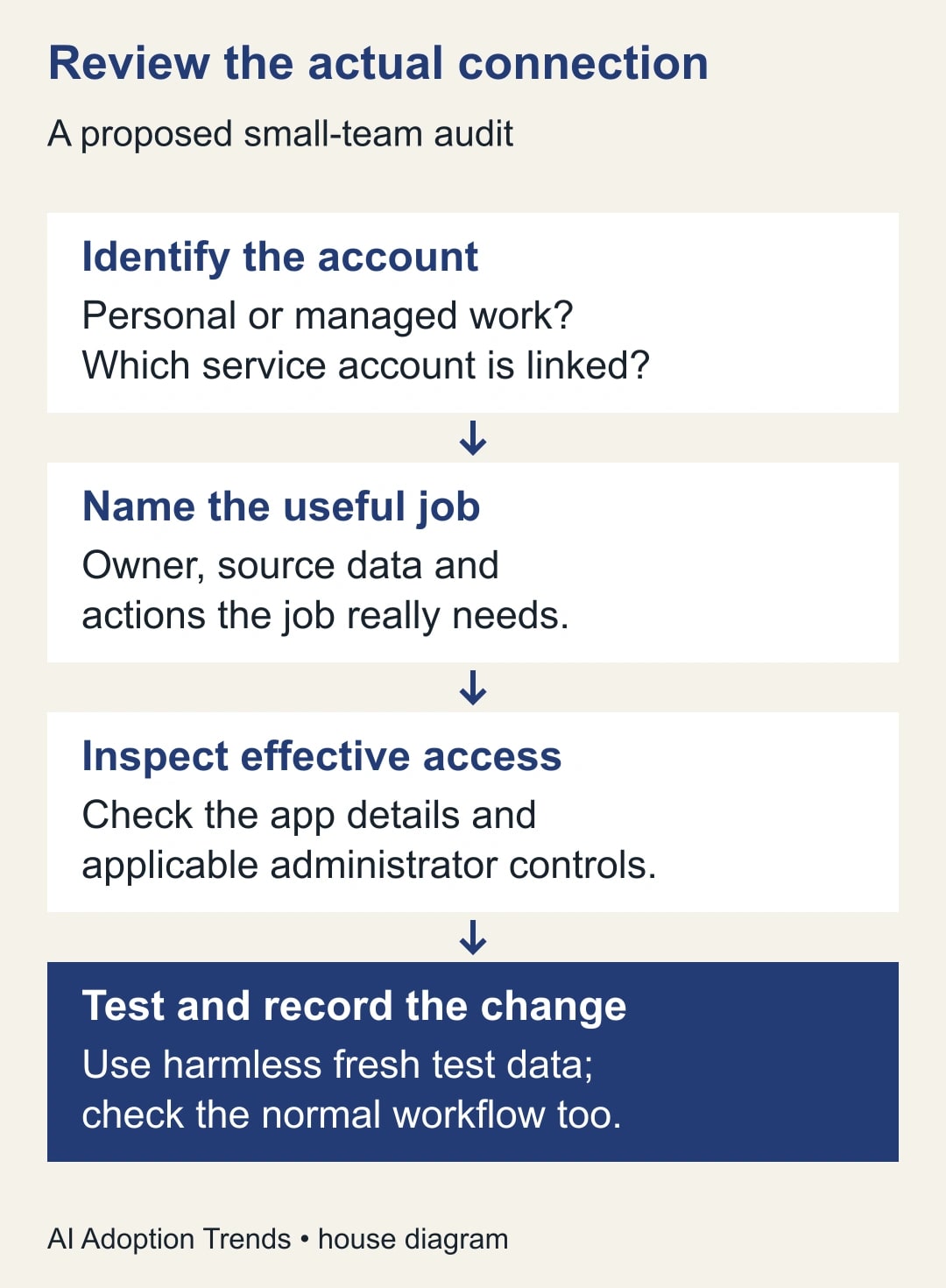
Treat the hub as a starting inventory, then inspect each app's details and its linked service account. A familiar app name is not enough. A sales tool could be connected to a test organization, a personal workspace or the production account. Record the destination a colleague would need to identify the connection without storing passwords, access tokens or customer content in the worksheet.
Use these fields: Gemini account; connected service and workspace; business job; owner; information needed; supported actions; effective permissions; last verified useful use; review decision; change owner; test evidence; next review date. Separate supported actions from effective permissions. The app might advertise the ability to edit records while the linked account has a narrower role, or the opposite might be true.
For each row, write the job as an observable output. Prepare a draft agenda from an approved project folder is more useful than increase productivity. The first statement lets you ask which folder, whose agenda and whether the result should remain a draft. The second can justify almost any access without showing whether the team benefits from it.
Keep the review small enough to finish. Begin with one team and the accounts used for one repeatable process. Agree which person can approve a removal and which person knows the downstream dependencies. Do not disconnect a shared service merely because the reviewer has not used it personally. Ask its owner to demonstrate the current job with non-sensitive test material.
Check what the connection can do, not just what the prompt says
Google's general Connected Apps documentation describes app detail pages containing supported and unsupported actions. It also provides a personal-account route through Customize, Connectors and the app's options to disconnect. The page explicitly sends work-account users to separate guidance. Use the instructions for the account you are reviewing and record any mismatch between the visible controls and the documented route.
Classify the job into four simple action levels: read information, draft an artifact, send something to another person, or change a saved business record. These levels are an operating aid, not a claim about Google's permission names. The connection's actual permission screen and the service account's role remain the evidence for what it can do.
If a weekly briefing only needs to read approved project notes, ask why the proposed service account also needs to modify the project. Where the product offers a narrower role or connection, have the administrator assess it and test the normal job afterward. Where it does not, record the broader access as a decision for the responsible owner. A prompt saying do not edit is useful guidance, but it is not proof that editing is technically unavailable.
Check the destination separately from the source. A tool might retrieve the correct project note and then create an event, task or message in an unintended account. In a trial, name the destination explicitly and use a harmless artifact that cannot notify a real customer or change live work. Confirm the result in the destination application instead of relying only on the assistant's report of success.
Decide what to keep, narrow or remove
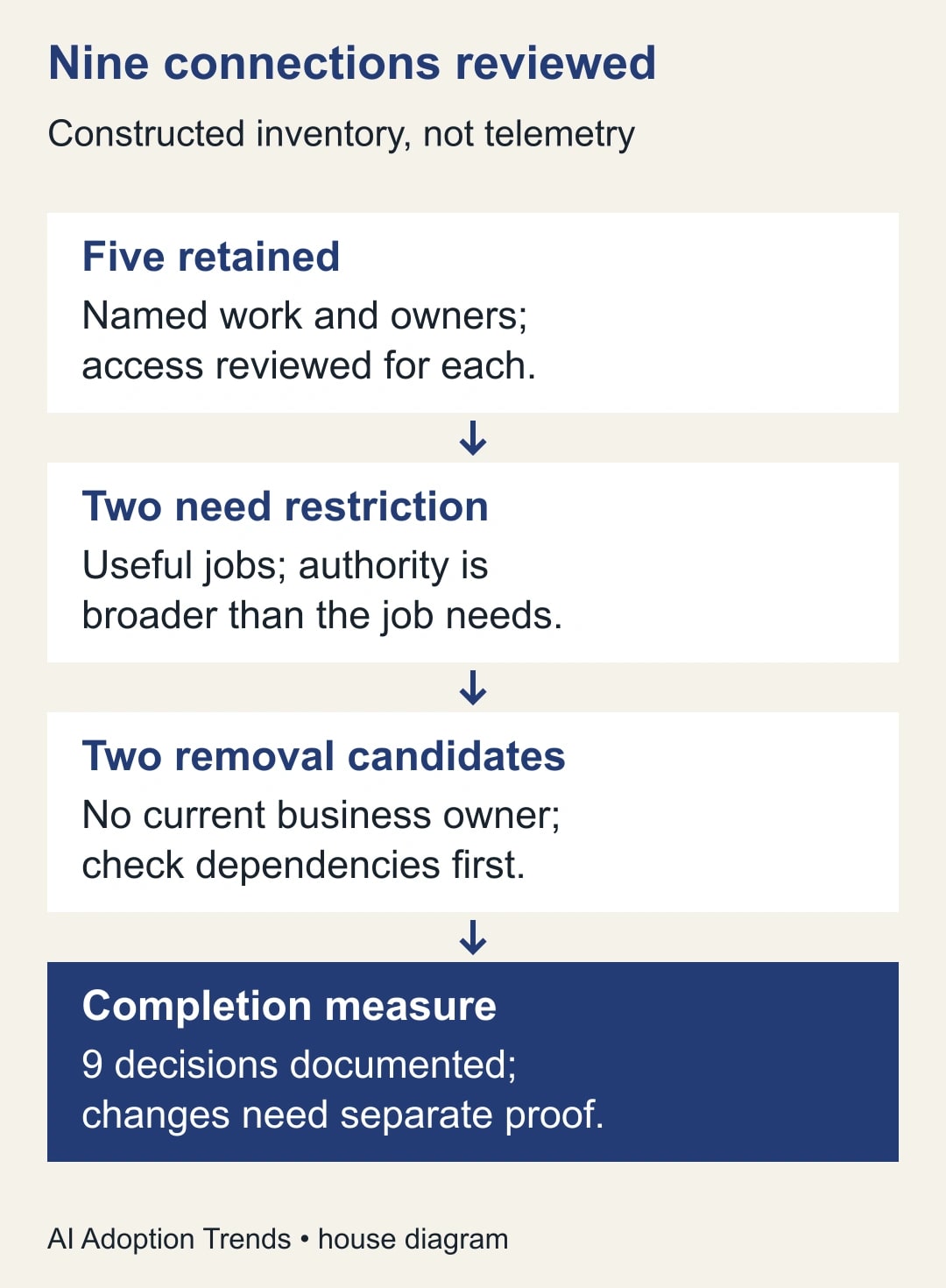
Use a short decision rule. Retain a connection when it supports current approved work and the owner accepts its access. Seek a narrower configuration when the job is useful but its authority is broader than necessary. Mark it for removal when the job has ended or no accountable owner can be found, after checking dependencies. Leave uncertain cases open with a named decision owner and deadline.
Consider a constructed inventory of nine connections. Five support current work and have named owners. Two serve useful jobs but need an access review. Two appear unused and lack current owners. The first review has therefore produced nine documented decisions, not nine completed changes. The two restriction requests and two removal candidates still need action and verification.
Suppose one removal candidate belongs to a former project whose monthly archive process still uses it. The owner may choose to finish the archive and retire the connection on a known date. That is a different outcome from leaving an unexplained connection indefinitely. Document the dependency, the temporary scope and the person who will verify the eventual removal.
Keep the decision register free of speculative risk scores. A row marked high risk without its data scope, available actions and owner often creates more argument than action. State the concrete concern instead: this connection can update the live sales workspace, but the approved job only prepares a read-only weekly brief. That gives the administrator a configuration question they can investigate.
Test removal without mistaking old context for fresh access
Before changing access, create a harmless test item in the approved test location. Give it a distinctive label and an ordinary value. Confirm that the connection can retrieve it through the expected route. Record the test account, service, item and time. Avoid real personal data, credentials or live customer documents; the test is about access, not the content's business importance.
Have the authorized person make the intended change through the applicable account or administrator controls. Then create a second harmless item that did not exist during the earlier conversation. Start a fresh chat and try the same retrieval job. A result copied from the old conversation does not demonstrate continued access, and failure to answer one vague prompt does not demonstrate that all access is gone.
Google's work-account help says an existing chat can retain information used for its original response after app access is disabled, while access to additional information stops unless apps are enabled again. That makes the fresh-item test useful. It does not establish that previous chat content, exported files or service-side records were deleted. Handle those separately under the organization's normal retention and account procedures.
Check that another route is not confusing the result. The test item might be publicly accessible, copied into a second service or available through another connected account. Use a private test location and examine the cited source. If the assistant supplies the fresh value after the change, stop the affected workflow and ask the administrator to identify the route before declaring the connection retired.
Use a reusable connection-review brief
- Intended work: name the output, users and business owner.
- Accounts: identify the managed Gemini account and the connected service workspace.
- Information: list the source locations the job needs, without copying their contents.
- Actions: distinguish reading, drafting, sending and changing saved records.
- Authority: record the actual permissions and who may approve changes.
- Dependencies: identify schedules, shared workflows or colleagues affected by removal.
- Test: retain the before-change retrieval and fresh-item result after the change.
- Decision: keep, narrow, remove or hold for a named owner, with a review date.
Attach that brief to the team's existing operations record. A separate expensive platform is not a prerequisite for a small inventory. If you already have an access register, add the connection details there rather than creating a second list that will drift out of date. The useful artifact is one maintained source of decisions and evidence.
An AI assistant can turn non-sensitive inventory notes into a draft checklist or highlight blank owner fields. Do not ask it to certify its own permissions from a conversational answer. The administrator's configuration and the controlled test are stronger evidence. Keep human approval for the actual access change and inspect the normal workflow after it, especially when another colleague depends on the connection.
Account for the review effort and the limits
Budget time to investigate dependencies, not only to click through the hub. In an illustrative nine-connection review, six minutes per initial row is 54 minutes. Four changes at ten minutes each add 40 minutes, and a 20-minute owner review brings the planning estimate to 114 minutes. Those are invented planning inputs, not a measured implementation benchmark or a claim about every team.
Measure completion by verified decisions and resolved exceptions. Useful signals include connections without owners, changes awaiting a test, failed normal workflows after restriction and new connections added outside the process. Avoid treating the smallest possible connection count as the goal. Removing a useful tool can push people toward an untracked workaround and make the work harder to understand.
If a restriction breaks the weekly briefing, restore access only through the authorized owner and agreed configuration, or use the manual fallback while a narrower route is prepared. Record what failed. Do not respond by widening every related permission until the assistant works again. The repair should address the specific missing capability and preserve the business boundary that motivated the review.
Repeat the relevant rows when a job ends, an employee changes roles or a connection gains new actions. Set a periodic review that matches the team's rate of change. For a stable small workflow, a short scheduled check plus event-driven updates may be more useful than a daily audit nobody completes.
Start with the next connection someone wants to add and fill its brief before accepting the permission screen. Use the site's read, draft, send and change approval matrix to agree who decides. If the actual task is moving old Gems into skills, use the separate Gem-to-skill migration guide. Today's useful result is a named owner, a justified connection and a test that proves the intended access change.
Weekly Newsletter
AI Adoption Weekly
New research, field guides, training studies, and tool decisions for operators.
No spam. Unsubscribe anytime.
Related Comparisons
Calculator
AI seat cost calculator
List price × headcount. You enter the hours and the operating assumptions.