
Use Google Sheets Box Plots to Find the Service Delays Averages Hide
Build a box and whisker chart in Google Sheets, check the underlying cases and separate a long delay from a data error. Includes a worked example.
Published October 23, 2026

If you run a service queue, use a box plot when the average resolution time looks reasonable but customers still report long waits. A box plot shows the middle of the results and how widely the times vary. It helps you choose which cases to investigate. It does not tell you why a delay happened or prove that one team works harder than another.
Google announced native box and whisker charts in Sheets on October 22, 2026. This makes a useful operating review easier to assemble without a separate statistics package. Start with comparable cases, show the number of observations and inspect the long waits against their original records. Keep open cases in a separate backlog review so the chart of completed work cannot hide the work that never finished.
This guide is for customer service and operations managers who already have case-level timestamps. It includes a constructed example you can reproduce. Skip this chart if your immediate question is total workload, staffing by hour or progress against a daily target; a count, time series or backlog table may answer those questions more directly. Eight example cases teach the calculation. They are not enough to establish a general performance claim.
Check whether the new chart is available
According to Google's October 22 announcement, Sheets accepts raw numeric observations and calculates the chart statistics. It offers inclusive and exclusive quartile choices and controls for points and mean markers. Rapid Release rollout started October 22 and can take 15 days; Scheduled Release starts November 6. The announced availability includes Workspace and personal accounts. These are rollout dates, not a guarantee that the chart appears in your account today.
Open a disposable spreadsheet before changing an operating report. Check the chart-type list for box and whisker. If the option is missing, keep your existing report and prepare the clean data and review questions below. Do not buy an additional AI subscription to obtain a chart that the announcement lists for all accounts. Verify your actual account and release schedule first.
Your main costs are likely to be preparation and review time. Assign a report owner to define the timestamps, an analyst to build the sheet and a queue manager to investigate exceptions. An AI assistant can help draft a formula or explain an unfamiliar term, but a person must check the formula against known cases. There is no need to put customer messages into a general-purpose assistant to produce this chart.
Define the clock before comparing the queues
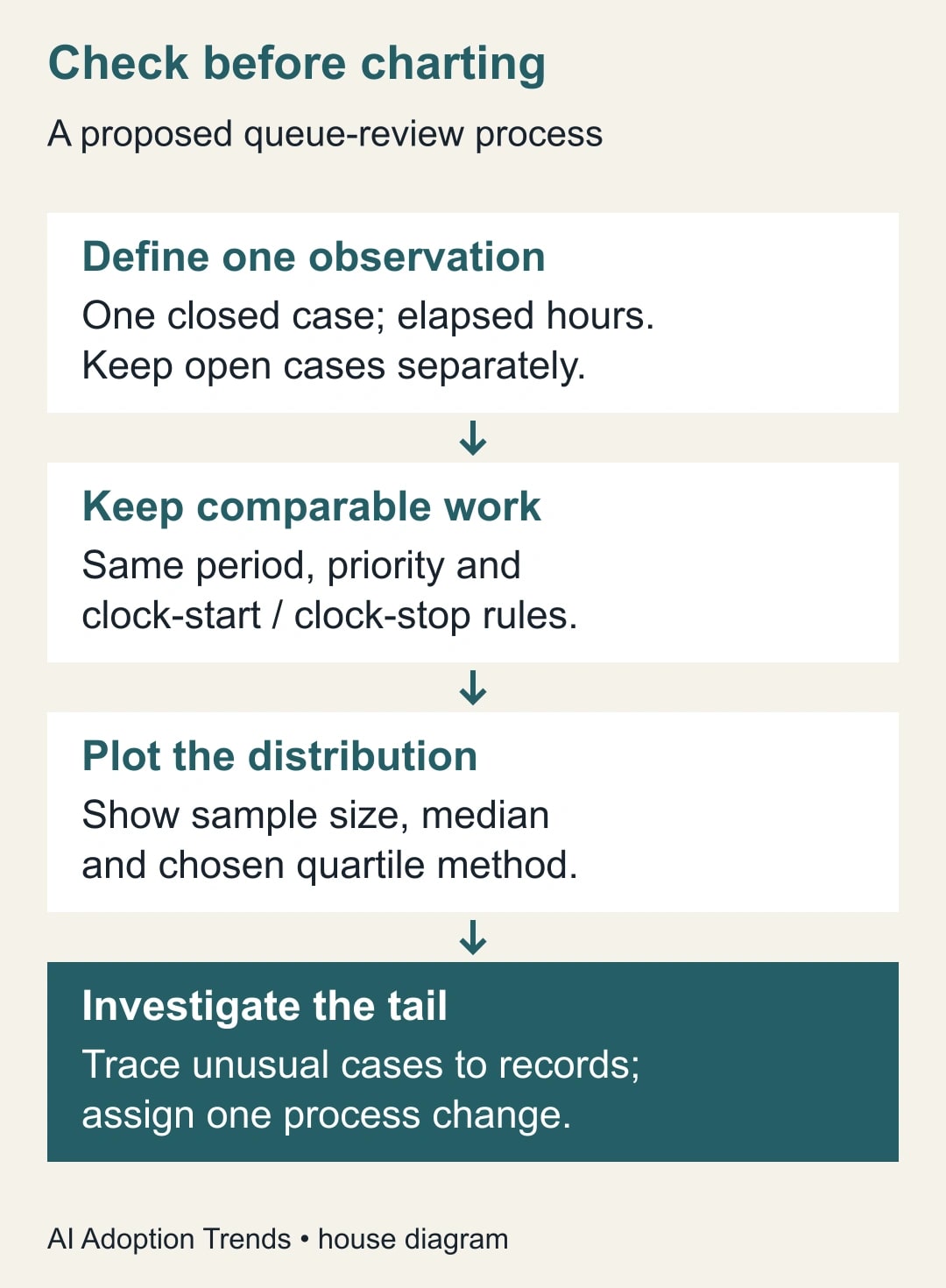
Write a one-sentence definition of the measure. For example: elapsed hours from the first valid customer request to the final completed response, including nights and weekends. That is a proposed definition, not a universal service standard. If your service promise instead uses business hours, calculate that clock consistently and name the relevant calendar. Do not compare elapsed hours in one queue with staffed hours in another.
Build a source table with Case ID, Queue, Priority, Opened at, Closed at, Duration hours and Review note. Keep timestamps in one agreed time zone or convert them consistently. A simple elapsed-hours calculation in Sheets is the difference between the closing and opening date-time cells multiplied by 24. This only works when both cells are genuine date-time values and the time-zone interpretation is correct. Check a case lasting exactly two hours before applying the formula to the whole export.
Decide how reopened cases count. A case closed on Monday and reopened on Tuesday might use the final closure date, or your process might treat the second episode separately. Either can support a specific question, but switching silently between them makes the comparison unreliable. Retain a stable identifier for the observation so the manager can find the original case after seeing an unusual point.
Exclude impossible durations from the chart and keep them in a correction list. A negative duration usually points to a timestamp or definition problem. A very long positive duration could be a real wait, a reopened case or a missing closure event. None should be deleted just because it makes the chart uncomfortable. Record the reason for every exclusion and keep the original export unchanged.
Read the box before reading the average
The median is the middle value after sorting the observations. The lower and upper quartiles mark the 25th and 75th percentiles; the box between them describes the middle half of the data. The interquartile range is the upper quartile minus the lower quartile. These are useful ways to describe spread without letting one very large value dominate the center.
Whiskers need a definition too. Some box plots extend them to the smallest and largest observations. Others use fences to identify unusually distant points. The NIST explanation of box plots describes both approaches. In the worked example here, the fences sit 1.5 interquartile ranges below and above the box. Whiskers end at observed values inside those fences; values outside are drawn separately.
An outlier under that rule is a prompt for investigation, not a data-entry error or a performance verdict. The chart cannot see whether the customer was waiting for a replacement part or whether a manager forgot to close the record. Read the underlying case before choosing an action. Keep your chosen quartile method visible because small samples can produce noticeably different boundaries under different methods.
Reproduce a two-queue example
Use these invented elapsed durations, in hours, for eight completed cases per queue. Queue A contains 2, 3, 3, 4, 4, 5, 5 and 6. Queue B contains 1, 2, 3, 4, 4, 5, 6 and 23. Enter each queue in its own column with a clear heading. These are constructed numbers, not results from a product test or customer operation.
Both medians are 4 hours. Queue A totals 32 hours across eight cases, so its mean is 4 hours. Queue B totals 48 hours, so its mean is 6 hours. The median alone makes the queues look alike. The mean signals a difference but does not show whether most cases slowed down or one case waited much longer.
Using inclusive quartiles, Queue A has a lower quartile of 3 and an upper quartile of 5 hours. Its interquartile range is 2 hours, giving fences of 0 and 8 hours. All eight observations lie inside them. Queue B has quartiles of 2.75 and 5.25 hours, an interquartile range of 2.5 and fences of −1 and 9 hours. Its 23-hour case is beyond the upper fence. The upper whisker ends at 6 hours, the largest observed value still inside it.
The negative lower fence is a statistical boundary, not a possible negative service duration. You can verify the quartiles in spare cells with QUARTILE.INC over the eight numeric cells, using 1 and 3 as the quartile arguments. Use MEDIAN and AVERAGE for the other checks. Spreadsheet locale settings may change formula separators. The expected results above give you something concrete to compare with the sheet's output.
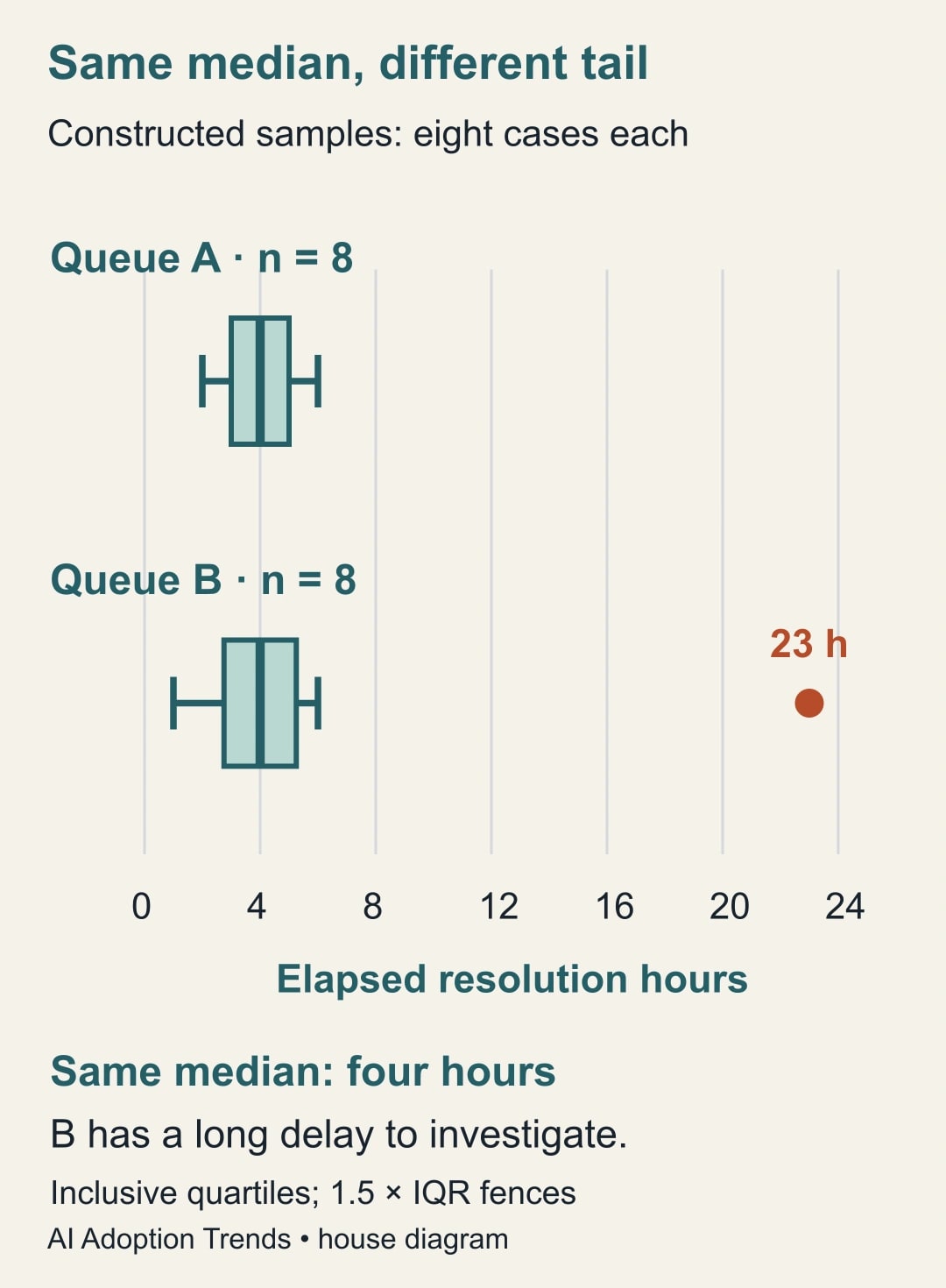
Suppose the 23-hour case was waiting for a specialist approval. The useful next move is to inspect that approval handoff and check whether similar cases remain open. Removing the point would improve the reported mean without improving service. Conversely, if the timestamp was wrong, correct it with an explanation and regenerate the chart. Preserve the before-and-after result so a colleague can follow the change.
Build the chart and test the presentation
On a computer, select the two columns of example durations and choose Insert, then Chart. In the chart editor, use Setup and Chart type to choose box and whisker when available. Google's chart creation guide documents the general insertion, range and chart-type controls. Check that each queue is a separate series and that the selected range contains observations rather than precomputed totals.
Choose inclusive quartiles to reproduce this example. Show individual points or outliers where the available controls allow it, and keep the mean marker distinct from the median line. If a setting or result differs, inspect the current options and reconcile the example before using live data. Do not redraw an inconvenient point manually or label an unfamiliar line by guessing what it means.
Title the chart with the measure and period: elapsed resolution hours for cases closed in the selected week. Add the sample counts and the quartile convention nearby. Make the unit explicit. A presentation containing only a product-generated chart title leaves too much interpretation to the reader. Keep enough white space that the long Queue B value does not crowd out the central boxes.
Open the report at the size the manager will use. Labels readable on a large monitor can disappear in an emailed image. Check the exported artifact as well as the source spreadsheet if you send a copy. The new feature announcement describes Excel round-trip support, but a provider compatibility claim is not proof that your particular workbook survived unchanged. Verify ranges, labels and the example statistics after any export or import.
Turn the picture into one operating decision
Bring a short review brief to the queue meeting. State the period, measure, excluded records, number of closed cases and number still open. Ask which unusual cases share a handoff, supplier dependency or approval step. Then nominate one owner to investigate the records and propose a change. The chart narrows the question; the case history supplies the explanation.
Avoid ranking teams until the work is comparable. Queue B may handle difficult cases that Queue A never receives. Separate priority or case type where that distinction changes the interpretation. Do not slice the sample into so many tiny groups that every box rests on a handful of observations. If the groups become too small, show the actual durations and describe the limitation plainly.
Also inspect a dated list of open cases, including their current age. A chart of closed cases can look faster when a team leaves difficult work unresolved. This is why completion-time and backlog reviews belong together. A useful improvement would reduce avoidable waits without increasing the number of aging open cases or encouraging premature closure.
Reuse this review worksheet
- Decision: name the queue or handoff the manager can actually change.
- Observation: define one case, its starting event, stopping event and treatment of reopening.
- Scope: record the period, priorities included, time zone, completed count and open count.
- Quality: list missing timestamps, impossible durations and documented exclusions.
- Display: record the quartile method, whisker rule, unit and sample size for each group.
- Investigation: name the unusual cases, likely causes and evidence still needed.
- Action: assign an owner, one change and the date for a comparable follow-up review.
- Stop condition: pause publication if the example does not reconcile or the queues use different clocks.
Save that worksheet beside the report, not only in someone's meeting notes. It makes the next review faster because the analyst can see which choices were deliberate. When the process changes, update the definition and mark the break in the series. A changed clock should not masquerade as an improvement in service.
For an initial trial, budget one analyst hour to define and clean a small export and one manager review session. Those are planning allowances, not measured implementation times. After two cycles, compare actual preparation and review effort with the old report. If the chart generates no useful investigation, simplify it or stop producing it. More visual detail has no value when nobody can act on it.
Start with the sixteen invented observations and prove the arithmetic in your own sheet. Then bring one comparable real queue into the same process. If your source is arranged in monthly columns, first use the guide to unpivot monthly data while preserving missing values. The next useful result is a documented explanation for a delay and an owner for changing the handoff that caused it.
Weekly Newsletter
AI Adoption Weekly
New research, field guides, training studies, and tool decisions for operators.
No spam. Unsubscribe anytime.
Related Comparisons
Calculator
AI seat cost calculator
List price × headcount. You enter the hours and the operating assumptions.