
Fuzzy Match Supplier Names in Power Query Without Combining the Wrong Firms
Use fuzzy matching to suggest supplier-name matches, review ambiguous candidates and reconcile spend before loading a report. Includes a mapping worksheet.
Published October 23, 2026

Use Power Query fuzzy matching to propose supplier-name matches for review. Keep stable supplier identifiers as the preferred route, and load only approved mappings into the final spend report. A high similarity score can suggest that two names look alike. It cannot establish that they represent the same legal entity, trading location or supplier account.
This matters when an accounts export contains names such as Northstar Industrial, North Star Industrial Ltd and Northstar Industrial Services. Combining them may repair inconsistent spelling, or it may combine different firms. The useful output is a checked mapping from each source record to the intended supplier identifier, with unresolved amounts kept visible. It is not the largest possible percentage of names automatically matched.
This guide is for procurement analysts preparing reporting data, using a constructed six-line example. It does not authorize changes to payment details or supplier master records. If you already have reliable supplier IDs in both sources, use an exact match instead. If the master list itself is unreliable, repair that list before asking approximate text matching to compensate for it.
Prepare two tables and preserve the originals
Start with a copy of the transaction export and a dated copy of the approved supplier list. The transaction table needs a stable source-row identifier, original supplier name, amount and any existing supplier ID. The master needs a unique supplier ID and approved name. Add authorized supporting fields such as country or business address when they help reviewers distinguish similar names. Keep sensitive payment information out of a name-matching worksheet.
Define the reporting unit before proceeding. A parent company, a subsidiary and a trading location may belong to one corporate group but remain separate supplier accounts. Your report might need both an account-level total and a parent-group view. Do not collapse the underlying identity merely to create the group view; maintain a separate approved grouping field.
Set the name columns to text and retain an untouched Original name column before cleaning a second column. Removing accidental leading or trailing spaces can help comparison. Removing every location suffix or number can destroy useful distinctions. For example, Branch 12 and Branch 21 may be separate purchasing locations. Write down each cleaning rule and inspect the names it changes.
Confirm that each supplier ID in the master occurs once. If the same ID appears twice with conflicting names or statuses, send it to the master-data owner. A fuzzy comparison against an inconsistent reference list makes the next stage harder to interpret. The preparation checkpoint is two identified source tables, preserved raw values and a master whose IDs have a clear meaning.
Resolve known identities before trying approximate names
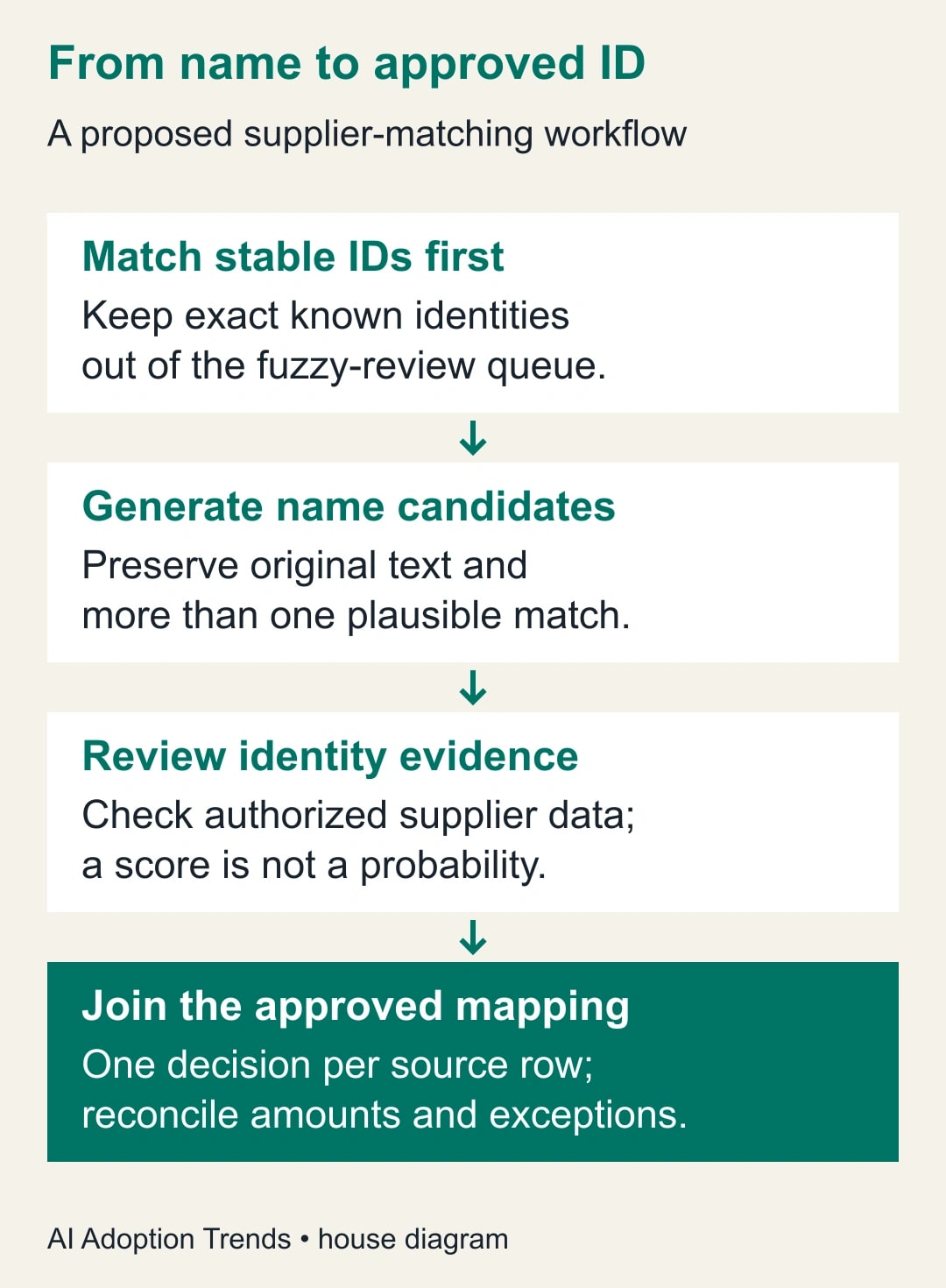
First match existing supplier IDs exactly. Keep successful matches and their transaction amounts outside the fuzzy-review queue. Next apply any previously approved alias mapping whose scope still fits this source. An alias is a known alternate name tied to an approved supplier ID; it should have an owner, evidence and review date. It should not be an unexamined list of substitutions accumulated over several years.
Send the remaining rows to a separate query for candidate generation. In Power Query, a query is the saved sequence of data-preparation steps. Keeping candidate work separate makes it easier to compare results without changing the accepted report. The unresolved rows should retain their source-row IDs and original names throughout the process.
Microsoft's merge overview describes a left outer join as retaining all rows from the left table and matching rows from the right. Use that shape for the unresolved transaction table so a failure to find a candidate does not silently remove spend. Inspect unmatched rows as an explicit exception list after the merge.
The reporting owner should decide whether the exercise is worth doing at all. If only four names need attention this month, a reviewed manual mapping may be faster than tuning a fuzzy process. If hundreds recur, a reusable candidate queue can be useful. Measure the total review effort, including false suggestions, rather than assuming automation is cheaper because it returns results quickly.
Generate candidates without hiding ambiguity
In the merge dialog, select the prepared name columns and enable fuzzy matching. Microsoft's fuzzy merge guide says the feature applies to text columns. It documents a default similarity threshold of 0.80, case and text-part options, a maximum number of returned matches and an option to show similarity scores. Check which controls your Power Query host exposes; availability of a menu is a prerequisite for this particular route.
Start with a documented setting and inspect the candidates before changing it. Lowering the threshold can return more suggestions, but a longer list is not necessarily a better list. A similarity score is not an 80% probability that two companies are the same. It reflects a text comparison, not a verified company identity or a calibrated forecast of correctness.
For a small review batch, allow more than one candidate per unresolved name. Setting the result to a single candidate can conceal a plausible alternative. The Table.FuzzyJoin reference explains that NumberOfMatches limits the returned matches per input row. It also notes that a fuzzy match at a threshold of 1 can still ignore differences such as case, word order or punctuation. Do not treat that setting as a substitute for a literal identifier comparison.
Expand the candidate supplier ID and name, retaining the source-row ID beside them. Include similarity information if your interface supports it. A source row may now appear more than once because several candidates were returned. This candidate table is not the final transaction table. Summing its amount column would count the same transaction multiple times.
Keep the candidate query out of the published spend model until the review is complete. Name it clearly and restrict its use to the people doing the review. A neat table with IDs and amounts can look ready to use even while it contains mutually exclusive suggestions. The next checkpoint is a list of possible matches, not a reporting total.
Review a six-line supplier example
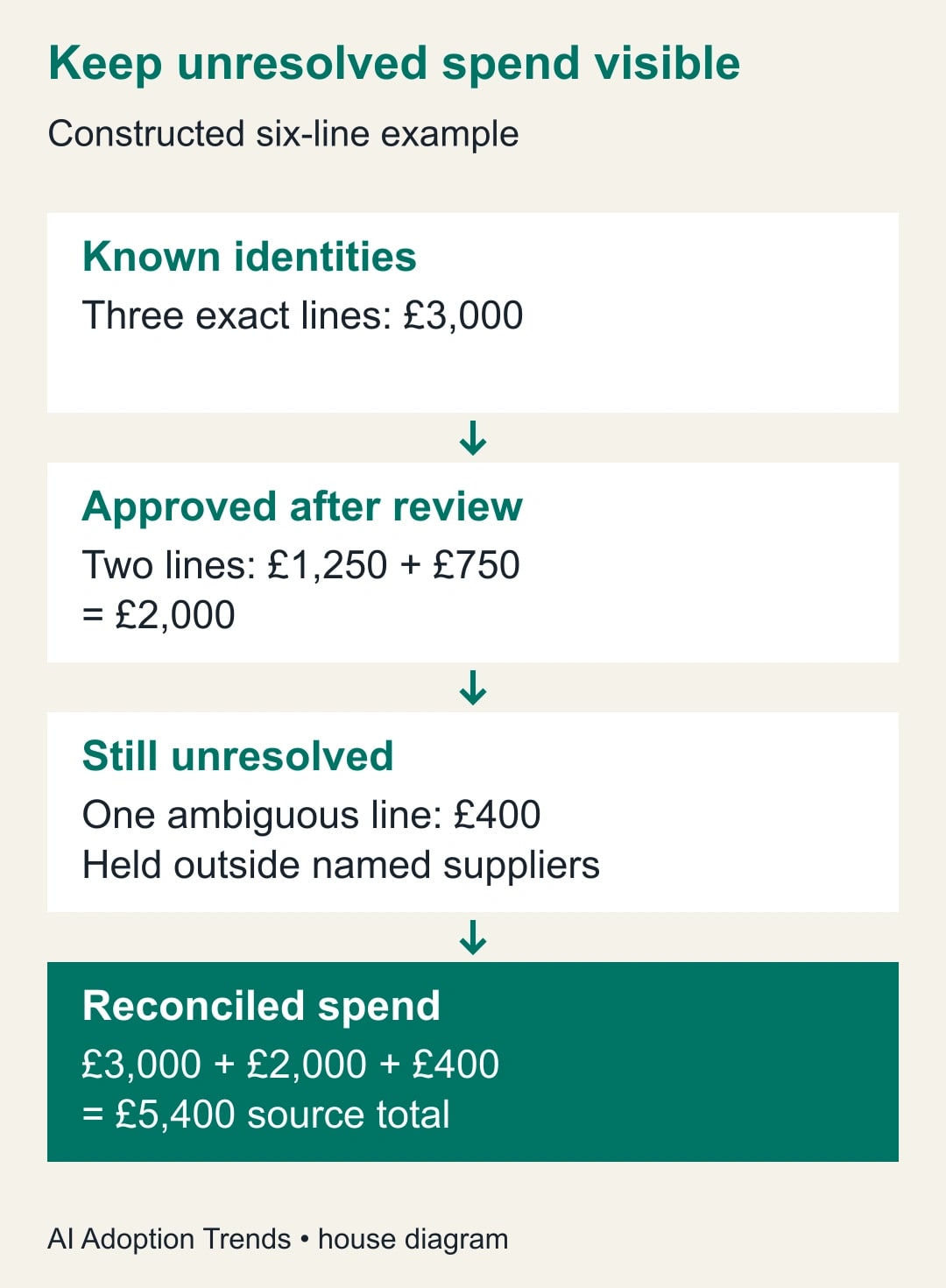
Consider six invented transaction lines with total spend of £5,400. Three lines already have verified supplier IDs and total £3,000. Two remaining lines contain spelling variants that reviewers can resolve using approved supplier records: one for £1,250 and another for £750. The final £400 line has a name shared by two plausible suppliers and lacks enough supporting information.
The accepted report can assign £5,000 to named suppliers: £3,000 plus the two reviewed lines totaling £2,000. The £400 remains in an unresolved category. Together, £5,000 + £400 = £5,400, so the report reconciles to the source. It should not describe the whole £5,400 as fully classified supplier spend.
Suppose one £1,250 line has two candidates. A reviewer checks the purchase reference and authorized supplier address, then records the correct master ID. The other candidate is rejected. The amount appears once in the accepted transaction table. If both candidate rows were summed, that one mistake would add £1,250 to the report even though the original export never changed.
For the ambiguous £400 line, preserve the source-row identifier and ask the purchaser or master-data owner for evidence. A familiar-looking name is not enough. If the answer arrives after the reporting deadline, retain the unresolved amount in the current report and record the later correction explicitly. Do not choose whichever candidate produces a more convenient supplier ranking.
Save the decision as an explicit mapping
Use a review table with Source row ID, Original name, Candidate supplier ID, Decision, Evidence reference, Reviewer and Decision date. Keep an approved supplier ID field separate from the candidate field. A pending row must not contain an apparently approved ID just because the first candidate was copied into it automatically.
When the same alias recurs consistently, the master-data owner can approve a reusable name-to-ID mapping. Scope it to the context where it is valid, such as the source system and country, rather than assuming a short name means the same company everywhere. Review mappings when suppliers change names, merge, close or move between business units.
Power Query also supports transformation tables for custom text mappings. The function reference describes From and To columns and warns that replacements apply to occurrences within the text. That is a reason to use them carefully. Replacing a short token throughout a name can create unintended matches. For controlled supplier reporting, an explicit approved alias-to-ID table is often easier for a business owner to inspect than a broad text substitution rule.
After review, join the approved mapping back to the original transaction rows using their stable source-row IDs. Require one final outcome per source row: exact match, approved reviewed match or unresolved. Do not use the expanded candidate table as the transaction source. That separation protects the amount totals while preserving the evidence behind each identity decision.
Reconcile rows, amounts and exceptions
Count unique source rows before and after classification. Compare the total amount to the source, and compare amounts by a few meaningful dimensions such as month and business unit. A correct grand total can still hide a misclassification between two suppliers. Check the largest reassignments individually and retain the unresolved category in every summary that claims to cover all spend.
Test a small deliberately difficult set before using the process repeatedly. Include an exact name, a spacing variation, two genuinely different firms with similar names, a blank name and a transaction with an ID that contradicts the name. The expected outcome for the ambiguous and contradictory cases is review, not an automatic match. Record those expected outcomes before looking at the candidate results.
If an accepted match proves wrong, change the approved mapping and regenerate the affected report. Identify which periods and exported copies used that mapping. Tell report recipients what changed and whether a supplier comparison or purchasing decision needs review. Avoid editing only the displayed supplier label while leaving the underlying relationship wrong.
Stop the refresh if source-row IDs are missing or duplicated unexpectedly, the supplier master has conflicting IDs, or amounts no longer reconcile. Hold the last verified report with its date visible while repairing the data. Refreshing a broken mapping more frequently makes the error more current, not more trustworthy.
Reuse this matching worksheet
- Scope: identify the source export, period, currency and meaning of one supplier account.
- Reference: record the master-list version and owner who can resolve identity questions.
- Known matches: retain exact IDs and approved aliases before fuzzy comparison.
- Candidate settings: record threshold, comparison column and maximum returned matches.
- Review: keep candidate IDs separate from the approved ID and attach evidence to decisions.
- Exceptions: preserve blank, conflicting and ambiguous rows with their amounts.
- Reconciliation: compare unique source rows, total spend and selected supplier allocations.
- Release: name the approver, unresolved amount and procedure for correcting a published mapping.
For a pilot, time the manual process and the candidate-assisted process on the same small batch. In a constructed planning example, checking 60 names manually at two minutes each takes 120 minutes. Preparing candidates takes 20 minutes, reviewing 60 names at one minute each takes 60, and resolving ten exceptions at three additional minutes takes 30. The assisted total is 110 minutes, releasing ten minutes of capacity if those assumptions hold.
That ten-minute estimate is not cash savings and does not justify weakening review. If false candidates increase exception work, the process may cost more time than it releases. Track wrong accepted mappings separately from unresolved names; leaving an uncertain name unresolved is often the correct result. Keep the workflow only if it improves the quality or effort of the actual reporting job.
Start with six to ten known transactions and their expected supplier identities. If the problem is duplicated rows after a merge rather than uncertain names, use the separate guide to diagnose inflated totals from Power Query merges. The first useful outcome here is a reconciled report whose supplier assignments can be explained, including the amounts you have deliberately left unresolved.
Weekly Newsletter
AI Adoption Weekly
New research, field guides, training studies, and tool decisions for operators.
No spam. Unsubscribe anytime.
Related Comparisons
Calculator
AI seat cost calculator
List price × headcount. You enter the hours and the operating assumptions.