
Fix Power Query Missing-Column Errors Without Hiding Bad Data
Find the first broken step, distinguish required from optional columns and test a repair before accepting a changed source export.
Published October 30, 2026

When Power Query reports that a column was not found, inspect the first failing step and the table immediately before it. Confirm whether the source changed its name, removed the field or changed what the data means. A required field should stop the report until the problem is resolved. Only genuinely optional fields should be filled with null values under an agreed rule.
The dangerous repair is to make every missing field optional so the refresh turns green. That can replace an obvious error with a plausible but incomplete report. If a sales amount disappears, a successful refresh containing blank amounts is usually less useful than a clear failure naming the missing input.
This guide is for an analyst maintaining a recurring Excel or Power BI import from a structured export. It addresses changes to the source’s schema, meaning its column names and expected structure. Microsoft’s documentation was checked on October 30, 2026. The sample files and acceptance results below are constructed; the expressions are documentation-based examples, not a claim of testing your private workbook.
Find the earliest broken assumption
Save the current query and a copy of the last accepted source file before editing. Keep the new source file too. Record its export date and source-system version if available. Comparing those two files is often more informative than repeatedly changing the step that happens to display the error.
Read the error details and identify the missing column name. In Applied Steps, inspect the immediately preceding successful step. List the columns actually present there. The missing field may already be absent at the source, or an earlier rename, selection or header operation may have changed it inside the query.
Microsoft distinguishes step-level errors, which prevent a query from loading, from cell-level errors. Its missing-column example shows an old rename step failing after the source already adopted the new name. Removing that redundant step is appropriate in that example because the intended column is already present. It is not a general instruction to delete whatever step fails. Microsoft’s error-handling guidance
Check exact spelling, spaces and the source row being promoted to headers. A file can contain the expected words in a title row while the actual data headers begin below it. Compare values as well as names: a column called Amount might now include tax, use cents instead of dollars or represent a different currency. A familiar heading does not establish an unchanged meaning.
This method fits a stable recurring export with an identifiable source owner. Skip a quick formula patch when the file is an unstructured report whose layout changes unpredictably. Ask for a supported export or another dependable input. Also separate this problem from a missing file, expired connection or inaccessible location; changing column handling cannot repair source access.
Write a small column contract
A column contract states what the query expects and what should happen when the input differs. It can be a short worksheet, not a complex governance project. Name the source owner, report owner and the business decision that depends on the data. Then classify fields by their role in that decision.
For a constructed order report, use four required columns: OrderID, OrderDate, NetAmount and Currency. OrderID identifies the order; OrderDate selects the period; NetAmount supplies the value; Currency prevents unlike amounts being added together. Use two optional columns, Comment and SalesRepNote, for contextual notes that do not determine the totals or eligibility.
Optional means the report remains meaningful without the field. It does not mean that a missing field is inconvenient to fix. If the report uses SalesRepNote to decide which orders are excluded, that field is no longer optional for that workflow. Review downstream filters and calculations before assigning the category.
For each column, record the expected data type, meaning, allowed missing values and responsible owner. Separate a missing column from a blank cell inside an existing column. A presence check can confirm that NetAmount exists while every value in it is blank. Both the structural check and the value checks are necessary for the report to be accepted.
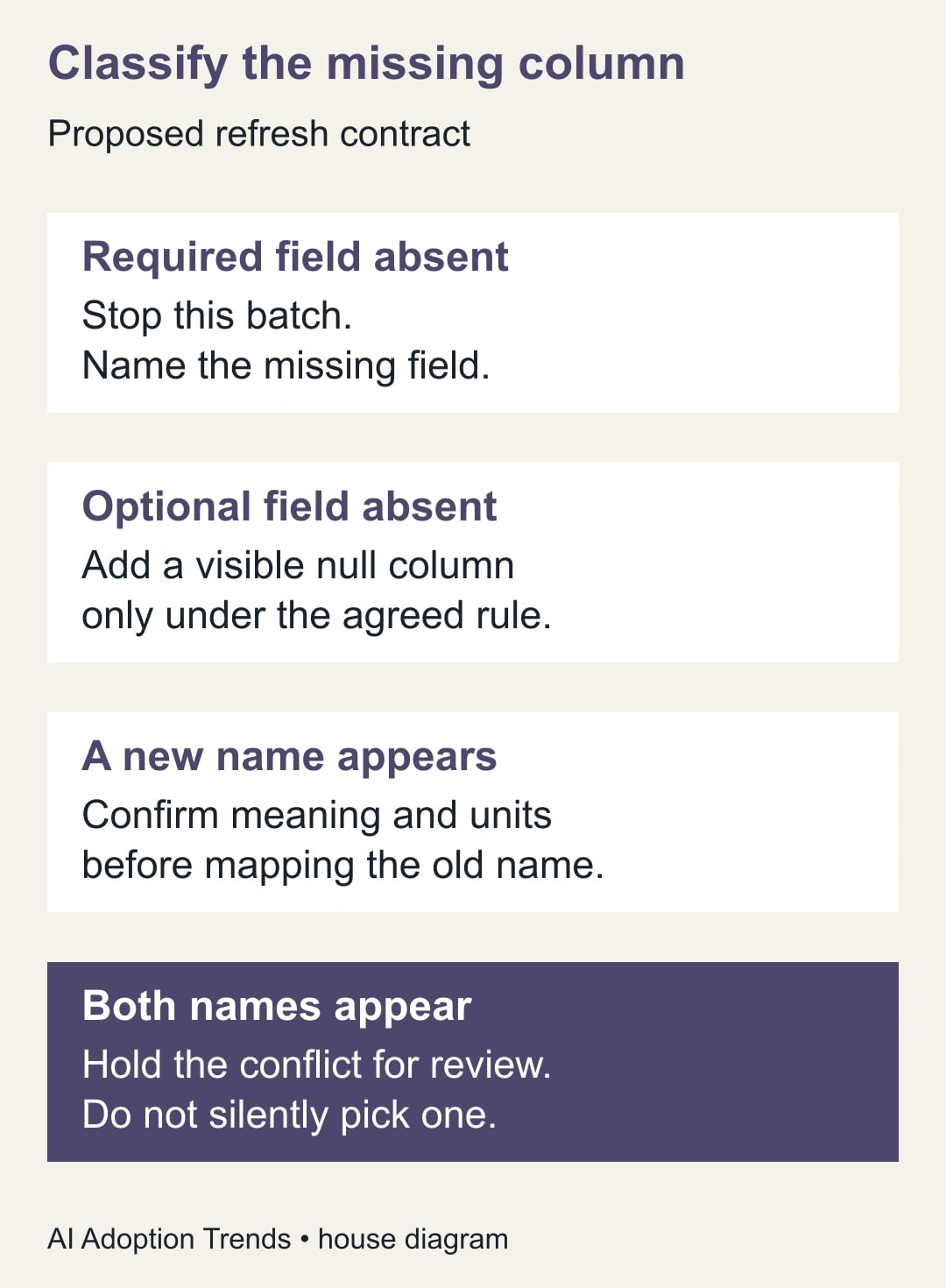
Check required names before adding optional columns
Microsoft’s Table.HasColumns function returns whether a table contains the specified column or columns. Use it to make the required-field expectation explicit near the start of the transformation, after the correct headers and any approved source-name mapping have been established. Table.HasColumns reference
For the sample contract, the presence expression is Table.HasColumns(Source, {"OrderID", "OrderDate", "NetAmount", "Currency"}). Replace Source with the actual previous-step reference in your query. A true result says the names exist; it does not validate types, amounts, uniqueness or the source’s business meaning.
If the required-field check fails, stop this batch with a useful message naming the missing requirement. Keep the last accepted report clearly dated rather than presenting old data as a new refresh. The analyst should be able to tell the source owner which export and column caused the hold without reconstructing the entire query.
After required fields pass, select the agreed output columns. Microsoft documents that Table.SelectColumns normally errors when a requested column is absent, while MissingField.UseNull creates a null-filled column for the missing name. That option is useful for an approved optional field; applying it indiscriminately to required fields can hide a broken input. Table.SelectColumns reference
An adaptable selection expression is Table.SelectColumns(CheckedSource, {"OrderID", "OrderDate", "NetAmount", "Currency", "Comment", "SalesRepNote"}, MissingField.UseNull). Here CheckedSource must be the result of the required-field guard, not an unchecked source. Keep the guard and selection connected so that later editing cannot accidentally bypass the required check.
In a small query, a combined pattern is easier to review: if Table.HasColumns(Source, {"OrderID", "OrderDate", "NetAmount", "Currency"}) then Table.SelectColumns(Source, {"OrderID", "OrderDate", "NetAmount", "Currency", "Comment", "SalesRepNote"}, MissingField.UseNull) else error "Required order columns are missing". Adapt the names and step references, then test in a copy. For regular operations, improve the error message to list the actual missing names.
Treat a renamed amount as a question, not an automatic match
Suppose the next export replaces NetAmount with Amount. The query should not silently decide that those fields are equivalent. Ask the source owner whether Amount excludes tax, uses the same currency unit and represents the same order-level value. Record the answer and the source version to which it applies.
If the meaning is unchanged, add an explicit approved mapping from the new name to the report’s expected name before the required-field check. Keep the transformation readable so the next maintainer can see why it exists. Avoid broad fuzzy matching of financial or identifying fields: a name that looks close can still represent a different measure.
If both NetAmount and Amount appear, hold the ambiguity until the source owner explains it. Choosing the first column found creates a hidden priority rule. A dual-column export may be a transition period, or it may contain genuinely different values. Compare a few source records and the relevant export definition before selecting the authoritative field.
When the source has permanently adopted the report’s final name, an old rename step may become redundant. Remove or revise it only after verifying the columns before and after the change and rerunning the acceptance checks. Preserve the change note so a later export in the old format is not accepted accidentally under an untested assumption.
Use three orders to check the value, not just the structure
Create a synthetic source with three unique orders in one currency: O-101 with NetAmount 120, O-102 with 80 and O-103 with 50. Use valid dates in the same reporting month and set Currency to USD on all three. The expected row count is three, the unique-order count is three and the amount total is 250 USD.
Remove Comment from a test copy. Under this contract, the query should still produce three orders and 250 USD, with Comment present as null and the omission recorded. Removing NetAmount should instead stop the batch. It must not produce three apparently accepted orders with zero total or a blank amount that disappears from the summary.
Now replace NetAmount with Amount and change the values to 12,000, 8,000 and 5,000. If the new export uses cents, merely renaming the field produces 25,000 rather than 250. The names can be repaired while the meaning remains wrong. An approved unit conversion needs its own visible rule and arithmetic check before the report is released.
The sample illustrates why a matching total alone is insufficient too. Two duplicated orders and one omitted order might happen to balance. Compare identifiers and row counts alongside totals, and retain rejected or held records for explanation. For multiple currencies, reconcile totals separately by currency unless an approved conversion process supplies a common basis.
Build a six-file acceptance pack
Keep six small variations of the source file and write the expected decision for each before running the query. The pack should be safe to share with the query maintainer and contain no real customer information. Its purpose is to expose structural and semantic failures quickly whenever the import changes.
- Original structure: all four required and two optional columns; expect three orders and 250 USD.
- Optional column omitted: remove Comment; expect the same records and total, with a visible null column and omission note.
- Required column omitted: remove NetAmount; expect a clear stop before the report is refreshed.
- Required column renamed: replace NetAmount with Amount; expect a hold until an approved meaning-preserving mapping is supplied.
- Both names present: include conflicting NetAmount and Amount values; expect a hold rather than an arbitrary choice.
- Wrong value type: keep NetAmount but put an invalid text value in one row; expect the value-validation process to block acceptance or route the row to an explicit exception review.
The name guard does not solve the last case. It passes because the column exists. The maintainer must separately check data types and conversion errors, along with blank required values. Do not claim that a single Table.HasColumns expression makes the whole import safe. Each acceptance result should identify which check produced it.
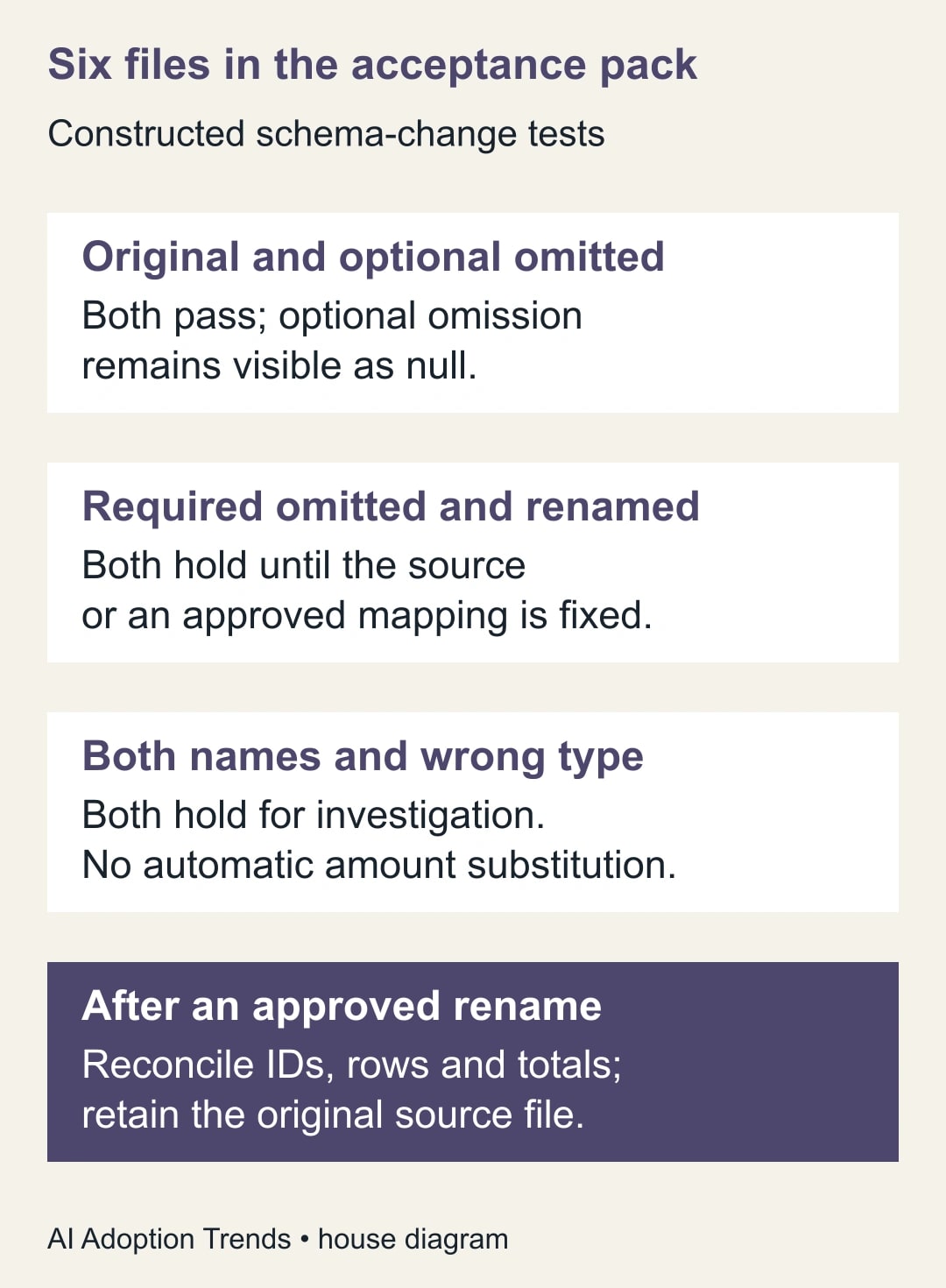
Once a rename is approved, rerun the original and changed formats according to the intended support policy. Decide whether both remain acceptable or whether only the new export should pass. Supporting old files indefinitely can make a stale upload look current. Record the expected export period and source timestamp alongside the structural checks.
Keep refresh and publication as separate decisions
Run the repaired query in a copy of the workbook or a test dataset first. Inspect every downstream step that references the affected field, including filters, merges, calculations and final column selection. A successful early preview can still be followed by a later step using the old name or a changed value type.
Compare the output with the source for one completed reporting period. Record row count, unique identifiers, held rows, null counts in required fields and totals by currency. Have the business owner review any change to definitions or units. The technical maintainer can repair syntax, but should not invent a new definition of revenue to make the refresh complete.
Use existing tools and access for the first repair. The main cost is analyst time, source-owner clarification and ongoing maintenance. A new connector is justified only if it addresses a demonstrated limitation in the current input. Repeatedly paying to patch an unstable export may eventually support a different data path, but one renamed optional field does not establish that case.
If acceptance fails, restore the prior query and keep the previous report visibly dated. Preserve the new source file and the failing test evidence. Do not overwrite the accepted report with a partial output simply because some rows loaded. Where a partial report is useful, give it a distinct scope and have the business owner approve that limitation explicitly.
Leave the next maintainer a repair worksheet
- Source: export name, period, file timestamp and source owner.
- First failure: step name, missing column and columns present immediately before it.
- Contract: required and optional fields, meanings, types and permitted blanks.
- Decision: source correction, approved rename, optional null handling or held batch.
- Evidence: sample records confirming units and meaning, plus the six-file acceptance results.
- Reconciliation: expected and actual identifiers, row counts, exceptions and totals by currency.
- Release: query version, reviewer, accepted report date and rollback location.
Monitor unexpected column changes and unresolved exceptions after future refreshes. A useful outcome is a clear, explainable hold when a required input disappears and a stable report when a harmless optional note is omitted. Start by writing the required-field list for one recurring export. If the real problem is lost rows or repeated matches, continue with the guides to reconciling removed error rows and repairing duplicate merges, which address different failures after the input structure is understood.
Weekly Newsletter
AI Adoption Weekly
New research, field guides, training studies, and tool decisions for operators.
No spam. Unsubscribe anytime.
Related Comparisons
Calculator
AI seat cost calculator
List price × headcount. You enter the hours and the operating assumptions.