
Stop Duplicate Power Automate Actions Without Losing Real Requests
Trace duplicate flow effects, define a stable operation key and reconcile uncertain outcomes before retrying a Power Automate request.
Published October 30, 2026

When Power Automate creates the same task twice or sends a repeated message, first establish which business operation happened more than once. Then give that operation a stable identity and a recorded outcome. Reducing the number of visible flow runs may help, but it does not prove that the destination received only one action.
Microsoft documents that actions can be duplicated even within a single visible run, and recommends idempotent design: repeated inputs should not repeat the intended effect. Its troubleshooting guide also identifies active copies of a flow as another possible cause. The guidance below was checked against Microsoft’s documentation on October 30, 2026. Power Automate trigger troubleshooting
This is a practical investigation for an operations owner and the person maintaining the flow. It uses a constructed service-desk task example. It is not a promise of exactly-once delivery for every connector, and it does not recommend experimenting on customer emails, payments or other actions that are difficult to reverse.
Preserve the evidence before replaying anything
If the flow is still producing harmful duplicates, use your incident process to contain the affected action and preserve incoming requests for reconciliation. Record when containment began. Turning a flow off may change what happens to events during the interruption, so the maintainer must understand that trigger’s behavior before restarting it. Microsoft distinguishes polling and webhook behavior in its trigger optimization guidance.
Collect the source request identifier, relevant change version, flow name and environment, run identifier, action name, destination record identifiers and timestamps. Use the minimum data needed to match the events. A screenshot of two similar task titles is a starting point, but a stable source ID and two destination IDs are much stronger evidence of a duplicate effect.
Build a small timeline. Did the source submit the same event twice? Did two flows respond to it? Did one flow loop over two matching rows? Did an action report a timeout after the destination had already accepted the request? These possibilities lead to different repairs. A retry setting cannot fix a loop that deliberately processes two rows, and deleting a second task does not explain why it was created.
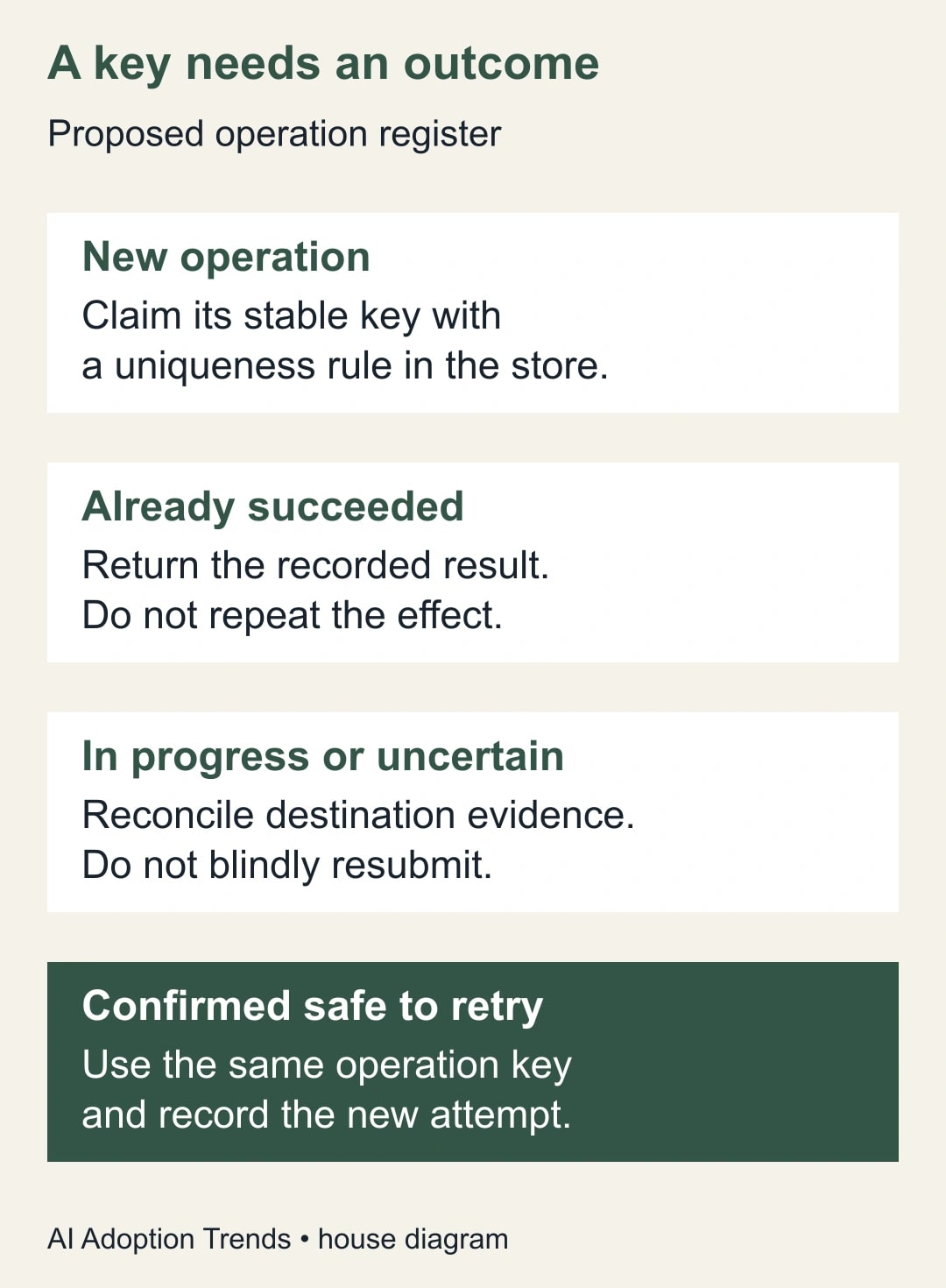
Do not replay a failed run merely to see whether it succeeds this time. A failed or timed-out response can leave an uncertain outcome. Check the destination first. If the task exists, recover its identifier and record the result; if the destination cannot establish what happened, keep the request in an exception queue for a person to resolve.
Decide what counts as the same operation
An operation key is a stable label for one intended business action. It is different from a flow run ID, which identifies an attempt to perform work. If every retry receives a new operation key, the duplicate protection cannot recognize that it is retrying the same action.
For a task-creation workflow, a candidate key might combine the source system, request ID, approved request version and action name. A readable example is helpdesk-104-v1-create-review-task. The business owner must decide whether an edited request creates a new task, updates the existing one or requires review. Including a version automatically is not correct for every process.
Avoid using a title or an arrival timestamp as the only identity. Two legitimate requests can share a title, while the same request can arrive at different times. A customer name alone is also too broad: suppressing every later action for that customer would hide real work. Test the key against both repeated deliveries and distinct requests that look similar.
The prerequisites are access to the affected flow and its destination, a source identifier that survives retries, a maintainer who can implement persistent uniqueness, and a safe test destination. If the source cannot distinguish requests or revisions, fix that contract first. A deduplication formula built from unreliable inputs may quietly discard legitimate requests.
Store the outcome, not just a processed flag
A proposed operation register should hold the key, request reference, state, attempt history, destination ID, last update time and the person or process responsible for unresolved cases. Useful states include in progress, succeeded, failed before effect and uncertain. A single yes/no processed field cannot explain whether a timed-out operation created its destination record.
The register needs a uniqueness rule enforced by its storage system. A flow that first searches for a key and then creates it can race with another run: both searches find nothing and both proceed. The maintainer must make claiming the key an atomic operation, meaning only one attempt can obtain the claim even when requests arrive together. A plain spreadsheet lookup is not evidence of that guarantee.
Microsoft Dataverse alternate keys can enforce uniqueness using business columns. Their supporting index has a status; confirm it is Active before relying on it. This is an option for teams already using Dataverse, not a reason to buy it for every small flow. Account for connector licensing, storage and maintenance before selecting a design. Microsoft’s alternate-key documentation
If the destination itself supports a documented idempotency key or unique external reference, use that capability where appropriate. Otherwise, a register can reduce duplicate attempts but cannot make a separate external action transactional. A flow can send an email and fail before recording success. Repeating the send because the register is incomplete would create the very duplicate the register was meant to prevent.
Walk through four deliveries and three intended tasks
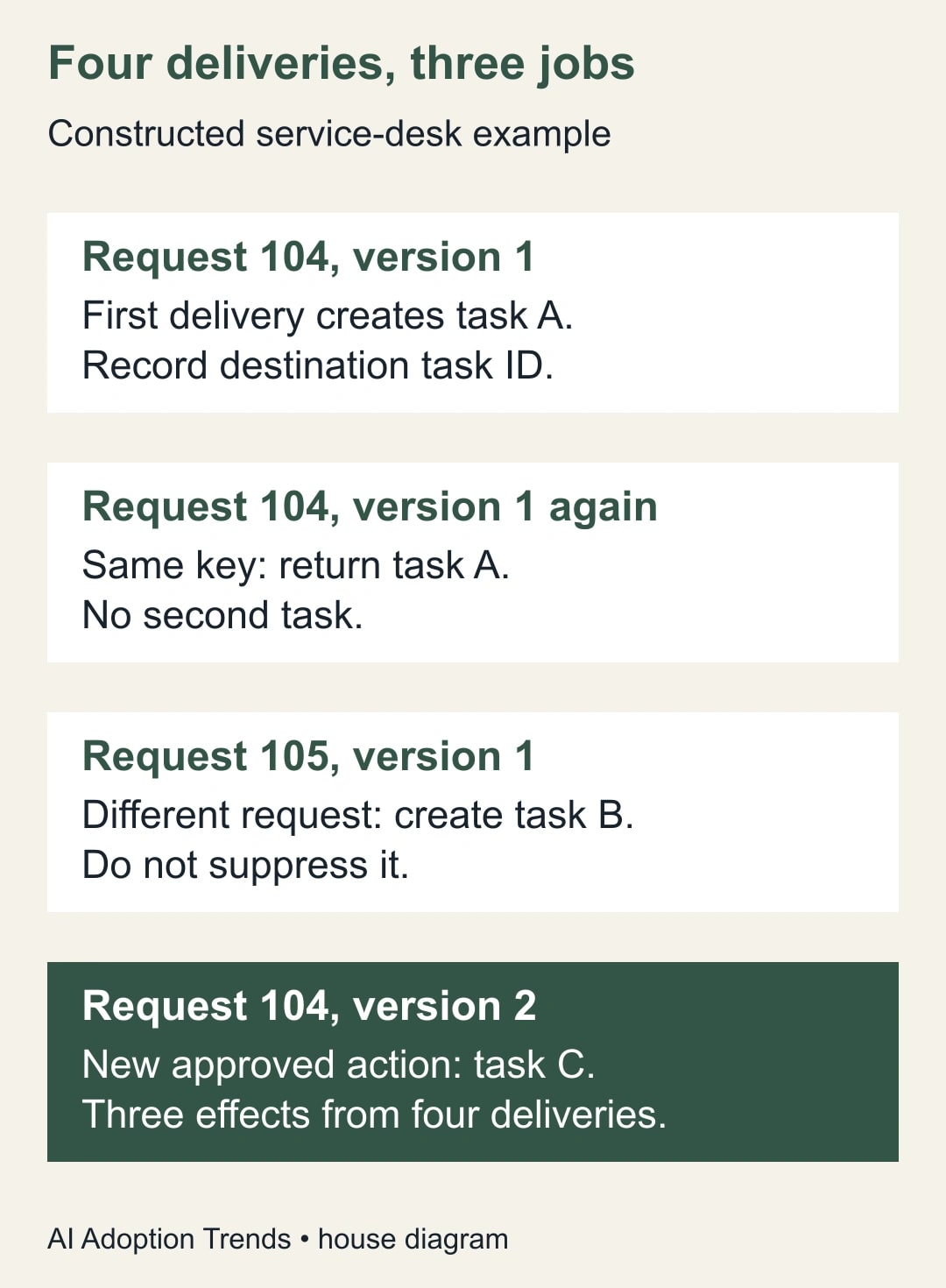
In this constructed example, the business rule says each approved request version needs a separate review task. Delivery one is request 104, version 1. The flow claims helpdesk-104-v1-create-review-task, creates destination task A and records task A’s identifier with a succeeded state. The result can now be reconciled independently of the run history.
Delivery two repeats request 104, version 1. It has the same operation key. The flow finds the successful operation and returns or references task A instead of creating another task. Record this as a repeated delivery handled without a new effect. It is useful evidence that the protection worked, not necessarily an error to hide.
Delivery three is request 105, version 1. Its title happens to match request 104’s title, but it represents a different request. The distinct key allows task B to be created. A rule based only on the title would suppress valid work here. This is why a duplicate test must include a look-alike request as well as an exact repeat.
Delivery four is request 104, version 2. Under the stated example policy, it creates task C. Four deliveries therefore produce three intended tasks. If your actual policy requires version 2 to update task A, the expected result would be different. Write that decision before implementing the key so the technology follows the work rather than silently defining it.
Now add a failure case. Suppose task A is created, but the response is lost before the register stores its ID. A later delivery sees an incomplete operation. It must not assume the first attempt failed before doing anything. Search the destination by the stable external reference if supported, inspect the relevant audit evidence and recover task A. If that evidence is unavailable, escalate the uncertainty instead of guessing.
Treat concurrency and trigger filters as separate controls
Concurrency means how many runs may execute at the same time. Limiting it can reduce certain races, but it does not establish that a later repeat should be ignored. A single-file queue can still execute the same business request twice, one attempt after the other. Keep the operation-key rule even when the flow is intentionally serialized.
Microsoft cautions that enabling trigger concurrency control cannot simply be undone; removing it requires a new flow. Inspect the current setting and test the implications before changing it. Do not use it as a casual first response to every duplicate. The storage claim and destination behavior still determine whether repeated requests can produce repeated effects. Concurrency-control considerations
Trigger conditions can reduce unnecessary starts. For example, a task should be created only when a request reaches the business state that authorizes it. But a condition that merely says “approved” may remain true during later edits. The maintainer should examine which changes should count as a new operation and whether the flow’s own updates can trigger another run.
Also search the relevant environments for active copies responding to the same event. A test copy connected to a live source can produce valid-looking runs alongside the intended flow. Document the authorized producer for each destination action. Fixing one flow’s key logic does not automatically control a second flow that bypasses the same register.
Run a failure-oriented test pack
Use synthetic requests and a destination where test records are clearly separated from live work. Define expected effects before running the tests. The maintainer should retain the key, attempt and destination evidence for each case, while the operations owner verifies that legitimate work was neither duplicated nor suppressed.
- Deliver the same request twice in sequence: one intended effect, with the second delivery recognized.
- Deliver the same request twice at nearly the same time: one successful key claim and one intended effect.
- Deliver two different requests with identical titles: both legitimate effects occur.
- Deliver a new approved version: create or update according to the written business rule.
- Fail before the destination action: retry only when evidence confirms no effect occurred.
- Simulate an uncertain response after the destination accepts the action: reconcile the existing effect before any retry.
- Leave an operation in progress beyond its expected duration: route it to review rather than clearing the claim automatically.
- Restart after an interruption: reconcile the source backlog and destination results before normal processing resumes.
Do not force a dangerous connector failure just to complete the pack. Where a safe simulation is unavailable, document the untested case and use manual handling for that branch. A design review can identify the expected behavior without falsely claiming that a production failure was reproduced. Uncertainty should change the release scope.
Give uncertain operations an owner and a deadline
An exception queue needs someone who checks it. Assign an operations owner to decide whether the business action already happened and a technical owner to repair the cause. Record what evidence allows a retry, what evidence closes the operation as successful, and what requires a separate correction to the destination.
If duplicate tasks already exist, choose the authoritative record before closing or merging others. Check whether people added comments, files or decisions to either copy. Deleting the later record by timestamp alone can lose useful work. For duplicate messages, acknowledge or correct the situation through the normal communication process rather than generating another automated message without review.
Keep the operation history long enough to cover the actual replay and reconciliation window. An expired key can permit an old request to create a new effect. The appropriate retention period depends on your source, destination and business process; choose it deliberately and document what happens to older requests. Avoid an unexplained universal number of days.
Record the release decision
Use a short worksheet: business action; source identity; version policy; operation-key format; storage uniqueness mechanism; destination duplicate protection; uncertain-outcome procedure; backlog handling; test evidence; owners; and rollback plan. Include the monthly cost of any additional connector or store, using the organization’s actual terms. The maintenance burden is part of the design, even when no new license is needed.
After release, measure duplicate business effects per intended operation, legitimate requests incorrectly suppressed, unresolved-operation age and recovery time. Count effects at the destination rather than equating successful runs with successful work. A decrease in runs is not enough if requests are disappearing, and recovered staff time is not cash savings without an actual cost reduction.
Start with one repeated request and reconstruct its source-to-destination timeline. If you cannot identify the intended operation or determine the destination outcome, keep that branch under manual review. For related failures, use the approval-timeout recovery guide or the locked-Excel recovery process. Each addresses a different cause; the shared requirement is to know what happened before trying again.
Weekly Newsletter
AI Adoption Weekly
New research, field guides, training studies, and tool decisions for operators.
No spam. Unsubscribe anytime.
Related Comparisons
Calculator
AI seat cost calculator
List price × headcount. You enter the hours and the operating assumptions.