
Find Missing Slack Later Items and Rebuild Your Follow-Up List
Find items after Slack’s Later-to-To-dos change, reconcile reminders and rebuild a small follow-up list without losing unfinished commitments.
Published October 30, 2026
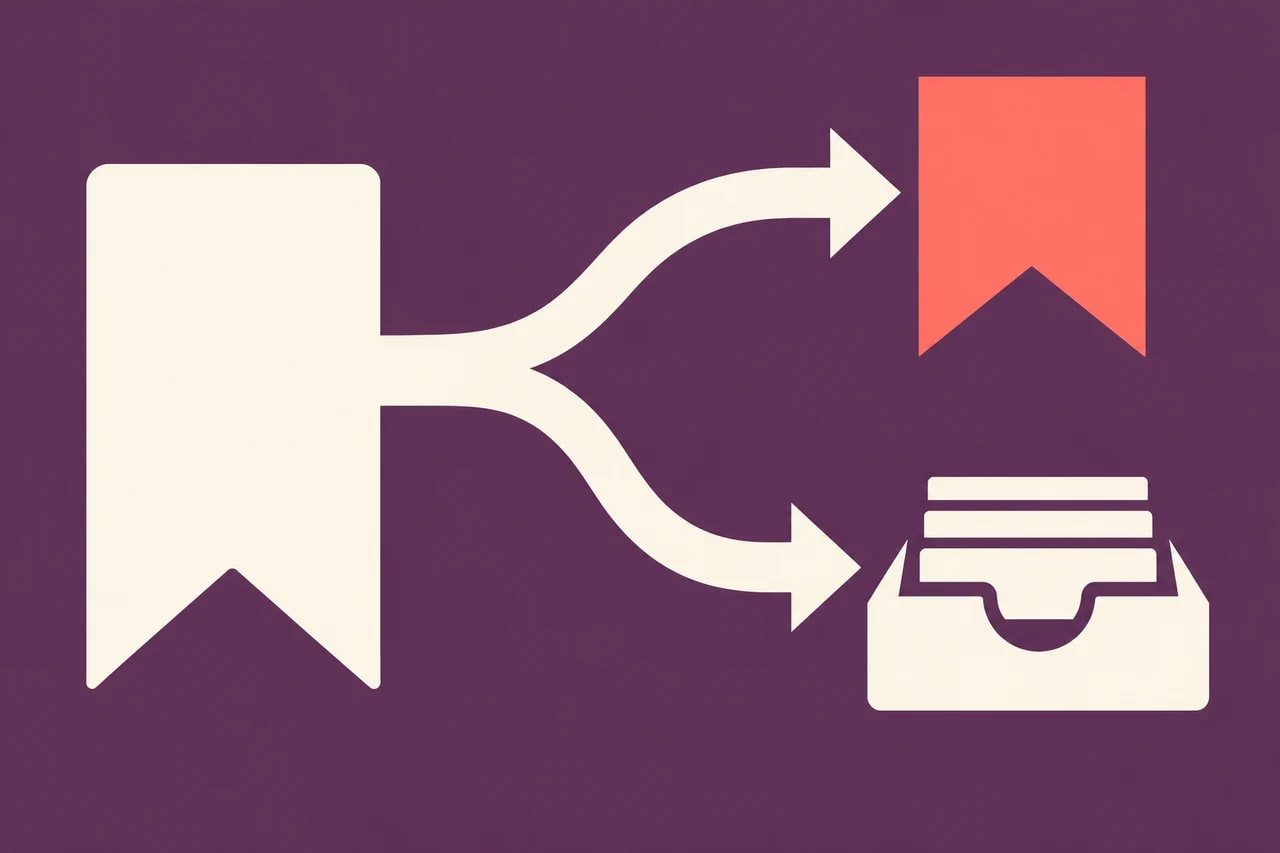
If items seem to have disappeared from Slack Later, check both To-dos and Saved before recreating them. Slack is splitting the old list according to reminder and completion status. An unfinished message without a reminder can now be stored with reference material, so finding everything requires more than opening the new task tab.
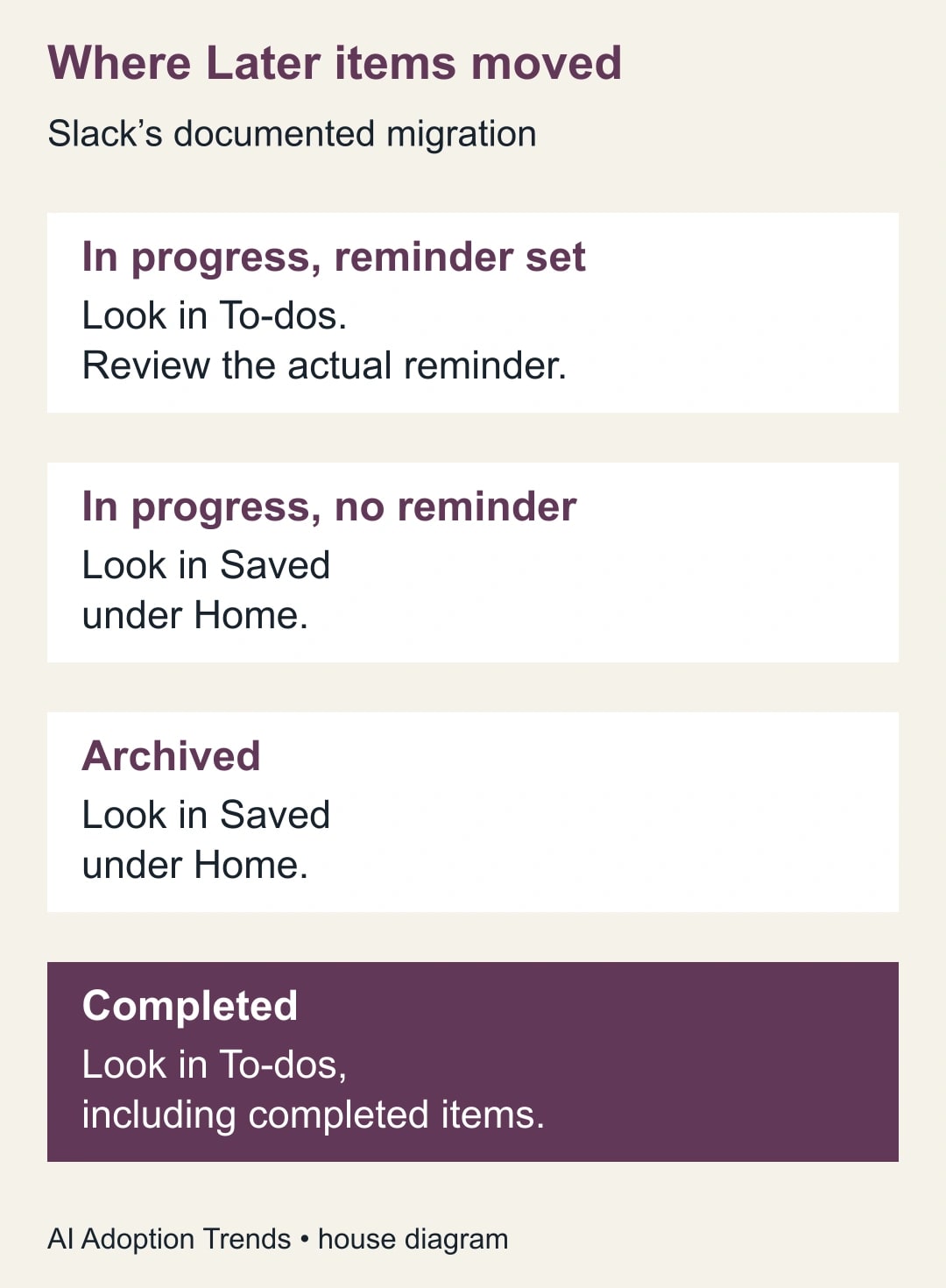
Slack’s October 2026 migration guide says the change is rolling out gradually on all plans. In-progress items with reminders move to To-dos; those without reminders move to Saved under Home. Archived items also move to Saved, while completed items remain in To-dos. This is the documented mapping checked on October 30, not evidence that any individual workspace has completed the migration. Slack’s Later-to-To-dos guide
For a team lead, the immediate job is to recover a reliable personal follow-up list. Start by accounting for existing items, then decide which still need action. Reorganizing an uncertain list too quickly can turn a navigation change into a missed customer reply, duplicated request or forgotten decision.
First decide whether this is migration or missing work
This guide fits a user who previously used Later as a mixture of reminders, unfinished work and useful references. It also helps a manager explain the change to colleagues without turning a personal list into a new team-wide project system. It does not recover deleted messages, override access restrictions or prove that a saved item still exists under your organization’s retention rules.
If your workspace still shows Later, use the interface actually available to you. Do not rename channels, move files or ask everyone to rebuild their lists just because another workspace has the new view. Record what you see and use Slack’s current migration guide to distinguish an expected interface difference from an unresolved problem.
Before touching the list, identify one missing item you can describe precisely. Use its author, conversation, approximate date and subject. “The renewal discussion from last Tuesday in the operations channel” gives you something to trace; “a few things are gone” does not. If you have a message link in an existing note, start there rather than generating new tasks from memory.
Check that you are in the correct workspace and signed into the expected account. Then inspect both destinations and the relevant completion or reminder filters. Slack documents filters for status and reminders in To-dos. A filtered view is a view of part of the list, not a complete inventory. Avoid treating a small count on screen as proof of loss.
Make a short reconciliation record
Use a private working note with one line per important item. Record the original message link if available, its short purpose, where you expected to find it, where you found it and whether it still needs action. This note is temporary evidence for the cleanup. It should not become another permanent list competing with Slack and the team’s task system.
You do not need to inventory years of harmless saved references before answering an urgent customer. Start with open commitments: promises to reply, decisions due this week, handoffs awaiting acceptance and work that blocks someone else. After those are accounted for, review lower-priority references and old completed items at a separate time.
Use three findings in the reconciliation note: found and understood; found but meaning unclear; not located. A fourth category, “probably complete,” is tempting but unhelpful. If completion matters, identify the actual evidence: a sent reply, an accepted task, an approved decision or a delivered file. The presence of a check mark alone does not explain what was done.
For an item you cannot locate, search the original conversation using the known subject and participants. If the message is inaccessible, ask the conversation owner through the normal work process for the needed context. Do not paste private content into a broader channel to make it easier to find, and do not assume an administrator can restore every missing item.
A twenty-item example shows why the new list looks smaller
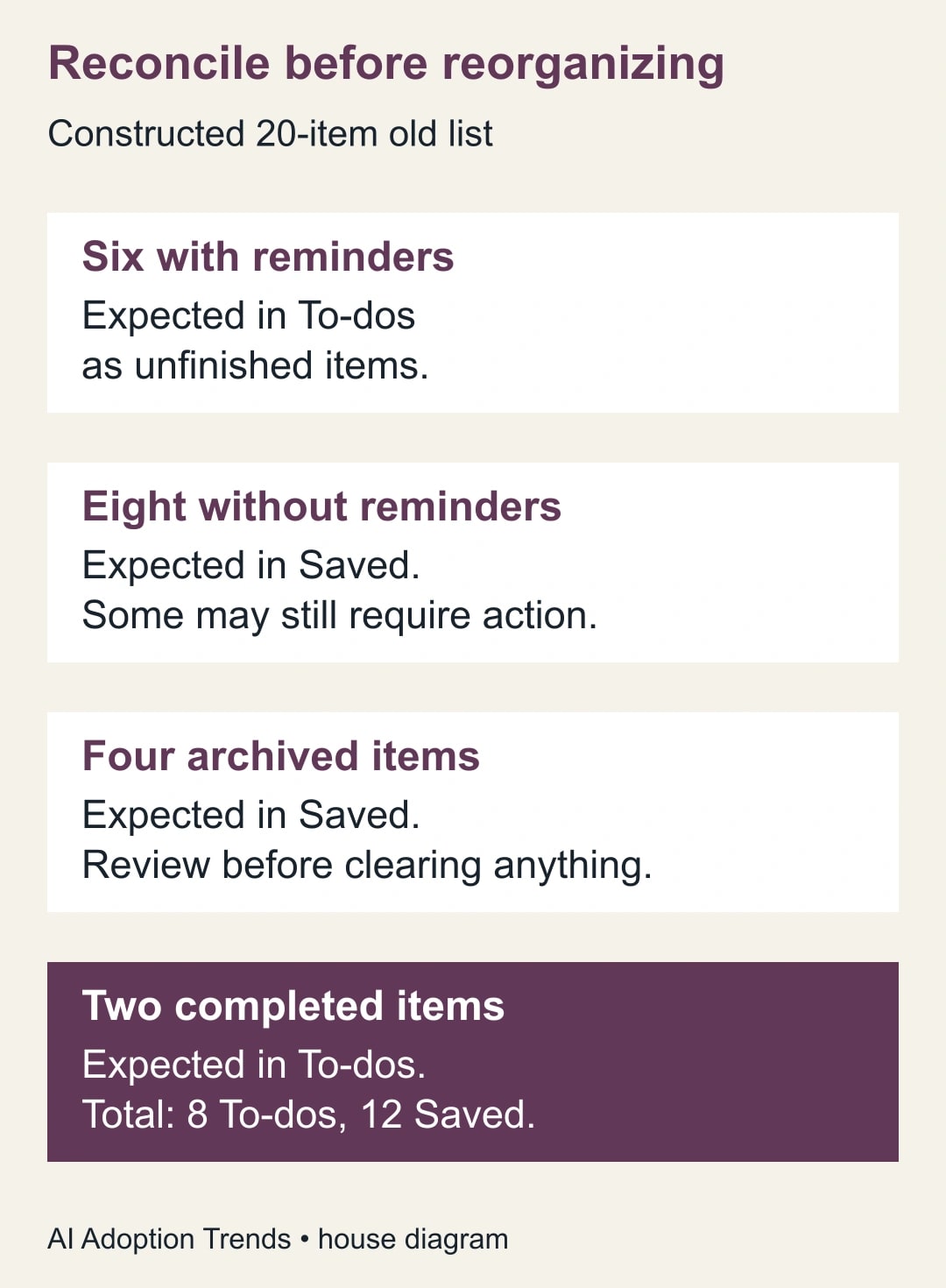
Consider a constructed old Later list with twenty items: six unfinished items with reminders, eight unfinished items without reminders, four archived references and two completed items. Under Slack’s documented mapping, eight items belong in To-dos when completed items are included, while twelve belong in Saved. The new action list can therefore look much smaller even when every item is accounted for.
The arithmetic is six plus two equals eight in To-dos, and eight plus four equals twelve in Saved. Eight plus twelve equals the original twenty. This is a reconciliation of synthetic data, not a claim about Slack’s migration accuracy. In a real list, you may lack a reliable old count, in which case record that limitation and verify important items individually.
Now examine the eight unfinished items that moved to Saved. Suppose three are genuine next actions, two are background references, two have already been completed elsewhere and one is too ambiguous to classify. The three actions need a place in the working task process. The references can remain reference material. The completed items need confirmation, and the ambiguous item needs a question answered.
The key distinction is that “found” and “organized” are different milestones. All twenty items can be located while one important commitment remains unclear. Conversely, a tidy list of five tasks can hide several unreviewed promises. Report both the reconciliation and the unresolved work rather than declaring success because the sidebar looks cleaner.
Convert a message into a next action you can finish
A saved message is often context rather than a task. “Pricing thread” does not tell you what to do when it reappears. Rewrite the action in your own working record as a verb, an object and a completion test: “Send the approved price comparison to Ana after finance confirms the totals.” Keep the source link so that the action does not lose its context.
Separate the actual commitment from the moment you want to be reminded. A customer may need an answer on Friday while you need to start reviewing it on Wednesday. A reminder at the final deadline is too late for work that requires another person’s input. Choose the reminder based on preparation time and dependency, then keep the real due date in the task wording or established shared system.
Slack’s reminder documentation describes setting and managing reminders on messages and files. After creating one, inspect the date and time rather than trusting an informal phrase to mean what you intended. Use an unimportant test item if you need to confirm how a reminder appears in your account. Slack’s reminder instructions
Creating a to-do does not automatically create a reminder, according to Slack’s migration guide. That matters when a user assumes that moving an item has preserved an alerting habit. For the few tasks that truly need an alert, explicitly verify one is present. Avoid adding a reminder to every reference simply to make the new list resemble the old one.
For reference material, write a brief reason to keep it when the meaning is not obvious: “Approved wording for the customer onboarding email” is more useful than “good example.” Slack provides Saved for messages and files you want to return to. Use it for retrieval, while recording time-sensitive commitments in the action process. Slack’s saved-content guidance
Keep personal reminders separate from team ownership
A personal follow-up list is useful for remembering to check a handoff. It is not sufficient evidence that another person has accepted responsibility. If a task belongs to a colleague, use the existing shared channel, task board or service queue to agree the owner, expected output and due date. Keep only your own follow-up obligation in your personal list.
For example, “Review the draft proposal” could mean you must edit it, you must ask Sam to edit it, or you are waiting for Sam’s accepted assignment. Those are different actions. A clear handoff says: “Sam owns the pricing review; the expected output is an approved totals sheet by Thursday noon; I will check for it Wednesday afternoon.” Use the actual agreement, not an assumption inferred from a mention.
This distinction also prevents duplicate reminders from becoming duplicate work. If a request already has a task in the team’s board, link to that task and use Slack only to remind yourself to follow up. Do not create a second competing assignment with a different deadline. When the shared task changes, update the personal reminder that depends on it.
If the request never had an owner, the cleanup should expose that gap. Ask who owns the next step and leave the item unresolved until the answer is clear. Moving it into Saved because nobody volunteered would make the list look better while leaving the business problem unchanged.
Use a controlled cleanup, then test the new habit
Avoid bulk clearing while the reconciliation is incomplete. Work on a small group of items, check the result and then continue. Keep the temporary note until the important commitments are located and the new action wording is usable. Old completed items may be valuable context during this transition, especially when several similar requests exist.
For a short trial, choose five real actions with different needs: one due soon, one awaiting another person, one without a fixed deadline, one already represented in a shared task system and one reference that should not become a task. Write the intended treatment for each before changing the list. The expected output is a small, understandable queue rather than an arbitrary reduction in item count.
At the end of the next working day, check whether the urgent action was visible at the right time, whether the waiting item had an accepted owner and whether you could retrieve the reference quickly. If the same item exists in two places, identify which place controls the work. If an alert did not help, adjust its timing or wording rather than adding more alerts indiscriminately.
The main cost is review time and interruption, not a new subscription purchase for this migration. Set a reasonable time allowance for the first pass and protect urgent work from an extended archive-cleaning exercise. A ten-minute daily list review is useful only if it prevents more confusion than it creates; measure your own experience rather than assuming a standard productivity gain.
A reusable recovery and handoff worksheet
- Item: short description, original conversation and message link where available.
- Location: old status if known, expected new location, actual location and active filters checked.
- Meaning: action, reference, confirmed complete or unresolved; include the evidence for completion.
- Next action: a specific verb and output, with a named owner who has accepted the work.
- Timing: actual commitment date, preparation time and reminder date, each recorded separately.
- Shared record: the existing task or service request that controls the work, if there is one.
- Recovery: who will investigate an inaccessible or unlocated item, and when you will check again.
- Completion: what result closes the action and what reference, if any, should remain available.
Measure the transition by unresolved commitments, missed follow-ups and time spent finding context. Do not measure it solely by the number of items cleared. Stop reorganizing if you cannot explain where an important request went or if duplicate task records are causing conflicting instructions. Preserve what you have and resolve the specific uncertainty first.
Start with one missing commitment, locate it and write a finishable next action. Once that works, reconcile the rest in small groups. If the cleanup reveals a broader handoff problem, the chat-to-task ownership guide offers a reusable way to agree responsibility. If AI will later draft or act on requests, define its limits with the read, draft, send and change approval matrix before connecting automation to the queue.
Weekly Newsletter
AI Adoption Weekly
New research, field guides, training studies, and tool decisions for operators.
No spam. Unsubscribe anytime.
Related Comparisons
Calculator
AI seat cost calculator
List price × headcount. You enter the hours and the operating assumptions.