
Power Automate Excel File Locked? Recover the Queue Before Retrying
Stop competing writes, identify requests that already reached Excel, and replay only missing work. Use a small test to decide whether the workbook can stay.
Published October 19, 2026

When a Power Automate flow reports that an Excel file is locked, the safest first move is to stop competing writes and find out which requests already reached the workbook. Repeatedly resubmitting every failed run can make the incident worse. A timeout or error message does not always tell you whether the underlying row was written.
This guide is for an operations team using the Excel Online (Business) connector to collect requests in a workbook stored in OneDrive for Business or SharePoint. It covers recovery and the decision to keep that design. It is not a runbook for personal OneDrive, a promise of exactly-once processing, or advice to use a spreadsheet as the permanent record for consequential transactions.
The practical sequence is pause, preserve, reconcile, repair and replay narrowly. Keep incoming requests somewhere durable while the workbook is unavailable. Assign one person to decide when writing resumes. If several people independently retry the same queue, even a correct technical fix can leave the business data wrong.
Confirm which problem you actually have
Microsoft’s Excel Online (Business) connector reference lists a 25 MB workbook limit, possible update or delete locks lasting up to six minutes after connector use, and unsupported simultaneous modifications from multiple clients. The same reference warns that write results can take time to appear and that timeouts followed by retries can duplicate inserts. These product limits were checked October 19, 2026.
Those facts are reasons to inspect the incident, not reasons to wait exactly six minutes and declare the file safe. Another active flow or user can touch the workbook while you are waiting. Record the action name, error text, run time, workbook and connection account. Establish whether the failure is a lock, permission problem, missing table, throttling or timeout before changing the design.
A flow that cannot find its table needs a different repair from a flow competing with another writer. An access error does not justify giving everyone broad file access. A slow workbook does not automatically need more retries. The error is a starting point for investigation; the request and its intended output remain the unit of recovery.
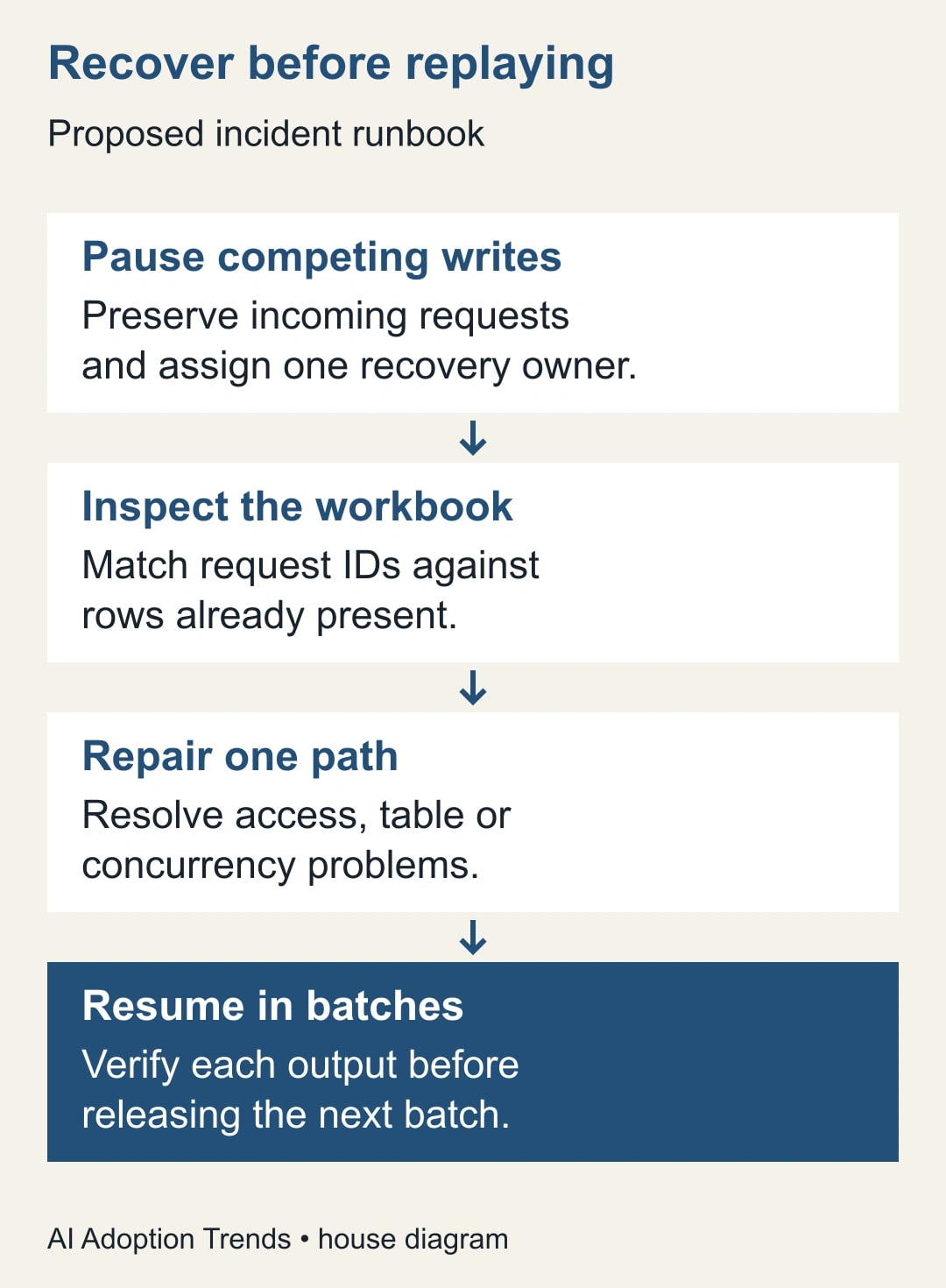
Put one person in charge of the incident
Name a recovery owner who can coordinate the flow builder, workbook owner and receiving team. Give the incident a short identifier and record when the team stopped normal processing. Explain where new requests will wait and when staff will receive another update. This prevents people from creating parallel workarounds because they think nothing is happening.
Preserve the original request list and relevant run history before making changes. Save a protected copy or approved version reference for the workbook. Do not distribute a copy containing customer information to everybody helping with troubleshooting. The builder usually needs identifiers, field structure and error details rather than the full business contents.
Pause or coordinate every known writer: scheduled flows, other automations and manual editing sessions. Disabling a trigger may not cancel work already in progress, so review active runs separately. If you cannot identify all writers, keep the destination closed to automated recovery until you have a workable inventory. A local setting on one flow cannot coordinate another flow you have overlooked.
Keep request intake separate from the failing destination. For example, preserve the originating form responses and record which identifiers still need processing. Do not tell people to submit again unless you deliberately want a new request. A second submission can look like new business demand even when it is only an attempt to recover a missing row.
Reconcile outputs before changing retry behavior
Give every incoming request a stable identifier that travels into the workbook. If your flow starts from a form, retain the form response identifier or another documented unique key. The key should refer to the request, not the time of a particular attempt. A new random identifier on every retry makes duplicate detection harder.
For each uncertain run, search the destination for that key. Classify it as absent, present once, present more than once, or present with incorrect values. Record the evidence and the next action. A visible row count alone is insufficient because one missing request and one duplicate request can cancel each other numerically.
Inspect recent values carefully. If results are still settling, avoid interpreting an immediate filtered lookup as definitive proof that a write failed. Allow the system to settle under controlled conditions, then check again before authorizing a repeat. If you cannot determine the outcome, keep that request in an uncertainty queue and ask the owner to resolve it.
For duplicate rows, identify whether downstream work has already occurred. Removing a duplicate from the workbook will not reverse an email, purchase order or task created from it. Resolve those effects with the relevant business owner. Record the accepted request once and preserve an explanation of the correction rather than silently erasing the incident.
Repair the narrowest cause
Check the connector’s account, storage location, selected file and selected table. A connection that worked for the original builder may fail after an account or permission change. Have the file owner grant only the access the approved workflow needs. Reconnect through the organization’s normal process and test with harmless data.
Inspect whether the destination range is an actual Excel table and whether its column mapping still matches the flow. Microsoft’s Forms-to-Excel setup guide uses Add a row into a table and calls for checking the mapping and avoiding an additional synchronization path that can duplicate data. If your workbook already receives the same responses through another connection, remove the duplicate route through a planned change.
If multiple runs write to the same workbook, design one controlled writing path. Reducing concurrency in one flow can help within that flow, but it does not coordinate separate flows or manual editors. Inventory those writers and decide who is allowed to write when. Keep reporting calculations in a separate output when they make the intake workbook heavy or fragile.
Do not casually switch calculation to manual just to make errors disappear. That change can make the report look healthy while its numbers become stale. If a calculation-mode change is proposed, the report owner must define when recalculation occurs, how freshness is displayed and how the totals will be checked. A simpler intake table is often easier to reason about.
Prove the repair with a small recovery batch
Use one harmless request to test the repaired path. Confirm that exactly one row appears with the intended identifier and values. Then test a request that already exists and verify that the recovery procedure does not add it again. These are acceptance tests you should perform in your environment, not reported results from our own deployment.
Next, select a small group of missing requests that covers the important field types and branches. Keep all other uncertain requests on hold. Process the group through the controlled path, wait for the resulting state to settle and reconcile every identifier. Stop immediately if duplicates or unexplained omissions appear.
Review retry settings only after you understand what the action may already have done. Blindly increasing retries turns a transient problem into more attempts, not necessarily more accepted work. Where the business requires a strict uniqueness guarantee, consider a destination that enforces a unique request key. A check followed by an insert into Excel is not an atomic guarantee against two simultaneous writers.
The recovery owner should sign off on three things before normal intake resumes: the writing path is understood, the backlog is reconciled, and the receiving team can see which requests remain unresolved. If any one is missing, keep the temporary queue and publish an honest internal status update.
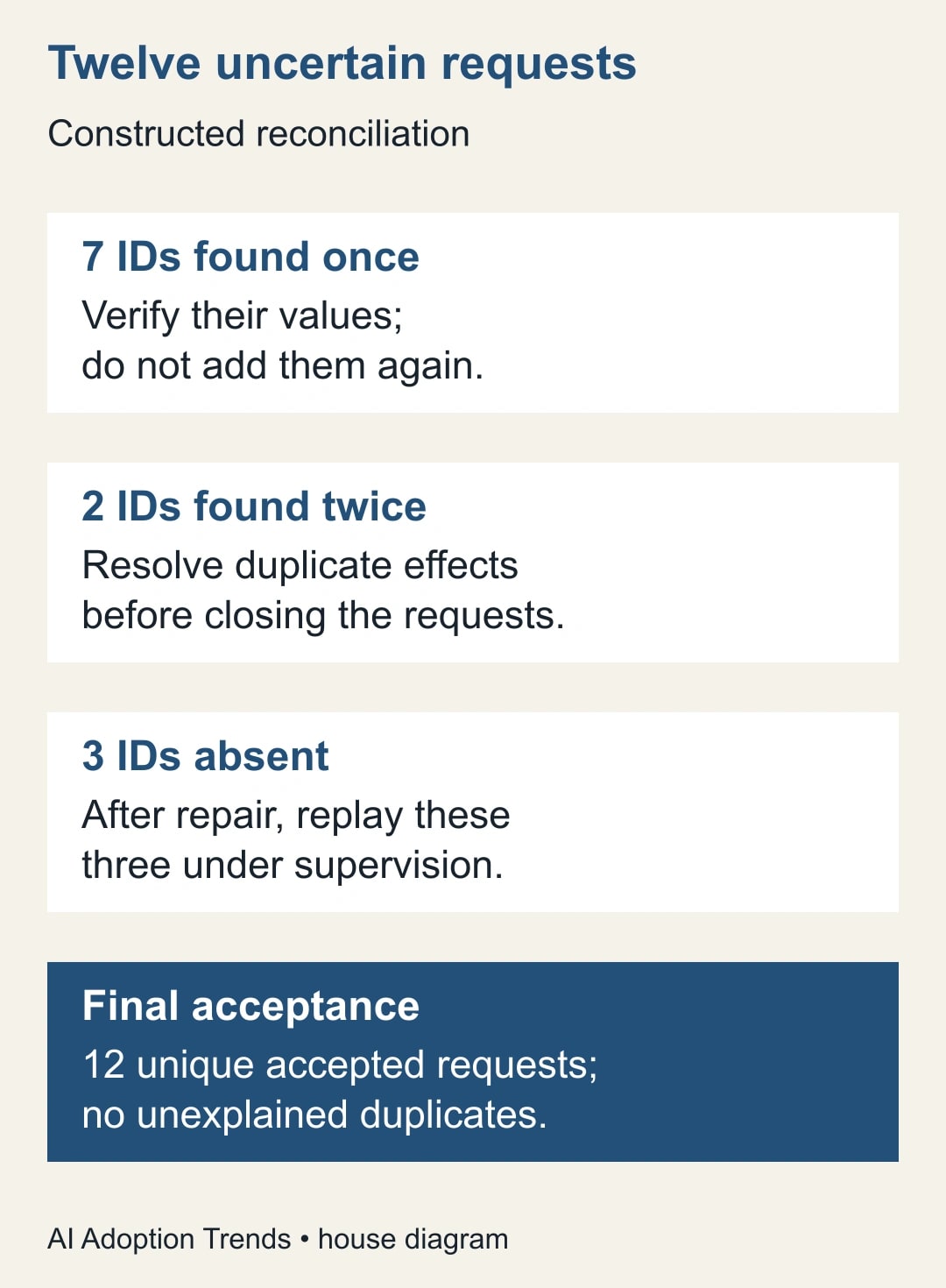
Worked example: twelve uncertain requests
Consider a constructed service-intake incident. Twelve flow runs have an error or timeout after attempting to add a row. The owner searches for all twelve request identifiers. Seven appear exactly once with correct information. Two appear twice. Three are absent. There are eleven rows associated with nine request identifiers: seven single rows plus four duplicate rows.
The team does not replay all twelve requests. It accepts the seven correct entries, investigates the two duplicate pairs, and reserves replay for the three absent requests after repairing the writer conflict. If no downstream side effects occurred, resolving each duplicate pair to one accepted entry leaves nine unique requests. Replaying the three missing requests should bring the accepted total to twelve.
The final check compares all twelve original identifiers with twelve accepted outputs. It also checks names, routing and required details. A workbook containing twelve rows is not sufficient evidence unless those rows represent the right twelve requests. Two unrelated test rows or an incorrectly retained duplicate would invalidate the count.
Keep the incident’s attempt count separate. The original twelve attempts, any automatic retries and three supervised replays can exceed twelve. That is normal accounting for recovery effort; it should never inflate the count of completed customer requests.
Use this recovery card
- Incident owner and start time: who may resume normal writing, and when was the queue paused?
- Destination: connector type, storage library, workbook, table and approved connection identity.
- Writer inventory: each flow, synchronization process and manual editing group that can touch the file.
- Request register: original identifier, run evidence, current destination state and authorized next action.
- Repair: what changed, who approved it and which harmless tests passed?
- Acceptance: one correct output per request, relevant downstream effects checked, and unresolved items assigned.
- Resume condition: backlog reconciled, one controlled writer path active, and a person watching the first normal batch.
Store this card with the flow documentation. The next colleague should be able to distinguish a request awaiting processing from a request whose processing outcome is uncertain. That distinction matters more than a reassuring green status icon.
Decide whether Excel should remain the destination
Excel can be a reasonable destination for a modest, controlled workflow with a clear owner and low contention. Keep it when the team can coordinate writing, reconcile requests and tolerate the refresh behavior. Do not replace it solely because one recoverable incident occurred.
Reconsider the design when many independent users and automations must write at once, when missing or repeated work has serious consequences, or when recovery requires hours of manual comparison. Evaluate a list, application database or other system suited to the workflow, including its permissions, uniqueness controls, operating costs and reporting needs. This is an architectural decision to assess, not a promise that moving the table will fix a poorly defined process.
Measure the full weekly cost: time investigating failures, correcting records, supervising retries and maintaining the workbook. Add any new licensing and support costs to the comparison. Staff hours released by a better design are capacity, not automatically cash savings. The Power Automate licensing guide can help frame that review without assuming your existing entitlement covers every proposed connector.
Start today by choosing one uncertain run and tracing its request identifier into the workbook. If you cannot do that reliably, repair the identifier and recovery record before increasing automation volume. The next incident will be much easier when every request has an explainable outcome.
Weekly Newsletter
AI Adoption Weekly
New research, field guides, training studies, and tool decisions for operators.
No spam. Unsubscribe anytime.
Related Comparisons
Calculator
AI seat cost calculator
List price × headcount. You enter the hours and the operating assumptions.