
Find Missing Invoice Records with a Power Query Left Anti Join
Build an exception list of unmatched invoice IDs, check both directions, and keep missing records separate from duplicate keys and amount differences.
Published November 15, 2026

A Power Query left anti join answers a narrow but useful question: which rows in the first table have no matching key in the second? For invoice reconciliation, put the authoritative source export first and the destination export second. Match on the agreed invoice identity, then investigate the unmatched rows. Do not interpret the output as a list of unpaid invoices or a list approved for reposting.
This method fits finance operations teams comparing exports from an invoicing system and a downstream ledger, reporting tool or workflow. It is useful when you need a repeatable exception list instead of scanning two spreadsheets. Skip automated repair if the exports cover different companies, periods or record statuses, or if there is no reliable shared identifier. Establish comparable populations and identity before treating an absent match as a processing failure.
Microsoft's left anti join documentation, checked November 5, 2026, confirms that this join retains unmatched rows from the left table. The table order therefore changes the question. Source against destination finds source-only records; destination against source finds destination-only records. Neither comparison checks whether matching records have the same amount.
Agree on what one invoice means in these exports
Name the business owner who can decide whether an invoice should exist in the destination. The analyst owns the comparison; the system owner explains timing and export scope; the process owner approves any operational correction. Separating these decisions prevents a spreadsheet result from becoming an unauthorized accounting action.
Before importing files, write down their extraction times, time zones, entity scope, status filters and row definitions. An invoice-header export and an invoice-line export are not interchangeable. One invoice may appear once in the first and several times in the second. If the decision concerns invoice presence, construct an invoice-level comparison rather than treating every line as an independently missing document.
Choose the complete key. An invoice number may be unique only within a company or supplier. A candidate key might therefore be company code plus invoice number. Do not concatenate values casually if the resulting text can be ambiguous: AB plus 12 and A plus B12 can produce the same unseparated string. Selecting the separate columns is often clearer for the comparison and the review record.
Keep the original identifiers alongside any cleaned versions. A leading zero, prefix or space may be meaningful in one system and formatting noise in another. Agree on normalization rules with the system owner. If you remove characters without understanding them, a false match can hide a genuinely missing invoice. Treat blank keys as exceptions to investigate before merging, not as ordinary invoice identities.
You need a Power Query-capable environment available to your team, permission to read both exports, a safe working copy and someone who can inspect the output. Confirm the exact menus in your Excel or Power Query environment. No additional automation service is required for this file comparison. Plan time for source reconciliation and exception ownership; the merge itself is usually the smaller part of the work.
Freeze the inputs so the result can be reproduced
Use dated copies of the exports and retain their original filenames in the working record. Record row counts, distinct-key counts, blank-key counts and source amounts before transformation. Do not edit the raw files to make the comparison look cleaner. A separate transformation step should explain each cleanup rule.
A row-count match alone is weak evidence. Two exports can each contain 100 rows while referring to different invoices. Likewise, equal totals can hide an omitted invoice offset by an unrelated extra invoice. Your control record needs both identities and amounts, with a clear statement of whether the amounts are gross, net, tax-inclusive or another defined measure.
Check key uniqueness before joining. Repeated keys may be legitimate line items, duplicate exports or actual source defects. Decide which case you have. Do not remove duplicates simply to obtain a one-row-per-invoice shape if the rows contain different amounts or statuses. Summarizing line items requires an explicit business rule and a separate arithmetic check.
Build the unmatched list as a separate query
Import each export into its own query. Give the queries descriptive names such as SourceInvoices and DestinationInvoices. Keep the raw-stage queries intact and create the comparison separately, so a reviewer can trace how the exception list was produced without damaging either input.
From the merge menu, choose Merge queries as new. Select SourceInvoices first and DestinationInvoices second. Select the corresponding key columns, in the same component order for a multi-column key, and choose Left anti. Microsoft notes that the paired columns should have matching data types; their headings need not be identical. See the merge queries overview.
Load the result to a clearly named exception table. Preserve the source identifier, source amount, business date and useful context fields. The important result is the unmatched source rows; do not expect destination values for records that have no destination match. Rename the output to something like SourceOnlyInvoices rather than UnpaidInvoices or FailedInvoices.
Create the reverse comparison as another query, using destination first and source second. Keep the outputs separate. That distinction tells the reviewer whether the source contains an invoice absent downstream or the destination contains an item outside the chosen source population. A combined exception queue can be useful later, but retain the direction as a visible field.
For matched identities, create a separate comparison of amounts and other consequential fields. That is a different test. If the matching side has duplicate keys, resolve the intended comparison grain before expanding values, or you can multiply rows and inflate totals. The site's guide to merge duplicates and inflated totals addresses that failure in detail.
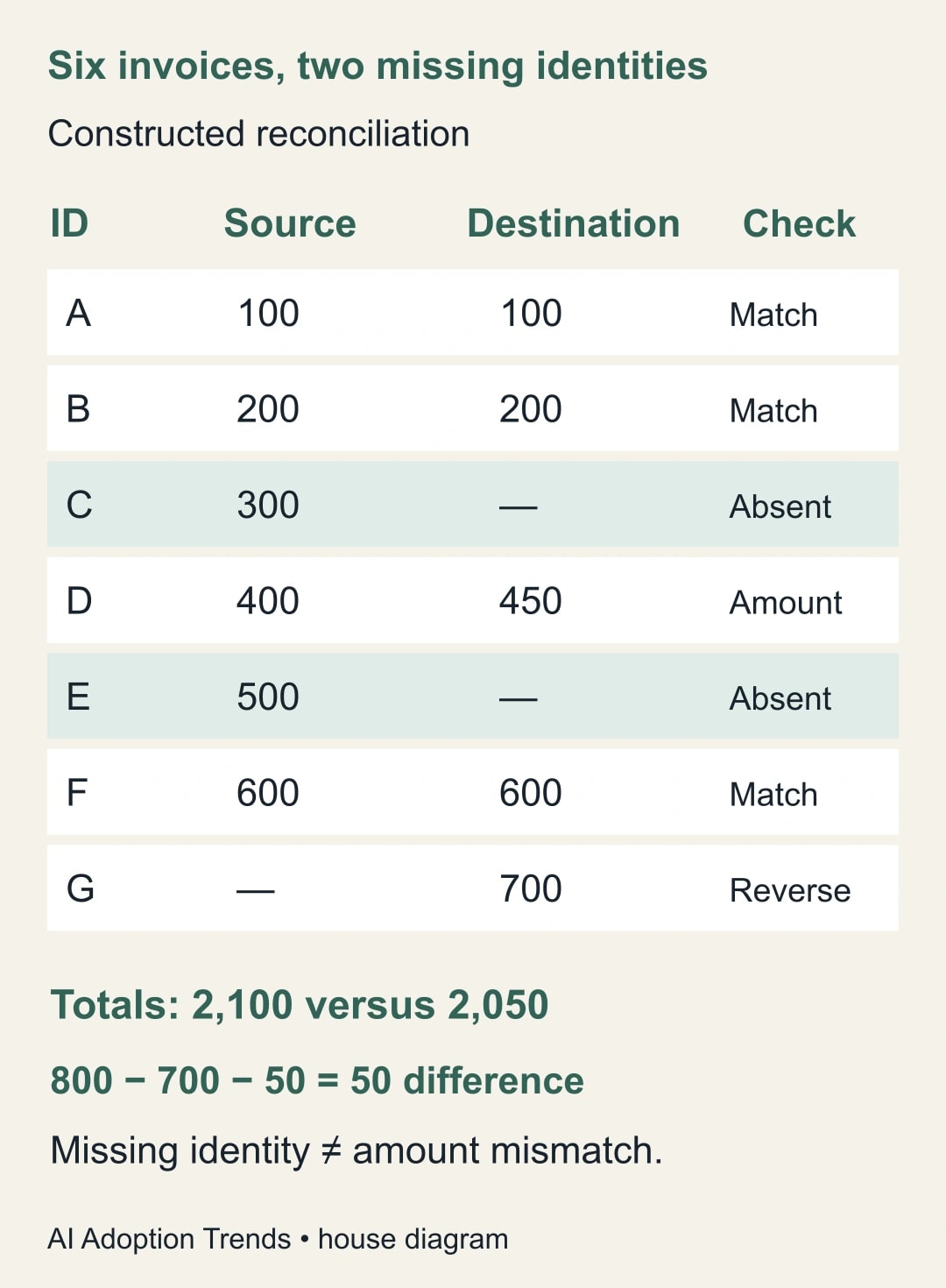
Six invoices show why the missing list is only one control
Consider this constructed example for one company and one currency. The source contains six invoice IDs: A for 100, B for 200, C for 300, D for 400, E for 500 and F for 600. Its total is 2,100. The destination contains A for 100, B for 200, D for 450 and F for 600, plus G for 700. Its total is 2,050.
The source-to-destination left anti join returns C and E. Their source amounts total 800. The reverse comparison returns G, with a destination amount of 700. The matched-ID amount check returns D because 400 in the source differs from 450 in the destination by 50. A, B and F have matching identities and amounts in this example.
The net difference is only 50: source 2,100 minus destination 2,050. That small number conceals three different issues. The relationship is 800 of source-only value, minus 700 of destination-only value, minus the extra 50 on a matched destination invoice. Those components explain the 50 difference; the total difference by itself does not identify the work to do.
Now imagine D was duplicated in the source. A left anti join would still treat both D rows as having a matching destination identity. It would not put them in the missing list merely because they were duplicates. This is why the pre-merge uniqueness check remains necessary even when the anti-join output looks plausible.
Or imagine C's destination key is C followed by an unintended trailing space. The record may appear source-only under the current key comparison while its underlying business transaction exists. Investigate normalization and the original destination record before authorizing a repost. The comparison is evidence about the selected keys in the selected files, not an omniscient statement about the operational system.
The amounts and IDs above are invented to demonstrate reconciliation logic. They are not customer results or evidence that a particular integration loses records. Reproduce the same small case in your own environment before relying on a larger export, then use real records only within the team's approved access and handling process.
Turn each exception into an owned decision
Use a worksheet with one row per exception and a controlled status vocabulary. An analyst should be able to hand the file to an operator without the operator needing to infer whether the row means missing, delayed, duplicated or merely out of scope.
- Comparison direction: source-only, destination-only or matched-field difference.
- Identity: original company and invoice IDs, plus any normalized comparison values.
- Evidence: export timestamps, source row and destination lookup result.
- Reason: timing, scope mismatch, key defect, duplicate ambiguity or confirmed gap.
- Proposed action: wait, correct mapping, investigate, or request an approved repair.
- Ownership: decision maker, due time, action reference and verified final state.
A timing exception should have a review time based on the actual processing arrangement. Do not invent a universal delay allowance. If the destination is intentionally updated overnight, a same-afternoon absence may be normal. If the process promises immediate posting, the same absence may need prompt investigation. The system owner supplies that expectation.
For scope mismatches, correct the comparison population and rerun it. Do not mark dozens of rows as repaired when no business data changed. For key defects, repair the mapping in a controlled copy and check that it does not create new false matches. For confirmed gaps, send an explicit list to the person authorized to act in the destination system.
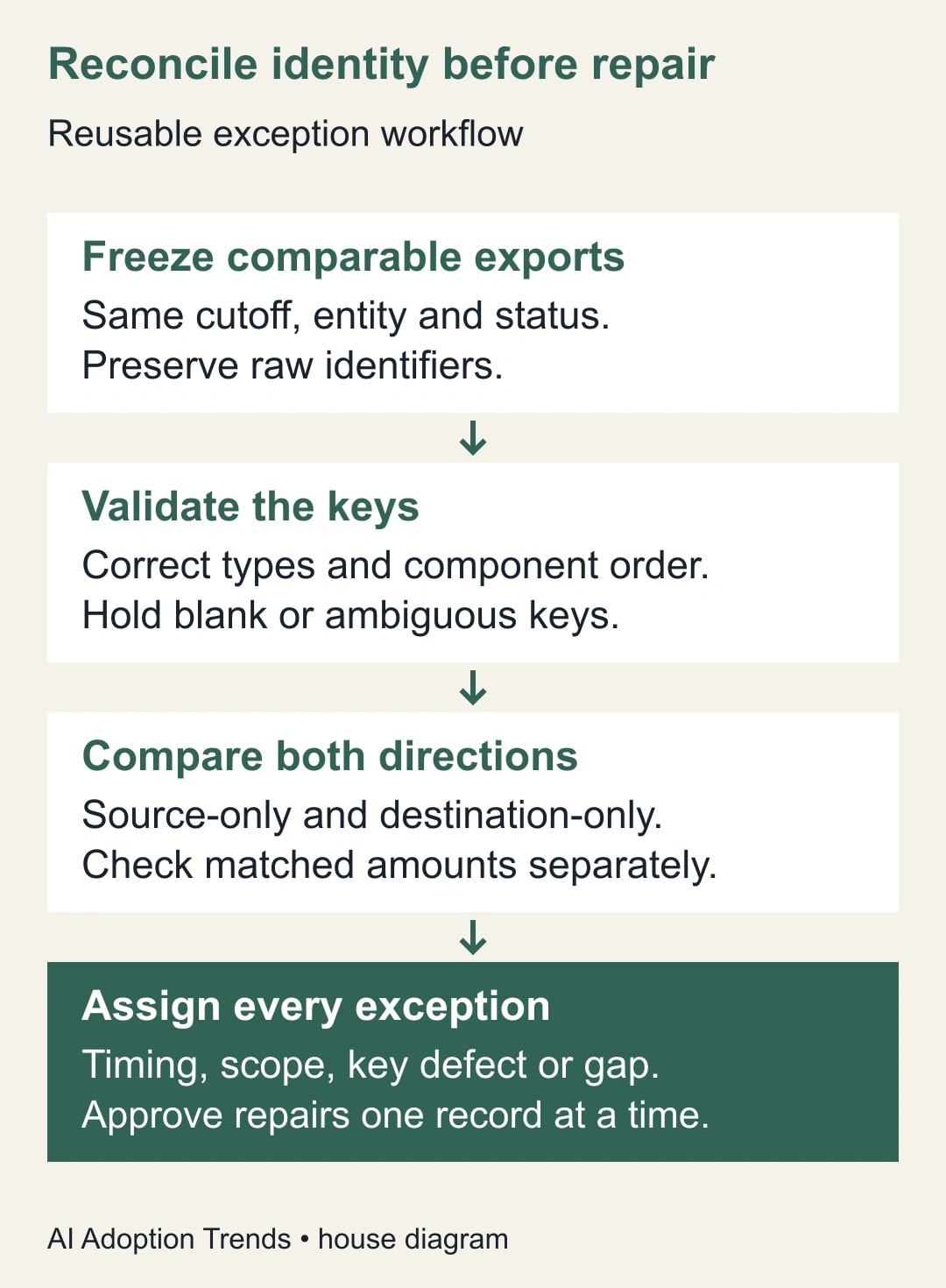
Test the method before making it routine
Start with the six-invoice case and verify C and E in the forward output, G in the reverse output, and D in the amount comparison. Then add a blank key, a duplicate key and a deliberately mismatched type. The test should show how each problem is caught or held. Do not count a completed refresh as a passed test unless the expected exception identities appear.
Next, take a small authorized historical sample whose final state is already known. Compare your output with that answer key. Include at least one genuinely missing record and one timing-related absence. A sample containing only clean matches proves very little about the exception workflow you intend to use.
Record the query version, source-file references and actual results. Have the process owner review at least the proposed repair population before the first operational use. If the output is unexpectedly empty, verify the table order, key selection and source populations. If almost everything is unmatched, check types and formatting before assuming the entire integration failed.
Do not feed the exception list directly into a write-back automation during the first iteration. The list needs classification because several causes lead to the same absent-match symptom. Automating a repost from every unmatched row can create duplicates when the destination export is delayed or incomplete. Any later automation needs its own approval rules and destination-state checks.
Measure a closed exception, not a disappearing row
A useful reconciliation report states how many invoices were compared, how many source-only and destination-only identities were found, how many matched records differed, and how many exceptions remain unresolved. Track amounts by category without adding overlapping populations. An invoice can have a key issue and an amount question; the report should explain how it avoids counting the same business exposure twice.
Closing an exception requires evidence: a corrected export scope, an established timing explanation, a repaired mapping or a verified destination record. A row disappearing after a transformation change is not enough. The disappearance might mean the rule became too broad. Keep the original exception and the reason it was closed.
For recurring work, measure analyst review time as well as refresh time. A faster query that produces an unreliable queue can increase total effort. Any hours released are capacity until there is a separate change in spending. Do not present the value of missing invoices as savings generated by the query; it is a comparison amount requiring business interpretation.
Stop if the key cannot uniquely identify the intended invoice, if the exports are not comparable, or if a proposed repair lacks an owner. The next action is to freeze two small exports and produce both directional exception lists. If rows are disappearing earlier during cleanup, use the Power Query removed-errors reconciliation guide before trusting the merge output.
Weekly Newsletter
AI Adoption Weekly
New research, field guides, training studies, and tool decisions for operators.
No spam. Unsubscribe anytime.
Related Comparisons
Calculator
AI seat cost calculator
List price × headcount. You enter the hours and the operating assumptions.