
Zapier Invoice Lines Have the Wrong Prices: Check Item Alignment
Repair Zapier invoice mappings with a three-line fixture that catches swapped prices, missing quantities and misleading totals.
Published November 20, 2026

If a Zapier invoice contains the right products but the wrong quantities or prices, compare each source row with the line sent to the invoicing app. The likely repair is to preserve the relationship between fields before mapping them into the invoice. A successful Formatter step and a correct grand total are not sufficient proof that the lines are right.
Start by stopping automatic invoice delivery for the affected workflow. Work in a test destination or a draft-only invoice action that your accounting system supports. Preserve one failing source record, the relevant Zap run and the destination invoice identifier. The billing owner needs to see what changed before deciding whether any issued document needs correction.
This guide is for an operations person who maintains a billing Zap, with a finance colleague available to approve the expected invoice. It fits multi-product orders, service bundles and expense lines. Skip the line-item transformation if the source already provides a correctly structured collection that the destination action can accept directly. Unnecessary conversion creates another place to lose the relationship between a product and its price.
First distinguish a list from a collection of rows
A line item is one repeated row of business information, such as product, quantity and unit price. Zapier describes line-item fields as collections that can contain several related properties. A comma-separated sentence is still text until an appropriate transformation produces the structure the receiving action expects. See Zapier's field-type guide for the distinction.
Imagine three parallel lists: product codes, quantities and unit prices. The first quantity must belong to the first product, and the first price must belong to that same product. If one list is independently sorted, filtered or shortened, matching positions no longer necessarily describe the same row. That is a general data-handling risk, not a claim that Zapier always makes a particular repair when lists have different lengths.
Prefer a source that supplies complete rows with stable identifiers. A stable identifier is a value that distinguishes one order line even if its description changes. Carry the order identifier and line identifier through the transformation where the destination permits it. Descriptions are useful for readers; identifiers are useful when reconciling a disputed line.
Before changing the Zap, write the expected destination fields: customer, order reference, currency, product or service reference, description, quantity, unit price and any required tax or account information. Confirm which fields your chosen invoice action accepts. This article does not assume every accounting connector has the same field names, draft behavior or treatment of empty values.
Choose the transformation that matches the source
Zapier documents two Formatter > Utilities choices. Text to Line-item converts one comma-separated set. Line Itemizer (Create/Append/Prepend) lets you define multiple properties and map the corresponding source fields, with an optional group name. Test the transformation and inspect its output before using those values downstream. These are the steps in Zapier's line-item creation guide, checked November 20, 2026.
For a three-property invoice source, a single list of product names is not enough. You also need the correctly paired quantities and prices. Map the transformed outputs into the invoice action rather than accidentally keeping the original text fields. Name the step clearly enough that a future maintainer can identify which version of the data it produces.
Zapier's Formatter overview lists Professional, Team and Enterprise availability and says Formatter steps do not count toward task usage. That does not make the whole workflow free. Check the plan, connected app access and downstream action usage before expanding it. Include time for reconciliation and finance review in the operating cost.
If your source is a loosely formatted email, stop before assuming commas are reliable separators. “Consulting, implementation” may be one description, not two services. Ask whether the upstream form, database or order system can provide structured rows. A small change to the input can be safer than a chain of increasingly complicated text repairs.
A three-line invoice that defeats a total-only check
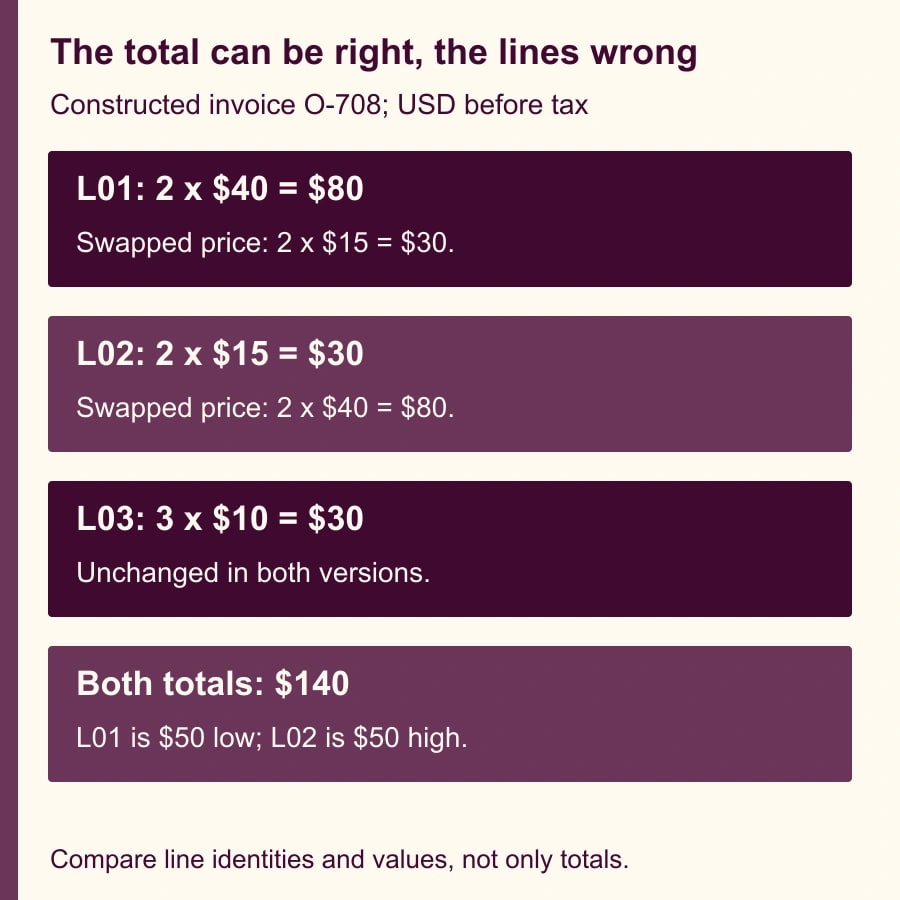
Use this constructed invoice as a reusable acceptance fixture. All amounts are in US dollars, before tax, shipping or discounts. The customer is C-42 and the source order is O-708. The three line identifiers are L01, L02 and L03. The finance owner has approved the following expected values for this example.
- L01, service A: quantity 2, unit price $40, line amount $80.
- L02, service B: quantity 2, unit price $15, line amount $30.
- L03, service C: quantity 3, unit price $10, line amount $30.
- Expected invoice: three lines, seven units and a total of $140.
Now suppose the first two prices are exchanged while quantities and product references remain in place. Service A becomes two at $15, or $30. Service B becomes two at $40, or $80. Service C remains $30. The invoice still totals $140 and still contains seven units. It is nevertheless wrong: A is understated by $50 and B is overstated by $50.
This is why the acceptance record must compare tuples: the line identifier together with product, quantity, unit price and amount. “Tuple” simply means those values considered as one unit. Comparing each column's totals independently cannot prove the pairing is correct. The fixture deliberately uses equal quantities on the first two rows to expose that weakness.
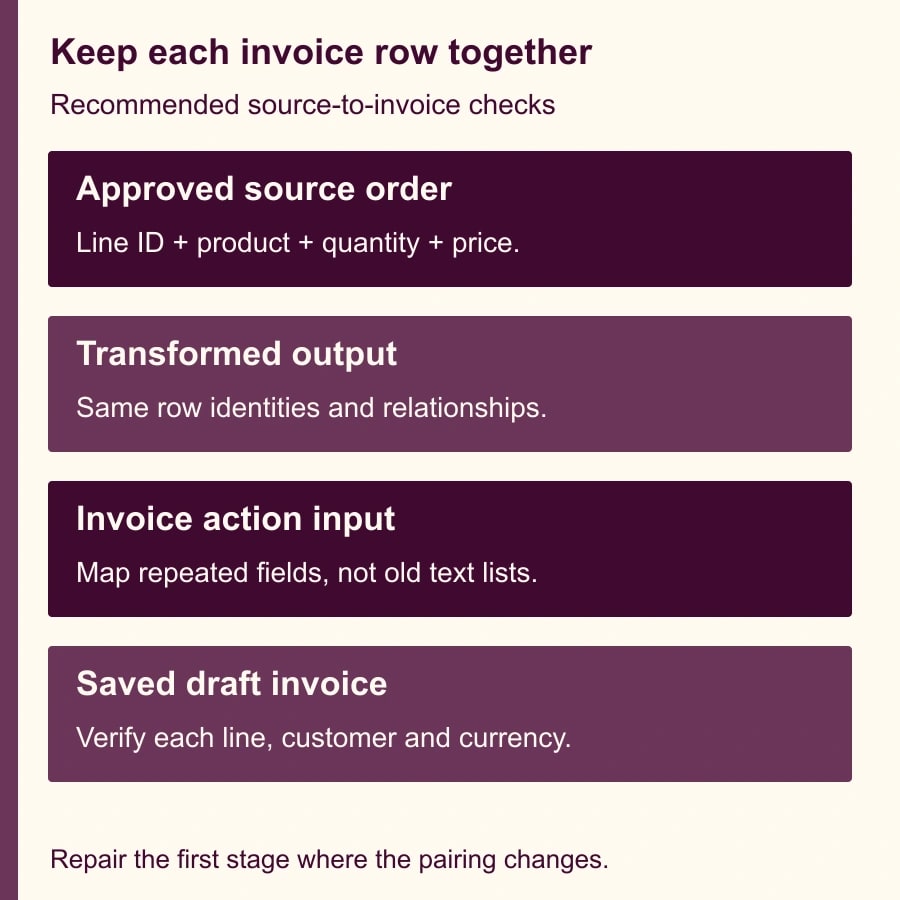
Create an expected-results sheet with those three lines. Compare it first with the source output, then Formatter output, then the destination action's input, then the saved draft invoice. Mark the earliest point where the association changes. Repairing the earliest incorrect stage is more reliable than compensating for it at the final invoice field.
Keep the comparison independent of the transformation. If you build the expected sheet using the same suspect mapping, both can repeat the same mistake. The finance owner should derive the expected values from the approved order. A reviewer should be able to explain why service A costs $80 without inspecting the Zap's configuration.
Test the awkward values before a large order arrives
Add a blank quantity to the middle line of a copy of the fixture. Your acceptance rule should hold that order for review unless the business has explicitly approved a default. Do not independently remove the blank from the quantity list and leave the other lists unchanged. That can make the remaining positions misleading. Inspect how your exact action represents the blank rather than assuming it inserts a zero or shifts a value.
Test zero separately. A zero-price service may be an approved included item, while a missing price may mean the order is incomplete. Those states deserve different treatment. Write down whether zero quantity is allowed, whether it should produce a visible line, and who approves a credit or negative amount. The integration owner should not invent billing policy to make a test pass.
Add a description containing a comma and another containing a line break. Confirm that each stays attached to one source line in the resulting structure. If the text transform cannot unambiguously preserve those values, use structured source fields or a documented parser appropriate to that format. Do not remove punctuation from customer descriptions as a silent workaround.
Test prices represented as text, including a currency symbol and a thousands separator. Choose the input convention and expected numeric value before adding a number conversion. A string such as “1,250” is ambiguous when the same character is also being used as a list separator. Preserve the original input in the review evidence so a failed conversion can be diagnosed later.
Finally, include repeated product codes on different lines. Two rows for the same service can be legitimate when they refer to different periods or agreed rates. The acceptance rule should preserve separate line identifiers unless the business explicitly wants consolidation. If consolidation is intended, document the grouping rule and how quantities, descriptions and prices are combined.
Map the draft invoice and inspect the saved result
Once the transformation matches the fixture, map the actual repeated output fields into the receiving action. Check customer and currency at the same time. Correct line arithmetic under the wrong customer is still a failed invoice. Confirm the source order reference is retained in a field that the billing team can search.
Run the draft-only test and open the resulting invoice in the destination system. Compare the saved line identifiers where available, descriptions, quantities, unit prices and amounts with the expected-results sheet. If a destination cannot store your line identifier, retain a separate mapping between source lines and saved destination lines in the reconciliation record.
Then inspect any destination-calculated fields. Tax, discounts, rounding and account defaults may change the final total even when the mapped base lines are correct. For this fixture, those adjustments are intentionally excluded. In a real workflow, the finance owner must supply the expected treatment and approve any difference between the base-line sum and the invoice total.
Use a second order with a different number of lines before releasing the workflow. One three-line sample does not establish that a one-line or ten-line order works. Include the largest realistic order in the test set and verify that all lines are represented. Avoid a live invoice send simply to see whether the action accepts the data.
Recover existing errors without duplicating invoices
Make a list of affected source orders and destination invoices. Classify each as not created, draft created, issued, or uncertain. The finance owner decides how to correct issued documents under the organization's accounting process. The automation maintainer's immediate job is to preserve the mapping and prevent a repair run from creating a second invoice for the same order.
For a draft with incorrect lines, use the destination's supported correction process and record what changed. For an order with no invoice, process the repaired mapping only after confirming that no destination record already exists. An error message from a later action does not necessarily mean the earlier create action did nothing.
If the state is uncertain, search the destination using the source order reference and inspect the run history. Resolve that uncertainty before replaying. Do not use customer name and total alone as the duplicate test: the constructed example demonstrates that different line assignments can share the same total, and customers can place repeated orders of the same value.
Keep automatic delivery paused until the failing fixture passes, the awkward-value tests have documented outcomes and the affected historical orders have owners. Record the old and new mapping versions. That allows a reviewer to tell which orders were processed under the repaired workflow without guessing from the date of a support message.
Set a release rule the billing team can use
The reusable release checklist is: source order identified; every line has a stable reference; field counts agree; product-quantity-price pairs match the order; blanks and zeros have approved meanings; customer and currency match; destination calculations reconcile; and prior delivery state is known. A mismatch in any of those checks holds the order instead of silently dropping a line.
Measure the proportion of orders that reconcile on first review, the number held for input repair, duplicate invoices and minutes spent resolving exceptions. Count an order as successful only when the intended destination document is correct. A lower Zap error rate can conceal a worse business result if malformed input is being converted into plausible but incorrect invoices.
If staff spend less time correcting lines, report that as released capacity until a real budget action produces cash savings. Also track new review effort. Automation can be worthwhile with a deliberate exception queue, but the queue needs an owner and a response time that fits the billing cycle.
Begin with O-708 and its three expected lines. If your workflow cannot preserve that small set through the saved invoice, keep delivery paused and repair the first mismatch. Use the invoice reconciliation workflow to design the business review, and the Zapier duplicate-record recovery guide for the separate problem of repeated creates.
Weekly Newsletter
AI Adoption Weekly
New research, field guides, training studies, and tool decisions for operators.
No spam. Unsubscribe anytime.
Related Comparisons
Calculator
AI seat cost calculator
List price × headcount. You enter the hours and the operating assumptions.