
Shared Mailbox Sent Items Missing? Check Where Outlook Saved the Reply
Find missing shared-mailbox replies without resending them. Check Send As settings, personal copies and a four-message acceptance test.
Published November 21, 2026

If a reply sent from a shared mailbox is missing from that mailbox's Sent Items, check the sender's own Sent Items before sending it again. Microsoft documents that shared-mailbox messages can be saved in the sending user's mailbox by default. A missing shared copy is therefore not proof that the customer received nothing. Establish delivery separately, then ask the mailbox administrator to configure the appropriate sent-message copies.
This guide is for support managers and Microsoft 365 administrators who need colleagues to see replies sent from a team address. It covers the distinction between Send As and Send on Behalf, server-side copy settings, and a small acceptance test. Skip these configuration steps if the message is still in the Outbox or there is a delivery-failure notice: that is a sending problem requiring its own investigation.
Microsoft's current troubleshooting guidance distinguishes server-side mailbox settings from older Outlook client configuration. Only its server-side method applies to new Outlook. Details below were checked November 21, 2026. The examples and test plan are constructed; they are not evidence that a particular customer mailbox has been repaired. Microsoft's shared-mailbox Sent Items troubleshooting guidance
Separate the customer event from the saved evidence
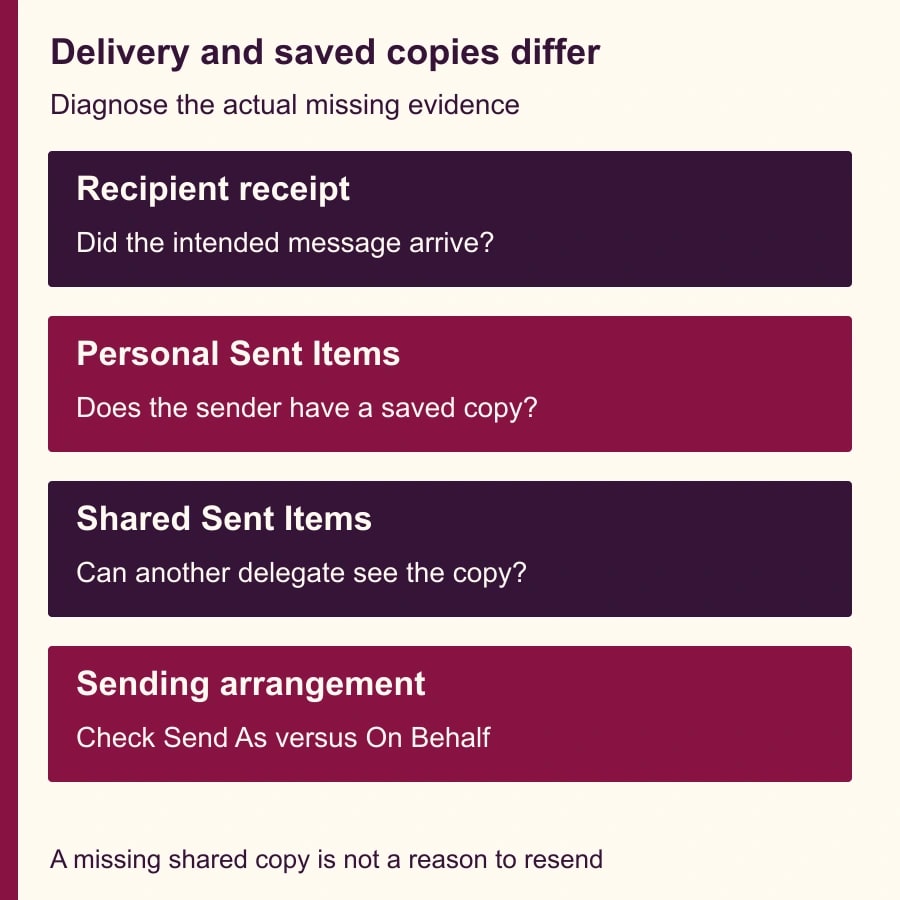
There are two questions. Did the message reach the intended recipient? Where was a sent copy stored? The team needs answers to both, but a folder view answers only the second. Treating an empty shared Sent Items folder as a delivery failure can create an unnecessary second reply, conflicting instructions or an awkward request for the customer to confirm something they already received.
Begin with a specific message: sender, team address, recipient, approximate sending time and subject. Search the sending user's Sent Items and the shared mailbox's Sent Items. Check the Outbox and any failure notice without deleting or moving the evidence. If delivery remains uncertain, ask the administrator to investigate using the organization's normal mail-tracing process rather than guessing from the folder location.
Do not make a customer part of a configuration experiment. Use an approved internal test recipient for new messages. If an existing customer conversation needs a response, the support owner should decide that on the facts of the conversation, not because an administrator is changing where copies are saved.
Identify how the reply was sent
Send As and Send on Behalf are different sending arrangements. In broad terms, Send As presents the shared mailbox as the sender; Send on Behalf identifies a delegate acting for it. Confirm the actual arrangement and permissions with the administrator. The copy settings are separate, so enabling the one that does not match the team's workflow can leave the reported problem unresolved.
Record the client as well: new Outlook, classic Outlook or Outlook on the web, plus the relevant account and how the shared mailbox is opened. A team may use several combinations. A successful test from one client does not prove that every workstation has the same configuration, especially if older client settings remain in place.
Microsoft's documented server settings are MessageCopyForSentAsEnabled and MessageCopyForSendOnBehalfEnabled. They correspond to the two sending arrangements. The administrator should inspect the current configuration before changing it and keep a record of the previous values. Separate settings for Send As and Send on Behalf
You need an existing authorized shared mailbox, an administrator permitted to change its settings, and a controlled recipient for testing. This guide does not grant sending rights or assume that every shared mailbox has the same licensing requirements. Confirm your existing setup rather than buying a new product to solve a copy-location issue.
Give the administrator a complete handoff
Use this short request instead of “Outlook lost our email.” It provides the evidence needed to choose a repair while keeping the support team's customer work separate from administration.
- Mailbox and purpose: The team address and why colleagues need to see its sent replies.
- Example message: Subject, recipient and approximate sending time, using the organization's approved method for sharing message details.
- Observed location: Whether the item appears in personal Sent Items, shared Sent Items, the Outbox or another known folder.
- Sending arrangement: Send As or Send on Behalf, confirmed where possible rather than inferred from the address alone.
- Client and user: Outlook version or web client, the affected account and whether other delegates see the same issue.
- Desired result: A shared sent copy for the team's authorized workflow, with recipient delivery and duplicate-copy behavior checked separately.
- Test owner: Administrator making the change, support lead approving the result, and an internal recipient available for a controlled test.
Include one representative example rather than a dump of unrelated customer correspondence. The administrator should be able to reproduce the copy behavior with a harmless message. If the issue occurs only for one user, compare that user's client and mailbox access with a working colleague before making organization-wide changes.
Configure server copies through the supported path
Microsoft documents a Microsoft 365 admin center route through Teams & groups, Shared mailboxes, the selected mailbox and its Sent items options. The administrator can choose the relevant copy behavior there. Confirm the selected mailbox and save only the intended setting. Configure a shared mailbox's sent-message copies
Where the organization uses Exchange PowerShell, Microsoft's troubleshooting article gives separate Set-Mailbox settings for MessageCopyForSentAsEnabled and MessageCopyForSendOnBehalfEnabled. Have the authorized administrator apply the appropriate setting to the verified mailbox identity. A copied command with an unverified mailbox name is not a substitute for checking the target and current values. Server-side configuration method
Do not start by asking every employee to edit a registry value. Microsoft's guidance limits the applicability of its older client method, and new Outlook uses the server method. For classic Outlook, the administrator should check whether an existing DelegateSentItemsStyle setting interacts with the server setting. That is a targeted compatibility check, not a general instruction to alter all clients.
The documented combinations can produce different folder-copy outcomes, including two copies in the shared mailbox under one combination of classic-client and server settings. Two saved copies do not by themselves establish two deliveries to the recipient. Keep the receipt check in the test plan so the team does not turn duplicate folder evidence into an unsupported claim about duplicate mail. Client and server setting interactions
Run four controlled messages
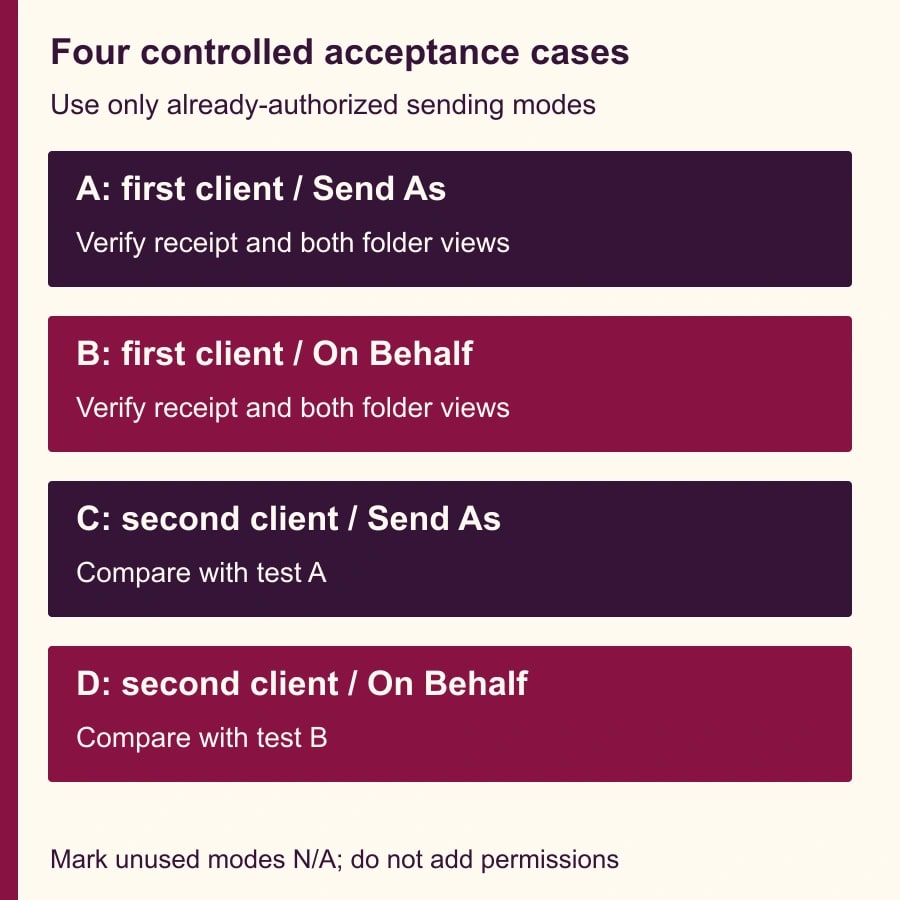
The following acceptance matrix is an editorial recommendation. Use it for a mailbox whose delegates are already authorized for both sending arrangements. If your organization uses only one arrangement, mark the other cases not applicable and test the clients actually used; do not grant extra permissions merely to complete this example.
- Test A: From the first supported client, send a uniquely titled internal test using Send As. Check the From presentation, recipient receipt and both Sent Items locations.
- Test B: From that client, send a different uniquely titled internal test using Send on Behalf. Check the same three things and record the distinct arrangement.
- Test C: From a second client actually used by the team, repeat Send As with a new test title. Compare the saved-copy outcome with Test A.
- Test D: From the second client, repeat Send on Behalf with another new title. Compare the outcome with Test B and investigate any client-specific difference.
Use a subject such as Shared copy test A with the date, and put a plain statement in the body that no business action is required. Record the time and recipient. Avoid reusing one subject for every case, because conversation grouping can make several messages look like one item and complicate the evidence.
For each case, the recipient confirms which message arrived and how the sender was displayed. The sender checks personal Sent Items; a second authorized delegate checks shared Sent Items. Record observed copy counts and locations, rather than just writing “works.” If the application groups conversations, inspect the actual messages before counting them.
Read the results without guessing
If the recipient receives the test and only personal Sent Items has a copy, the delivery path worked but the desired shared evidence is still missing. Confirm that the setting matches the sending arrangement and the mailbox being used. If the recipient receives the test and the shared folder has the expected copy, ask another delegate to verify visibility before calling the team workflow restored.
If the shared folder shows two copies, compare their message details and check the classic-client/server interaction with the administrator. Do not delete evidence immediately or resend to see what happens. The recipient's observation and administrative tracing, where needed, help distinguish duplicated storage from duplicated delivery.
If no message arrives and the item remains in the Outbox, stop the copy-setting test. That result does not establish whether the shared-copy configuration is correct. Investigate sending, connectivity, permissions or the specific error through the appropriate support path, then restart the controlled test after the sending problem is resolved.
If one delegate sees the shared copy and another does not, investigate their access, view and synchronization before changing the copy rule again. Changing a server setting repeatedly can obscure the original result. Record the exact difference between users and clients, including whether the same item appears in a web view available to the authorized user.
A worked support-team recovery
In this constructed example, a three-person support team uses a shared address. A colleague sees no reply in shared Sent Items and prepares to send another response. The team lead stops the duplicate response, locates the original in the sending user's personal Sent Items, and asks the administrator to establish the delivery evidence separately.
The administrator confirms that the team uses Send As and reviews the current shared-copy configuration. After making the intended server-side change, the team runs controlled tests from the two clients it actually uses. The recipient confirms the test messages, and a second delegate can see the shared copies. The team records the configuration and expected behavior rather than relying on the original sender's view alone.
Historical messages are a separate recovery decision. Do not assume enabling a future-copy setting repopulates old shared Sent Items. If the team needs older evidence in a shared location, agree a scoped process with the administrator, considering message ownership, retention practices and duplicate handling. Keep that work separate from verifying the new configuration.
The support lead then updates the team's handoff procedure: check the shared record and conversation status before replying, and investigate a missing copy without automatically resending. The repaired setting improves visibility, but it does not replace an owner for the customer conversation.
Measure the handoff, then close the change
For the first week, track replies that colleagues cannot find, unnecessary second responses, unexplained duplicate copies and the time spent investigating them. A successful change makes sent evidence consistently available to authorized colleagues without creating new uncertainty about delivery. Do not use the number of items in Sent Items as a proxy for customers helped.
Suppose, purely as a planning example, the team previously investigated eight missing-copy incidents per week at six minutes each. That is 48 minutes of investigation. If the new process reduces it to two incidents at five minutes each, it releases 38 minutes before accounting for administration and testing time. That is potential staff capacity, not a verified customer result or automatic payroll saving.
Close the change when the relevant client and sending-mode tests pass, the second delegate can find the shared evidence, and the owner knows how to recognize a recurrence. Pause further changes if delivery is uncertain or the client interaction cannot be explained. Preserve the prior settings and test record so an administrator can reverse the configuration deliberately if it causes an unexpected result.
Your next action is to locate one missing reply in both Sent Items locations and record how it was sent. Then give the administrator the handoff worksheet. If the problem involves automated mail handling, use our guides to recovering missing email-attachment content in Power Automate and preventing duplicate actions when a workflow retries.
Weekly Newsletter
AI Adoption Weekly
New research, field guides, training studies, and tool decisions for operators.
No spam. Unsubscribe anytime.
Related Comparisons
Calculator
AI seat cost calculator
List price × headcount. You enter the hours and the operating assumptions.