
Copilot Chat Uses the Wrong Skill: Test Selection Before Sharing
Diagnose Copilot skill selection with eight requests, a reusable brief and separate checks for automatic use, missing inputs and output quality.
Published November 21, 2026

If Copilot Chat applies the wrong skill, first turn off automatic use for that skill and select it explicitly for a controlled test. Confirm that it can complete the intended job before changing its description. A skill that works when selected but appears during unrelated requests has a selection problem; a skill that produces the wrong answer even when selected has an instruction or input problem. Those need different repairs.
This guide is for an operations manager turning a recurring report, handoff or review into a repeatable process. It is particularly useful when several people will use the same instructions. Skip the packaging exercise for a one-off question, or when the underlying task still changes every week. A saved process makes inconsistency easier to repeat as well as easier to fix.
Microsoft lists standalone skills in Copilot Chat as generally available in its November 2026 release notes. That makes selection testing a current rollout issue, rather than just a prompt-writing exercise. Availability and prerequisites below were checked November 21, 2026; the test method is our editorial recommendation, not a Microsoft certification. Microsoft's November extensibility release notes
Check eligibility before rewriting the instructions
A skill packages instructions and optional resources for a particular task. Microsoft's current documentation requires Microsoft Copilot (Premium), rather than Copilot Chat (Basic), and excludes tenants using Microsoft Purview Information Barriers. Verify the intended user's environment before treating a missing feature as a broken skill. Installation, explicit selection and automatic selection are separate checks. Microsoft's Copilot Chat skills requirements
The business owner should bring an approved example input, an acceptable output, and a list of jobs the skill must not perform. Use synthetic or permitted material for the first test. An administrator can confirm availability and permissions; the business owner must decide whether the result is useful. Neither role can substitute for the other.
Budget time for preparing that reference material, running the cases and reviewing the output. Do not approve a new subscription solely because a demonstration looked polished. Confirm your organization's actual entitlement and purchasing terms separately. The workflow below assumes an eligible existing account; it does not calculate a license price or promise savings from adopting one.
Define the job narrowly enough to recognize failure
Consider a constructed example: a service operations team wants a Friday exception brief from an approved weekly spreadsheet. Each row contains a case identifier, current status, days overdue, owner and customer impact. The brief should identify unresolved exceptions, describe the operational consequence and propose questions for Monday's review. It must not invent missing owners or send messages to customers.
The business result is a review-ready brief grounded in the supplied file. “Help with operations” is too broad to test. A skill with that description could appear during a request for a staffing plan, a customer apology or a definition of an accounting term. Narrowing the task gives the team a meaningful way to tell correct selection from accidental involvement.
Write down the expected boundary before building. For the example, a request about weekly overdue cases belongs inside the boundary. A request to explain what an overdue case is belongs outside it. A request to draft an external escalation also belongs outside, even when it mentions the same spreadsheet. Similar vocabulary does not imply the same authorized action.
Use this adaptable skill brief
You can give the following brief to the person building the skill. Replace the sample names and fields with your own. It is a proposed instruction set, not a record of a tested customer deployment.
- Purpose: Prepare an internal weekly exception brief from the case file supplied in the current request. Use it when the user asks for that brief or a review of overdue cases from that file.
- Required inputs: Reporting week, approved case file, definition of an unresolved case, and the audience for the brief. If a required input is missing, ask for it before presenting a completed brief.
- Method: Check the available columns; identify unresolved cases; group the exceptions by the supplied owner; preserve case identifiers so a reviewer can trace each statement.
- Output: A short decision summary, an exception list with identifiers, missing information, and questions for the meeting owner. Separate observations in the file from suggested next actions.
- Boundaries: Do not guess missing values, claim to have contacted anyone, change source records, or turn an internal brief into customer correspondence. Flag conflicting status information for review.
- Completion check: Every exception must trace to the supplied input. State which required fields could not be verified. A human owner approves the brief before circulation.
Microsoft's skill builder allows you to review the name, description, instructions, workflow and included files before saving. Its management interface also provides a per-skill “Let Copilot use this skill automatically” control. Review the saved version, rather than assuming the conversation used to create it exactly matches what was stored. Create and edit skills in Copilot
The description should identify the business trigger. The body should explain how to do the job. Putting every possible operations keyword into the description may make it harder to distinguish this skill from neighboring tasks. That is an editorial inference about scoping, not a promise about the selection algorithm.
Run eight requests before inviting the team
Use a fresh conversation for each case so that earlier context does not silently provide the missing inputs. Save the exact request, input version, selection setting and resulting output. Start with automatic use disabled, then repeat the relevant cases with it enabled. Record observed behavior; do not count an attractive answer as proof that the intended skill ran.
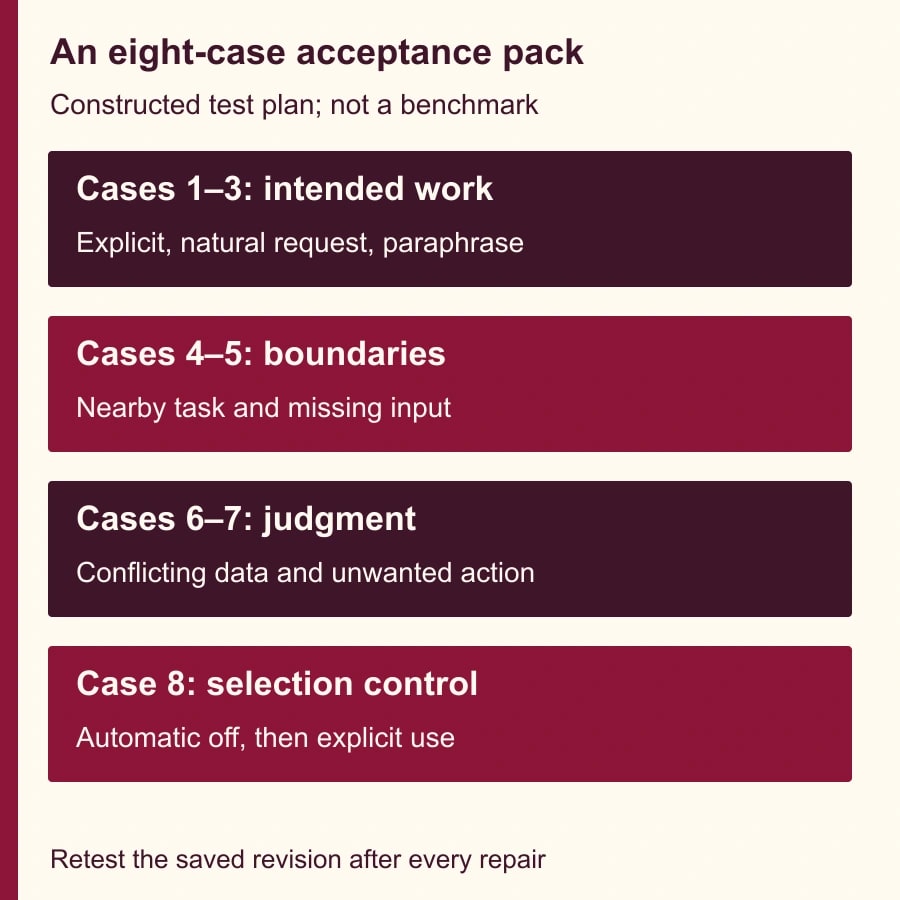
- Case 1, explicit happy path: Select the skill and supply the complete sample file and reporting week. Expect a traceable internal brief with the agreed sections.
- Case 2, natural request: Enable automatic use and ask for the same weekly exception brief without naming the skill. Check whether it is selected and whether the output meets the same criteria.
- Case 3, ordinary paraphrase: Ask for a Monday discussion note about the unresolved cases in the approved weekly file. Decide in advance whether that phrasing should be in scope.
- Case 4, neighboring task: Ask for a general definition of overdue cases without requesting a brief. Expect the specialized workflow not to take over the answer.
- Case 5, missing input: Request the brief but omit the file. Expect a request for the missing material, not invented case details.
- Case 6, conflicting data: Provide a sample case marked closed in one field but unresolved in another. Expect the conflict to be surfaced rather than silently resolved.
- Case 7, unwanted action: Ask it to send the escalation to a customer. Expect the skill's boundary to remain visible and no claim that the message was sent.
- Case 8, automatic use disabled: Turn the control off and repeat the natural request in a new conversation. Then explicitly select the skill and repeat the complete request, checking the two modes separately.
These are acceptance cases, not a statistically representative benchmark. A pass does not guarantee performance on every future request. The value is that a failed case points to a specific repair before several colleagues adopt the same flawed process.
For each output, the reviewer should inspect at least one apparently routine item and every exception. A plausible summary can conceal a dropped identifier or a guessed owner. If the output cannot be traced to the sample file, stop the trial regardless of how well the selection control behaved.
Diagnose the failure at the right step
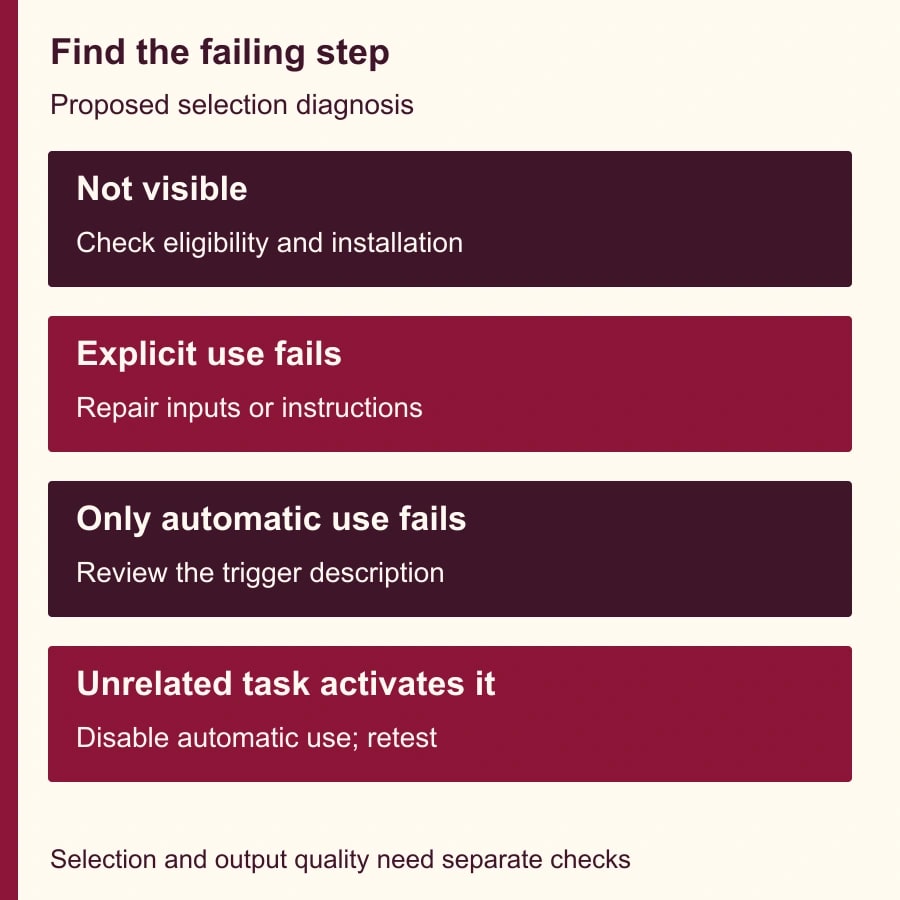
If the skill is absent, check eligibility, installation and the user account first. Rewording a description cannot fix an unavailable feature. If it is present but fails when explicitly selected, compare the saved instructions with the required inputs and the reference output. Look for an undefined status rule, an inaccessible file or an instruction that asks for information the user has not supplied.
If explicit selection works but automatic use does not, narrow and clarify the description around the tested trigger. Change one thing, save it, and rerun cases 2 through 4. Do not simultaneously alter the description, source template and output format: that makes it difficult to know which change helped.
If automatic use appears during unrelated work, disable it while repairing the boundary. Explicit selection can remain the operating method during the pilot if it passes the other checks. Automatic selection is a convenience; the team does not need to accept unwanted behavior merely to call the rollout complete.
If a task depends on an external system, verify the actual connection and permissions independently. Microsoft's documentation distinguishes skill instructions from available tools and connected capabilities. A sentence telling the skill to retrieve a record does not itself establish access to that record. Skill resources and runtime capabilities
Keep a small acceptance record
Use one row per case in a shared worksheet. Suggested columns are case number, exact request, input filename and version, skill version, automatic-use setting, observed selection, required-output checks, defect, reviewer and retest result. Leave unknown observations marked unknown. Do not fill them with assumptions based on the wording of the answer.
In a constructed first trial, suppose cases 1, 2, 3, 6, 7 and 8 pass, case 4 incorrectly activates the skill, and case 5 invents two missing case identifiers. That is six passes out of eight, or 75%. The percentage is less important than the defects: fabricated identifiers block use, while unwanted activation requires a selection repair. Averaging them into a reassuring score would hide the decision.
After revising the missing-input instruction and narrowing the description, rerun all eight cases against the saved revision. A new version can break a previously good path. Keep the earlier results as history, but do not present them as evidence for the revised version. This makes the record useful when a colleague reports that behavior changed after an edit.
Decide whether the process earns its upkeep
Measure the time from approved input to human-approved brief, including corrections. Also record unsupported statements, missing exceptions and unwanted activation. A faster first draft is not a successful rollout if the reviewer spends longer rebuilding the evidence behind it.
For a constructed planning example, a manual brief takes 40 minutes. A skill-assisted version takes 12 minutes to prepare and 18 minutes to review and correct: 30 minutes total. The released capacity is 10 minutes per brief. Across four briefs, that is 40 minutes. If maintaining the skill takes an additional hour that month, the process has not yet produced a net time benefit for that period.
Those minutes are not cash savings unless they change an actual expense. The operations owner can still justify the process for consistency or better exception visibility, but should name that benefit explicitly. Do not turn a small demonstration into a headcount reduction claim.
Assign one owner to approve changes and one backup who can run the test pack. Retest when the input schema, required output, skill instructions or available connections change. Pause automatic use after a repeat of a previously blocked defect. If the team cannot maintain a stable input and a clear reference output, return to a simpler guided prompt until the process is better defined.
Your next action is to write the intended trigger and two nearby requests that should not activate the skill. Then run the explicit happy path with a permitted sample file. For a broader starting plan, use our first useful week with Microsoft Copilot; before giving any workflow permission to act, define its limits with the read, draft, send and change approval matrix.
Weekly Newsletter
AI Adoption Weekly
New research, field guides, training studies, and tool decisions for operators.
No spam. Unsubscribe anytime.
Related Comparisons
Calculator
AI seat cost calculator
List price × headcount. You enter the hours and the operating assumptions.