
Asana Dependency Dates Do Not Move: Check the Buffer Setting
Diagnose Asana dependency dates with buffer settings, relevant dates and a worked schedule that preserves the client commitment.
Published November 20, 2026

If an Asana task has a dependency but its dates do not move after a delay, inspect the project's buffer setting and the dependency's relevant dates before rebuilding the schedule. A dependency describes a relationship between tasks. The date-shifting setting determines whether a change should preserve the gap, use the available gap or leave the other dates alone.
For a project manager handling a client launch, an unchanged date can be correct. The team may have enough slack to absorb the delay. It can also be a warning that the project is configured to ignore conflicts, a task is complete, or the relationship uses a different date from the one you changed. The useful question is which business commitment the schedule should preserve.
This guide fits an agency or operations team using Asana to coordinate dated work. It is for diagnosing and choosing a scheduling behavior, not for estimating the work automatically. Skip automatic shifting when the team has not agreed on the order of work or the meaning of the gaps. Moving uncertain dates consistently will not make the underlying plan reliable.
The product documentation was checked on November 20, 2026. Asana lists dependency features for Starter and higher paid tiers, including specified legacy plans. Verify your account's access before buying a plan for this repair. The prerequisites are a project you can edit, linked incomplete tasks, the relevant dates, and a project owner who can approve changes to the delivery plan. See Asana's dependency-type documentation.
Decide what the gap represents
A gap between tasks might be deliberate review time, ordinary scheduling slack or an accidental artifact of an old plan. Those meanings call for different responses. If the client needs two full days to review artwork, preserving that interval may be essential. If the team simply scheduled the next step later because nobody was available, the gap may be available to absorb a delay.
Ask the work owner to finish this sentence: “When this task moves, the next task may start or finish earlier only if…” The answer exposes assumptions that a timeline cannot settle. A two-day gap may include an external approval, a production cutoff or a resource constraint that is not represented by the dependency line.
Separate the client deadline from internal working dates. A project can have a fixed launch commitment even when intermediate tasks move. The project manager should compare every proposed change with that commitment and escalate an infeasible plan. A scheduling feature does not authorize a new client delivery date.
Keep a baseline before testing. Record task identifiers, names, owners, start dates, due dates, completion states and dependency types. Include the current project setting and working-calendar assumptions. A screenshot can help explain the layout, but a list of exact dates is more useful when restoring a mistaken change.
Read the three settings as business choices
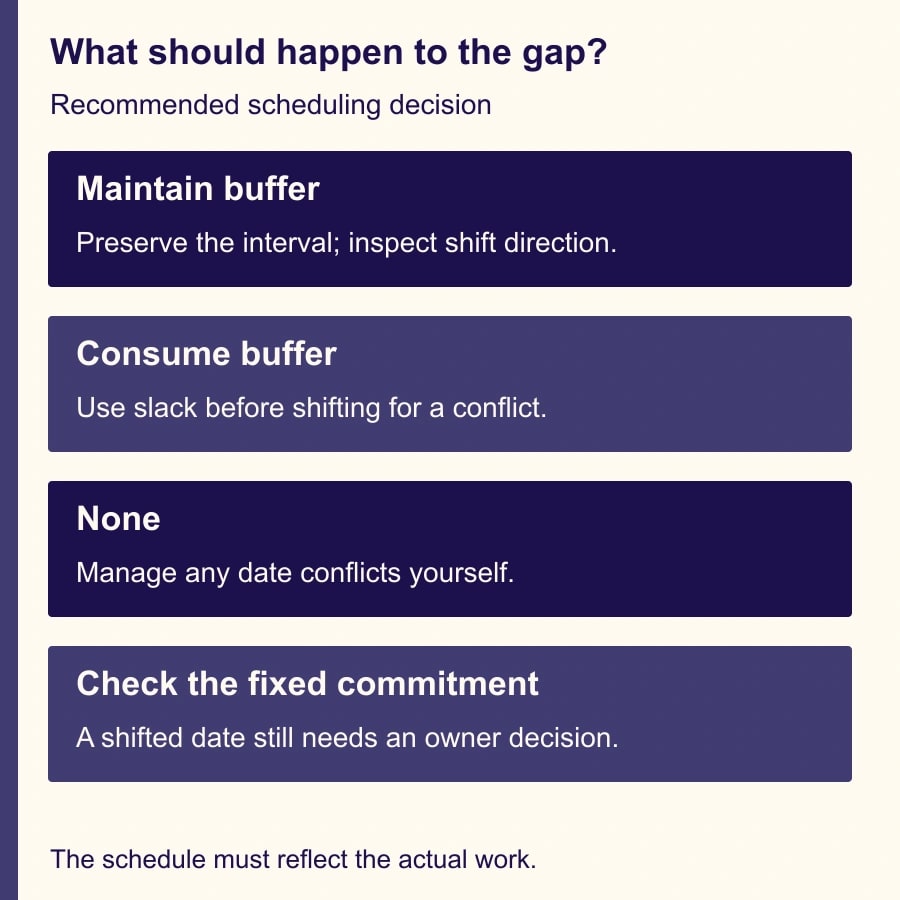
Asana documents Maintain buffer, Consume buffer and None. Maintain buffer preserves the gap and can apply to all linked tasks or downstream tasks only. Consume buffer allows available slack to shrink, shifting dates when the change creates an overlap. None leaves the gaps unmanaged even when dates conflict. Auto-shifting requires linked, dated, incomplete tasks; weekend handling can also affect the result. The date-change preview lets you inspect proposed changes before saving. These behaviors come from Asana's auto-shifting guide.
Choose Maintain buffer when the gap represents time that still needs to exist after a delay. Choose Consume buffer when the gap can legitimately shrink. Choose None only when the team will manage the consequences itself. Do not use None just to make a date stop moving without assigning someone to review the conflicts that remain.
For Maintain buffer, the direction matters. A downstream-only change can fit a plan where completed preparation or an earlier commitment should remain anchored. An all-task shift can fit a coordinated move of the whole sequence. Inspect the actual proposed dates rather than assuming the label matches your intended change in every case.
The dependency type identifies which dates matter. Finish-to-start relates the earlier task's due date to the later task's start date. Finish-to-finish compares due dates; start-to-start compares start dates; start-to-finish connects the earlier task's start with the later task's due date. Asana makes finish-to-start the default at creation. Confirm the selected type rather than inferring it from the line's appearance. The type reference explains these relationships.
Compare three outcomes in a small launch plan
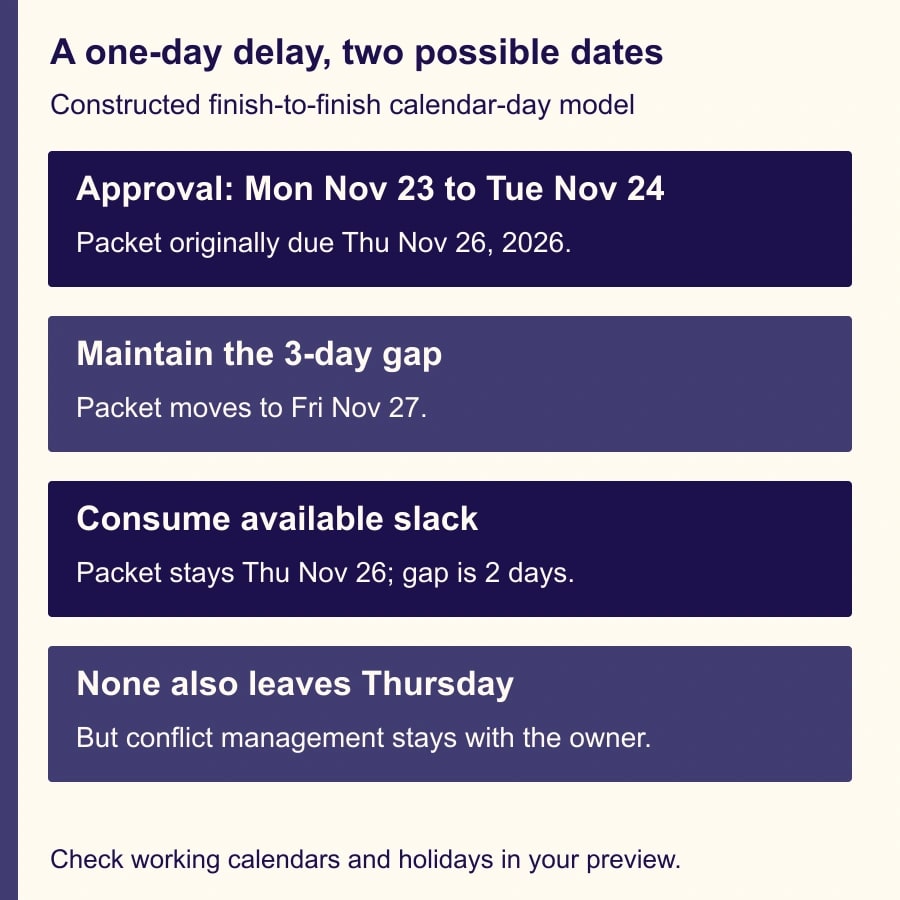
Here is a constructed scheduling model to clarify the choice. It is not a live Asana test. Use two incomplete tasks connected finish-to-finish: “Approve copy” is due Monday, November 23, 2026; “Finish launch packet” is due Thursday, November 26. The gap between those due dates is three calendar days. A separate client commitment requires the packet by Friday, November 27.
The copy approval is delayed from Monday to Tuesday, November 24. Under a simple Maintain buffer model, preserving the three-calendar-day gap moves the packet's finish to Friday, November 27. Under Consume buffer, the packet can remain Thursday, November 26, because the gap shrinks from three days to two without an overlap. Under None, Thursday also remains, but no automatic conflict management is being requested.
The two unchanged outcomes look identical for this small delay, yet their meaning differs. Consume buffer expresses permission to use available slack. None leaves the manager to resolve every consequence. To distinguish them in testing, add a delay large enough to create a conflict and inspect the proposed result. Do not conclude the feature is broken from a test where no shift was required.
For a second test, move copy approval to Monday, November 30, after the fixed client commitment. Regardless of which new packet date the product proposes under your working calendar, the original commitment is no longer supported by this sequence. The project manager must change scope, change the dependency with a defensible reason, add an approved alternative path or agree a new commitment with the client.
The dates above deliberately use a simple calendar-day model. November 26 may be a holiday for some teams. For a real project, check the organization's working schedule, weekends and holiday arrangements before treating the illustrated dates as a feasible plan. The example teaches the gap calculation; your own preview and staffing commitments determine the usable dates.
Diagnose an unchanged date in a controlled order
First confirm that the tasks are actually connected in the direction intended. A task title such as “After approval” is not evidence of a dependency. Inspect the task identifiers so similarly named copies do not mislead you. If the relationship points to a different approval task, correct that relationship before experimenting with date settings.
Next inspect the date fields that matter for the selected type. If the relationship is finish-to-start, changing a date unrelated to that relationship may not exercise the condition you meant to test. Record both start and due dates for each task. This also helps reveal whether a task's duration has changed in a way the owner did not intend.
Then check completion state. Do not mark a completed task incomplete merely to force it into a new schedule. A finished deliverable is historical evidence. If genuinely new work is needed, the owner should represent that new work explicitly and decide how it relates to the remaining tasks.
Check the buffer mode and whether a conflict actually exists. With Consume buffer, a delay that fits inside available slack may leave the later date unchanged. That is the behavior the team selected. Use the constructed small-delay and conflict-delay cases to observe the difference without putting a live client schedule at risk.
Finally, inspect the preview and working-calendar assumptions. If the proposed date differs from your hand calculation, compare the dates, direction and calendar before saving. Keep a record of the discrepancy. The objective is to explain the result, not to keep dragging the task until the timeline looks approximately right.
Turn the preview into an approval worksheet
For a meaningful change, record the changed task, old date, proposed date and reason. List every other task whose date would change, its owner and whether the change crosses a fixed commitment. Include tasks that remain unchanged but lose review time. A schedule can stay on deadline while becoming harder to deliver because all contingency time has disappeared.
Use this adaptable review brief: “Task [identifier] moves from [date] to [date] because [reason]. The project uses [buffer mode and direction]. Proposed changes are [task/date list]. Unchanged tasks lose [review or contingency interval]. The client commitment is [date]. [Named owner] confirms resources and approves [save, revise or reject].”
For the small-delay example, the brief should explain whether the team is spending one day of slack or moving the packet to the client deadline. That is a real operating decision. The project manager may prefer to use slack if reviewers confirm they can still complete their work. If the three-day interval is mandatory, preserving it is more honest than leaving an impossible Thursday date on the board.
Ask affected owners to confirm availability rather than accepting a calendar shift as proof of capacity. A task moved to Friday may collide with another client's deadline. If an AI assistant summarizes the change, supply the approved date list and ask it to highlight conflicts; verify every date and owner before sharing the summary.
Test and recover without distorting project history
Use a small test project with representative incomplete tasks. Include one relationship of the type you actually use, one completed task that should remain historical, and one fixed commitment for comparison. Record the before state, apply a small delay, inspect the preview, and compare the result with the expected business rule.
Then test a larger delay, a change to a middle task, and a date near a weekend. For Maintain buffer, verify the chosen direction. For Consume buffer, confirm the distinction between using slack and creating a conflict. For None, confirm the owner can see and resolve the conflicting plan instead of assuming it will be repaired automatically.
If a saved change produces an unacceptable schedule, use the preserved baseline to plan the correction. Review what else changed after the test before restoring dates; another teammate may have made a legitimate update. Record the repair and tell affected owners which schedule is now authoritative. Blindly resetting every date can erase work done while the issue was being investigated.
Do not unlink dependencies or mark tasks complete merely to suppress an inconvenient shift. That can hide the real sequence from the next person. Change the relationship only when the work itself supports that change. If a deliverable can proceed with a provisional input, document the remaining approval and the owner who accepted that approach.
Keep the measure tied to delivery
Track unexplained date changes, missed fixed commitments, time spent repairing schedules and the number of tasks with no clear owner or relevant date. Review the gaps that were consumed as well as the dates that moved. A project that meets the displayed deadline by eliminating every review interval may be accumulating quality problems elsewhere.
For a small team, budget a short setup session plus review time for the first few changes. If each update used to require ten minutes of manual coordination and the tested process requires six, the four-minute difference is released staff capacity only when the same coordination is still completed. Do not count avoided clicks while ignoring new review work or claiming a payroll reduction.
Stop automatic expansion when the team cannot explain the proposed dates, a fixed commitment is crossed without an owner decision, or task relationships no longer reflect the work. The next action is to copy the two-task example into a safe test project and compare the preview under your chosen mode. For adjacent problems, use the Asana recurring-task diagnostic when the next occurrence is missing, and the client approval handoff guide when dates are moving because nobody owns the decision.
Weekly Newsletter
AI Adoption Weekly
New research, field guides, training studies, and tool decisions for operators.
No spam. Unsubscribe anytime.
Related Comparisons
Calculator
AI seat cost calculator
List price × headcount. You enter the hours and the operating assumptions.