
Calendar Email Guests Opens Gmail: Check Recipients Before Sending
Use Calendar’s Gmail handoff to select attendees or delegates, verify agenda access and avoid sending the wrong meeting packet.
Published November 20, 2026

Google Calendar's updated Email guests action can open a Gmail draft with selected meeting recipients and event details. Use it to prepare an agenda or follow-up, but review the addresses and file access before sending. Selecting attendees, substituting assistants and distributing a document are three separate decisions. A convenient draft does not settle all three.
For an executive assistant or client meeting coordinator, the benefit is straightforward: fewer trips between the guest list and an email window. The risk is also specific. An assistant may replace a leader who still needs the packet, a declined attendee may receive material unnecessarily, or an external guest may be unable to open the agenda. The useful workflow ends with a verified recipient list and a usable meeting packet.
Google announced the change on November 19, 2026. Rapid Release rollout began that day, with completion expected by December 11; Scheduled Release starts December 18 with a stated one-to-three-day rollout. As of this November 20 review, do not expect every account to have it. The feature is for Calendar on the web and is available across Workspace, Workspace Individual and personal accounts. There is no administrator switch for the feature itself. See Google's launch details.
Use the handoff for correspondence around a meeting
This workflow fits an agenda, reading packet, practical arrival instructions or a follow-up that needs normal email formatting. It is especially useful when the coordinator needs to select recipients by their response status. RSVP means the invitation response: accepted, declined, tentative or not yet answered.
Use the Calendar event itself when the meeting time, venue or invitation needs to change. An email saying “we moved to 2 p.m.” is easy to read and easy to overlook. The event remains the place participants consult for the scheduled commitment. Google's invitation guidance describes adding guests and saving event changes with invitation notifications. Keep that action distinct from writing a message about the meeting.
Skip this shortcut for a broad announcement whose audience is unrelated to the event. An old guest list is not a maintained distribution list. Also use your established secure delivery process when the packet cannot be shared through ordinary email and Drive permissions. Adding a person to a meeting does not establish that every document discussed there is appropriate for them.
Before starting, have the correct event, the current guest list, a final or clearly marked draft agenda, and authority to share its supporting files. Identify one coordinator as sender and one meeting owner as the person who resolves audience questions. If multiple assistants prepare the packet, decide who owns the final send so two polished drafts do not become two competing messages.
The immediate cost is coordination time, plus the subscription and storage arrangements your organization already uses. Eligible AI writing features have their own access conditions. Do not make them a prerequisite for sending an accurate agenda. A carefully checked plain email can complete the job while the new interface is still rolling out.
Preview the audience before opening Gmail
In the new web flow, open the event, choose Email guests, select response groups and review the recipient preview. The delegate option substitutes configured assistants for invited leaders. Compose in Gmail then carries the selected recipients, event title and overview into a draft. Gmail tools such as attachments and Schedule send become available there. Google says delegate relationships can come from Contacts or the Workspace Directory; administrators can configure Assistant, Admin Assistant or Exec Assistant relationships. These are documented product behaviors, not a recommendation to replace every leader with an assistant.
Our recommendation is to write the audience rule in one sentence before choosing checkboxes. For a preparation packet: “Send to accepted and tentative participants; assistants receive it instead of the two leaders they coordinate for.” For an attendance reminder, the unanswered group may be the correct audience. The right selection depends on what the email asks someone to do.
Copy or record the proposed addresses in a temporary review note when the meeting is sensitive or complex. Compare them with the intended people, not just the number displayed. Five recipients can be the wrong five recipients. Check external domains, similarly named colleagues and assistants who cover more than one leader.
Do not assume a saved draft will keep itself aligned with later invitation changes. Recheck the event and addresses immediately before sending, especially after a postponement or a change in attendance. This is a review recommendation; the announcement does not promise automatic synchronization of a draft with every subsequent event edit.
Work through an eight-guest example
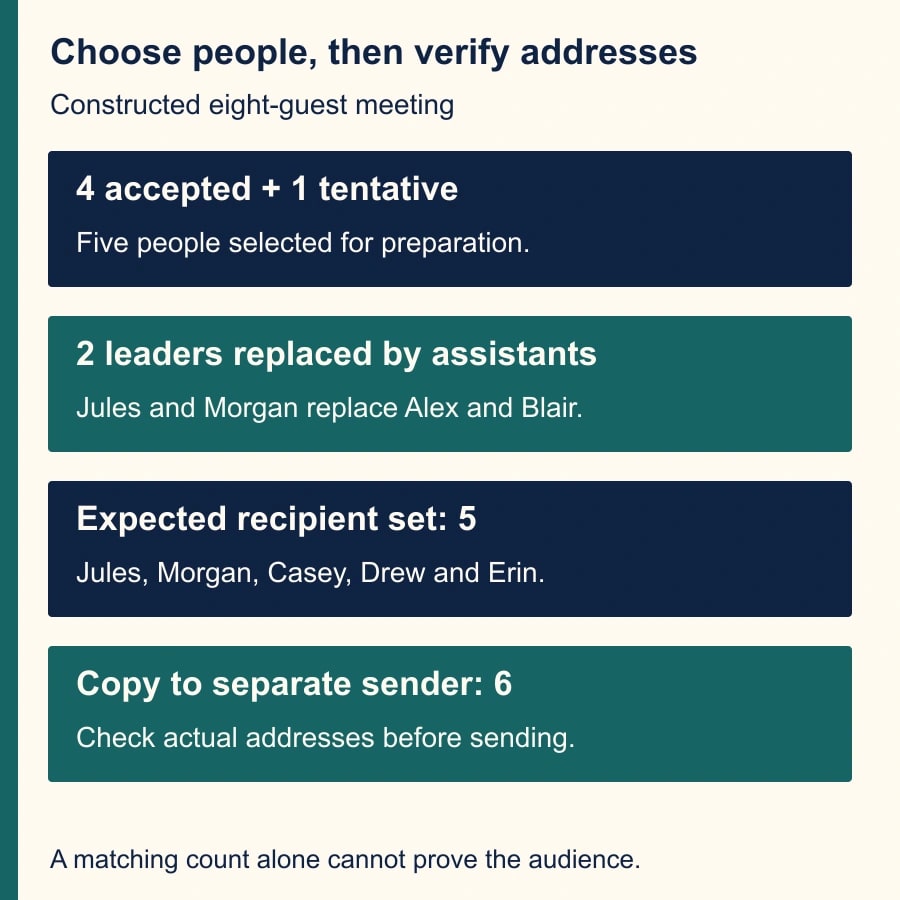
The following is a constructed client-review meeting, not a report of a live test. The eight invited guests are Alex, Blair, Casey, Drew, Erin, Farah, Gray and Harper. Alex, Blair, Casey and Drew have accepted. Erin is tentative. Farah declined. Gray and Harper have not answered. The sender is a coordinator who is not one of those eight guests.
For the preparation packet, the meeting owner chooses accepted and tentative participants. The expected people are Alex, Blair, Casey, Drew and Erin: five. Farah, Gray and Harper should not receive this packet under that particular instruction. If the owner later wants unanswered guests to receive it, change the rule explicitly instead of silently broadening the selection.
Alex is supported by assistant Jules, and Blair by assistant Morgan. The owner wants those two assistants to coordinate preparation instead of sending directly to the leaders. After substitution, the expected addresses belong to Jules, Morgan, Casey, Drew and Erin. That is still five distinct recipients in this example. Selecting a copy to the separate sender makes six addresses. Verify the displayed list; this arithmetic does not claim that every delegate arrangement yields the same count.
Now add the detail that often exposes a weak process: Erin is an external specialist, while Jules and Morgan are internal. The packet contains a general agenda and a budget workbook. The meeting owner approves Erin for the agenda only. Sending both file links to all five recipients would violate the intended audience even if Drive refuses Erin access to the workbook.
The coordinator should split the material or prepare a packet with the approved scope. One message can carry the agenda to all five; a separate restricted delivery can carry the workbook to the authorized subset. The expected output is a correct audience-content pairing, not merely an email that Gmail allows to leave the outbox.
If Alex wants both a direct copy and assistant coordination, substitution alone does not express that requirement. Confirm the addresses needed for this event and add the authorized recipient deliberately. Likewise, if Jules supports both leaders, review the resulting list for the intended distinct people. Do not use a guessed recipient count as a substitute for looking at the actual addresses.
Check the packet from the recipient's position
Open every linked document before composing the final message. Confirm the title, version, relevant date and sharing scope. Remove working notes that do not belong in the packet. A link to a live document can be useful when revisions are expected, but the coordinator still needs to establish which version participants should read before the meeting.
Google's new flow brings Gmail's Drive access checks into the handoff. Treat those checks as assistance with access, not as approval to widen sharing. If a warning appears, ask whether this recipient should receive the document. A missing permission can be a useful signal that the packet needs a different version or a narrower audience.
For an important external meeting, arrange a recipient-side access check with an authorized participant. Ask them to confirm that the correct file opens and the needed content is visible. Do not request that they forward the packet to an unapproved personal account to get around a restriction. Record the check in the coordination note and keep the troubleshooting separate from the final email.
If the packet is an attachment, inspect the actual attachment, not only the source file. Check that the exported pages contain the expected text, readable charts and no hidden preparation notes. For a linked packet, verify the destination after any last-minute file replacement. A familiar filename can conceal a different version.
Use a short message that states the decision
Here is an adaptable agenda brief. Replace the bracketed fields with confirmed details and remove any item that does not apply: “For [meeting title] on [date, time and time zone], please review [approved agenda link] before [preparation deadline]. We need to decide [specific question]. Bring [one required input]. [Named owner] will resolve questions about the packet. This email provides preparation material; the Calendar event contains the current meeting details.”
That message gives participants a job. A beautifully formatted packet without a preparation request may still lead to a meeting spent reading aloud. Keep the decision near the top and distinguish required reading from optional background. Put the most useful document first rather than presenting an undifferentiated list of links.
If you use an AI writing tool to shorten the message, provide only approved material and ask it to preserve dates, names, links and the requested decision. Review those fields against the event afterward. A smoother sentence that changes “review” into “approve” changes the assignment. The meeting owner, not the writing tool, decides what participants are being asked to authorize.
When scheduling delivery, choose a review point before the send time. Confirm the event has not moved, the audience still fits and the files remain current. If any of those changed, revise or cancel the scheduled message through the normal Gmail workflow. Scheduling is helpful for timing; it should not remove the final ownership of the message.
Recover from the wrong handoff without adding confusion
If the wrong recipient is discovered before sending, stop and repair the addresses and packet together. Removing one address is insufficient if the shared document was already made available to a broader group. Ask the document owner to check the actual access scope as part of the repair.
If a message has already been sent, preserve the message and identify exactly what went out. The meeting owner should decide whether a correction, replacement packet or access change is needed. Do not assume that editing a linked file erases what someone already saw, downloaded or received as an attachment. Follow the organization's normal handling process for a mistaken disclosure.
If the new interface is absent, check the rollout schedule before troubleshooting an account as broken. Continue with the established email process using a reviewed recipient list. If delegate substitution is missing or wrong, ask the administrator or contact owner to verify the relationship data. Do not infer an assistant relationship merely because someone handled a previous meeting.
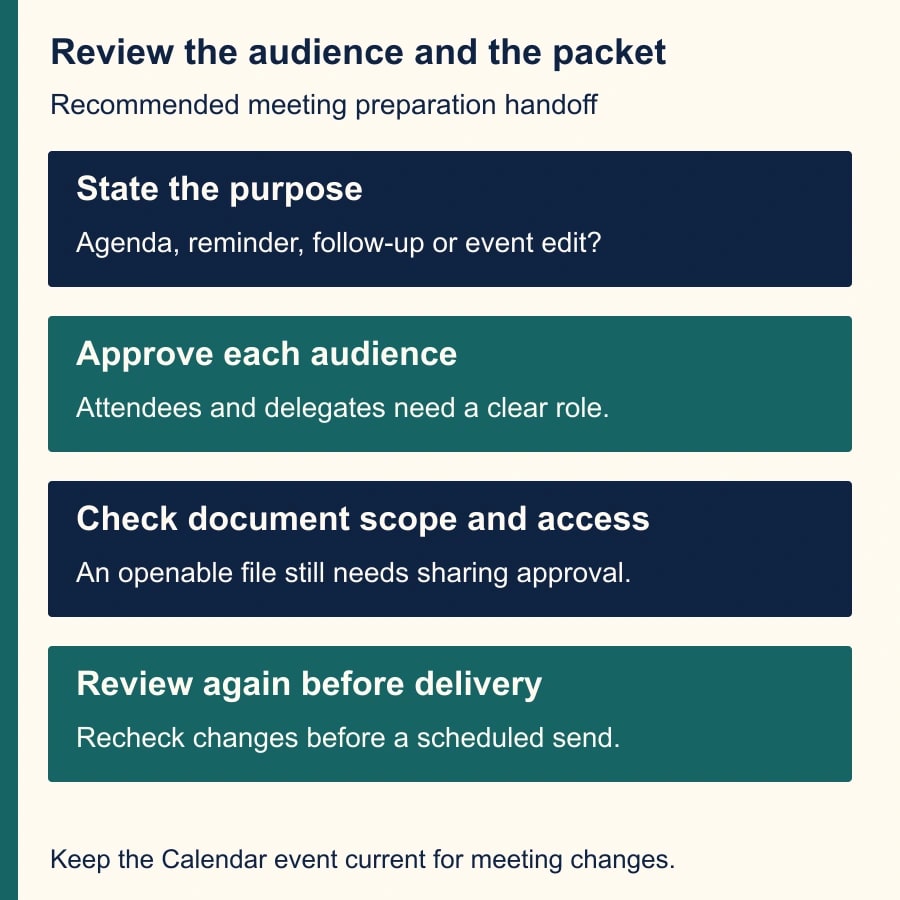
Use a small release checklist: correct event and time zone; intended response groups; reviewed delegate substitutions; approved packet for each recipient group; verified access; one final sender; and a review before scheduled delivery. Record exceptions with the meeting rather than storing unnecessary copies of guest information in a general spreadsheet.
Measure preparation quality, not just compose time
For the next ten packets, record preparation minutes, recipient corrections before send, access problems after send and participants who arrived with the requested input. Compare with a similar set of meetings. A faster email that creates five access requests may move work onto the participants rather than save it.
Set a practical stop condition: if the team cannot reliably identify the intended delegate or document audience, keep the simpler reviewed process while those records are repaired. The feature is useful when it reduces transcription and preserves accountability. It is not a reason to distribute more material to more people.
Start with one low-risk meeting and the eight-guest worksheet, then compare the preview with your expected addresses. Use the meeting time-zone checklist when participants work across regions, and the meeting follow-up workflow when the next job is turning the discussion into owned actions.
Weekly Newsletter
AI Adoption Weekly
New research, field guides, training studies, and tool decisions for operators.
No spam. Unsubscribe anytime.
Related Comparisons
Calculator
AI seat cost calculator
List price × headcount. You enter the hours and the operating assumptions.