
Fix Power Automate Variables That Change Across Parallel Loop Items
Trace shared variables inside parallel loops, restore predictable processing and reconcile actual recipients before replaying a notification batch.
Published November 15, 2026

When a Power Automate flow sends one record's message to another record's owner, inspect shared variables inside Apply to each before adding more retries. A variable used as a temporary recipient, amount or message body can be changed by another loop item while the first item is still working. Restore sequential processing for the affected loop, or redesign the actions so each item uses its own data, then prove the result in a harmless test.
This guide is for operations owners and flow makers maintaining batches of notifications, task creation or record updates. It addresses incorrect values within a loop. Missing source rows, expired connections and duplicate actions after a retry need different investigations, although they can occur in the same flow. Keep the source IDs and actual destination evidence so you can distinguish those faults.
Microsoft says variables are global within the cloud flow that creates them and persist across loop iterations. Its guidance warns that loops using variables should run sequentially when predictable results matter. See Microsoft's variable guidance, checked November 4, 2026. A variable's existence inside a loop's actions does not give each iteration an independent copy.
Start with the record that was wrong
Choose one known incorrect outcome. Record the source item ID, expected recipient, actual recipient, expected content and actual content. Capture the flow run and relevant action outputs. “Some emails were mixed up” is too broad to establish a cause. A concrete example can reveal whether the recipient changed, the body changed or the source lookup was already wrong.
If the flow is still producing incorrect external actions, contain that path using your approved operational procedure. Preserve the current configuration and run history before editing. The business owner should decide how to handle any incorrectly disclosed information or customer-facing mistake. A technical rerun does not undo a message already received.
Work in a copy or controlled test version. Replace real sends and updates with an evidence record that shows what the action would have done. Use fictional recipients and content. A test that sends harmless-looking messages to actual customers is still an external action, and repeated tests can create confusion even when the data is synthetic.
You need access to the flow definition, run history, input records and destination evidence. The main repair cost is the maker's investigation and review time. Check the account's existing connector and licensing requirements before redesigning around another service; this fault does not by itself justify buying a higher plan.
A two-item example explains the failure
Consider a constructed reminder flow with two source records. Item A belongs to Ana and contains request A-101. Item B belongs to Ben and contains request B-202. The flow stores the current owner in a string variable called Recipient, performs another step, then sends the current item's reminder using that variable.
With sequential processing, the first item finishes before the next item changes Recipient. With parallel processing, multiple items may be active at the same time. One possible order is: A sets Recipient to Ana; B sets Recipient to Ben; A reaches its send action and reads Recipient. At that moment the shared value is Ben.
The result can be A-101's content addressed to Ben. This is an illustrative interleaving, not a claim that every parallel run follows that order or a trace from a tested account. The point is that the design permits a value to be overwritten between its assignment and its use.
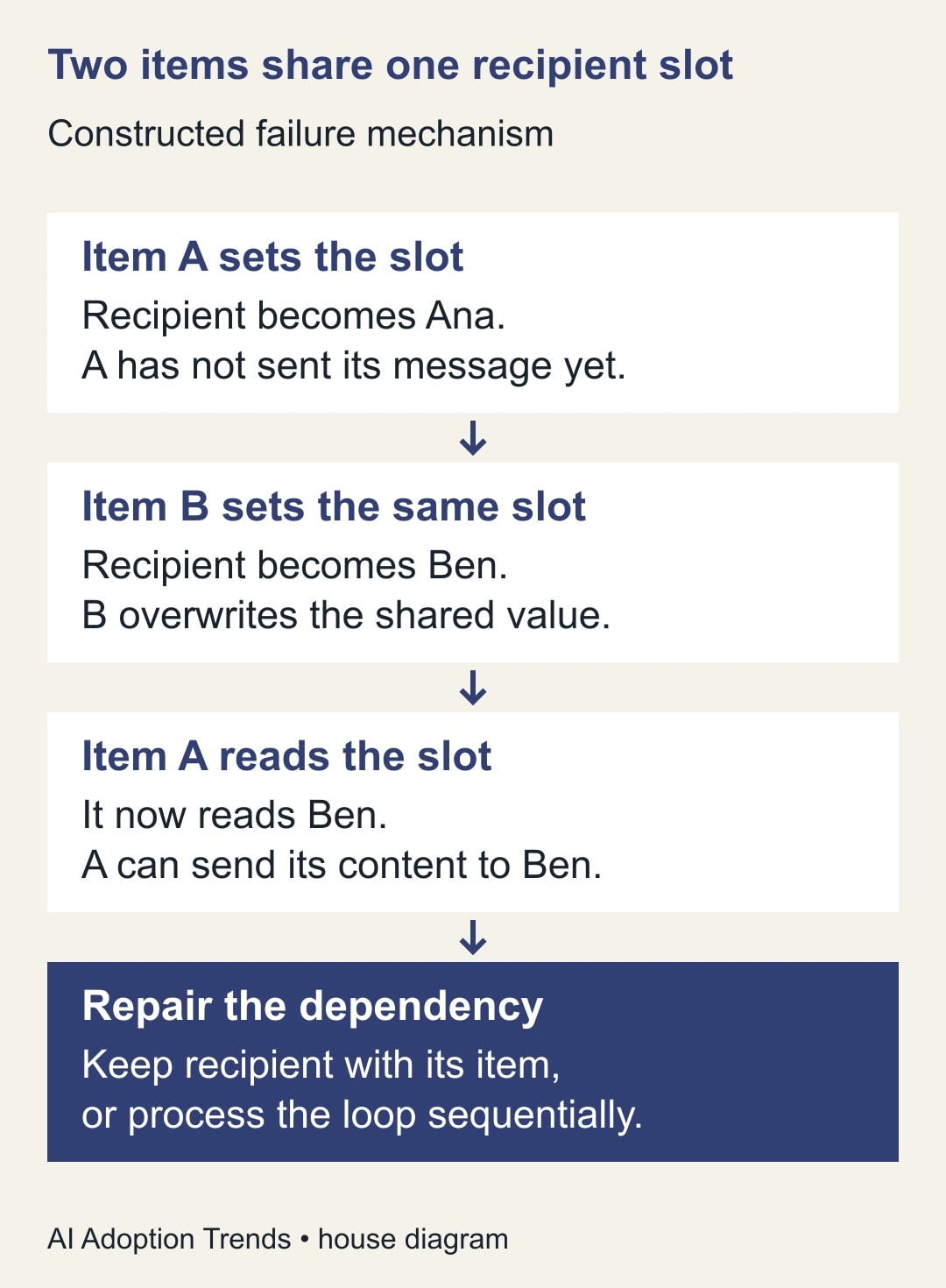
The same dependency can affect a temporary amount, approval owner or assembled text. It can be especially hard to notice when a run succeeds technically. The connector may have accepted exactly the recipient and body it was given. A green action status says that step completed; the business check is whether it completed for the right item with the right values.
Do not diagnose every wrong-recipient case as concurrency. A source mapping, lookup condition or stale contact address can produce the same symptom. The example becomes relevant when the run evidence shows the correct per-item input followed by a changed shared value before the action uses it.
Distinguish three different kinds of overlap
First, several iterations can be active within one Apply to each loop. That is the issue in the example. Inspect the loop's concurrency setting and the dependencies among actions inside it. Microsoft documents sequential execution as the default and a configurable degree of parallelism from 1 to 50. It also cautions that higher parallelism does not necessarily improve speed. See Microsoft's parallel execution guidance.
Second, separate flow runs can overlap. The variable described here is scoped to its own flow run; it is not a shared global variable across every run in the tenant. However, separate runs may still update the same external record or file. A loop repair does not automatically solve that destination conflict.
Third, a retry or replay can repeat an action that already completed. That is a duplicate-action problem. Making a loop sequential does not prove that a repeated run will avoid sending a second message. Keep completion evidence keyed to the source item and intended action when recovery might replay work.
Write down which overlap exists before changing settings. It is possible to have all three. A broad change to trigger concurrency can alter how new work arrives without fixing a shared variable used by parallel items inside an already running batch.
Choose the smallest repair that restores correctness
If the loop relies on shared mutable state, the immediate repair candidate is sequential processing. In the test copy, return the affected Apply to each to sequential execution and rerun the same controlled inputs. Compare every output with the expected source-to-destination mapping. Do not declare success from one corrected example while the rest of the batch remains unchecked.
For a longer-term design, keep the recipient, record ID and content attached to the current item. Reference the current item's field or an action output belonging to that iteration instead of assigning it to one shared temporary variable first. This reduces the interval in which another item can replace the value. Have the maker inspect the actual expression and loop context rather than copying an expression from a different flow blindly.
A Compose action can make an intermediate value easier to inspect, but its name is not a guarantee of isolation or correctness. The important question is what input it uses and which iteration's output the later action references. A Compose action that reads the same shared variable after another item changes it preserves the original problem.
If the loop builds a combined report, consider collecting item-specific results in a controlled design and assembling the report after those results are complete. Specify how records are keyed, how failures are represented and what ordering the final report requires. Do not turn a simple repair into a new distributed workflow unless the volume and maintenance cost justify it.
Test the dependency before testing speed
Create a test set with visibly different record IDs, owners and message text. Similar inputs can hide a mix-up. Include at least two records that take different paths, such as one requiring an extra lookup and one that already has complete data. The variation helps expose a design that accidentally depends on completion order.
For every item, capture the source ID, expected owner, actual owner, expected content marker and actual marker. Assert that A-101 stays with Ana and B-202 stays with Ben. Repeat the test with a larger set and with the same data presented in a different order. These are proposed acceptance exercises, not a guarantee that repeated success proves every future run safe.
Then introduce a controlled failure in one item without making external changes. Confirm that the evidence distinguishes completed items from failed or uncertain ones. The output should support targeted recovery. A batch-level failure flag without item details leaves the operator guessing which notifications might already have gone out.
Only after correctness holds should you compare duration. Measure elapsed batch time, maker intervention and failed actions under the actual workload. If sequential processing meets the business deadline, additional parallelism may not be worth the maintenance risk. If it does not, redesign and test item independence before increasing concurrency again.
Recover the affected batch from actual outcomes
Suppose a constructed batch contains 40 intended reminders. Destination evidence shows 34 correct sends, two sends to the wrong recipient, three missing sends and one uncertain outcome. The categories total 40. The two wrong sends are not “missing” merely because the intended owner did not receive them; they need a separate response to the actual communication.
Do not rerun all 40. Preserve the 34 completed outcomes. Investigate the two incorrect sends with the business owner, confirm the three gaps and resolve the uncertain case before deciding whether another send is appropriate. The recovery set is defined by evidence, not by a blanket assumption that a failed or suspicious batch did nothing.
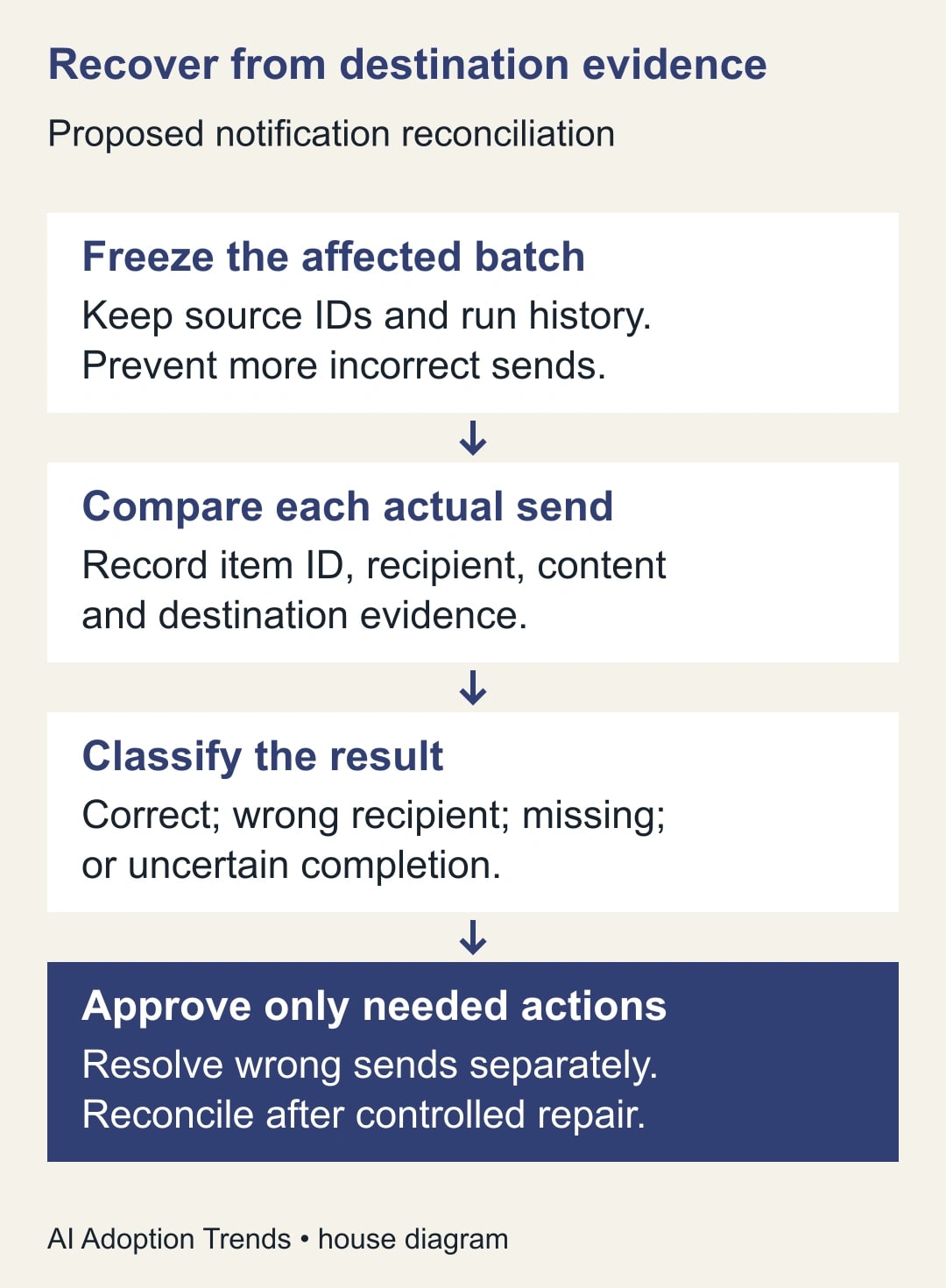
If the uncertain item is later confirmed correct, there are 35 correct outcomes, two incorrect sends and three gaps. If it is confirmed unsent instead, there are 34 correct outcomes, two incorrect sends and four gaps. Keep those branches explicit until the evidence resolves them. Do not use a convenient count to force the ledger to balance.
After a controlled repair, reconcile again against the original source IDs. Record any corrective communication separately from the intended reminder. A customer may have received both a wrong message and an explanation; counting them as two successful reminders would hide the incident.
Use this dependency and recovery checklist
- Source item: stable ID and expected recipient, content or update value.
- Shared state: every variable written inside the loop and later read by another action.
- Ordering requirement: which action must finish before another reads its result.
- Loop behavior: sequential or parallel, with the reason for the chosen setting.
- Separate runs: whether concurrent runs can affect the same destination.
- Harmless test: expected mappings and captured actual outputs for every item.
- Recovery evidence: completed, incorrect, missing and uncertain outcomes.
- Release owner: maker approves the design; operations owner approves any external recovery.
Keep the checklist with the flow's change record. It gives a future maintainer a reason not to “speed up” the loop by changing one setting without reviewing its dependencies. If the flow has a legitimate ordering requirement, name that requirement directly.
Set a useful completion standard
The repair is ready when the source-to-destination mapping is correct, the flow meets its business deadline and the operator can recover an interrupted batch without guessing. Track incorrect mappings, unresolved outcomes, duplicate actions and time spent on manual repair. Runtime alone is an incomplete measure.
For example, reducing a batch from 12 minutes to four minutes does not release eight minutes of staff time if the process was already unattended. It may improve timeliness, but cash or capacity claims need evidence of actual work removed. If a faster version creates 20 minutes of investigation, the operating result may be worse.
Stop release if any item uses an unexplained recipient, if the test cannot distinguish a completed send from an unsent one or if the maker cannot identify the data dependency behind the proposed repair. Keep the controlled sequential version or the approved manual process while the design is clarified.
Begin with one incorrect record and trace its values from input to action. For replay protection, continue with the Power Automate duplicate-action recovery guide. If the record and recipient are correct but the attachment is missing, use the attachment-content diagnostic rather than changing concurrency without evidence.
Weekly Newsletter
AI Adoption Weekly
New research, field guides, training studies, and tool decisions for operators.
No spam. Unsubscribe anytime.
Related Comparisons
Calculator
AI seat cost calculator
List price × headcount. You enter the hours and the operating assumptions.