
Fix Power Automate 429 Errors Before Replaying the Backlog
Identify the throttled connector, budget shared request capacity, and recover unfinished orders without replaying completed work.
Published November 15, 2026

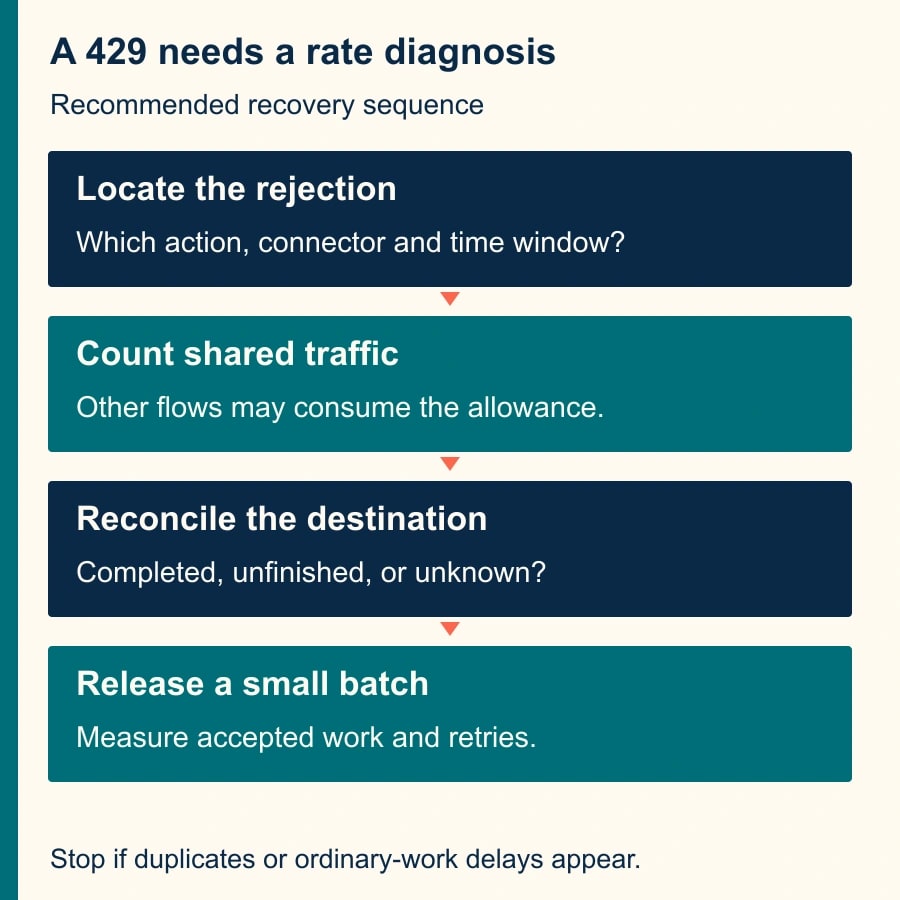
When Power Automate returns 429 Too Many Requests, identify the service and limit that rejected the call before replaying the backlog. Reduce the rate reaching that service, account for other flows sharing its capacity, and reconcile which business records already reached the destination. Increasing concurrency or resubmitting every failed run can create another burst without completing more useful work.
This guide is for an operations owner whose cloud flow updates orders, cases or records and now stalls under load. It fits a repeatable job with stable source IDs and a destination you can inspect. If the flow never starts, or its error is 401, 403 or a validation failure, diagnose that problem first. A delay does not repair expired credentials, denied access or invalid order data.
Separate three limits before buying anything
Microsoft distinguishes connector throttling from daily Power Platform request allocations and service-specific protection limits. A connector is the component that calls another application. It can reject a burst even when your total daily usage is modest. Microsoft's limits and throttling guidance, checked November 15, 2026, explains that extra license capacity does not generally raise connector or Dataverse service-protection limits.
That distinction changes the first decision. For a short burst at one connector, spread calls over time or reduce calls per record. For sustained platform-allocation pressure, review the flow's overall request count and licensing with the administrator. For a destination's own protection rule, use that service's documented retry and throughput behavior. Do not assume all three are the same budget.
Microsoft's connection-failure guide recommends delay or exponential-backoff retry for 429 responses. Exponential backoff means spacing later retries farther apart. Treat that as a recovery mechanism for temporary pressure, not a substitute for sizing a workload that runs every morning. The connector's current documentation and the actual error response remain the sources for its limit.
Preserve enough evidence to explain the queue
Before changing settings, select one affected run and record its start time, failing action, connector, connection, status code, retry information and source record ID. Save the relevant error text, including any suggested wait. Avoid collecting unrelated customer data in a troubleshooting document. The goal is to identify the rejected operation and the time window, not duplicate the whole order database.
Compare that run with a successful run and with another failure from the same period. Determine whether the 429 appears on a read, an update or a create action. A repeated read is usually different from repeating an order creation. If the run contains successful actions before the rejection, those effects may already exist and must be included in recovery.
Ask the administrator which other flows use the same connection or account. The visible failing flow may be only one contributor to shared traffic. A test that works at noon can fail at 09:00 when scheduled reporting, imports and customer updates all start together. Put their schedules and observed call rates on the same timeline before selecting a new rate.
Pause new intake if the business owner approves the operational impact, or route arrivals to a controlled queue that you can reconcile. Record the cutover time and last accepted source ID. Do not delete failed runs or source records to make the dashboard look clean. They are the evidence needed to distinguish unfinished work from completed work with an incomplete log.
Calculate calls per business item
Take a representative successful path and count how many times it calls the constrained connector for one order. Include lookups, writes and additional pages of results. Then inspect retries separately. This is a connector-call model; it is not the same as a complete count of billable or platform requests, which may include other actions in the flow.
Look for work that can be avoided. A flow that retrieves every customer and filters locally may be able to ask the source for only the required customer. A lookup repeated three times for the same order may be reusable within that run. Use supported source filters and batch operations only when they preserve the business result and the connector documents their behavior.
Estimate a starting recovery rate from the measured calls per item and the capacity left after ordinary traffic. Leave room for variation. Do not build to the published maximum and assume retries are free. Microsoft notes that retries and pagination contribute to request usage; they also add load when you most need it to fall.
The flow owner should write down both a rate and an acceptance target: for example, “Process this approved recovery queue within two hours while keeping current-order processing available.” That is more useful than “Make the flow faster.” It makes a slow but steady recovery acceptable if it protects live work and meets the deadline.
Worked example: a backlog that cannot clear at the old rate
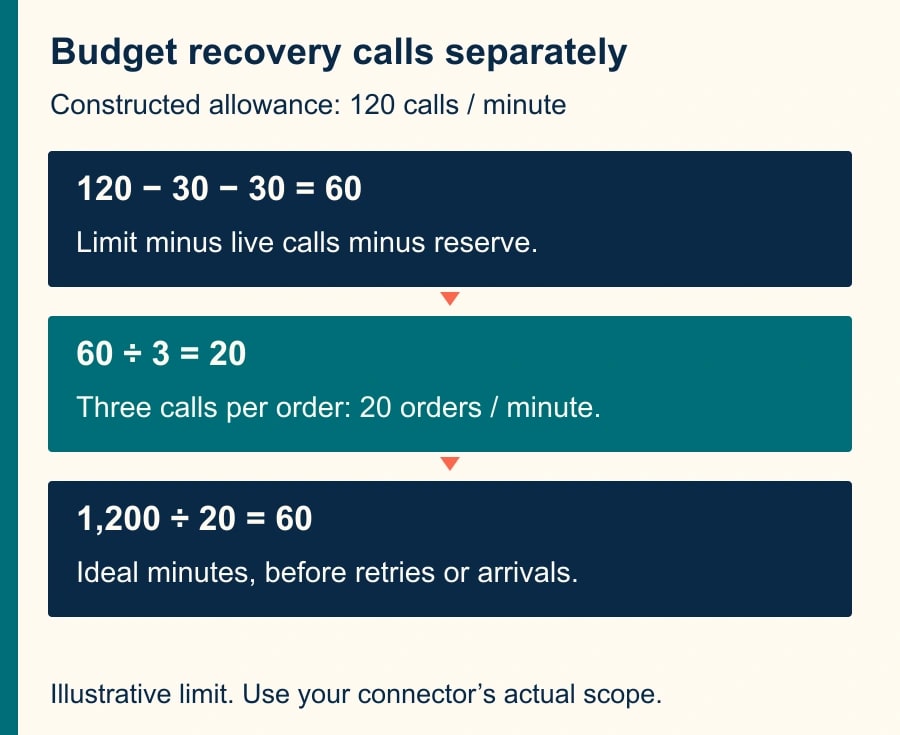
Consider a constructed connector whose documented allowance for this example is 120 calls per minute for the relevant shared scope. This is an illustrative limit, not a Power Automate-wide entitlement or a claim about your connector. Ordinary live work consumes 30 calls per minute. The team reserves another 30 for variation, leaving 60 for recovery.
Each recovery order needs three calls to that connector. The planned recovery rate is therefore 60 divided by 3, or 20 orders per minute. A backlog of 1,200 orders would take at least 60 minutes at that rate, before retries, human exceptions and other delays. Launching 100 orders per minute would demand 300 connector calls per minute from recovery alone, so more simultaneous runs cannot solve this example.
During a test, the owner discovers a fourth lookup on one common path. At four calls per order, the same 60-call allowance supports 15 orders per minute. The ideal queue-clear time rises to 80 minutes: 1,200 divided by 15. This is why the calculation needs the actual path, not the number of boxes that looked important in the designer.
If new work is also joining this same recovery queue, measure the net reduction. Processing 15 orders per minute while ten new orders arrive reduces the backlog by five per minute. Clearing 1,200 then takes an ideal 240 minutes. That queue is unlikely to meet a two-hour target without reducing arrivals, reducing work per order, moving the recovery window or agreeing on a different deadline.
These calculations describe capacity planning, not a guaranteed runtime. Rolling rate windows, variable action durations and service behavior can make actual throughput uneven. Start below the planned ceiling, observe the destination and adjust. Use the counts to choose a test, then let measured accepted work determine whether the test succeeds.
Change one pressure source at a time
First reduce simultaneous work where the burst originates. Inspect both trigger-level concurrency and the concurrency of loops that call the constrained service. Changing one while ignoring the other can leave the burst intact. Record the old settings, the new settings and the time of the change so you can interpret the next run window.
Where supported, configure the failing action's retry policy and respect the service's suggested retry delay. Use a limited retry budget. An endlessly retried record can occupy capacity needed by valid work and conceal a persistent destination problem. Decide when a record leaves automated processing for review, and ensure that review has a named owner.
A Delay action inside a sequential loop can help space requests, but a delay inside many parallel iterations is not a global rate limiter. Those iterations may wake together and call the service together. Similarly, adding the same delay to many independently triggered flows can merely move the burst. Test the aggregate arrival rate at the service, not just one run's timeline.
Do not rotate through extra connections simply to evade a service limit. Confirm the documented scope and intended architecture with the administrator. A different connection may change ownership or permissions, while the actual limit may still apply to the account, environment or destination. A recovery change should preserve who is authorized to perform the work.
Reconcile outcomes before resubmitting
Build a recovery register with source ID, original run ID, destination record ID if known, last confirmed action, current business status and recovery decision. For each item, classify it as completed, definitely unfinished, or outcome unknown. The unknown category is essential when a timeout or partial run leaves you without a clear result.
For completed items, repair the tracking record rather than repeat the business action. For definitely unfinished items, submit the smallest safe unit of work at the controlled rate. For unknown outcomes, inspect the destination using the stable source ID or another reliable business key. If the destination cannot be checked, route that item to the business owner before repeating a consequential create or send.
If the flow is designed so repeating an item produces the same result without duplicating it, document and test that property. It is often called idempotency. A preliminary “does this exist?” lookup alone may not guarantee it when two runs overlap. Use the destination's supported unique key or equivalent control where available; otherwise account for that limitation in the review process.
This article's rate calculation does not replace a duplicate-prevention design. Use the separate Power Automate duplicate-action recovery guide when the difficult part is deciding whether an action already happened. Throttling determines how quickly to try eligible work; reconciliation determines which work is eligible.
A reusable recovery worksheet
- Incident: first affected time, flow owner, failing connector/action and exact 429 response.
- Limit: documented scope, time window, current source link and administrator confirmation.
- Workload: calls per item, ordinary shared traffic, recovery allowance and expected new arrivals.
- Queue: initial item count, completed items, unfinished items and unknown outcomes awaiting review.
- Change: concurrency, delay or retry setting changed; old value; new value; rollback owner.
- Pilot: sample IDs, destination results, actual calls, accepted items, retry count and elapsed time.
- Release: approved pace, checkpoint interval, stop condition and next review time.
Do not use a generic percentage as the only pass condition. A small number of wrong customer updates can matter more than a large number of harmless retried reads. Require correct destination state for every sampled item and no duplicate business effects. Check the exception register with the operations owner before increasing the batch size.
Know when to stop the recovery
Stop and reassess if the 429 rate rises, ordinary work slows, the unknown-outcome queue grows, or the destination contains duplicate changes. Keep the last safe settings documented. If the smaller pilot succeeds but the full queue does not shrink, recalculate using new arrivals and the real calls per item; do not keep adding retries to a workload that exceeds capacity.
Measure accepted orders per minute, oldest uncompleted order age, duplicate outcomes, unresolved records and staff review time. A reduction in failed-run count alone can hide skipped work. Reconcile the queue at the end: initial items plus arrivals must equal completed items plus remaining items plus explicitly removed or cancelled items, with a reason for every removal.
Your next action is to inspect one 429 run and count its calls to the constrained connector. Use that evidence to choose a small recovery batch, not a license upgrade by default. Before leaving it unattended, verify that the failure-alert path actually runs and delivers its message. A queue that slows safely still needs an owner who notices when it stops.
Weekly Newsletter
AI Adoption Weekly
New research, field guides, training studies, and tool decisions for operators.
No spam. Unsubscribe anytime.
Related Comparisons
Calculator
AI seat cost calculator
List price × headcount. You enter the hours and the operating assumptions.