
Test a Notion CSV Export Before Relying on It for Recovery
Use stable IDs and a small restore rehearsal to check whether exported Notion records can recover client links, rollups and a usable work queue.
Published November 15, 2026

A Notion CSV export can preserve useful records without preserving a working system of related databases. Before relying on one for recovery, import a small copy into an isolated test area, rebuild the necessary relationships, and prove that the team's links, totals and navigation still work.
Notion's documentation says exported relation properties become plain-text URLs and warns that reimporting the CSV does not automatically re-establish those relationships. Its current import guide also describes a narrower option: when adding a CSV to an existing database, you can map a column to an existing relation property. That is worth testing, but it is not a promise that an exported workspace will restore itself.
These details were checked November 3, 2026 in Notion's relations documentation and CSV import instructions. This guide uses a constructed client-project example to help an operations manager decide whether a recovery process is usable. It does not claim a tested restoration of a private workspace.
Define what the team needs back
Start with one workflow rather than the entire workspace. For a client-services team, the minimum recovery might be the active client list, each client's projects, the responsible staff member and a reliable view of remaining work. A folder of readable project pages is helpful, but it may not support that workflow until the relationships are rebuilt.
A relation is a property connecting a page in one database with a page in another. A rollup calculates or displays information from those related pages. For example, a client page might show the total budget of its linked projects. Restoring project amounts without restoring the correct links leaves that total incomplete or wrong.
Use this guide when you own a manageable set of connected databases and can test copies safely. If you need recovery within minutes across a large workspace, involve the administrator and technical owner in a broader recovery design. A manual rehearsal can reveal requirements, but it does not establish that the entire system can be recovered within a tight service commitment.
You need export access to the source content, permission to create the isolated test databases, and an owner who understands the relationship rules. Budget time for the export, mapping, reconstruction and validation. Existing Notion plan limits apply, and external backup products would add their own costs. This process begins with evidence from the tools you already have.
Inventory the connections before exporting
List each database needed for the chosen workflow. For every relation, record its source database, target database, whether multiple related pages are allowed, and whether the team relies on a reciprocal view in the other database. Also note the formulas, rollups, views and automations that depend on it.
Give records stable business IDs where the process permits, such as C1 for a client and P1 for a project. Preserve source page URLs separately. An old URL helps trace the original, but a newly created page can have a different address. Do not use a mutable client name as the only matching key, especially when two clients share similar names.
Create a relationship list with one row per expected connection. Its minimal fields are source record ID, relation name and target record ID. This makes a project linked to two clients explicit as two connections. Keep the list beside the export and record when it was captured.
Capture expected derived results as well. For a budget rollup, preserve the project values and the expected total for each client. For a count of open work, preserve which statuses qualify. A total is useful as a secondary check, but it should not replace checking the underlying linked IDs because two wrong sets can have the same total.
Know what the export leaves out
Notion states that an export excludes pages the exporter cannot access, and teamspace settings can also affect what is included. It also warns that reuploading exported content cannot instantly recreate a workspace. See its backup guidance. A completed download therefore proves that files were produced, not that every needed record was captured.
Ask the workflow owner to identify expected content that is missing because of access. Record those omissions and route them to the authorized owner. Do not broaden access to unrelated private pages merely to make a count look complete. The recovery scope should be explicit about what is included and who can supply missing business content.
Keep the downloaded archive unchanged. Make a working copy for inspection or import. Preserve its export time, source scope and the identity or role of the exporter. If colleagues continue editing the live databases, identify the cutoff used by the rehearsal so later changes are not mistaken for export defects.
Check that the files can be opened before treating the archive as usable. Inspect representative page content and attachments required by the chosen workflow. A project row whose instructions exist only in an inaccessible attachment is not operationally complete, even if the row count matches.
Rehearse with three clients and six projects
In this constructed example, the client database contains C1, C2 and C3. The project database contains P1 through P6. P1 and P2 belong to C1. P3 is a shared project linked to both C1 and C2. P4 belongs to C2, while P5 and P6 belong to C3.
There are three client records, six project records and seven client-project connections. Counting only six restored project rows misses the extra relationship on P3. A recovery that attaches P3 only to C1 can pass a row-count check while leaving C2's work view incomplete.
Give the projects illustrative budgets: P1 is $100, P2 $200, P3 $300, P4 $400, P5 $500 and P6 $600. The project database total is $2,100. If each client rollup includes the full budget of every linked project, C1 shows $600, C2 $700 and C3 $1,100.
Those client totals add to $2,400 because P3 appears under two clients. That is correct for the specified rollup but unsuitable as a company-wide unique-project total. Document the intended calculation before rebuilding it. Do not “repair” the $300 difference by deleting a legitimate relationship.
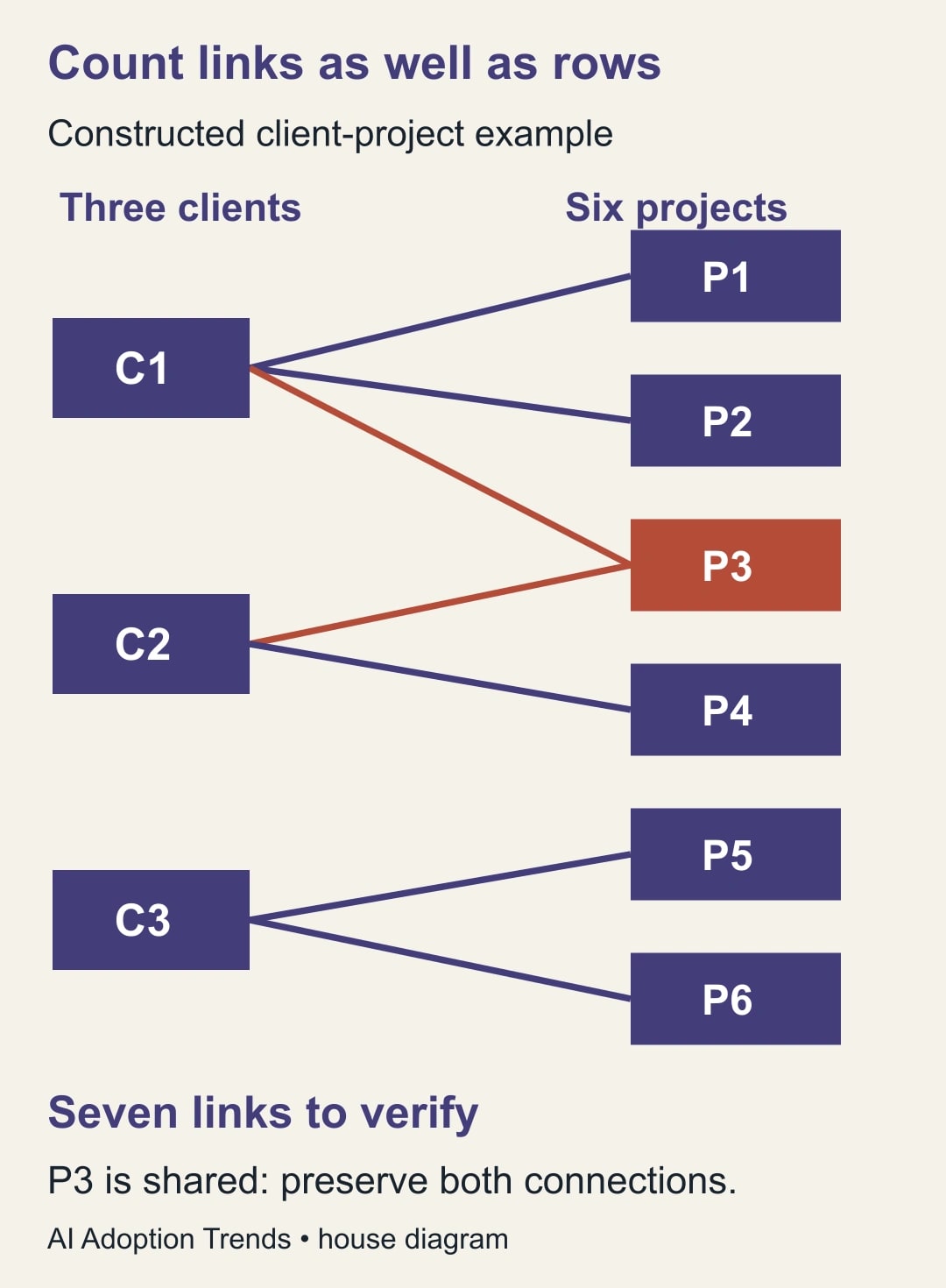
Now suppose a test import preserves all nine records but loses P3's link to C2. The client rollups become $600, $400 and $1,100. Their sum happens to equal the unique-project total of $2,100. That apparent agreement conceals an error. The seven-connection answer key exposes it immediately.
This is why recovery evidence should include both identities and calculations. A missing link can make one total wrong while making another total look more plausible. The business owner must define whether a measure counts projects once, counts client participation, or allocates a shared budget between clients.
Choose a controlled reconstruction route
For a new database import, plan to rebuild the relation, rollup and formula properties that the workflow needs. Notion's current CSV guide says a new import cannot create those properties automatically. Start with the client and project records, then establish the relations deliberately and compare each connection with the preserved list.
For an existing test database that already has the relation property, evaluate the documented CSV mapping option on a tiny sample. Include one ordinary relationship, one shared project and one deliberately unmatched identifier. Observe what the importer accepts and how it resolves targets. Do not assume that old exported URL text will resolve to new pages in every setup.
The CSV guide also says imports and merges add rows rather than updating existing ones. Reimporting a failed file into the same test database can therefore create duplicates. Record each test attempt and use a fresh isolated destination or a carefully reviewed cleanup process before repeating it. Never discover this behavior by merging into the live project database.
For a small recovery, manually linking records against a stable-ID worksheet may be easier to verify than designing an integration. At larger scale, a technical owner can evaluate a supported programmatic reconstruction. Require that method to produce the same connection evidence and exception list; automation does not remove the need to decide what should link to what.
Hold ambiguous matches. If two client pages appear to correspond to C2, resolve the duplicate identity before assigning projects. A nearest-looking name is not enough. Keep unmatched projects visible rather than attaching them to a placeholder client that would make the work queue look finished.
Rebuild the useful behavior after the links
Once all seven relationships in the example are correct, recreate the required rollups and formulas from their recorded definitions. Compare the three client totals and the unique-project total separately. Change one project budget in the test copy and confirm that the intended dependent views update as expected.
Navigate from a client to its projects and back through whatever reciprocal relation the team uses. Check the shared project from both client pages. If the business process expects a two-way relationship, confirm that behavior explicitly; a visible link on one side does not prove the reverse view was recreated.
Test with the role of an ordinary staff member who will use the recovered workspace. The administrator's ability to open every page does not establish that the assigned project owner can see the instructions or attachments. Compare access with the approved business requirements, including content that should remain restricted.
Keep recovered automations inactive until the copied data and intended actions are understood. Otherwise a restoration rehearsal can create assignments or messages. If the workflow depends on multiple Notion automations, review the guide to handoffs that stop after the first automation before treating a recovered page as a completed process.
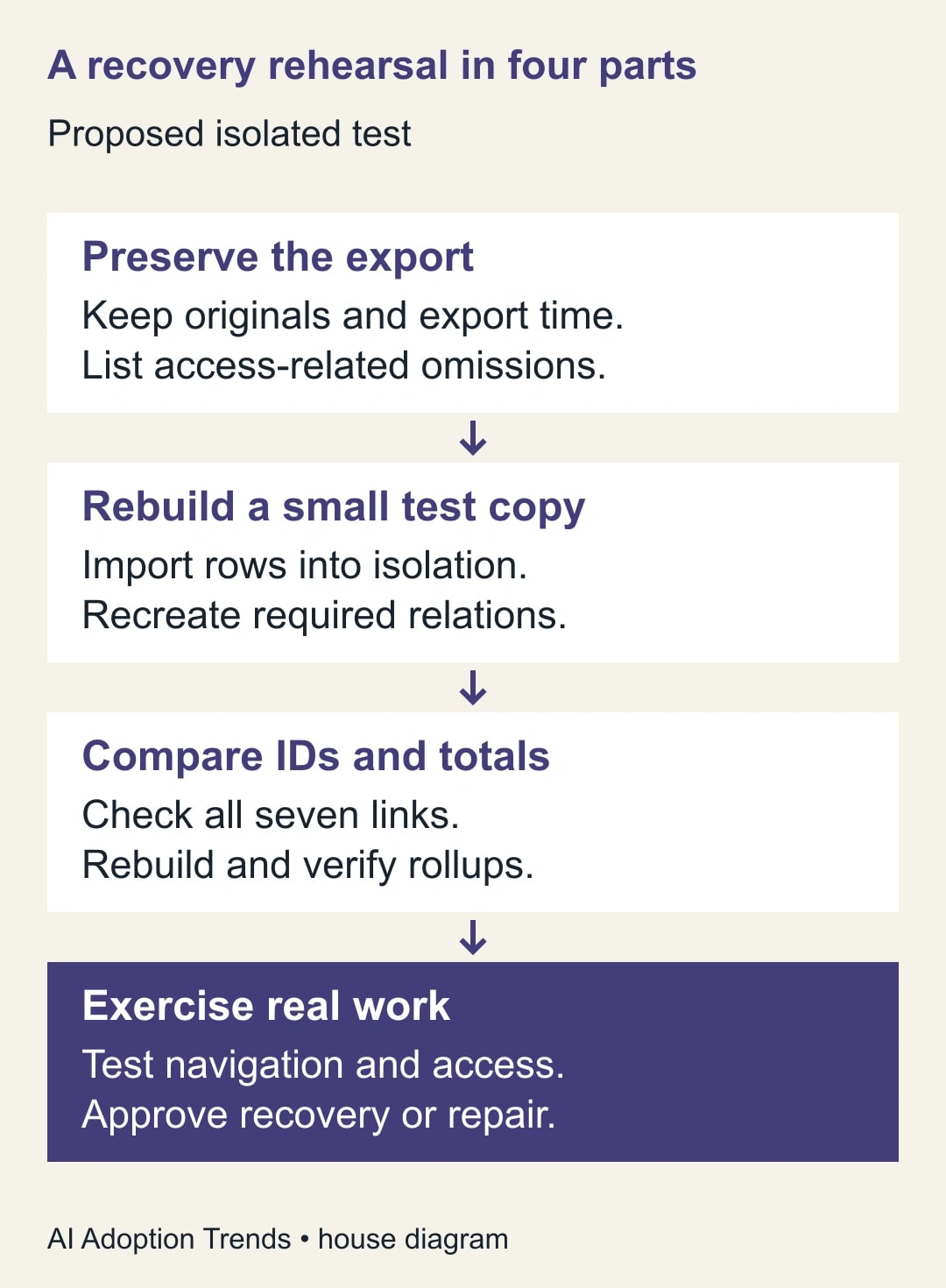
Use a recovery acceptance record
- Scope: workflow, databases, export cutoff and the minimum work the team must resume.
- Population: expected client and project IDs, excluded content and access-related omissions.
- Connections: one row per source ID, relation name and target ID; include shared relationships.
- Import route: new database or existing relation mapping, test location and attempt identifier.
- Derived results: formula definitions, rollup rules and expected values for known records.
- Usability: navigation, attachments, ordinary-user access and controlled automation behavior.
- Exceptions: missing records, ambiguous matches, duplicate imports and unresolved links with owners.
- Decision: accepted recovery scope, elapsed work time, remaining gaps and next rehearsal date.
Have the operations owner approve business completeness and the administrator approve the access and technical setup. Retain the original export and the test evidence. A successful rehearsal should specify what it demonstrated, such as recovery of one client-project workflow, rather than claiming proof of full-workspace restoration.
Measure the time to produce a usable queue, not just the download duration. Track manual linking effort, unresolved connections and missing attachments. If a six-project rehearsal is already hard to reconcile, improve identifiers and the relationship inventory before expanding the recovery scope.
A backup tool purchase may eventually be justified by the required recovery time, scale or automation. Compare it using the same sample and acceptance record. Require a demonstration of the needed relationships and permissions rather than relying on the word “backup” in a feature list.
Stop the handover if a required client is missing, a shared project is attached incorrectly, or staff cannot reach the instructions they need. Your next step is to select one connected workflow and write its expected record and relationship counts. Then rehearse a small restoration while the original remains available for comparison.
Weekly Newsletter
AI Adoption Weekly
New research, field guides, training studies, and tool decisions for operators.
No spam. Unsubscribe anytime.
Related Comparisons
Calculator
AI seat cost calculator
List price × headcount. You enter the hours and the operating assumptions.