
Make Sends the Wrong Customer Digest: Check Grouping and Source Scope
Repair Make customer digests by checking aggregation scope, stable group keys, preserved fields and per-customer reconciliation.
Published November 19, 2026

If a Make scenario sends one email per work item instead of one digest per customer, inspect the aggregator's source module and grouping key before changing the email step. If it sends one combined digest to the wrong customer, stop delivery and check which customer identity and recipient survive the aggregation. Reconcile every customer separately; a correct grand total can still conceal a serious mix-up.
An aggregator combines incoming bundles of data. A bundle is one package of fields moving through a Make scenario. The useful business question is what each incoming bundle represents, which set of bundles belongs together and what one outgoing bundle is supposed to mean. For a weekly customer digest, one outgoing bundle should represent one customer for one reporting period.
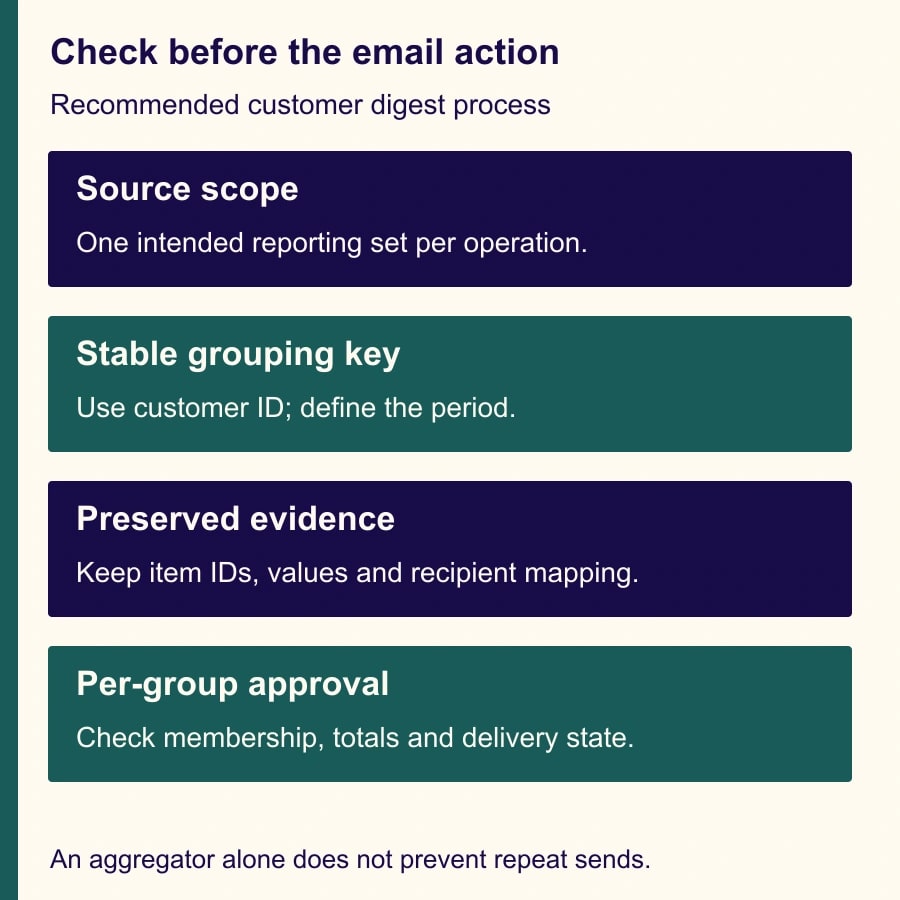
Make's documentation says an aggregator collects bundles during a single source-module operation. Its Group by setting produces separate outputs for distinct key values, and fields from the source and intervening modules need to be included explicitly if they are needed after aggregation. Product behavior was checked November 19, 2026. Make's aggregator guidance.
Decide whether this is an aggregation problem
This process fits an agency or service operations owner assembling weekly client updates from several work records. It assumes an existing Make scenario, a source system with stable work-item and customer identifiers, an approved recipient list and someone who can pause outbound delivery.
Skip a simple aggregator repair if the source is one unrelated webhook event arriving at a time and the requirement is to accumulate a whole week of events. An aggregator's execution boundary is not a durable weekly inbox. Use a scheduled search of the system of record or a deliberately designed persistent collection process, then aggregate the selected reporting set. Do not expect separate scenario executions to merge themselves into one digest.
Also distinguish the number of records from the number of recipients. A customer may have several approved recipients, or several projects that belong in separate reports. Decide the reporting unit first. “One email per customer” is only appropriate when the business has approved that grouping and recipient scope.
Before editing, save the current scenario configuration and recent execution evidence. Disable the send step or route test output to a controlled internal destination. Use synthetic customer names and addresses during the repair. A preview that includes real customer data in another customer's draft is already a warning, even if the email has not been sent.
The operations owner defines the reporting unit and acceptance criteria. The automation owner repairs the scenario. The customer account owner approves recipients and the report's meaning. If a mistaken digest was delivered, involve the organization's responsible incident or client-service owner rather than trying to erase the event by sending a corrected message silently.
Define the output before choosing the module
Write a small output contract: one digest per customer ID and reporting period; only eligible work items; each work-item ID appears once; recipient drawn from the approved customer record; totals reconcile to the selected source records; no email for an empty reporting set unless the business explicitly wants an empty-status report.
Keep a structured array when downstream steps need to check identifiers, totals and completeness. An array is an ordered collection of items. Convert the approved result into readable text after those checks. If you use a text aggregator for presentation, keep enough structured evidence elsewhere to verify which items produced the text. A paragraph is difficult to reconcile reliably after the identifiers have disappeared.
An iterator does the reverse kind of work: it turns array items into separate bundles. Make documents that behavior in its flow-control guidance. Adding an iterator after grouping can recreate one-per-item processing, so inspect whether the email module sits after such a step. Make's iterator and flow-control documentation.
Configuration should follow the output contract. An email module successfully running five times may be technically normal while violating the requirement for three customer digests. Conversely, one email may be wrong if the scenario combined all customers into a single group.
A six-record example that exposes the error
Use this constructed fixture in a separate test. A, B and C are stable customer identifiers, not names. Hours represent a selected measure of open work for the report; they are not billable charges or promised completion times.
- W01 belongs to customer A, is open and has 2 hours.
- W02 belongs to customer A, is open and has 1.5 hours.
- W03 belongs to customer B, is open and has 3 hours.
- W04 belongs to customer B, is open and has 0 hours.
- W05 belongs to customer A, is closed and has 4 hours.
- W06 belongs to customer C, is open and has 1 hour.
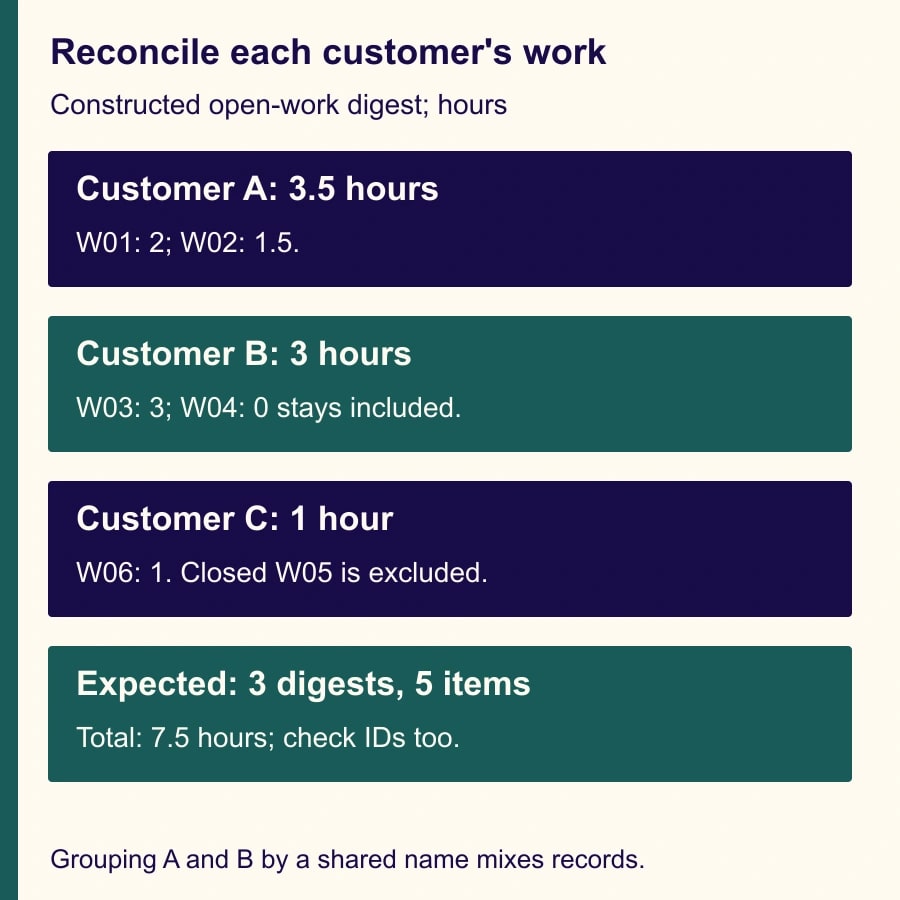
The approved eligibility rule includes open items and excludes closed items. It therefore selects five records: W01, W02, W03, W04 and W06. Customer A's digest contains two records totaling 3.5 hours. Customer B's contains two records totaling 3 hours. Customer C's contains one record totaling 1 hour. The overall selected total is 7.5 hours across three digests.
W04 remains eligible despite its zero-hour value. Filtering on a positive amount would remove it and make the report incomplete. W05 is excluded because of status, not because its hours are inconvenient. This is why the reporting rule needs to be written before someone tunes filters to make the output count look right.
Now give A and B the same display name, Acme. Grouping by display name combines four records and 6.5 hours into one output, leaving C's one-hour output. The grand total remains 7.5 hours, but there are only two groups and one group crosses a customer boundary. Stable customer IDs prevent this particular collision; they still need a verified relationship to the correct recipient record.
Trace the source boundary
Open a test execution and identify the module that produces the reporting set. Is it a search returning the week's eligible records, an iterator expanding one fetched collection, or a watch module delivering a different unit of work? Select the intended source in the aggregator and inspect the highlighted aggregation route.
The expected input for the fixture is the five eligible work-item bundles within the intended aggregation scope. If the upstream search returns only a page of results or applies a limit, repair that selection before evaluating the digest. The aggregator cannot include records it never receives. Compare identifiers with the source query's expected set, including records near the date boundary.
Use an explicit reporting period and time zone. “This week” can mean a calendar week, a rolling seven-day window or the period since the last successful report. Write the actual start and end rules in the configuration record. For recurring reporting, prefer a stable period identifier so a retry can refer to the same reporting set.
If one source operation feeds several independent groups, Group by should use the approved grouping identity. For the simple fixture that is customer ID. If the report is also separated by project or contract, define a composite identity deliberately and test it. Do not concatenate ambiguous names and assume the resulting string is unique.
Inspect one outgoing bundle for each expected customer. It should contain that customer's key and the correct collection of work items. If there are five outputs, look for a source scope that is too narrow, a grouping value that changes per work item or a later iterator. If there is one output, look for a missing or constant grouping key.
Carry the fields needed to prove correctness
Include work-item ID, customer ID, status, reportable amount and the fields required to render the digest in the aggregated structure. Determine the recipient from a trusted customer mapping after grouping, or carry an explicitly validated recipient value. Do not take the last visible email address from an unrelated upstream bundle and use it for the whole group.
Validate that all records in a group agree on customer identity. If your design carries recipient data per item, conflicting recipients should produce an owned exception, not an arbitrary choice. Some differences may be legitimate contact changes, but the account owner should decide which address governs delivery.
Keep display names for readability and IDs for matching. Two distinct customers can share a name; one customer can change its name. The same distinction applies to work-item titles. “Monthly review” can appear on many records, while the source record ID identifies the one that belongs in this digest.
Make explicitly notes that source and intermediate fields are not automatically available downstream of the aggregator. That explains why a mapped recipient or identifier may disappear after a seemingly successful grouping step. Add the required fields deliberately and inspect the outgoing data rather than merely remapping the email module until it accepts something. Make's field-preservation guidance.
Choose empty-result behavior deliberately
Make documents that an aggregator can output a result even when no bundles reach it; enabling Stop processing after an empty aggregation prevents an output bundle in that case. Decide whether your workflow should send nothing or send an explicit no-open-work report. Those are different business requirements. Make's empty-aggregation behavior.
A customer absent from a work-item search is another case to consider. If the requirement is to send every customer a report, including customers with no work, a search of work items alone does not establish the complete customer population. Start from the approved customer list and design the empty-customer path deliberately. Do not assume a single empty aggregate will create one empty report for each absent customer.
Test an entirely empty period, one customer with no eligible items and an item whose customer ID is missing. A missing identity should be held for repair, not grouped under a blank key and delivered using whichever recipient remains available. Record who reviews the held item and whether its eventual correction belongs in the current report or a later one.
A pre-send worksheet to reuse
For each reporting period, save a compact record that ties the source selection to the messages approved for delivery. The following fields can be adapted to a spreadsheet, database table or the existing execution record.
- Period identifier, start, end and time zone: [approved values].
- Source selection: [query or filter, expected unique work-item IDs, pagination and limit check].
- Eligibility: [included status values, excluded records and reasons, zero-value rule].
- Group definition: [customer ID or approved composite key].
- Per-group reconciliation: [expected and actual IDs, item count and total].
- Recipient check: [customer ID, approved destination, account owner and approval date].
- Empty and exception behavior: [no send, explicit empty report or owned hold].
- Delivery record: [period and customer key, message identifier, sent, failed or uncertain].
- Recovery decision: [which groups may be retried and which must not be resent].
For the fixture, require A to have W01 and W02, B to have W03 and W04, and C to have W06. Check those memberships before the 3.5, 3 and 1 hour totals. If W01 is duplicated and W02 omitted, a simple count of two items would not detect the error. Membership is the strongest check available in this small example.
Recover without sending every digest again
If a test produces incorrect membership, keep sending disabled and repair the source scope or grouping key. Rerun the fixture and compare the expected identifiers. Do not use production customers as the acceptance test for a routing change.
If some real digests were already sent, inspect the delivery record before retrying. A failed overall scenario can still contain successful earlier email actions. Mark each customer-period group as sent, failed before send or uncertain. Reconcile uncertain cases with the email service's message evidence rather than assuming a timeout means no delivery.
Use a durable customer-period delivery key in the surrounding workflow if repeat executions are possible. The aggregator itself is not a guarantee against duplicate sends. Decide how corrections are versioned: a corrected digest may need an explicit revision and explanation rather than pretending to be the original report.
For a wrong-recipient incident, stop the affected path, preserve the relevant records and follow the organization's established response process. Repair the recipient mapping and access scope as well as the grouping. A correct second email does not undo an earlier disclosure.
Costs, measures and the stopping point
Measure source records processed, output groups, email actions, exception handling and maintenance time. Check actual Make credit usage and connected-service charges for your scenario instead of assuming aggregation produces a fixed percentage saving. Testing, retries and AI-written summaries can change the cost even when the number of final messages falls.
For a small pilot, budget time to inspect all groups and recipients. The useful outcome is fewer manual assembly steps with no loss of completeness or separation. Released staff capacity is not cash savings unless spending changes independently. Stop expansion when customer identity is unreliable, source pagination remains unresolved or an uncertain delivery cannot be reconciled.
Start with the six-record fixture and keep sending disabled until every customer matches. If concurrent webhook runs are part of the problem, use the guide to handle out-of-order Make webhooks. For a run that stopped partway through, follow the Make incomplete-execution recovery checklist before retrying customer messages.
Weekly Newsletter
AI Adoption Weekly
New research, field guides, training studies, and tool decisions for operators.
No spam. Unsubscribe anytime.
Related Comparisons
Calculator
AI seat cost calculator
List price × headcount. You enter the hours and the operating assumptions.