
Fix HubSpot Renewal Workflows That Do Not Re-enroll
Diagnose date-based re-enrollment, check schedule eligibility and build a renewal task process that catches missed cycles without duplicate outreach.
Published October 28, 2026

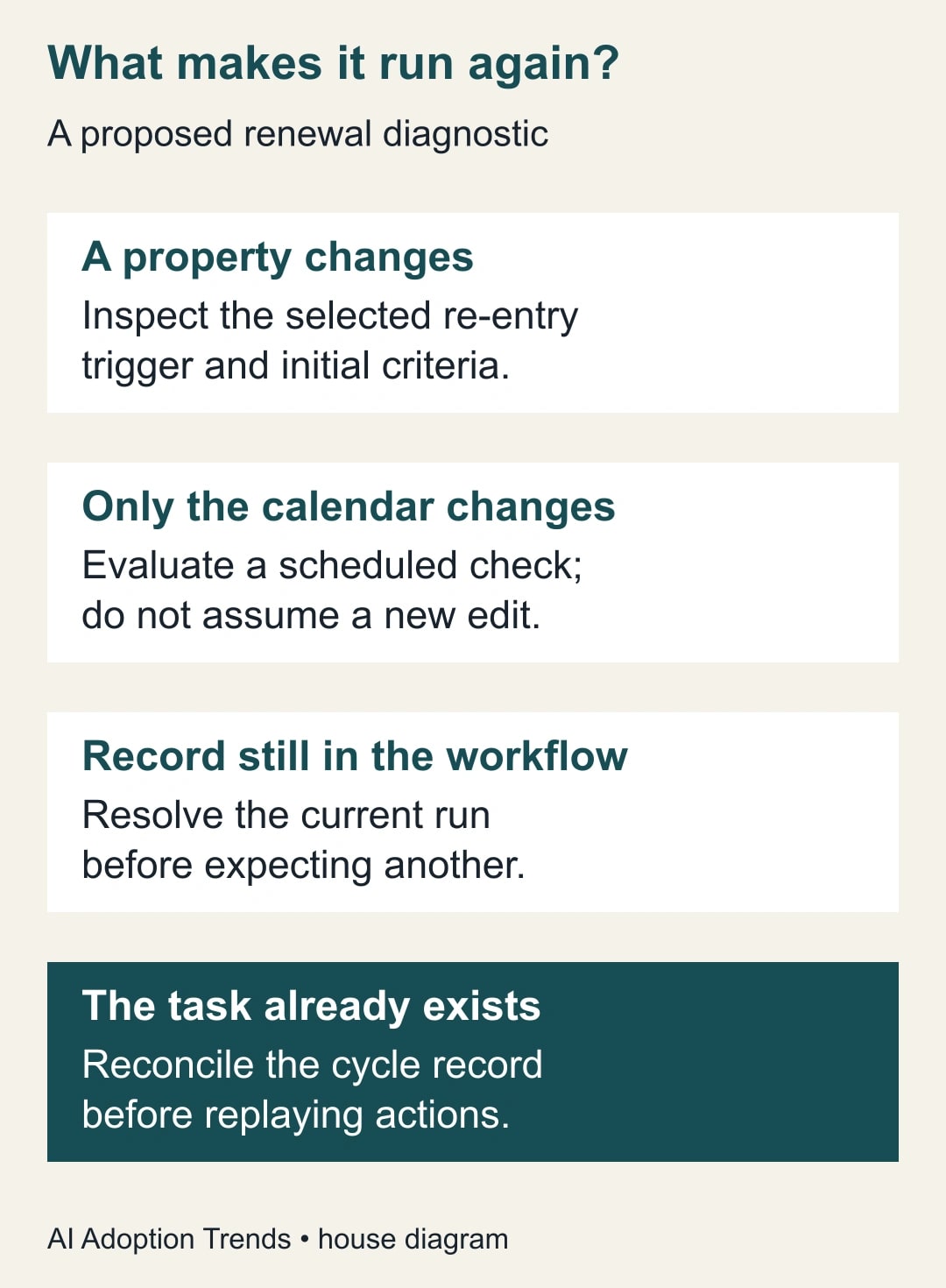
If a HubSpot renewal workflow ran last year but does not run again when the next renewal date arrives, separate two events: a property changing and the calendar reaching a date. A record can remain unchanged while its renewal becomes due. Turning on re-enrollment does not, by itself, create a daily renewal check.
Start with one missed renewal, its workflow history and the exact date property used by the trigger. Then decide whether the process should react to a new property value or inspect an eligible population on a schedule. Keep customer emails out of the repair pilot. First prove that each due renewal produces one correctly owned internal task.
This guide fits customer success and revenue operations teams that already use HubSpot workflows. It is not a billing-system design, a guarantee of renewal revenue or a reason to buy a new plan before diagnosing the fault. If your contract dates are unreliable or multiple contracts share one company-level date, resolve that data model before automating reminders.
What re-enrollment actually promises
HubSpot’s current documentation says a completed record can re-enter when it meets the initial criteria and a selected re-enrollment trigger again. A record already in the workflow cannot re-enroll. Re-entry starts the actions again from the beginning, so a repair can repeat more than the reminder you intended. HubSpot’s re-enrollment rules, checked October 28, 2026.
The same documentation warns against relying on today’s date as a re-enrollment condition. A relative-date condition must be true when the relevant property changes. A date entered weeks earlier does not become a new property edit merely because today catches up with it. HubSpot recommends considering scheduled enrollment for that recurring calendar check.
Treat this as a diagnostic distinction, not a universal prescription. A workflow that responds to an explicit “Renewal review approved” change may need event-driven re-entry. A daily queue of contracts entering a review window has a different trigger. Write down the business event first; the workflow type should follow that decision.
Gather one record’s evidence before changing settings
Choose a missed renewal that an account owner can verify. Record the object type, record ID, contract or renewal-cycle identifier, renewal date, review date, account owner and current status. A renewal cycle is one specific contract decision for one period, such as contract C-204’s 2027 renewal. It is more precise than a company name.
Open the workflow’s enrollment history and inspect the record’s previous run, current enrollment state and trigger version. Compare the property history with the expected review date. The input is the record’s actual history; the output should be a short explanation of why it did or did not enter. HubSpot documents the history and “Why did this enroll?” diagnostic route in its workflow enrollment troubleshooting guide.
Do not use a manual enrollment as proof that the automatic trigger is repaired. It can run a record under different conditions and replay actions immediately. Likewise, a successful task-creation action test says little about whether tomorrow’s unchanged renewal record will be selected. Trigger behavior and action behavior need separate evidence.
Preserve the existing workflow configuration before editing it. Record its enrollment criteria, re-entry conditions, exclusions, delays and actions. Identify anything that sends a message, changes a lifecycle stage or writes to another system. The safest first repair is a separate internal-task pilot with a small allowed list of test records and no customer-facing action.
Check the subscription and operational cost
The scheduled route has an important entitlement boundary. HubSpot currently requires Data Hub Professional or Enterprise for monthly, weekly or daily scheduled recurrence. The account time zone governs scheduled dates and times, and eligible records also need enrollment filters. Verify the actual account entitlement rather than assuming that access to some workflows includes daily scheduling. HubSpot’s scheduled-enrollment documentation.
If that entitlement is absent, do not quietly replace the process with an unapproved upgrade. A saved due-renewal list reviewed by a named owner can cover the immediate gap while you compare options. Another existing authorized scheduler may be viable, but its connections, maintenance and duplicate prevention need their own design. This article does not assume either option is free.
Estimate the work in terms the team can verify: the time to reconcile contract dates, configure the pilot, review exceptions and maintain ownership. If a daily manual check takes fifteen minutes, record that observation before claiming automation will save it. Even a genuine reduction in staff effort is capacity released, not cash saved unless spending actually changes.
Define one task per renewal cycle
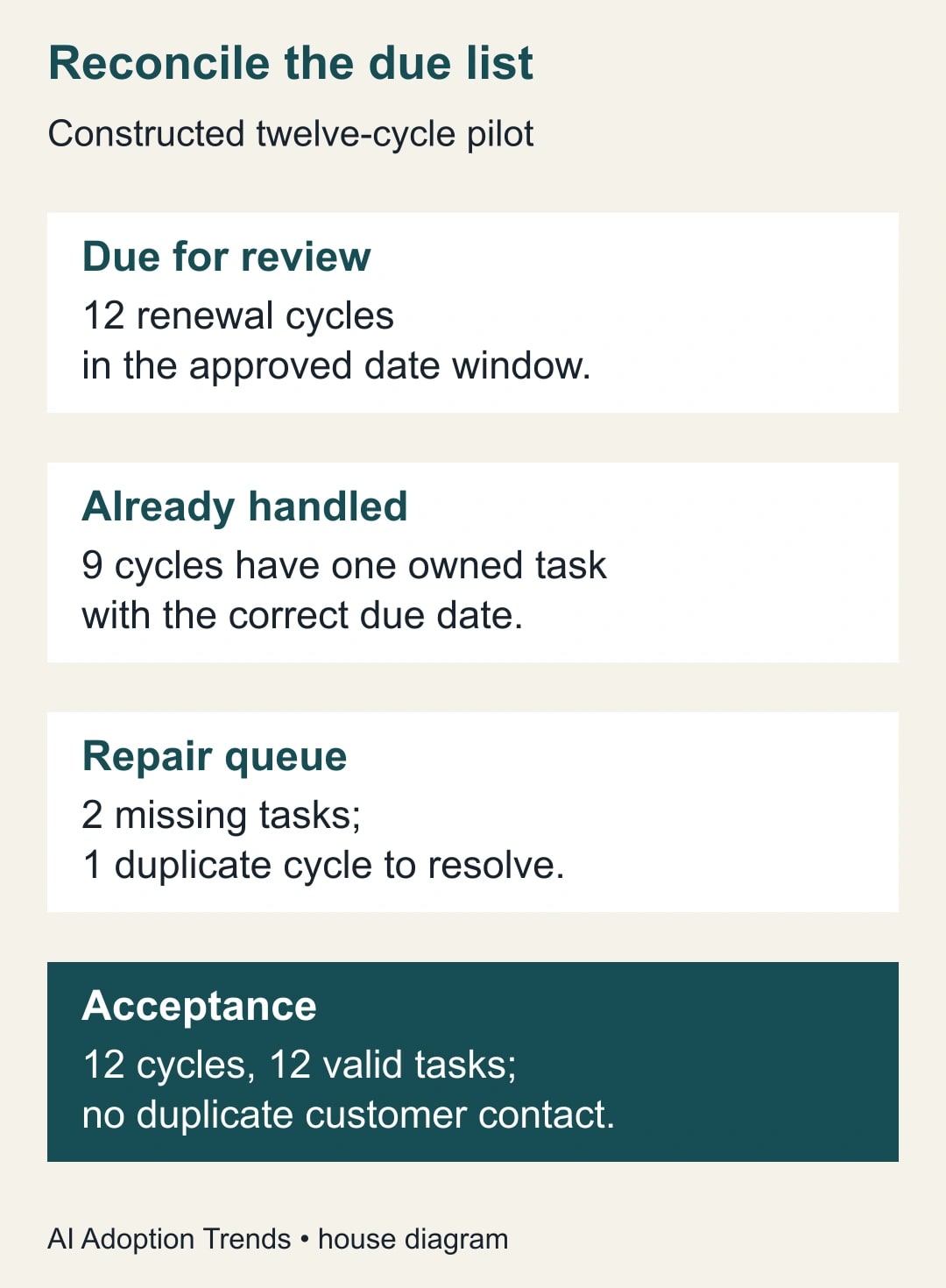
Use a constructed service-business example. Twelve renewal cycles enter the approved review window this week. Nine already have one valid internal task with the correct owner and due date. Two have no task. One cycle has two tasks because someone retried a previous run. Counting task records alone would conceal both missing work and a duplicate.
The acceptance condition is twelve distinct cycles, each with exactly one valid task. Repairing the example requires creating two missing tasks and resolving the duplicate for the remaining cycle. After reconciliation, there should be twelve valid tasks. Whether an obsolete duplicate is closed or otherwise handled follows the team’s recordkeeping practice; do not delete history solely to improve the count.
Give each cycle a stable reference that appears in the task and in the review register. A company ID plus a genuine contract/cycle ID is preferable when one company can renew several agreements. If your chosen HubSpot object does not represent that distinction, the data model may need to change. A company-level date cannot reliably stand for three independent contracts.
The review register needs at least the cycle reference, due date, task reference, owner and status. A “task created” checkbox alone is weak evidence: it may survive a changed contract date or be set after a failed action. Store enough detail to reconcile the actual work. Do not claim this design provides transaction-level duplicate prevention unless your implementation really does.
Build the smallest scheduled pilot that answers the question
In a new internal pilot, choose the appropriate workflow object and the supported scheduled enrollment option. Set a deliberate account-time-zone run time and a narrowly defined test population. Add eligibility conditions that reflect the business decision: a valid review date, an active renewal cycle and an accountable owner. Keep the exact filter wording aligned with the properties available in your account.
Changing an existing workflow’s start trigger can erase its previous triggers, according to HubSpot’s schedule documentation. That is a reason to preserve the original and use a controlled pilot, not a reason to experiment directly on the production renewal sequence. Record the intended replacement rule and have a second person compare it with the old behavior before switching.
Decide how to handle a missed day. An exact “review date is today” selection can leave a gap after downtime or a paused workflow. A bounded catch-up queue can include due dates up to today that remain unhandled, but it must exclude cancelled cycles and already completed work. Set the oldest date the owner is willing to review; do not turn on an unlimited backlog without inspecting it.
Keep the workflow short. Select eligible cycles, check whether the intended task already exists or is recorded, create the internal task where appropriate, and record the resulting task reference. The exact action design depends on your object and available actions. If you cannot reliably check task identity natively, reconcile the pilot manually before scaling or have the technical owner design that check explicitly.
Do not mark a cycle handled before the task action succeeds. Conversely, if the task succeeds but recording its reference fails, a replay can create a duplicate. Your recovery path must inspect existing tasks for the cycle before retrying. A business register and a run history answer different questions; use both when an action sequence partially completes.
Rehearse six cases before any customer outreach
Test a newly due cycle with no task: it should create one owned task. Test the same cycle again: it should not produce another valid task. Test a cycle already handled before the pilot: it should remain handled without repeating customer contact. Use dummy or explicitly approved internal records so testing does not surprise an account owner or customer.
Next, test a renewal date moved forward, a cancelled contract and a record missing an owner. The moved date needs an agreed rule for the existing task: update it, close it and replace it, or send it to review. Cancellation should remove the cycle from future action while preserving its history. Missing ownership should enter an exception queue, not default to a random colleague.
For the calendar behavior, include a record whose date was entered earlier and remains unchanged until the scheduled review day. Observe the actual scheduled run, not just an action preview. Record the account time zone, run time, selected cycle and resulting task. This is the test that distinguishes a calendar check from a property-change trigger.
Also test an intentionally interrupted sequence in a safe environment or reason through a documented failure case with the technical owner. If task creation succeeded but the register update did not, establish how the operator finds that task before retrying. Do not deliberately fail a live customer process to create test evidence.
A reusable renewal repair worksheet
- Business event: property change, recurring date check or explicit human approval.
- Record model: object type, record ID and stable renewal-cycle reference.
- Timing: review window, account time zone, run time and catch-up boundary.
- Eligibility: active contract, valid review date, accountable owner and exclusions.
- Completion evidence: task reference, correct due date, owner and cycle status.
- Recovery: who reconciles partial runs before a replay, and where exceptions appear.
- Acceptance cases: new, repeated, already handled, rescheduled, cancelled and ownerless.
- Release decision: approver, pilot observations, stop conditions and next review date.
Use the worksheet to ask an administrator for a concrete change: “For these twelve cycle references, show which will enter tomorrow, which already have valid tasks, and how a retry avoids duplicate work.” That request is more useful than “Make renewals run again,” because it names the population and the evidence needed for acceptance.
Repair the backlog separately from the future process
Once the pilot behaves as intended, inspect missed cycles since the last verified successful check. Compare contract dates with real task evidence. Separate genuinely missed reviews from cancelled agreements, manually handled renewals and records that were never eligible. Have the account owner prioritize the backlog before creating a large number of tasks.
Do not automatically send an overdue renewal email simply because the internal queue was repaired. The customer may already have renewed, received a personal message or disputed the terms. A human should review the current relationship and the existing conversation before outreach. The immediate automation objective is complete internal ownership, not maximum email volume.
Measure coverage as distinct due cycles with a valid owned task divided by distinct eligible due cycles. Track duplicates and unresolved exceptions alongside that rate. The constructed example begins with nine fully correct cycles out of twelve, or 75%; after the three problematic cycles are resolved, the target is 12 of 12. Workflow-run counts alone cannot demonstrate that improvement.
Stop expansion if a cycle can create repeated tasks, dates cannot be traced to the contract or nobody owns the catch-up queue. Keep a daily human review until those defects are repaired. The next useful action is to diagnose one missed renewal and reproduce it in the internal pilot with an unchanged date property.
If the problem starts with imported records, first update existing HubSpot records using stable IDs. If another automation creates duplicate customer records, use the duplicate CRM record diagnostic before adding more renewal triggers.
Weekly Newsletter
AI Adoption Weekly
New research, field guides, training studies, and tool decisions for operators.
No spam. Unsubscribe anytime.
Related Comparisons
Calculator
AI seat cost calculator
List price × headcount. You enter the hours and the operating assumptions.