
Pilot Label-Based Google Support Approvals Without a Coverage Gap
Map file ownership, labels and existing policies before piloting Google Workspace support-access rules, with coverage tests and an approval rota.
Published October 28, 2026

Before turning on a label-based Google Workspace support-access rule, test the combination of classification label, resource owner and effective policy. A sensitive file can carry the right label yet fall outside the intended owner scope. A broad department policy can also interact with a more specific rule. Start with a small coverage worksheet, not a domain-wide switch.
This guide is for business systems owners whose organizations already have the relevant Assured Controls licensing and a defined need to manage Google support access to covered data. It is not a way to change ordinary employee sharing permissions, approve documents or certify regulatory compliance. If your problem is a colleague opening the wrong folder, use the appropriate file-sharing controls instead.
Google’s October 12, 2026 announcement introduced classification-label targeting for Access Management and Access Approvals rules on Drive files, alongside organizational-unit and group scope. It described a rollout beginning September 30. Access Approvals rule enforcement requires Enterprise Plus or Frontline Plus with Assured Controls or Assured Controls Plus; Access Management rule enforcement requires the Plus add-on. Verify your entitlement and console availability. Google’s announcement, checked October 28.
Define the support decision in ordinary language
Access Approvals concerns approval for Google staff to view covered data for support. Access Management concerns which Google staff can take covered support actions, using location and credential restrictions. Keep those purposes separate from the business decision you are trying to support. A team should be able to explain why a particular file category needs a particular control without relying on the product name.
For a pilot, write one sentence such as: “For the finance team’s sensitive test documents, we want the designated support-access approver to review covered access requests, while keeping a documented route for urgent support.” This is a proposed operating objective, not a claim that a rule covers every possible access or every service.
Avoid starting with a label called “Compliant.” It conceals the actual classification decision. Prefer a clearly defined sensitivity category with an owner and examples of what belongs in it. The label identifies a condition; it does not establish that the file’s content is accurate, that a regulation applies or that the entire organization meets an obligation.
Agree who can classify files, who can change the control and who can respond to a support request. These may be different people. The business owner defines the intended treatment, the Workspace administrator implements it, and the support-access approver makes a recorded decision when a request arrives. A missing response owner can turn a technical control into a stalled support case.
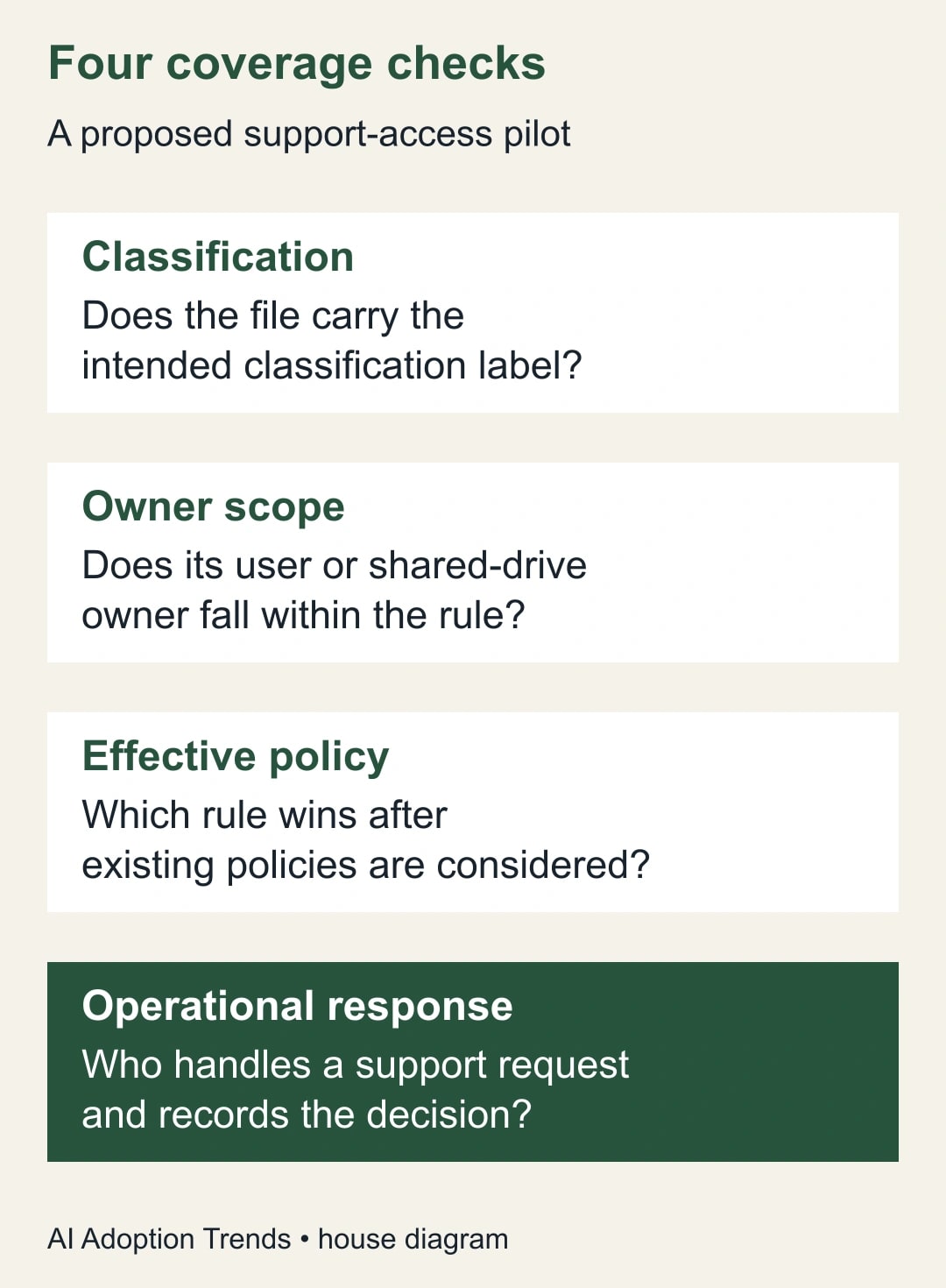
Inventory ownership before building the rule
Create a list of representative files with stable references, sensitivity decisions, labels and actual owners. Include user-owned files and shared-drive-owned files where relevant. A person who can open a file is not necessarily its owner. Copying the department of the last editor into the worksheet would answer the wrong question.
Google’s rule documentation states that scope follows the resource owner, including the user account or shared drive, rather than the person accessing the resource. It also describes rule precedence over user-based policies and global location priority for conflicting regional rules. These details make ownership and overlap essential to the pilot. Google’s Assured Controls rule documentation.
Do not move production files merely to make a test pass. Ownership changes can have consequences beyond this control. If the intended population includes files owned outside the proposed scope, record that mismatch and ask the policy owner whether the scope or the operating process should change. The first deliverable is an accurate map, not a cleaner-looking folder tree.
Include ordinary files as negative controls. These are files that should not receive the proposed treatment under the pilot’s stated objective. Without them, you can demonstrate that some sensitive files match while missing an overly broad rule that affects unrelated support work. Use synthetic content wherever possible; real sensitive data is unnecessary for many configuration checks.
Work through a twelve-file example
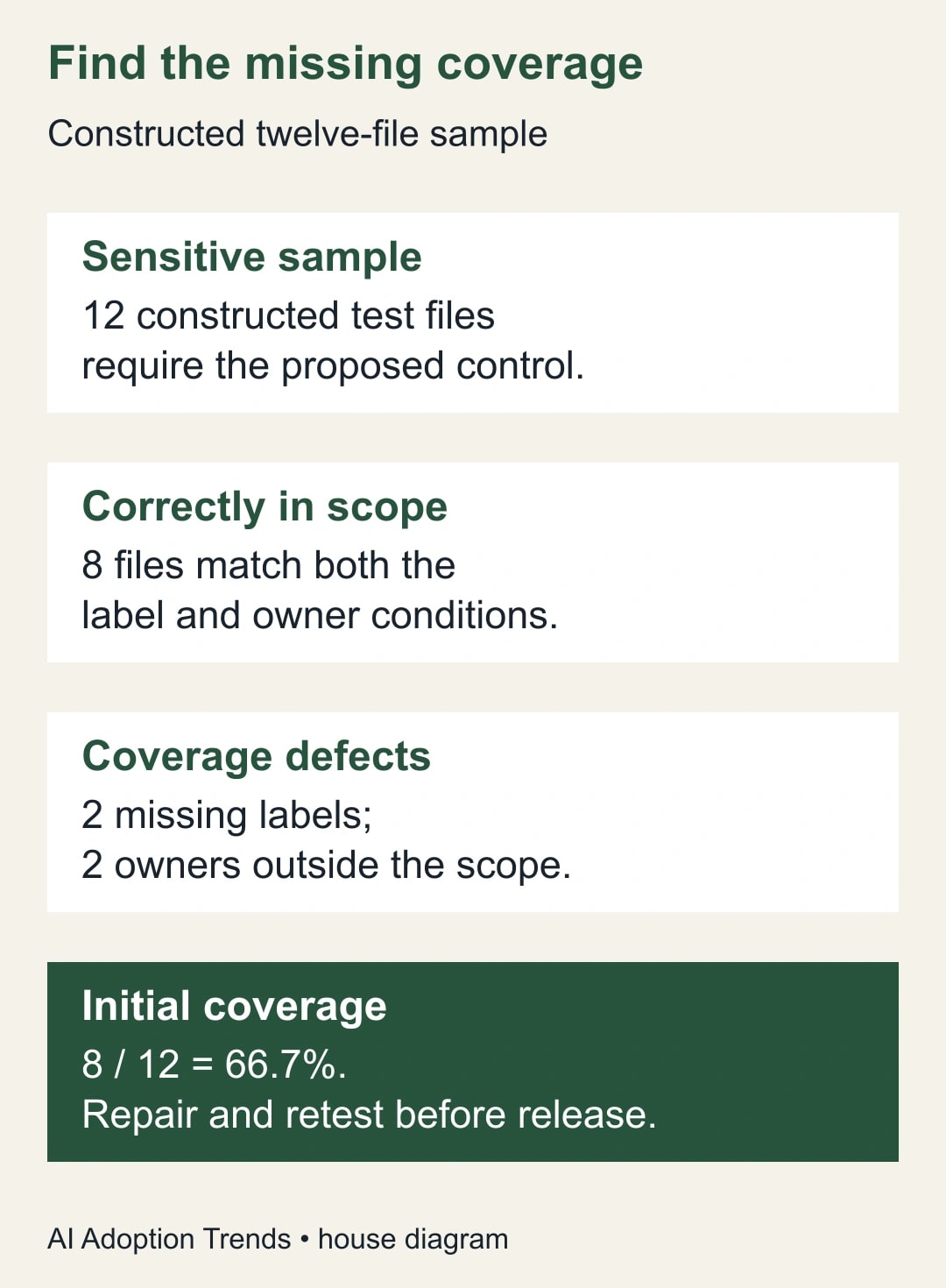
Consider a constructed finance pilot with twelve files that the business owner says need the proposed support-approval treatment. Eight have the correct label and an owner within the planned scope. Two have the right owner but no label. Two have the right label but an owner outside the scope. The initial intended coverage is eight of twelve, or 66.7%.
A count of ten labeled files would overstate readiness. It includes the two outside the owner scope and says nothing about the two unlabeled files. Conversely, a department-wide inventory might count the ten owned files and overlook the two externally owned examples. The worksheet needs both conditions for each file.
Add four ordinary test files that should remain outside the proposed label-specific rule. The complete test set now has sixteen files: twelve intended positives and four intended negatives. Record expected treatment before inspecting the configuration. Otherwise the team may redefine the objective to match whichever files happen to be covered.
The repair is not automatically “label everything and widen the scope.” The two missing labels require classification review. The two owner mismatches require a scope decision. An ordinary file incorrectly labeled sensitive requires a correction to the classification process. Each defect has a different owner and should retain its explanation in the test record.
Prepare a bounded rule and compare it with existing policies
A super administrator can use Rules, Create rule, Assured Controls to configure the selected support policies, owner scope and classification-label condition. Google provides an inactive status option while preparing a rule. Use that preparation stage to have another administrator compare the settings with the written objective before a controlled activation. Do not treat an inactive configuration as proof that enforcement succeeded.
Keep the configuration summary short enough to review: rule name, chosen actions, resource-owner scope, label condition, existing policies that overlap and intended conflict outcome. For location restrictions, have the accountable policy owner review the actual option wording and the domain’s conflict priority. Do not shorten a qualified regional option into a stronger promise than the setting makes.
Preserve the previous configuration and define a rollback owner. A rollback must restore a known policy state, not simply remove the new rule and assume protection remains identical. Because specific rules can take precedence, removing one may expose a different inherited policy. Record the expected state before and after both activation and rollback.
Limit the pilot to the population needed to establish behavior. A well-chosen sample includes a labeled in-scope file, an unlabeled in-scope file, a labeled out-of-scope file and an ordinary negative control. Include any realistic overlap between existing policies. The aim is to expose classification and scope mistakes before they become difficult to explain across a large estate.
Test configuration, coverage and response separately
First, test configuration: do the saved settings match the approved design? Second, test coverage: does each sample’s owner and label lead to the expected effective policy? Third, test operations: can the responsible people identify, review and record an actual or appropriately arranged support-access request? Passing one layer does not establish the others.
Do not manufacture a production incident to provoke access. Use documented administrative evidence and coordinate any support-assisted validation through your normal support channel. If you cannot observe an enforcement event during the pilot, label that part of the evidence as unverified. You can still repair obvious scope defects, but should not describe a configuration review as an end-to-end access test.
Keep expected and observed results together. For every sample, record the classification decision, owner, applicable rule, competing policy if any, evidence source and unresolved question. A screenshot of the rule editor demonstrates what was configured. It does not independently prove that a particular support action was governed as intended.
If automated labeling is part of the proposal, validate it as a separate upstream process. A missed classification can prevent the intended condition from being met. Start with human-confirmed test labels to isolate the rule behavior, then test the automated classification against a representative sample. This avoids blaming the access rule for a label that never existed.
Build a response rota before enabling approvals
Google warns that support response time increases while support waits for approval, and that specified time-sensitive situations can bypass Access Approvals. The control covers defined data, not every conceivable access. The product documentation also describes request details and recorded response actions. Read those boundaries with the person responsible for service continuity. Google’s Access Approvals guide.
Create a primary and backup response owner, with a clear way to reach them during the periods your business depends on support. Decide what information they need: the support case, affected resource, requested scope, duration and business reason. Their job is to assess a particular request, not approve every alert automatically because it arrived from a familiar system.
Rehearse a request-handling scenario without pretending it is a real Google request. For example, a constructed payroll-reporting incident occurs while the primary approver is absent. Can the backup find the case, identify the affected test resources, consult the business owner and record a reasoned decision? Note any missing permissions or contact information before relying on the rota.
Set an internal response target appropriate to the service. That target is your operating choice, not a Google service-level promise. Measure whether the rota meets it during drills or actual cases. If nobody can provide coverage, narrow or delay the pilot rather than assuming that a stricter setting automatically produces a better business outcome.
Reuse this pilot acceptance worksheet
- Purpose: the specific support-access decision and the business reason for it.
- Entitlement: edition, add-on, licensed population and observed console availability.
- Sample: stable file references, human classification and ordinary negative controls.
- Scope: actual owner, applicable organizational unit or group and label condition.
- Effective policy: overlapping rules, regional priority where relevant and expected result.
- Evidence: configuration review, coverage check and separately identified enforcement evidence.
- Response: primary and backup approver, contact route, case context and recorded decision.
- Release: unresolved defects, rollback state, accountable approver and next review date.
This worksheet is also a useful vendor or administrator brief. Ask for the evidence against each sample, not a statement that “Assured Controls is enabled.” The narrower request makes missing labels, ownership mismatches and untested response assumptions visible without requiring the business owner to memorize every console setting.
Decide whether the pilot is ready to expand
Expansion requires no unexplained coverage gaps in the agreed test set, no unintended treatment of the negative controls, a reviewed policy-conflict outcome and a workable response rota. If enforcement evidence is still missing, keep that limitation explicit in the release decision. Do not assign a perfect coverage score to unknown behavior.
The cost decision should include the actual add-on quote, administrator setup time, classification maintenance and response coverage. No public price estimate is needed to determine whether the pilot works. Once the control is understood, compare its total operating cost with the specific requirement it addresses. Avoid treating a security feature as a general productivity saving.
Review the sample when file ownership, classification rules or support responsibilities change. Add a small set of newly created files to catch drift. A one-time successful test will not reveal a future shared drive outside the scope or a renamed classification value that no longer matches the intended condition.
Your next action is to assemble the sixteen-file worksheet, mark the expected treatment and have the business owner confirm it before any production rule changes. If the upstream issue is classification accuracy, start with the Drive classification pilot. For a separate evidence-retention task, use the Workspace Gemini export test; retaining records and controlling support access answer different questions.
Weekly Newsletter
AI Adoption Weekly
New research, field guides, training studies, and tool decisions for operators.
No spam. Unsubscribe anytime.
Related Comparisons
Calculator
AI seat cost calculator
List price × headcount. You enter the hours and the operating assumptions.