
Give Temporary Google Workspace Admin Access an Expiry and a Handoff
Plan short-term administrator cover with a narrow role, explicit expiration, acceptance checks and a handoff for work that outlasts the assignment.
Published October 28, 2026

For short-term Google Workspace administrator cover, define the allowed job, assign the smallest usable role with an explicit expiration, and verify the handoff when the window ends. An expiring grant solves only part of the problem. The team still needs to know what happens to unfinished work and whether another assignment leaves the same privilege available.
This guide is for small IT and business systems teams covering an absence, completing a bounded migration task or arranging a temporary review. It is not a recommendation to give every contractor super administrator access. If the work can be completed by an existing responsible administrator without another grant, that may be the simpler arrangement.
Google announced temporary administrator roles on September 23, 2026 for Workspace customers. The announcement describes expiration for assignments to users, groups and service accounts, with automatic revocation of the access granted by that role. The primary administrator must retain permanent super administrator privileges. Google’s temporary-role announcement, checked October 28.
Start with the job, not the person’s title
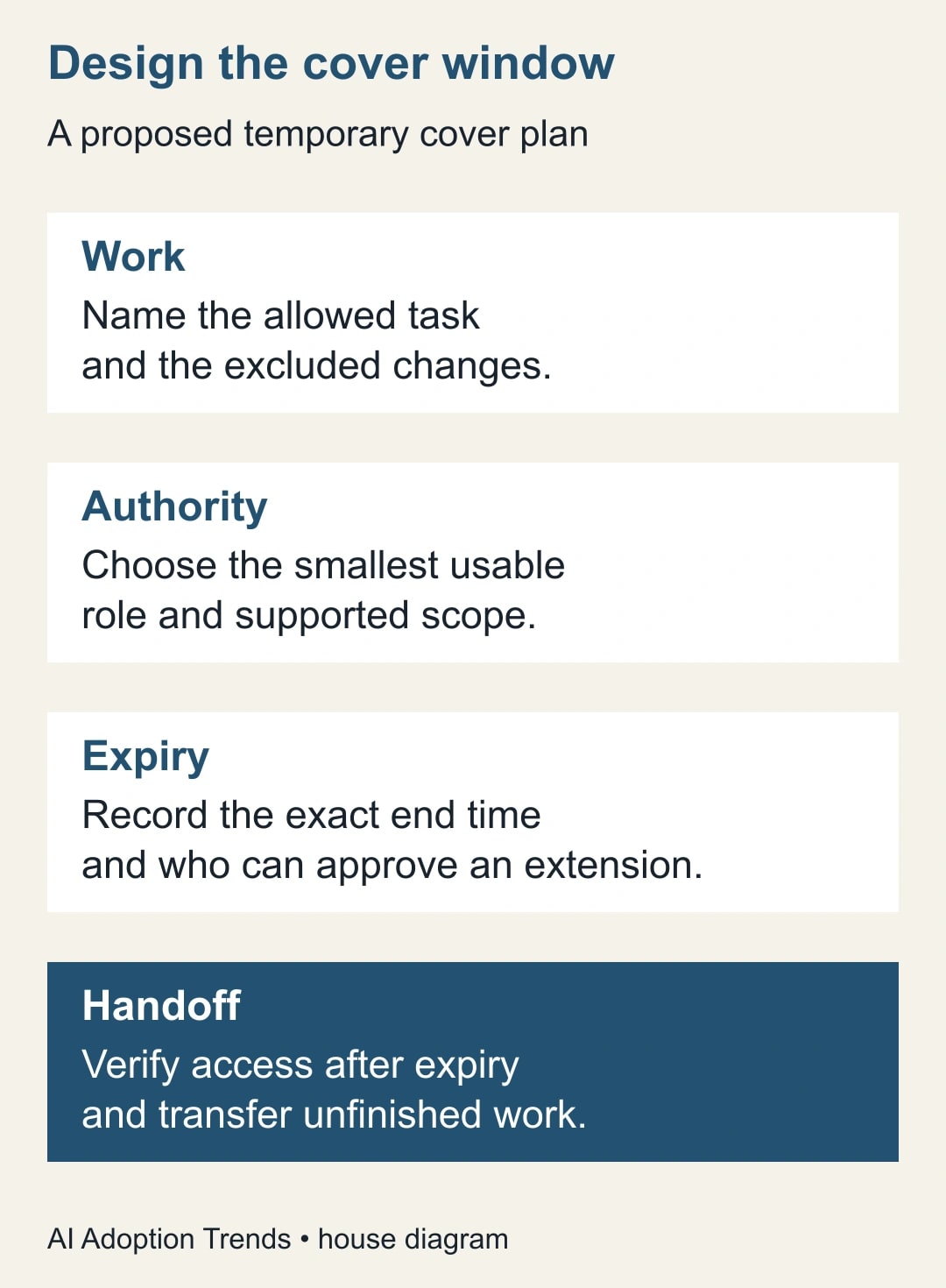
Write down what the temporary administrator must accomplish. “Cover IT” is too broad. “Handle approved user-account support requests for the sales team during the named absence” is more useful because it identifies a type of work, a population and a period. List excluded actions too when the boundary matters, such as changing organization-wide authentication policy.
The business owner should explain the consequence of a missed task. Is a delayed request inconvenient, or does it prevent a scheduled customer operation? That distinction helps choose the coverage window and backup. It does not justify broad access by itself. The administrator should translate the approved work into the narrowest supported role and scope.
Separate identity from authority. A person may already have a Workspace account and ordinary access to shared documents. The temporary role grants particular administrative privileges. Expiring that role does not necessarily suspend the account, remove document sharing or end access in another application. Include those separate items in the handoff if the person is leaving the organization entirely.
For a service account, the same principle applies to the workload: name the specific automated job and who owns it. An expiring role can interrupt that job after the window. Do not assign a deadline simply to satisfy a policy if nobody has planned how a continuing process will operate afterward. A temporary experiment and a production dependency need different ownership decisions.
Gather the prerequisites and make the cost visible
You need an accountable administrator authorized to assign roles, a verified recipient identity, an approved work request and a recovery route if the assignment is wrong. Inspect the actual console for expiration options. Google’s current help page notes that some enterprise users may not yet see those options, so do not promise availability solely from the announcement.
The feature does not remove the need to understand existing assignments. Review direct roles and relevant group memberships before adding a temporary grant. Record the privileges already available and those the proposed assignment would add. If the recipient already has broader permanent access, a temporary narrow role will not establish the boundary you intended.
There is no separate add-on purchase stated in the announcement for this feature, but implementation still consumes time. Budget the role review, recipient briefing, controlled test, handoff and expiration check. If the team lacks a second person able to review the change, arrange that coverage rather than treating the absence of review as a software problem.
Avoid quoting a precise risk reduction or cost saving. You can measure how many temporary assignments have explicit end times and how many remain unjustifiably active. You cannot infer the financial value of an avoided incident from one expiring grant. The immediate benefit is a more explicit, reviewable boundary around administrative work.
A constructed cover assignment
Imagine a sales operations administrator is away for three business days. A designated colleague will handle approved account-support requests for a defined sales population. The owner chooses an end time of 17:00 in the organization’s agreed business zone on the final cover day. The work record names a permanent administrator who will take over unfinished requests.
Before the cover begins, the reviewer identifies four representative tasks: two allowed routine requests, one request outside the selected population and one organization-wide policy change that is explicitly excluded. The acceptance test should show that the permitted work can be completed while the excluded work remains unavailable or is routed to the permanent owner.
This is a constructed planning example, not a claim that a particular built-in role supports exactly those four cases. The administrator must check the role’s actual privilege list and available scope. If the selected role cannot express the approved boundary, revise the design rather than asserting that a friendly role name guarantees the right access.
At the end of the window, two requests remain open. They are transferred to the named owner with their current state and supporting references. The temporary grant expires as planned. If additional cover is necessary, it becomes a new, justified decision with its own end time, rather than an automatic extension triggered by an unfinished queue.
Set the expiration deliberately
Google’s current procedure uses Admin roles and the assignment page. Select the recipient, choose Change expiration or Set expiration, set a predefined duration or a custom date and time, then save the assignment. The documented maximum is one year. Confirm the exact recipient and saved deadline before considering the change complete. Google’s role-assignment instructions.
The same help page lists important limits, including a restriction on multiple roles for the same user, group or service account in the expiring-role context. It also notes that organizational-unit scoping is available only where the role supports it. Check these constraints in the live console and current documentation; do not design several overlapping temporary grants and assume they will be accepted.
Write the deadline in the work record with its time zone. “Friday evening” is insufficient for colleagues in different regions. Confirm how the console displays the chosen date and time before saving. This guide does not assume the console’s display zone matches the recipient’s location, and it does not recommend changing the organization’s time settings to make one assignment convenient.
Set a reminder for the handoff owner before the deadline, separate from the access expiration itself. The reminder is for unfinished work and evidence review; it should not automatically extend the privilege. Where role changes require an additional approval in your organization, include that approval in the plan and verify the assignment’s resulting state.
Do not use the maximum duration merely because it is available. Choose a window tied to the actual task, with enough time for a controlled completion and handoff. If the work has no foreseeable end, the question is whether it needs an ongoing role with periodic review rather than a succession of nominally temporary grants.
Verify both useful access and the boundary
Have the recipient perform an agreed, low-impact test within the permitted scope. Use a test object or a reversible action approved for the pilot. Confirm that the person can complete the task they were assigned; a grant that is narrow but unusable still fails the business objective. Record the observed result and any delay before access becomes usable.
Then check an excluded action safely. Prefer inspecting whether the control or scope is available rather than attempting a harmful change. The purpose is to establish the boundary, not to create a production incident. If an excluded privilege is available, inspect other assignments and memberships before broadening or removing anything.
Keep a before-and-after record of the assignment and the tested capability. The evidence should identify the recipient, role, supported scope, expiration and reviewer. A message saying “access granted” is not enough to determine later whether the intended deadline was saved or whether the recipient received a different role.
If the permitted task fails, first check identity, assignment state, supported scope and existing approval requirements. Do not jump directly to super administrator access as a diagnostic shortcut. Ask the permanent owner to complete urgent work while the role design is investigated. Broadening access can make the test pass while invalidating the reason for having a bounded grant.
What to do when the window ends
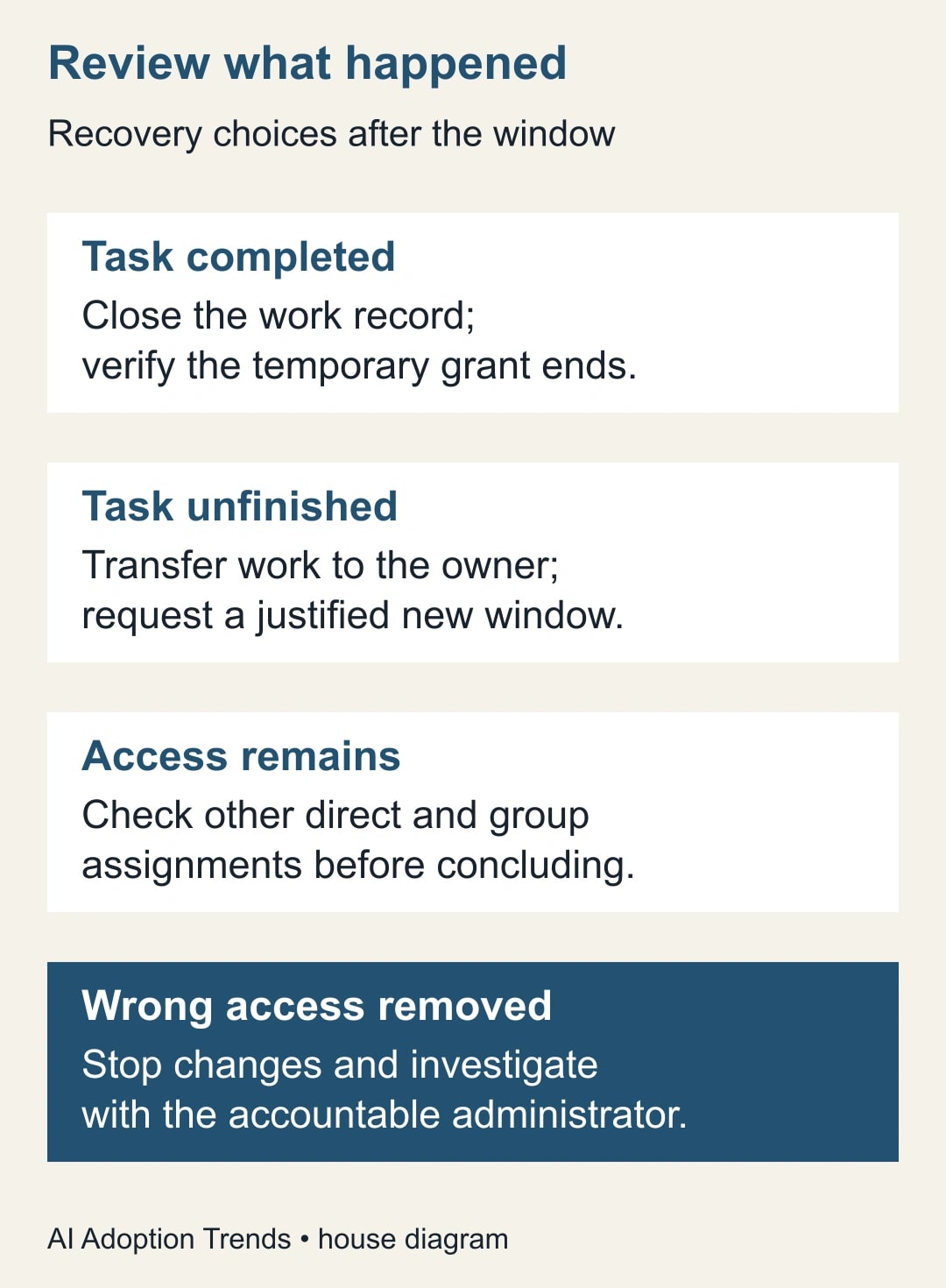
At the agreed handoff time, review completed work, open requests and any changes that require follow-through. Transfer each unfinished item to a named owner with enough context to continue. A temporary administrator should not remain the only person who knows which account, document or service was affected.
After expiration, verify that the temporary assignment no longer grants the intended capability. Inspect the assignment state and conduct an appropriate low-impact access check. Record when you checked and what you observed. Do not infer the exact moment of effective revocation from a later screenshot; the evidence supports the observed check time.
If the capability remains, investigate other direct roles, group-derived roles or a different signed-in identity. Expiration of one assignment does not prove every route to a privilege disappeared. Preserve the evidence and involve the accountable administrator. Do not mass-remove unrelated memberships to make the result look correct.
If work stops unexpectedly, determine whether the expiration was correct and the handoff failed, or whether the wrong recipient or deadline was configured. Those are different repairs. Restore or extend authority only through the person authorized to make that decision, with the smallest justified scope and a new documented end time.
Use this temporary-access brief
- Business task: the specific work, affected population and reason temporary cover is needed.
- Recipient: verified user, security group or service-account identity and accountable owner.
- Existing access: direct assignments and relevant memberships that could affect the boundary.
- Proposed grant: role, supported scope, permitted tasks and explicitly excluded changes.
- Window: start arrangement, exact end date and time, zone and extension decision owner.
- Tests: one permitted task, one excluded capability and expected evidence for each.
- Handoff: open-work destination, permanent owner and pre-expiry review time.
- Closure: assignment state, observed access result, unresolved issues and reviewer.
For a group assignment, add a membership-review step. A temporary grant to a group affects a population that may change during the window. Record who is expected to receive the authority and who can alter that population. A well-chosen expiration cannot compensate for an uncontrolled membership process.
For a service-account assignment, add the job schedule and expected behavior after expiry. Decide whether the job should stop, transfer to another approved identity or be retired. Include the alert and recovery owner. A scheduled automation that fails silently after its role expires is an operational defect even when the expiration itself worked correctly.
Measure the process without inventing security outcomes
Track the number of temporary assignments with a documented business task, an explicit end time and a completed closure check. Separately track overdue handoffs, unexplained remaining privileges and extensions without a new reason. These are observable process measures. They are more defensible than claiming a percentage reduction in breach risk from enabling the feature.
For a constructed monthly review of ten temporary assignments, suppose eight have complete closure evidence and two do not. The completion rate is 80%. That does not mean the two grants remained active; it means the evidence is incomplete. Investigate their actual state before reporting either a control failure or a successful revocation.
Stop expanding the process if the team cannot identify the true recipient, explain the role’s scope or provide a permanent owner for unfinished work. Repair those issues first. A deadline is useful only when it is attached to a clear grant and an operational plan that survives the grant ending.
The next action is to choose one upcoming cover request and complete the brief before assigning access. Have the permanent owner review the allowed task, excluded capability and handoff together. For AI-connected administration, use the read, draft, send and change approval matrix to define what an agent may do. For a separate application-identity change, follow the Workspace MCP client checklist.
Weekly Newsletter
AI Adoption Weekly
New research, field guides, training studies, and tool decisions for operators.
No spam. Unsubscribe anytime.
Related Comparisons
Calculator
AI seat cost calculator
List price × headcount. You enter the hours and the operating assumptions.