
Why Removing a HubSpot Suppression Segment Does Not Restart a Workflow
Reconcile contact history and current eligibility after removing suppression, then recover only the unfinished work without repeating completed messages.
Published November 15, 2026

Removing a contact from a HubSpot suppression segment does not automatically restart the workflow. First confirm why the contact was suppressed, what work already happened and whether the contact is currently eligible. Then choose a controlled recovery for the remaining work. Reenrolling everyone who disappeared from a segment can repeat messages, create duplicate tasks or undo a valid exclusion.
HubSpot's documentation says contacts removed from a suppression segment do not automatically enroll merely because they meet the workflow's triggers. They become eligible when the appropriate enrollment or reenrollment criteria are met again. The same guidance explains that a contact still in a suppression segment cannot be manually enrolled. See HubSpot's suppression and unenrollment guidance, checked November 4, 2026.
That distinction is the key to this repair: removing a barrier changes eligibility; it is not evidence of a new workflow run, a continuation from the previous step or a completed action. Inspect the actual history before deciding what should happen next.
Use this guide for a corrected exclusion, not a new campaign
This workflow fits a marketing operations team that has found an incorrectly defined suppression segment, repaired its membership rule and now needs to recover missed work. The intended output is a reconciled set of contacts with documented next actions. It is not a shortcut for sending to people who have declined communication or who remain excluded for a valid reason.
If the real problem is a renewal date that changes without qualifying for another enrollment, use the separate HubSpot renewal reenrollment diagnostic. Here the starting point is a suppression correction and the history of a specific affected cohort. Keeping those investigations separate prevents a broad workflow redesign from obscuring a small recoverable mistake.
You need a workflow-capable account, permission to inspect and change the relevant workflow, access to contact history and a campaign owner who can approve recovery. HubSpot lists Professional and Enterprise subscriptions across several hubs for the documented settings. Check your own subscription and action availability rather than assuming every account has the same controls. This is a repair within an existing workflow setup, not a recommendation to upgrade.
Budget time for history review and test execution. The cost is usually driven by the number of uncertain contacts and the complexity of actions that may already have occurred. A small targeted review can be cheaper than a bulk rerun followed by apologies and duplicate-task cleanup.
Preserve the affected population before changing more rules
Save the contact IDs associated with the suspected error, the suppression segment definition, the workflow version and the time the correction was made. Preserve enough evidence to distinguish contacts incorrectly excluded by the old rule from people who entered or left the segment for legitimate reasons later.
For example, suppose an operations team intended to exclude customers with an open onboarding exception but accidentally selected all customers with any historical exception. Fixing the segment is only the first step. Some affected customers may have completed onboarding through another route; others may still have a genuine unresolved issue. The historical segment membership alone cannot decide who should receive a message now.
Keep the cohort fixed for the investigation. A live segment can continue changing while someone reviews it. If the team simply uses its current count as the recovery population, records can disappear from the audit without an explanation. Record stable IDs and review each against current eligibility before any action.
Do not change contact properties solely to force a trigger to fire unless the business meaning of that change is valid and the downstream consequences are understood. A temporary edit can activate other workflows or damage the record's history. Prefer an explicit, reviewed recovery mechanism over pretending a business event happened again.
Inspect the journey, including work outside this workflow
For each contact, identify the last relevant enrollment, suppression or unenrollment event and the actions that actually completed. A contact may have received an email before being excluded from later steps. A task may have been created and then completed manually. A salesperson may have sent a replacement message outside the workflow.
Check destination evidence when the workflow history is insufficient. That might be an email-send record, a task ID, a property change or a service record. Record which evidence supports the conclusion. Avoid using the absence of a convenient dashboard row as proof that nothing happened.
Also check current business eligibility. The offer might have expired, the customer might have already completed the requested task or the contact might no longer be the right recipient. Recovery is a current operating decision, not a mechanical recreation of an old plan.
Do not rely on a universal promise about the exact moment suppression removed a contact. Workflow type, state and current product behavior matter, and documentation can change. The safe recovery input is the observed enrollment and action history. If the record is still active or its next action is uncertain, resolve that before starting another route.
Partition a 30-contact cohort before any rerun
Consider a constructed example with 30 contact IDs affected by a segment correction. Review finds 12 contacts already completed the intended action, eight still have a valid exclusion, seven are currently eligible with verified unfinished work and three have uncertain history. These are illustrative categories, not a reported HubSpot campaign result.
The arithmetic is 12 + 8 + 7 + 3 = 30. The immediate recovery-review population is seven, not 30. The 12 completed contacts should not receive the same action again. The eight excluded contacts remain excluded. The three uncertain contacts stay on hold while the owner collects better evidence.
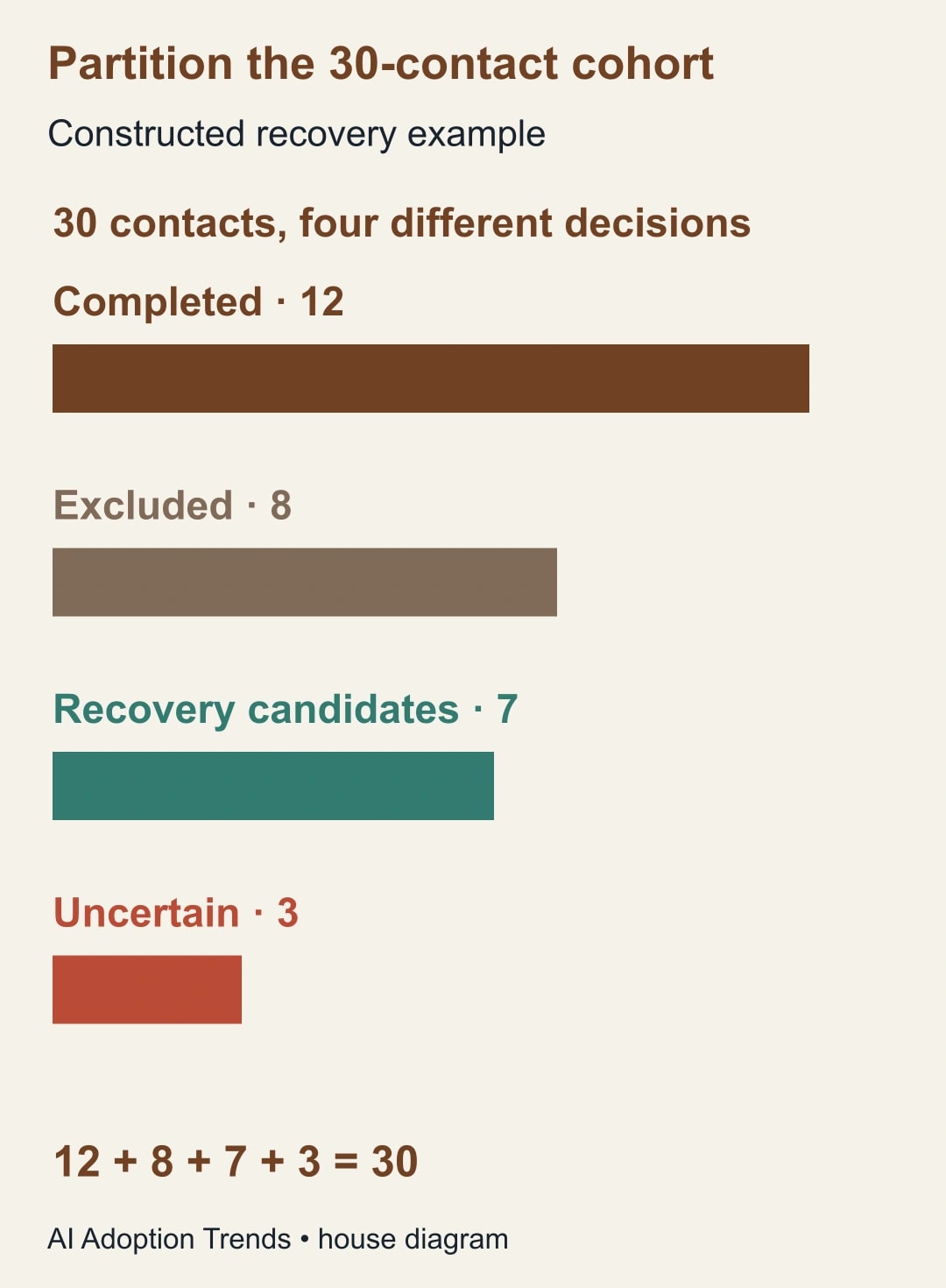
Suppose the three uncertain cases are later resolved: one completed through another route, one remains excluded and one is eligible with unfinished work. The final partition becomes 13 completed, nine excluded and eight recovery candidates, still totaling 30. Record the evidence and decision for each movement rather than changing the totals without a trail.
Recovery candidates are not automatically approved sends. For each of the eight, check the intended remaining action and its current relevance. One may need only a task; another may need an updated message because the original deadline has passed. The campaign owner decides what still serves the contact and the business.
Choose a recovery route that does not repeat completed work
There are three practical choices. Let an eligible future event enroll the contact naturally when timing allows. Use a supported targeted enrollment route after checking how the workflow will execute. Or create a narrowly scoped recovery workflow containing only the approved unfinished actions. Choose based on the work, not on which button is easiest to click.
For the original workflow, inspect every action that a new enrollment would encounter. HubSpot says manual enrollment starts at the beginning, requires the workflow to be on, and requires reenrollment to be enabled for previously enrolled records. Active records, suppressed records and records meeting unenrollment conditions cannot be manually enrolled. See the manual-enrollment requirements. A contact may need step three without needing steps one and two again.
For an approved targeted test, open Automation, Workflows, select the intended workflow and choose Enroll. Select individual contacts or the reviewed list, then compare the displayed enrollment count and IDs with the approved recovery set before confirming. Inspect enrollment history afterward. Do not broaden the criteria simply because some reviewed records are rejected; establish which requirement prevented enrollment.
A recovery workflow can make the scope clearer, but it creates another process to maintain. Give it a fixed cohort, an owner, an expiration condition and a record of completed actions. Review its enrollment rules carefully so future contacts do not accidentally join an old repair campaign.
Waiting for a future legitimate trigger is sometimes the best answer. If the communication is optional and the next normal cycle is soon, recovery may create more confusion than value. Record that as an intentional decision with a date, rather than leaving contacts in an unexplained “will probably restart” state.
Test with harmless actions and explicit expected outcomes
Build a small test copy using internal test contacts. Replace customer-facing messages and record changes with a log or another harmless evidence action. Include a contact that should remain suppressed, one that is eligible but has completed the task, one eligible with unfinished work and one whose evidence is uncertain.
Write the expected result for each before running the test. The excluded contact must not receive the recovery action. The completed contact must not receive a duplicate. The eligible unfinished contact should reach the intended action only once. The uncertain contact should remain held until a human resolves it.
Test the recovery boundary as well as its entry. What stops the workflow after the fixed cohort is processed? What prevents the same contact from entering twice? What happens if a contact becomes ineligible between review and execution? Use current eligibility checks at the appropriate decision point and confirm the observed result in the test history.
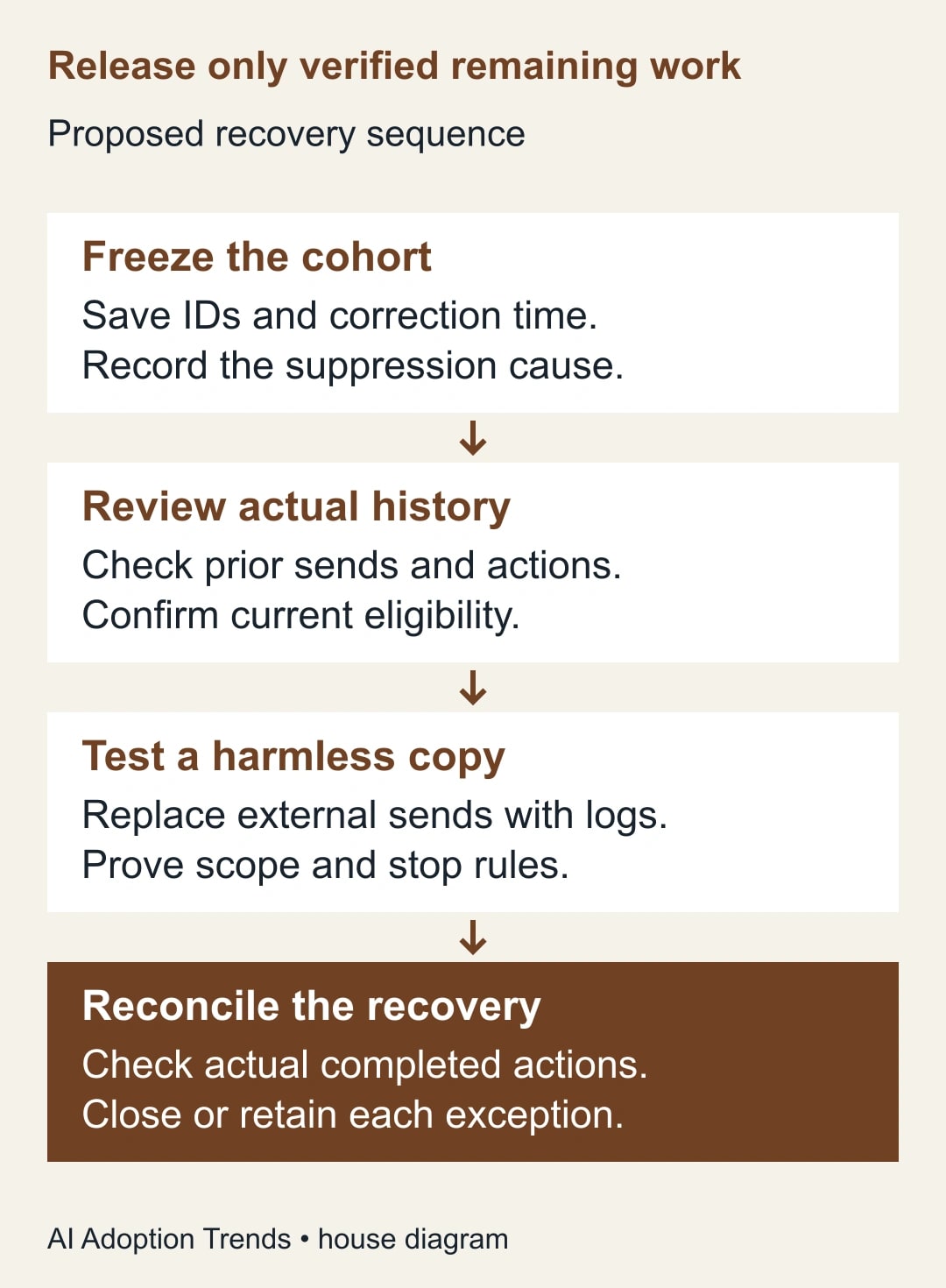
Then run a small approved production subset and compare actual outcomes with the expected actions. Keep the remaining cohort held until the evidence matches. A harmless test proves a useful part of the design, but it does not establish that every production contact has the same history or permissions.
Use a recovery worksheet with one row per contact
- Contact ID and review time: a stable reference and when eligibility was checked.
- Original exclusion: segment, rule and evidence that it affected this contact.
- Prior work: completed actions, destination IDs and any manual replacement.
- Current eligibility: approved, excluded or uncertain, with the reason.
- Remaining action: exactly what still needs to happen and why it is timely.
- Recovery route: normal future trigger, targeted enrollment, recovery workflow or no action.
- Approval: campaign owner and any special instruction for this contact.
- Final evidence: actual action, time, destination reference and unresolved issue.
Keep communication preferences separate from the operational correction. A mistaken segment rule does not invalidate a person's opt-out or make a previously unsuitable message appropriate. If preferences are unclear, hold the contact and resolve them through the organization's existing process.
Watch the counts without turning them into success claims
A useful completion report for the example would say: 30 contacts reviewed; 13 already complete; nine intentionally excluded; eight approved for specified remaining work. After execution, report how many of those eight actually completed, failed or remain uncertain. Do not report all 30 as recovered merely because the segment was fixed.
If seven of the eight complete and one fails, the recovery completion rate is seven of eight, or 87.5%. That number describes this recovery set only. It does not measure campaign effectiveness, email engagement or customer value. Keep the failed contact visible and avoid counting a retry as an additional unique success.
Track review effort too. In a constructed planning example, reviewing 30 contacts for two minutes each takes 60 minutes. If better history reduces review to one minute per contact, it releases 30 minutes of staff capacity. It does not create cash savings without a separate spending change, and it does not justify skipping the uncertain cases.
The more useful long-term measure is how often a suppression correction creates an unaccounted-for cohort. If the same problem recurs, improve the segment change process: preview membership, sample included and excluded records and have the campaign owner approve consequential rule changes.
Close the repair with evidence and an expiry
Stop automated recovery when prior completion cannot be established, the current eligibility reason is unclear or the workflow would repeat an action the owner has not approved. Escalate those contacts individually. A smaller verified recovery is better than a clean-looking dashboard built on assumed outcomes.
After the approved cohort is processed, reconcile every original ID to a final category. Disable or retire any temporary recovery route through the team's normal change process, while preserving its evidence. Keep unresolved contacts assigned to an owner and a next review date so the repair does not become an abandoned list.
Start with one suppressed contact whose expected action is known. Trace its history, confirm its current eligibility and write the precise remaining task before touching enrollment. If the correction also requires contact-data changes, use the HubSpot record-ID update guide to preserve identity while repairing the source data.
Weekly Newsletter
AI Adoption Weekly
New research, field guides, training studies, and tool decisions for operators.
No spam. Unsubscribe anytime.
Related Comparisons
Calculator
AI seat cost calculator
List price × headcount. You enter the hours and the operating assumptions.