
Google Docs Compare for Word Files: Review Supplier Edits Before Approval
Compare a supplier’s Word return with the exact baseline, resolve commercial changes and inspect the final layout before approval.
Published November 17, 2026

If a supplier returns a Word proposal with quiet changes to price, delivery or scope, compare it with the exact version you sent before approving anything. Google Docs now supports comparing .docx files without first converting them. The useful result is a review document showing differences; it is not evidence that somebody accepted the new terms. Keep the original files, assign an owner to each consequential change, and check the finished layout separately.
This workflow is for procurement managers, account leads and operations teams that exchange proposals between Word and Google Docs. It fits a straightforward service brief, quotation or statement of work where the team already knows which version is authoritative. Skip it as the sole review method when the file depends on complex layout, embedded objects or specialist interpretation. A comparison can help the responsible expert find changes, but it cannot make their decision.
What changed, and what the comparison actually produces
Google announced direct .docx comparison on November 16, 2026, with availability for Workspace customers, Workspace Individual subscribers and personal accounts. Its release announcement for comparing Word files in Docs describes the feature as available now. This removes a conversion step from a mixed Word-and-Docs review. It does not remove the need to identify the right inputs.
The current comparison instructions describe a third Google Doc containing differences as suggested edits. They also identify a limitation: changes to document column layout and table column width are not compared. That distinction matters when a supplier changes a pricing table. Read the values in the comparison, then inspect the actual table in the deliverable. Do not interpret a quiet comparison as proof that the two files look identical.
For the mixed-format route, store the returned .docx in Drive, open the primary document in Docs and choose Tools, then Compare documents. Select the comparison file from Drive. The dialog lets you assign an attribution label and include comments from the selected document. Run Compare and open the result. Those controls are described in Google's help; the operating checkpoints below are our recommended review process, not an additional Google feature.
Start with a two-file manifest
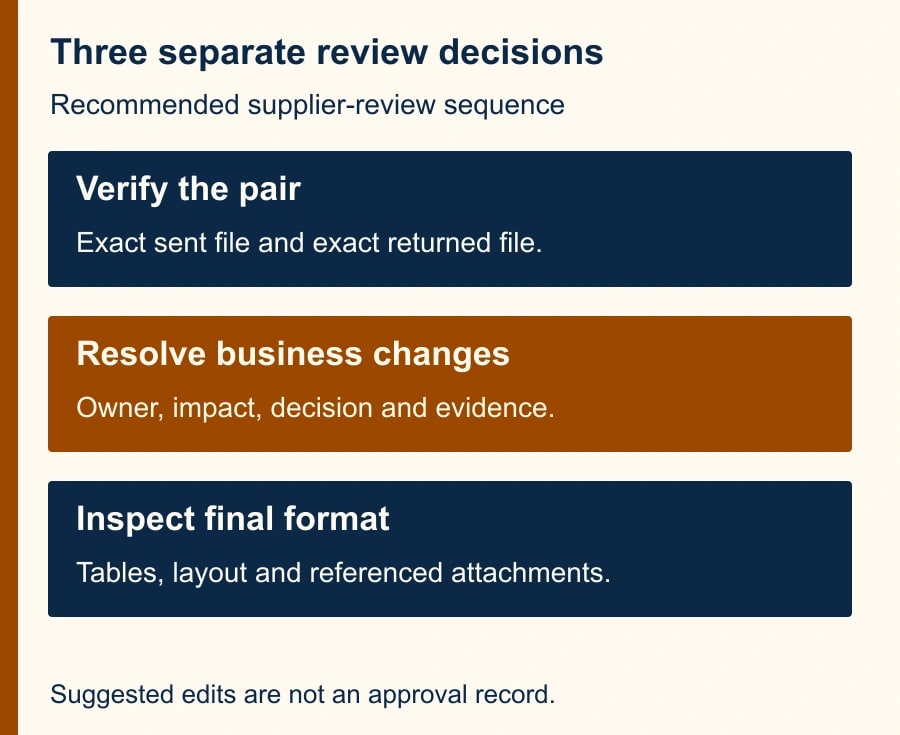
Before running the tool, make a small record of the baseline and returned file. Write the supplier, project, baseline filename and date, returned filename and receipt date, and the person who selected them. Add the Drive links. If the source arrived as an email attachment, keep that attachment with the receipt rather than replacing it with a renamed working copy.
The baseline should be the exact version that went out. An internal draft saved later may already contain changes the supplier never saw. Comparing against it can make a supplier's edit disappear or make your own edit appear to be theirs. If nobody can establish the baseline, stop the approval and ask the project owner to identify it. Ten minutes locating the right file is preferable to a tidy review of the wrong pair.
Preserve both originals and create the comparison in the appropriate project location. Give it a name that includes the two version identifiers and the review date. For example, “Warehouse brief v3 versus supplier return 17 Nov — review only” tells a colleague what they are opening. The phrase “final comparison” says much less and can be mistaken for an approved deliverable.
Check access before inviting reviewers. A file available to the coordinator may not be accessible to the budget owner. Share the specific review materials with the people who need them under the team's existing policy. A comparison containing both versions may expose material absent from the final proposal, including discarded prices or comments. Treat it as a working record with its own audience.
Attribute differences without inventing an author
The comparison dialog's attribution field is a presentation label. It is not an identity check. Use a neutral label such as “Differences from supplier return dated 17 Nov” instead of assigning every suggested change to a named employee. The comparison cannot establish who typed an edit or whether that person had approval authority.
Make the same distinction with comments. Include them when they explain an unresolved question, and keep the comment's context in your review notes. An old comment saying “agreed” may concern an earlier price or a narrower scope. Ask the relevant owner to confirm the current item rather than treating inherited comments as blanket approval.
If Compare documents is unavailable, first confirm that you opened the file in Google Docs rather than a restricted viewer. Google's instructions specifically identify the legacy Office Editing Chrome extension as a possible cause and suggest opening the file from Drive with Open with, then Google Docs. If that does not resolve it, retain the originals and use your team's established comparison method. Do not convert and overwrite the only copy simply to make a menu appear.
A worked supplier review: the price is only one change
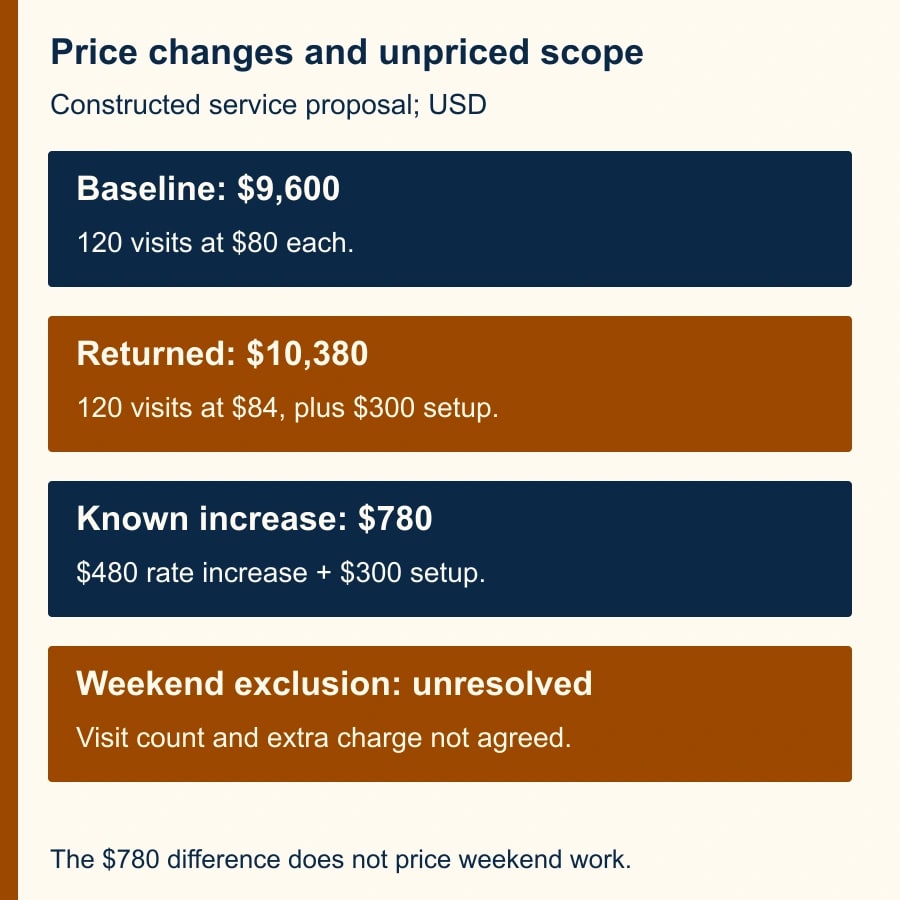
Consider a constructed example, not a customer incident. A facilities team sends a service brief for 120 scheduled visits at $80 each. The baseline service subtotal is $9,600. The supplier returns a proposal for the same 120 visits at $84 each, adds a $300 setup fee, and excludes weekend visits from the standard service. The returned subtotal is $10,380 before any tax. The price difference is $780: $480 from the rate increase and $300 from setup.
The weekend exclusion is a separate decision. The $780 calculation does not price it because neither the number of weekend visits nor the extra charge has been agreed. Writing “total increase $780” without that qualification would make the commercial review look complete while leaving a consequential assumption unresolved. Record the arithmetic and the open scope question separately.
Now suppose the returned file also changes an invoice reference, rewrites a sentence for clarity and reduces the width of a table column. The coordinator can classify the invoice reference as an administrative change, ask the service owner whether the new sentence preserves meaning, and inspect the narrower column in the actual file. Do not count those three changes as equivalent to the price and service exclusions merely because the tool displays suggested edits for some of them.
Use a change register with one line per decision. For this example, the rate row says “$80 to $84; $480 impact; budget owner; pending.” The setup row says “new $300; procurement owner; ask whether one-time.” The weekend row says “service exclusion; impact unpriced; operations owner; hold.” The register is what turns a comparison into accountable work.
Review in three passes
First, check coverage. Confirm the project name, parties, dates, page sequence, appendices and tables in both originals. Look for missing attachments and references to documents that were not returned. A document can have no problematic line edits yet omit the schedule that defined the work. Record missing material as a blocker, not as a formatting inconvenience.
Second, review meaning. Group differences into commercial, operational and administrative changes. Commercial changes include amounts and payment timing. Operational changes include deliverables, responsibilities, acceptance criteria and deadlines. Administrative changes include contact details and reference numbers. These categories are a suggested way to allocate review; they do not determine importance by themselves. A changed bank detail, for example, belongs in the organization's established verification process.
Third, inspect the intended final format. Open the returned .docx and check tables, page breaks, numbering, footnotes and referenced attachments at a readable size. If your team will send a PDF, inspect that exported PDF too. Verify that no amount is hidden, wrapped confusingly or separated from its description. Google explicitly excludes some layout differences from comparison, and a text-focused pass cannot substitute for this check.
Keep the sequence practical. The coordinator establishes coverage, the appropriate owner resolves meaning, and the person producing the outgoing file checks presentation. One person can hold more than one role in a small business, but the record should still show which decision they made. “Reviewed by the team” is hard to act on when an exception resurfaces next month.
Reusable review worksheet
- File pair: baseline link, returned-file link, version dates, receipt reference and person who selected them.
- Difference: location, old wording or value, new wording or value, and the relevant suggested-edit reference.
- Business consequence: price calculation, changed work, changed deadline, or an explicit “impact not yet known.”
- Decision: accept, reject, clarify or defer; named owner and reason; supporting confirmation link.
- Release: unresolved items remaining, final-file link, output-format check, approver and date.
For a small proposal, this can be a simple shared table or a short note. For a larger review, give changes stable identifiers such as C01 and C02 so email discussions can refer to the same decision. Avoid creating a second document full of copied proposal text that itself becomes another uncontrolled version. Quote only enough to identify the issue and link back to the source.
Ask reviewers to answer the question assigned to them. The budget owner can approve the calculated price change while the service owner still withholds approval of the weekend exclusion. Those are compatible states. Do not let a resolved price row turn the whole proposal green. Release requires every blocking decision to be resolved or explicitly accepted by the person authorized to take that risk.
Recover when the review becomes unreliable
If the comparison shows an unexpectedly large number of differences, check the file pair before spending an hour accepting edits. A wrong baseline, copied content from a different proposal or a wholesale restructure may be responsible. Repeat the comparison with verified inputs and retain the discarded review as superseded if colleagues already used it. Explain the change so nobody keeps resolving obsolete suggestions.
If the supplier sends a second revision during review, freeze the first review's decisions and compare the new return against the appropriate agreed reference. Carry forward decisions only after confirming the relevant wording remains the same. A resolved issue can reappear elsewhere, and a newly added appendix can change an earlier conclusion. Update the manifest and change register before asking for another approval.
If the tool produces a result but the output omits a known test change, stop relying on that comparison for the affected material. Use the original files and an alternative review method, then document the limitation. For a recurring workflow, keep a harmless test pair containing a changed amount, deleted sentence and altered table width. That lets the team distinguish expected layout limits from a new usability problem without experimenting on a live approval.
Cost the review and define completion
The announced feature does not require buying a separate comparison product, but the workflow still consumes coordinator and reviewer time. Do not promise that it reduces that time until you measure it. Track minutes spent selecting inputs, reviewing differences, resolving questions and preparing the outgoing file. A fast comparison followed by repeated clarification may cost more than the previous method.
For the first three routine proposals, record whether the baseline was unambiguous, whether every material change had an owner, how many changes were found after approval, and the elapsed time to a usable decision. The target is fewer missed changes with an acceptable review burden. The number of suggestions accepted is not a useful productivity target: one changed delivery obligation can matter more than twenty punctuation edits.
Completion means a named approver has resolved the commercial and operational questions, the outgoing file matches those decisions, and its final format has been inspected. Archive the comparison and register alongside the approved version. If the baseline, authority or missing attachment remains unresolved, the useful output is a clearly held proposal, not an artificially completed review.
Start with one low-complexity supplier return and make the two-file manifest before opening Compare documents. If AI helped write the proposal, also use the business-document citation checks. For files that move through another editable format, the Markdown round-trip checklist explains how to verify that the handoff preserved the intended content.
Weekly Newsletter
AI Adoption Weekly
New research, field guides, training studies, and tool decisions for operators.
No spam. Unsubscribe anytime.
Related Comparisons
Calculator
AI seat cost calculator
List price × headcount. You enter the hours and the operating assumptions.