
How to Check Copilot Citations in Word Before Sharing a Business Document
Turn Word's new citation visibility into a practical review: check the claim, recompute the numbers, and preserve evidence in the final document.
Published October 13, 2026
A citation in a Copilot draft helps you find evidence. It does not establish that the evidence supports the sentence beside it. Before an AI-assisted proposal, executive brief, or client update leaves your team, open the important sources and check the exact claims. The fastest useful review follows the claims that could change a decision, rather than polishing every sentence first.
Microsoft's September 2026 Copilot update says citations to web and work content in Copilot responses in Word rolled out in September. That gives business writers a better starting point for review. It does not turn a cited answer into an approved document. A correct link can accompany an outdated number, a reversed conclusion, or a promise the source never made.
This guide is for a proposal manager, chief of staff, or operations lead preparing documents from known business records. It uses a constructed supplier-recommendation example and provides a repeatable claim-checking worksheet. It is not a legal review procedure or a substitute for the specialist who owns a consequential claim. If the document is purely stylistic and adds no facts or commitments, a lighter review may be sufficient.
Prepare a small source pack before drafting
Start with the decision the document must support. For a supplier recommendation, that might be whether to renew an existing service or run a limited trial of an alternative. Gather the current quote, relevant service description, internal requirements, and approved evaluation notes. Give each source an owner, date, and status. A draft quote should not carry the same authority as an executed agreement.
Remove obsolete copies from the working set, while preserving them in the appropriate archive. If two current documents disagree, record the disagreement instead of asking Copilot to select a winner. The budget owner may know that a salesperson's email supersedes a preliminary proposal, but that decision needs evidence and approval. The model should not infer contractual authority from whichever file looks more complete.
Microsoft's Word drafting guidance describes generating from prompts and reference files, including using a slash to select a source where available. It also says experiences depend on license, organizational settings, app version, and platform. Use an approved work account with the relevant feature enabled. Have your administrator confirm access and cost before making a new subscription purchase for this workflow.
Set aside an untouched copy of the source pack and draft. That gives the reviewer a stable reference while colleagues continue editing shared files. A source that changes halfway through review can make a correct comment appear mistaken. Record the review date and the source version or last-modified information with the decision, not just in the chat conversation.
Ask for a claim list before asking for elegant prose
Use Copilot first to identify what the sources establish and what remains unanswered. This makes gaps visible before fluent writing covers them. In the Word experience available to you, point to the approved files and request a short evidence outline. Keep the scope narrow enough that a person can verify the output in one sitting.
Here is an adaptable prompt: “Using only the named supplier quote, service description, and our requirements note, list the factual claims needed for a renewal recommendation. For each claim, identify the source, relevant section or passage, date, and any conflicting information. Separate stated facts from calculations and your proposed interpretation. If a fact is missing, write ‘Not established.’ Do not infer a discount, service commitment, or implementation date.”
This is a drafting instruction, not a security boundary. Verify the actual sources used and follow the controls available in your organization. Microsoft's Copilot Chat source-review guide describes inline citations and a Sources list in that experience. Word's controls may differ. If Word does not expose enough context, open the original file directly. Do not claim that an unavailable citation control has been checked.
Once the outline is sound, ask for the recommendation in your normal business format: decision, reasons, costs, unresolved conditions, and next action. Request citations near consequential facts and a separate list of assumptions. Keep that list until the review is complete, even if the final document uses footnotes or a shorter source note. The reviewer needs a traceable claim more than a tidy first draft.
Review the claims that could change the decision
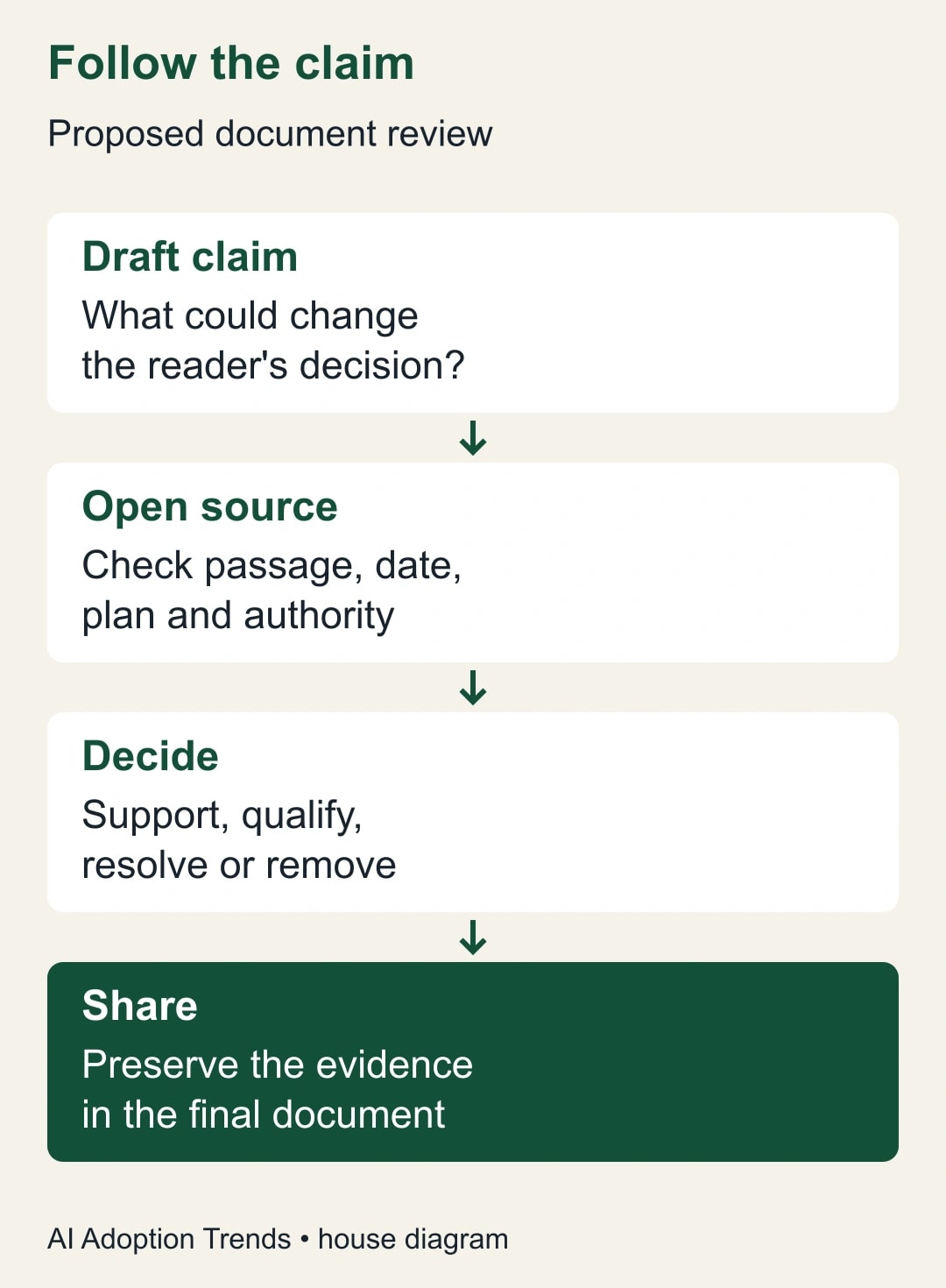
Begin with prices, quantities, dates, eligibility, obligations, product limits, and statements about customer outcomes. Then check claims that imply causation: “This tool reduced processing time” is stronger than “The supplier reports shorter processing time at one customer.” Finally review the connective argument. Individually true facts can still be assembled into a conclusion they do not support.
For each important sentence, open the cited source and locate the relevant passage. Read the surrounding text, not only a highlighted fragment. Ask whether the source concerns the same product, plan, country, period, and customer situation. A publicly listed entry price may exclude the feature under discussion. A product announcement may describe a limited trial. A case study may combine software with staffing and process changes.
Use four decisions: supported as written; supported after qualification; conflicting evidence; or unsupported. Avoid a binary “has citation” field. That field rewards the appearance of evidence and cannot distinguish a helpful reference from a misleading one. A claim can also be a calculation or editorial judgment, in which case label it and preserve the inputs rather than hunting for a source that appears to endorse it.
Keep a short record of the repair. Replace “all integrations are included” with the specific integrations in the quote. Replace “will save two employees” with a supported estimate of hours released, unless there is an approved staffing or spending change. Remove an invented delivery date and assign the unanswered question to the supplier owner. Each repair should reduce uncertainty for the decision maker.
Work through a recommendation with a misleading citation
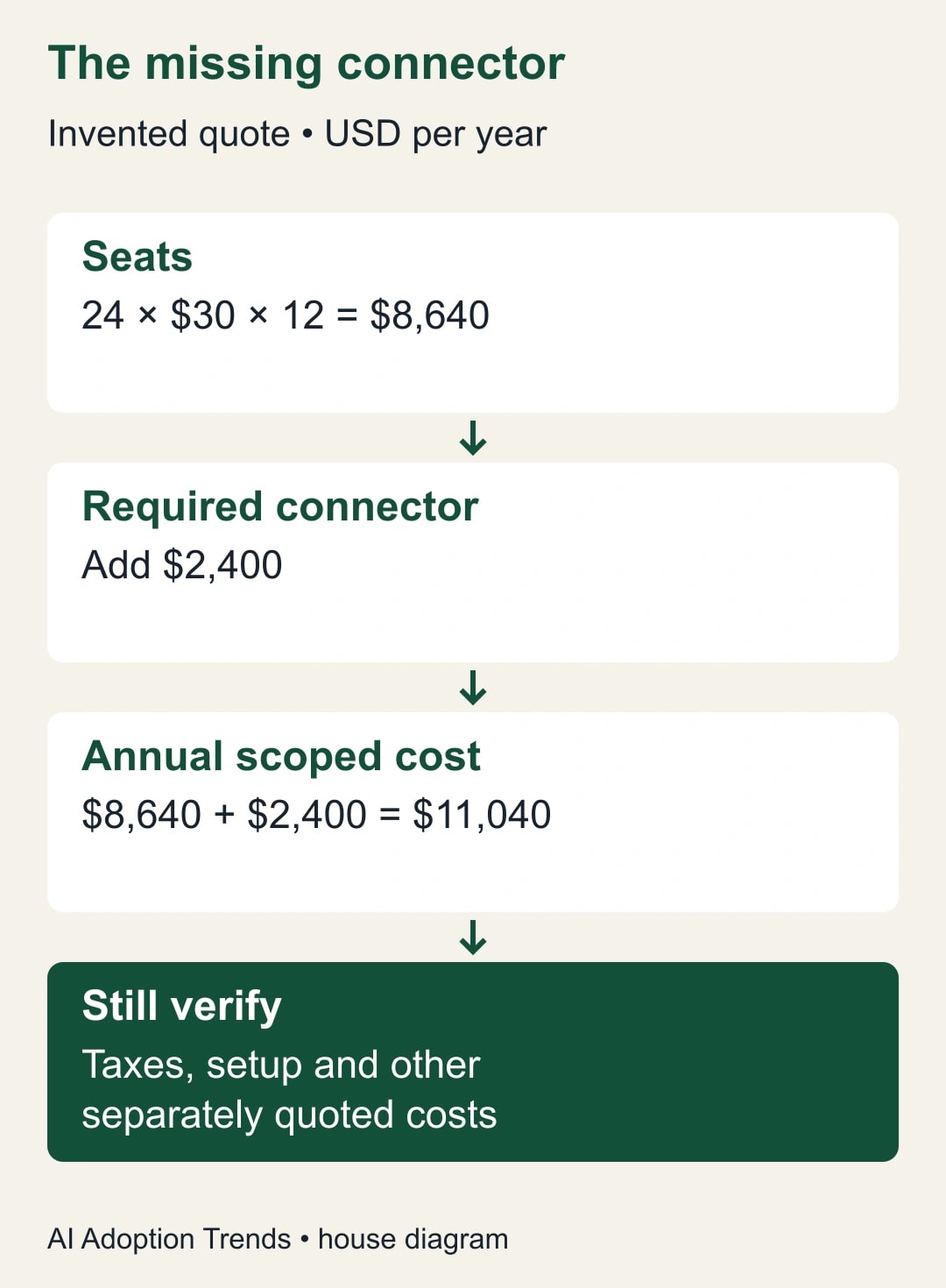
Consider a constructed example. A supplier quote offers 24 seats at $30 per seat per month, billed annually. An optional connector costs $2,400 per year. Internal notes assume every seat is needed for 12 months. The draft says, “The complete service costs $8,640 annually, including the connector,” and links to the quote. The link is real; the sentence is wrong.
The reviewer recomputes 24 multiplied by $30 multiplied by 12, which equals $8,640 for seats alone. Adding the connector produces $11,040 per year before any taxes, implementation charges, or other separately quoted costs. The correct sentence names the included scope and the remaining exclusions. This is an arithmetic example with invented prices, not a current quote for Microsoft or another provider.
A second draft sentence says, “The alternative will pay for itself by cutting review time in half.” Its source is a supplier case study about a different business. The repair is not to add another citation. Record the supplier-reported result as background if it is relevant, then build a local test with a baseline and acceptance measure. A reported outcome elsewhere does not establish your own payback.
Finally, an internal note says the pilot can begin “after security approval.” The draft turns that into “The pilot starts November 1.” No source establishes the date. Replace it with a condition: the project owner will schedule the pilot after the named approval and confirm the start date. The revised recommendation may sound less decisive, but it prevents a manager from treating an unapproved dependency as a commitment.
Use a worksheet that survives handoff
Create one row per consequential claim. A spreadsheet is convenient, but a simple document table is sufficient. Include claim ID, exact draft sentence, source link and version, relevant passage or location, claim type, reviewer decision, required correction, owner, and final status. Keep the claim ID stable when the wording changes so comments do not become detached from their subject.
- C01: annual subscription cost. Type: calculation. Evidence: dated quote and seat assumption. Check multiplication, billing period, required extras, and exclusions. Owner: budget lead.
- C02: connector capability. Type: provider description. Evidence: the applicable plan documentation and quote. Check whether the required operation is supported in the offered edition. Owner: system owner.
- C03: expected time benefit. Type: hypothesis. Evidence: baseline measurement and proposed trial. Remove language that presents the benefit as achieved. Owner: process lead.
- C04: implementation date. Type: planned commitment. Evidence: approved dependencies and a named scheduling decision. Hold the date if those are absent. Owner: project lead.
For a short internal brief, four or five rows may cover most of the risk. For a board paper or external proposal, there may be many more. Scale the review to the consequence and novelty of the claims. Reusing a previously approved paragraph still requires checking that its facts, context, and audience have not changed.
Do not paste confidential source passages into an unapproved tool merely to make review easier. Keep the worksheet in the same approved work environment as the source pack. A reviewer who cannot access a necessary document should flag the access gap. Broadening permissions is a separate decision for the document owner, not an automatic step in citation checking.
Make the final document carry its evidence
Chat citations can help the drafting process, but the recipient may receive a PDF, copied text, or a document without the chat history. Check the exact version that will be shared. Does each important reference remain understandable and open for the intended recipient? Does the document identify the source date and explain calculations? A link that works for the author can still be inaccessible to a client.
Use an appropriate reference format for the audience: a short source note, footnote, appendix, or linked claim worksheet. Do not expose internal URLs or restricted material to an external recipient. Where a source cannot be shared, have the authorized owner approve a suitable description or remove the claim. The solution is not to grant a client access to an entire internal folder.
After factual review, perform the prose edit. Check whether tightening a sentence removes a condition, changes “may” to “will,” or turns a proposed result into a reported one. Substantive edits return to the relevant claim row. Microsoft's drafting guidance explicitly asks users to verify facts, numbers, citations, names, and policy statements before sharing; a final human decision remains part of the workflow.
Measure whether the workflow earns its place
Run a supervised trial on a handful of ordinary documents. Measure total time from the approved source pack to an accepted final draft, not just generation time. Count unsupported claims, wrong calculations, missing conditions, inaccessible references, and rework after the reviewer returns the document. Save the difficult cases as examples for the next writer.
In a constructed comparison, five manual briefs take 50 minutes each to draft and check: 250 minutes total. Five AI-assisted briefs take 20 minutes to draft and 25 minutes to check: 225 minutes. The net release is 25 minutes, not the 150 minutes suggested by drafting speed alone. Any setup and training time still needs to be recovered. Released staff time is not a cash saving without a corresponding budget action.
Stop using the output for external decisions if the workflow repeatedly invents sources, changes obligations, or exposes restricted information. Return to the approved source pack and manual drafting while the owner repairs the process. If review consistently takes longer than the baseline, simplify the task: ask Copilot for an outline or a rewrite of already verified text instead of a complete recommendation.
Start with your next two-page internal brief. Build the claim list before generating prose, and have a second person check the four sentences most likely to influence a decision. The site's first useful week with Microsoft Copilot provides the broader starting point; the AI pilot scorecard helps decide whether this more disciplined drafting process is worth keeping.
Weekly Newsletter
AI Adoption Weekly
New research, field guides, training studies, and tool decisions for operators.
No spam. Unsubscribe anytime.
Related Comparisons
Calculator
AI seat cost calculator
List price × headcount. You enter the hours and the operating assumptions.