
Google Docs Captions: Keep Report References Correct After Edits
Keep Google Docs captions and cross-references accurate through report edits, evidence checks and Word or PDF delivery.
Published November 19, 2026

Use Google Docs inline captions to identify the visuals in a report, and cross-references to point readers to those captions. After substantive edits, refresh the references, update the table of captions separately, and inspect the exported file. A correct figure number does not establish that the chart or the sentence describing it is correct.
That distinction matters when an AI assistant helps rewrite a client report. The prose may still say that Figure 2 demonstrates a reduction in handling time after someone inserts a new chart ahead of it. Numbering can be repaired mechanically. Whether the cited evidence supports the conclusion still needs an analyst.
Google announced inline captions, cross-references and tables of captions on November 18, 2026. Its announcement describes automatic caption numbering and renumbering, with availability for Workspace, Workspace Individual and personal Google accounts. It also describes Word document import and export compatibility. These are provider statements, checked November 19, rather than results of a document compatibility test by this publication. Google's caption announcement.
Where this improves a reporting workflow
This process fits a reporting lead who produces recurring client reviews, operating reports or proposals containing several figures and tables. It is especially useful when a subject specialist changes exhibits while another person edits the narrative. The deliverable is a report whose references remain traceable through that handoff, with a named person responsible for the final file.
Skip the migration for a one-page note with one clearly described illustration. Also pause if your required delivery system does not preserve the document features you need. A client who must edit a Word file needs a check of that particular exported file. A reader receiving a PDF needs a legible, complete PDF; success inside the working Google document is insufficient.
You need edit access to a copy of the report, the underlying evidence for each exhibit, a list of required delivery formats and a reviewer who understands the business claims. Assign one report owner to manage revisions and one analyst to verify evidence. In a small team these can be the same person, but schedule a distinct final review after the editing session.
Budget time for converting existing manually typed references, checking each destination and reviewing exports. This guide does not assume a new paid add-on or quote a subscription price. Confirm access in the account you use. For an established template, the expensive part may be finding ambiguous references such as “the chart below,” not inserting a caption.
Start with an exhibit register
Make a short list before changing the document. Give each exhibit a working identifier that describes its subject independently of its current number. For example, use “handling-time,” “request-volume” and “backlog-age.” These are editorial working labels, not a required Google Docs field. Keep them in the review worksheet or an internal note.
For each item, record its source, reporting period, units, responsible analyst and the claim it supports. A bar chart might use minutes per completed request, while the paragraph compares total staff hours. Both numbers can be accurate and still fail to support the same claim. The register should make that disagreement visible before the document looks finished.
Decide whether an exhibit belongs in the report at all. Two charts answering the same question create more reference work and can suggest contradictory conclusions if they use different filters. Keep the version that serves the reader's decision, or explain why both views are necessary. Captioning is not a reason to preserve an unnecessary exhibit.
A useful register entry is: “handling-time; completed requests only; October; minutes per request; source workbook tab Operations; analyst Morgan; supports comparison of processing effort, excluding waiting time.” Morgan is an illustrative role name in this constructed example, not a reported customer or a real participant in our testing.
Convert one complete reference chain
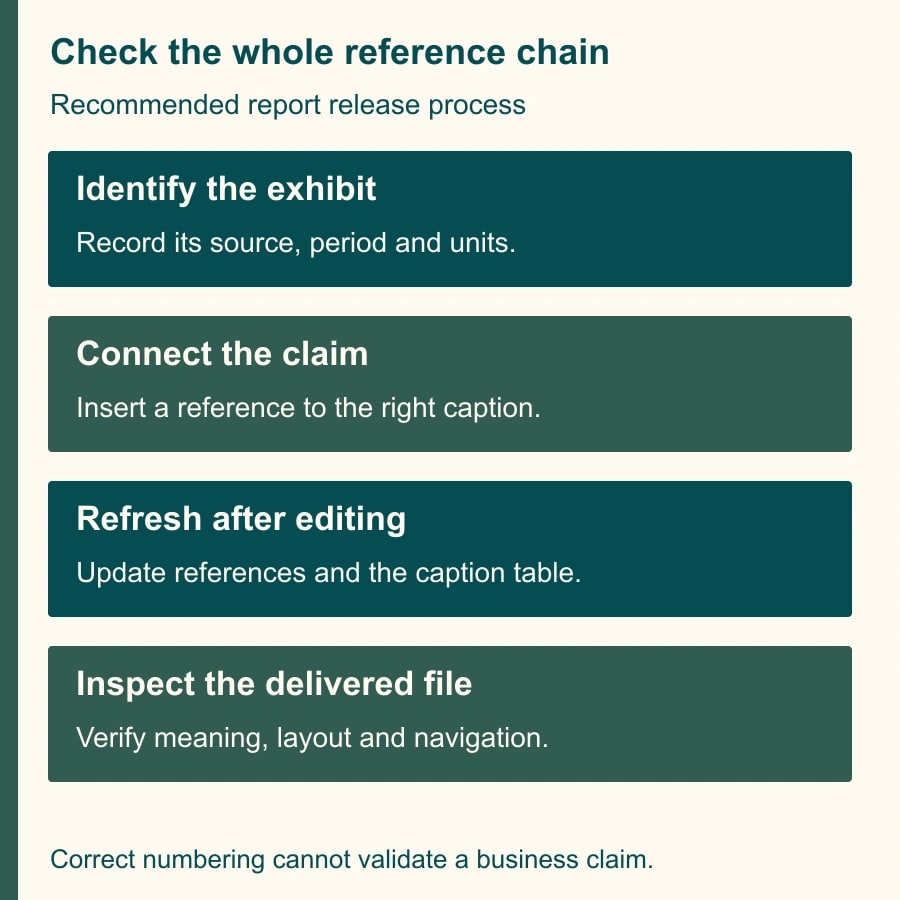
Begin with one important chart and the sentence that cites it. Select the chart and choose Insert, Page elements, Inline caption. Choose the appropriate caption type and numbering style. Add the caption before inserting its cross-reference. Then place the cursor in the narrative and use Insert, Page elements, Cross reference, Insert cross reference to choose the caption and display format. Google's caption and reference instructions.
Use a caption that identifies the evidence rather than repeats a promotional conclusion. “Completed requests by week, October” gives the reader a concrete subject and period. “Our AI transformation succeeds” hides what was measured. If the source excludes reopened requests, put that limitation where a reader of the exhibit will see it.
Replace the manually typed figure number in the sentence with the actual reference. Do not merely add a link beside an old number. The expected output is one sentence with one clear destination. Click through to confirm it selects the intended exhibit, then ask the analyst whether the surrounding claim still describes that exhibit accurately.
Repeat this process for the remaining references. Search for words such as figure, table, exhibit, above and below to find leftovers. Search results are candidates for human inspection: “table stakes” is not a table reference, and “above target” may describe performance. An AI assistant can help identify candidate sentences in approved material, but it should not decide which source proves a claim.
A constructed revision that catches the real mistake
Consider a monthly service report containing three exhibits. Figure 1 shows request volume. Figure 2 shows handling time. Figure 3 shows backlog age. The executive summary points to handling time, the operations section points to volume and the action plan points to backlog age. The intended relationships are three claims connected to three particular exhibits.
The analyst then inserts a new customer-mix chart before handling time. The report now contains four figures. Handling time becomes Figure 3, and backlog age becomes Figure 4. The executive summary must still point to handling time. A search-and-replace that changes every “Figure 2” to “Figure 3” is a weak repair because some references may describe different objects or already have been edited.
Next, the analyst replaces the handling-time chart with a version using completed requests only. Its displayed number can remain correct while the meaning changes. The summary originally compared all incoming requests with completed work. That is a denominator problem: the quantities being compared no longer describe the same population. Refreshing references cannot resolve it.
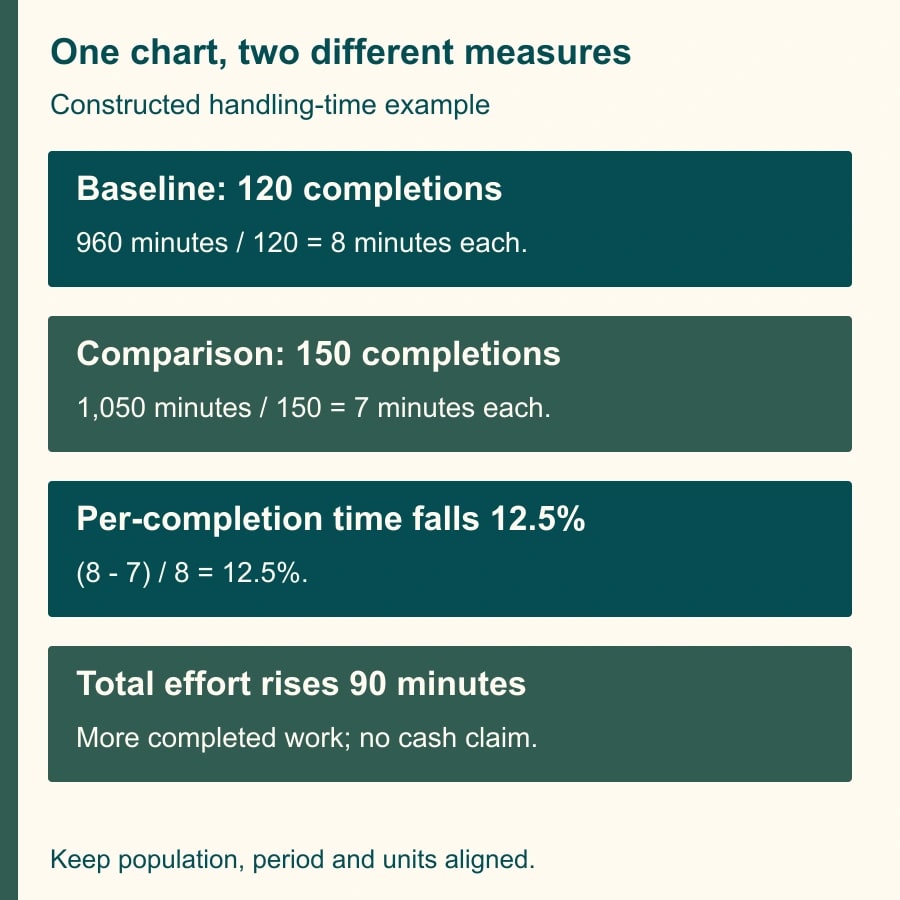
Suppose the report's constructed source data shows 120 completed requests and 960 handling minutes in the baseline period, then 150 completed requests and 1,050 minutes in the comparison period. Average handling time falls from 8 minutes to 7 minutes per completion, a 12.5% reduction. Total handling effort rises by 90 minutes, from 960 to 1,050, because completed volume rises by 25%.
The defensible sentence is: “Average handling time per completed request fell from 8 to 7 minutes, while total handling effort rose with higher completed volume.” A sentence saying “staff time fell 12.5%” would misstate the example. These are illustrative calculations, not measured performance or a claim of cash savings. Even reduced staff hours would need a separate staffing or spending change to become cash savings.
The final checkpoint therefore has two parts: the summary references the handling-time exhibit, and its comparison uses the same population, period and units as the exhibit. Record both. A reviewer who checks only the destination can approve an incorrect business conclusion.
Refresh and export as a release step
Google documents a refresh action for individual cross-references and a Refresh all option under the Cross reference menu. A table of captions has its own Update action. In pageless documents, page-number information and associated separators do not display as they do in Pages format. Use Pages when the delivered report depends on page numbers. Google's refresh and table guidance.
Set a review cutoff after the last substantive revision. Refresh all references, update the caption table, then generate the required delivery files. Record which document version and export time the reviewer inspected. If someone replaces a chart or rewrites a conclusion afterward, repeat the relevant evidence review and the export check. A file name ending in “final” does not preserve the approval.
Inspect the exported document from beginning to end. Confirm the caption stays with its visual, text is readable at a normal viewing size, the caption table identifies the right items and references remain understandable. Check navigation where the format supports it, but ensure the written reference still works for someone reading a printed page.
For Word delivery, open the exported document in the intended editing environment and check the same reference chain. Google's compatibility statement is a reason to try the workflow, not permission to assume every combination of layout, equations and recipient software behaves identically. If a critical element breaks, fix the source or use an agreed alternative delivery format, then inspect a fresh export.
Reusable report release worksheet
Copy this checklist into the report's internal review record. Replace the bracketed items with actual identifiers rather than marking the whole list complete after a quick scroll.
- Report owner: [name]. Evidence reviewer: [name]. Intended readers and decision: [description].
- Working document version and cutoff: [version or timestamp]. Delivery formats: [Google document, Word, PDF or other].
- Exhibit register: [subject, source, period, units, exclusions, analyst and supported claim for every exhibit].
- Reference check: [sentence location, intended exhibit, actual destination, pass or repair].
- Evidence check: [population, arithmetic, source date and qualification in the narrative].
- Refresh record: [all cross-references refreshed; caption table updated; reviewer and time].
- Export check: [file name, readable visuals, complete captions, reference meaning and navigation checked].
- Exceptions and release decision: [unresolved item, owner, deadline, hold or approve].
Keep the worksheet with the delivery record rather than burying it in a personal chat. The next reporting cycle should begin with the same subject identifiers and a clear list of sources to replace. Reusing a checked structure is useful; reusing last month's conclusion without examining new evidence is not.
What to do when a reference is still wrong
If the displayed number is stale, refresh and inspect the destination. If the destination is wrong, reinsert the cross-reference to the intended caption. If a sentence contains a typed number, replace that text with a proper reference. Avoid assuming that all three failures have the same cause.
If the caption is correct but the chart is outdated, return to the source data and regenerate or update the exhibit through your established chart workflow. Then verify the narrative again. If an exhibit has been deleted, either remove the unsupported claim or cite a suitable replacement after a human checks it. A nearby chart is not automatically an acceptable substitute.
If errors appear only in the export, keep the working document and failed export as evidence. Isolate one representative exhibit in a copy, simplify the layout if appropriate and retest. Do not send a file with known broken evidence references just because the online version looks right. Give the recipient a clear delivery alternative or a revised deadline.
Measure rework, then decide whether to expand
For the first three reporting cycles, count references inspected, incorrect destinations, unsupported claims and corrections found after export. Also record editing and review minutes separately. Fewer manual numbering edits may release staff capacity while evidence review remains necessary. That is a useful outcome even without a change in payroll.
Stop broadening the template if reviewers cannot trace the sources, if required exports repeatedly fail or if the extra structure makes a short document harder to use. Repair the particular weakness before adding more automation. For a complex recurring report, success means a reader reaches the right evidence and understands what it supports.
Start with one report and one reference chain today. If your next handoff involves external Word edits, use the guide to compare supplier changes in a Word document with Google Docs. For the evidence review itself, adapt the process for checking AI-generated citations in business documents.
Weekly Newsletter
AI Adoption Weekly
New research, field guides, training studies, and tool decisions for operators.
No spam. Unsubscribe anytime.
Related Comparisons
Calculator
AI seat cost calculator
List price × headcount. You enter the hours and the operating assumptions.