
Google Chat Meeting Suggestions: Check Guests Before You Schedule
Review the purpose, guest list and timing of a suggested Chat meeting, then verify one correct Calendar event.
Published November 16, 2026

A project coordinator can use Google Chat's meeting suggestions to shorten scheduling, but should review the guest list, purpose and time before creating the event. A person mentioned in a conversation is not necessarily someone who should receive the invitation. Treat the suggested card as an editable proposal, and use Calendar when the meeting needs more explanation or a narrower audience.
The useful outcome is a correctly scoped meeting that participants can prepare for. A fast invitation to the wrong people creates more coordination work than it removes. This guide turns the new scheduling shortcut into a small, repeatable review process for internal project decisions. The examples below are constructed scenarios, not observed customer results or a test of a live Google account.
What changed, and what remains your decision
Google's November 10, 2026 Chat scheduling announcement describes underlined meeting requests in web conversations of up to five participants. The card offers up to three times based on Calendar availability, a suggested title, and guests drawn from the conversation, including named people. The launch is English-only, with an extended rollout that began November 9 and may take longer than 15 days.
As checked November 16, the announcement lists Business Standard and Plus, Enterprise Standard and Plus, Frontline Plus, and AI Ultra Access eligibility. Smart features must be enabled. This is not evidence that every eligible account already has the shortcut. Ask the administrator to confirm availability in your account before changing a team procedure or buying a different plan for this feature alone.
There is also a documentation difference worth handling directly. The announcement describes Schedule and Open in Calendar. Google's current Smart Actions help still describes Beta or experimental access and Send, Edit, and Help me schedule controls. Use the controls actually shown in your account; the final scheduling or sending action creates an invitation. If the interface does not allow the review you need, finish in Calendar instead of guessing which button merely previews.
The operational guidance that follows is our recommended process. It does not assume that Gemini understands the team's authority, confidential project boundaries, or whether a meeting is necessary. Calendar availability can suggest a free slot. Only the organizer can decide whether that slot and audience serve the work.
Use the shortcut for a small, settled decision
This fits a coordinator arranging a short internal meeting with a clear decision and a stable list of participants. Examples include choosing between two delivery dates or assigning an owner to an unresolved dependency. The conversation should already contain enough context for the organizer to write a useful title without inventing missing facts.
Skip the shortcut for a broad workshop, sensitive staffing discussion, customer negotiation, or meeting with uncertain attendees. A mention of a customer, supplier or colleague can be context rather than an invitation request. A fast card is also a poor starting point when rooms, equipment, accessibility arrangements, or multiple time zones require detailed checking. The existence of a suggested slot does not settle those requirements.
Prerequisites are modest: an eligible work account with the feature visible, access to the relevant conversation, a known organizer, and permission to invite the intended people. The coordinator should have the decision brief and any approved preparation link ready. Product access comes through the applicable Workspace entitlement; the principal pilot cost is staff time reviewing invitations and correcting mistakes. Record that time rather than assuming the shortcut saves it.
Write the meeting brief before opening the card
Use four short lines in your own notes: decision, required people, preparation, and deadline. For example: “Choose the launch date for the revised order form. Required: the project owner, operations lead and account lead. Read the approved readiness note. Decide before Thursday's supplier call.” That brief is the standard against which you check the suggestion.
Do not ask the tool to manufacture a decision because the thread contains uncertainty. “We should talk sometime” may need a clarification message before any scheduling. The coordinator can ask whether a written reply would resolve the issue and who actually has authority to decide. If the answer is still unclear, leave the event unsent.
Write down the intended duration too. Fifteen minutes may be enough to approve a date when all facts are available; it may be too short to discover the facts. Adding everyone to a short slot does not make a poorly defined meeting efficient. The organizer owns this judgment even when the title and time arrive automatically.
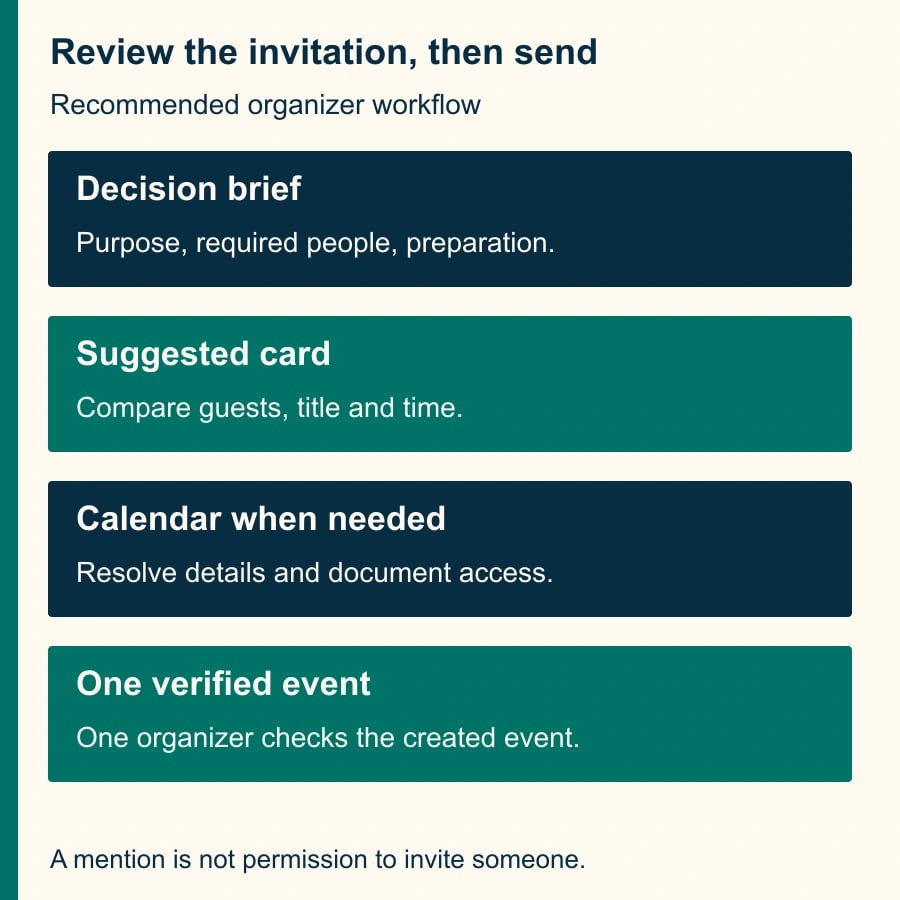
Review the proposal in four passes
First, inspect people. Compare every suggested guest with the required-person list. Check the actual account or address, not just a familiar display name. Remove anyone mentioned only as background, and add a necessary decision-maker only after confirming that person's role. If two people share a name, resolve the identity before sending. A wrong-person invitation can reveal the project title even if the attached file remains restricted.
Second, inspect the purpose. Replace a vague title such as “Proposal discussion” with a concrete, appropriate description. Avoid putting confidential details in the title simply because they appeared in a private thread. A useful title tells the invitee what decision to prepare for. If a title cannot do that honestly, return to the brief rather than polishing the wording.
Third, inspect time and duration. Check the date, displayed time zone and conflicts for required attendees. A free calendar is not proof that a person is available for useful work: travel, preparation and working hours may need a direct check. Treat a flagged conflict as an unresolved issue unless the affected person has agreed to the overlap. Do not silently move the meeting outside normal hours to obtain a green-looking card.
Fourth, inspect the preparation material and final event. If you need to add context, change details, or verify access to a source document, use the fuller Calendar workflow available in your account. Check that the preparation link is the approved version and that intended readers can open it. Avoid expanding file access to a wider group just to make an invitation convenient; ask the document owner for the appropriate sharing choice.
The checkpoint before sending is simple: the card or event agrees with the brief, and every exception has an owner. One named coordinator performs the final action. Two people independently clicking the suggestion can create competing coordination attempts even if the product's particular duplicate behavior varies. A short “I'll organize this” message prevents ambiguity without depending on that behavior.
Worked example: a named colleague who should not be invited
Consider a constructed four-person conversation: Maya, the project owner; Leon, the operations lead; Priya, the account lead; and Sam, the coordinator. Maya writes, “Can we meet tomorrow afternoon to choose the order-form launch date? Jordan sent the supplier estimate.” Jordan supplied information but is not required for this internal decision.
Suppose the suggested guest list includes Jordan. Sam compares it with the brief and removes that proposed guest before sending. He checks that Maya, Leon and Priya are included and decides whether he needs to attend as note-taker. This is a role decision, not a rule that the coordinator must always attend or always be excluded. The intended invitation in this example is the three decision participants plus Sam.
The first proposed slot conflicts with Leon's warehouse review. The second is free but leaves no time to read the revised readiness note. Sam selects a later suitable slot after confirming the preparation window. He changes the title to “Choose order-form launch date” and adds the approved note in Calendar. The final check is against the actual event, not memory of the original card.
After creation, Sam verifies one event with the right date, duration, guests and preparation link. He posts a short confirmation in the thread without resending an invitation. If someone asks to add Jordan later, Sam checks the reason with Maya. New information can justify changing the meeting; it should not silently alter the initial audience review.
The practical artifact is a tiny record: thread link, decision, organizer, expected guests, event link, and any exception. It need not become a permanent database for every routine conversation. Keep enough evidence during the pilot to distinguish a helpful shortcut from invitations that required substantial repair.
A ten-meeting pilot with honest arithmetic
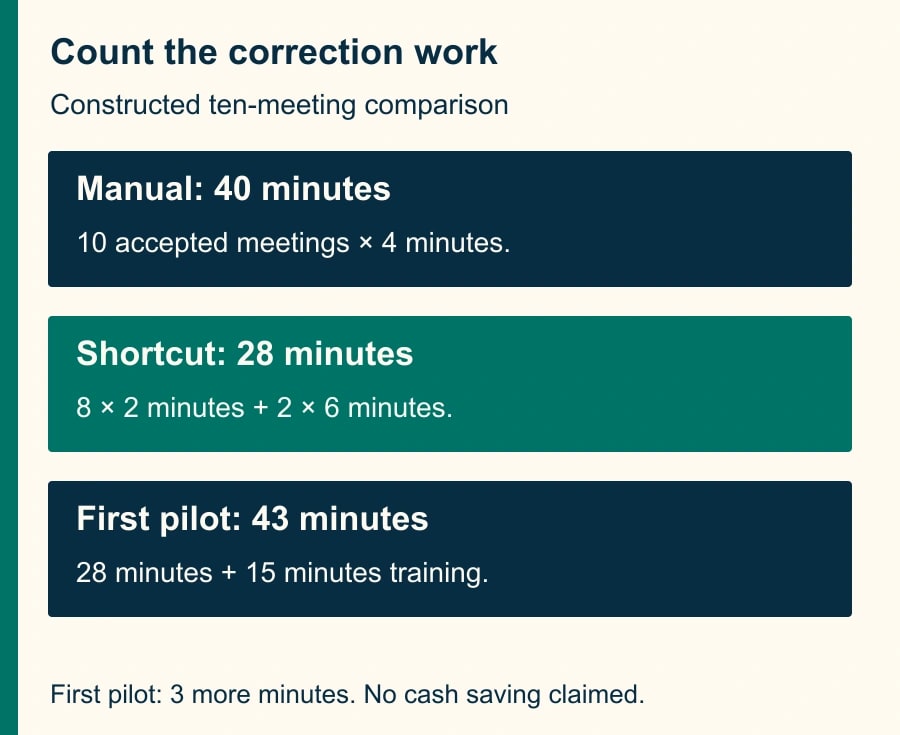
For a constructed pilot, suppose manual scheduling takes four minutes per accepted meeting. Ten meetings therefore require 40 minutes. With the shortcut, eight routine meetings take two minutes each, while two complicated ones take six minutes each after corrections. The total is 28 minutes: 16 plus 12. Released coordination capacity is 12 minutes across the ten meetings. Assuming all ten took only two minutes would overstate that benefit as 20 minutes.
If the coordinator also spends 15 minutes teaching the process, the first pilot consumes 43 minutes, three more than the manual comparison. That does not automatically reject the feature; training may be reusable. It does mean the first week's result is not a cash saving. Use a second comparable sample to see whether the review time remains lower after setup, and retain the cost of corrections in the calculation.
Measure accepted invitations, wrong-guest corrections, reschedules attributable to the workflow, and organizer minutes. Do not count suggested cards as completed work. Also separate normal attendee changes from avoidable scheduling defects. A participant becoming unavailable later is different from a conflict visible before the invitation was sent.
Recovery when the wrong event has already been sent
If the guest list is wrong, stop further scheduling from the thread and have the organizer inspect the existing event. Correct or cancel that event through the normal Calendar controls as appropriate. Do not create a second “fixed” meeting while leaving the first one active. Verify the resulting guest list and notify affected participants with the minimum explanation needed to resolve the mistake.
If an unintended person received sensitive information, involve the appropriate internal owner rather than assuming removal erases what was already delivered. This is a concrete consequence of the mistake, not a reason to make every routine meeting a security project. The recovery record should say what was shared, who corrected it, and whether any further action remains.
If no suggestion appears, check eligibility, rollout, supported surface and smart-feature settings with the administrator. Do not change organization-wide settings merely to fix one coordinator's convenience. The manual Calendar path remains a complete fallback. If an event was created but the thread confirmation is unclear, inspect Calendar before trying the action again.
Reusable organizer checklist
- Decision: I can state what this meeting must settle and why a written reply is insufficient.
- People: Each guest is required or deliberately optional; names and addresses have been checked.
- Time: Date, time zone, duration, working hours and known conflicts fit the brief.
- Preparation: The approved source is available to the intended readers without unnecessary sharing.
- Ownership: One organizer will create and maintain one event.
- Verification: The created event matches the reviewed proposal; corrections update that event.
Pause the pilot after any wrong-person send or repeated duplicate event until the cause is understood. Continue only when the review is shorter than manual work without increasing correction work. The next useful action is to try the checklist on one ordinary internal decision, then inspect the actual invitation. After the meeting, use the site's Chat recap and missing-next-steps guide to turn discussion into assigned work; use the time-zone meeting check when participants work across regions.
Weekly Newsletter
AI Adoption Weekly
New research, field guides, training studies, and tool decisions for operators.
No spam. Unsubscribe anytime.
Related Comparisons
Calculator
AI seat cost calculator
List price × headcount. You enter the hours and the operating assumptions.