
Find a Missing Google Chat Meeting Recap and Confirm the Next Steps
Check rollout, meeting notes and chat settings when a Google Chat recap is missing, then turn suggested next steps into confirmed work with an owner.
Published October 25, 2026

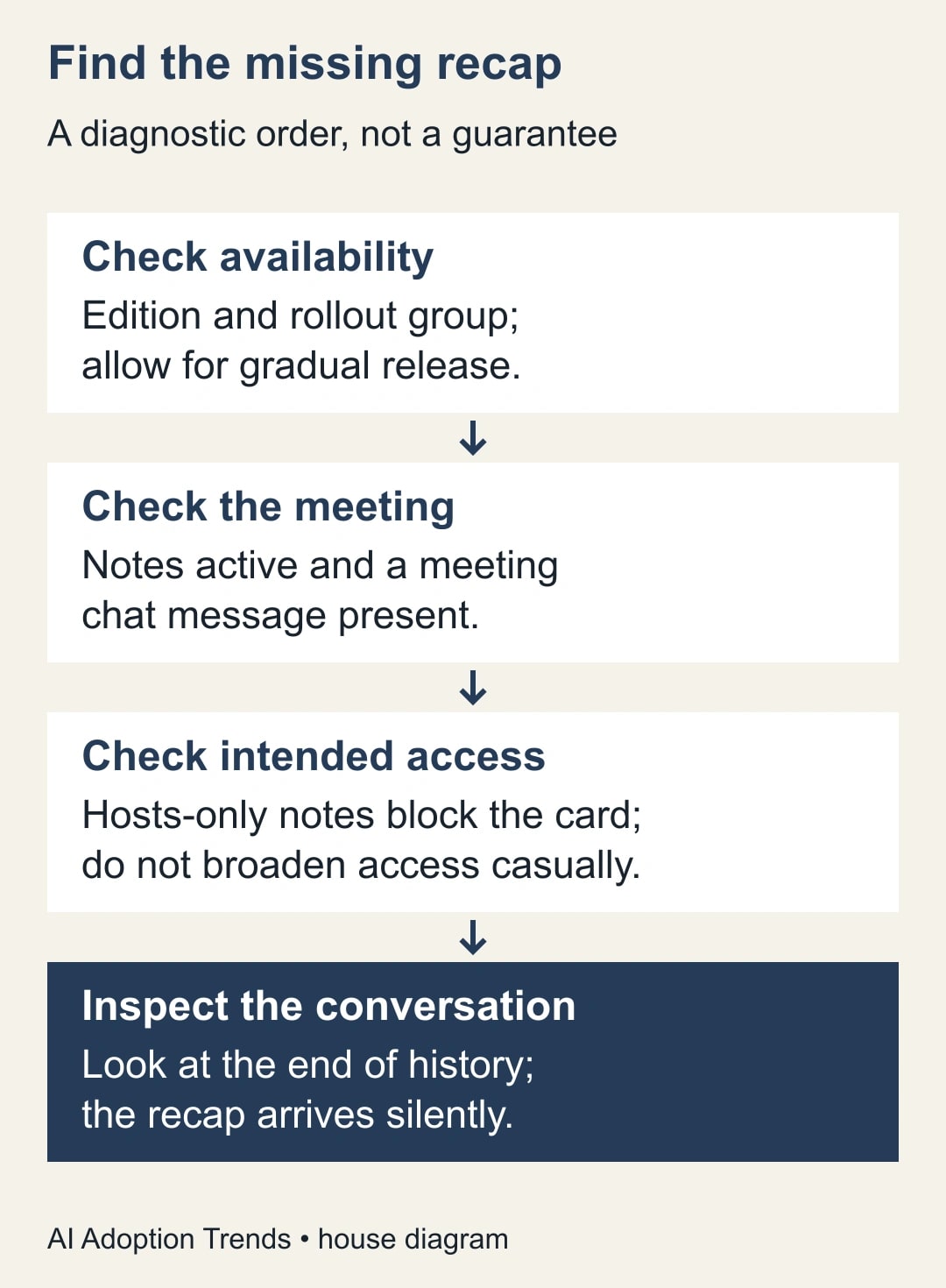
If a Google Chat meeting recap is missing, check the feature’s rollout, whether Gemini took notes, whether the meeting had a chat message, and who was allowed to receive the notes. Then look at the end of the meeting conversation. A missing notification is not evidence that the recap failed.
Once the card appears, treat its proposed next steps as a review queue. Confirm the work, owner and deadline with the people involved before copying anything into your task system. Finding the summary and accepting the commitments are two different jobs.
This guide is for a project or operations lead whose team already uses Google Meet and Chat. It is especially useful when people expect an automatic summary after an ordinary internal meeting. It is not a reason to turn on recording, expand access to a confidential discussion, or buy a new subscription just to avoid writing a short follow-up.
Product information was checked on October 25, 2026. The procedure below combines Google’s documentation with a proposed operating checklist. The worked meeting is a constructed example, not a report from a customer account.
Check the date before troubleshooting the meeting
Google announced the recap card on October 19. Its announcement says Rapid Release rollout began October 16 and Scheduled Release rollout begins October 27, with gradual delivery taking up to 15 days. Eligible editions listed are Business Standard and Plus, Enterprise Standard and Plus, and Frontline Plus. On October 25, a Scheduled Release organization should not assume this feature has arrived. Google’s meeting recap announcement
Ask your Workspace administrator for the organization’s release track and the account’s edition. Record those answers next to the meeting you are investigating. A screenshot of an absent card, without the account and meeting context, gives support very little to work with.
Do not repeatedly recreate the same meeting to force delivery while rollout is still pending. Use a manual action note for today’s work and arrange one small check after the relevant release window. That preserves the business outcome while the feature becomes available.
For an eligible team, the first cost is staff attention: an administrator checks access, the organizer checks meeting settings, and an action owner reviews the result. This article does not assume an incremental license price. If your edition is ineligible, compare the value of the whole proposed upgrade with the existing manual process, not with the convenience of this one card.
Establish one meeting as the test case
Choose a recent, uncomplicated internal meeting with a known organizer and a small invited group. Use a harmless rehearsal if the original discussion involved sensitive personnel, client or commercial information. The goal is to establish whether the delivery conditions were met, not to reproduce confidential content in another location.
Write down the meeting title, date, organizer, investigating account and the intended notes audience. Keep the meeting link in your internal working note. Add whether someone actually started note taking and whether anyone posted to the meeting conversation. These observations are more useful than remembering that the team “usually has AI on.”
Google’s Chat help lists smart features, active note taking and a meeting chat message among the conditions for an automatic recap. It directs users to the meeting conversation, at the end of the message history. The recap is therefore something to inspect in its specific conversation, rather than something to hunt for across unrelated direct messages. Google’s recap requirements and location
If a prerequisite was absent, record it as the explanation for that meeting. Do not state that enabling it afterward will reconstruct a recap of a meeting that was never captured. For the next suitable meeting, establish the intended settings beforehand and check the result afterward.
Keep the access decision separate from the delivery decision
Google says recap cards are not sent when the note-taking setting sends notes only to hosts and cohosts. It also says the cards arrive silently, without making the conversation bold or showing an unread badge. Both details can explain an apparently missing recap without a service failure. Recap delivery and visibility behavior
The tempting response is to change the audience until a card appears. That is the wrong decision sequence. First ask who should receive the meeting record. If hosts-only access was intentional, a restricted notes document and a short approved action message may be the correct outcome.
Meet’s “Send notes to” choices distinguish invited guests, invited guests in the organization, and hosts/cohosts. The invited audience can include people who did not attend. The organizer should inspect the actual invitation list, including external addresses, before changing that setting. Google Meet notes audience guidance
Suppose a project meeting included an external supplier for ten minutes, followed by an internal discussion of pricing options. A recap that is convenient for internal staff may not be appropriate for every invited guest. Write a separate, approved supplier action note if needed. Do not solve an access problem by posting the full source material into a wider conversation.
If the notes audience is appropriate but one person cannot open a linked artifact, investigate that artifact’s access separately. The existence of a card does not prove every linked document is available to every reader. Have the intended recipient check access using their own account; avoid testing by giving everyone broader permissions.
Inspect the summary without turning it into an automatic promise
Read the recap alongside the available meeting notes. Identify the statements that would change someone’s workload, spending, delivery date or customer expectation. Those statements deserve a deliberate confirmation even if the rest of the summary looks plausible.
A useful review asks three questions. Was this work actually agreed? Is the named person responsible for delivering it? What observable output will show that it is done? A sentence such as “Sam to review the rollout” is too vague to become a useful task without another conversation.
Translate it into something the owner can accept: “Sam will return a marked-up rollout checklist covering the three pilot locations by Thursday noon.” That is an editorial clarification, not permission to invent a deadline. If the meeting did not settle the date, write “date to confirm” and ask Sam.
Keep uncertain statements visibly uncertain. A proposed change is not an approved change; a question raised in discussion is not an assigned action. The reviewer’s job is to preserve those distinctions while making the follow-up shorter and easier to act on.
For important decisions, link to the relevant notes section and retain the organizer’s correction in the same working record. A polished replacement summary without the reason for a change can make later disagreement harder to resolve. The team needs enough context to understand what was confirmed, not a second transcript.
Work through four suggested actions
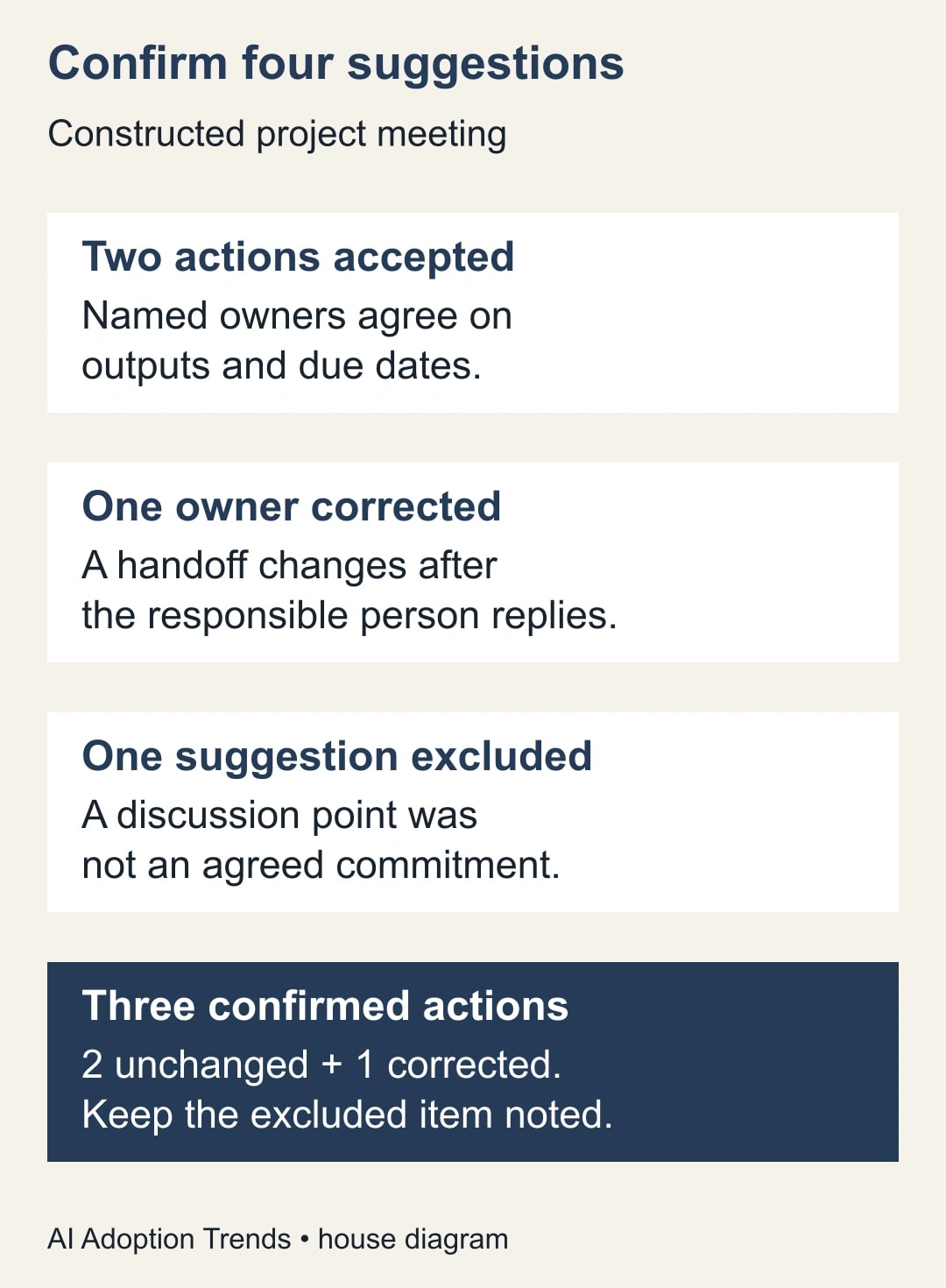
Consider a constructed meeting about launching an internal request form. The recap proposes four next steps: Ana publishes the approved form, Ben checks the routing rules, Chen emails the pilot users, and the team replaces the current approval system.
Ana and Ben confirm their actions, outputs and dates. Chen explains that the pilot communication belongs to Priya, who accepts it after seeing the draft message. The final suggestion came from a discussion of future options; the team never agreed to replace the approval system.
The reviewed record contains three confirmed actions: two unchanged and one with a corrected owner. It also records that the replacement proposal was excluded because no decision was made. Four suggestions did not become four commitments. Copying the recap without review would have created both a wrong owner and unauthorized work.
Use a compact action note for each accepted item. For example: “A-03: Priya sends the approved pilot invitation to the agreed internal list by Tuesday 14:00. Evidence: link to the sent message. Dependency: Ana confirms the form is ready. Priya accepted October 25.” These details belong to the constructed scenario; your actual dates and owners must come from the team.
The initial unchanged-action rate here is two out of four, or 50%. That describes this small example only. It is not a product accuracy estimate. A more useful operational measure is whether all three accepted actions have an owner, a due date and a place to record completion.
Copy this recap-to-action worksheet
Use one row per proposed action in your normal task tracker or a shared working document. The following fields are a suggested worksheet, not native fields that Google automatically creates for you.
- Meeting and source: title, date, notes link and relevant passage.
- Proposed work: the recap’s suggestion, preserved briefly enough to compare.
- Review decision: accept, correct, defer or exclude, with a short reason.
- Confirmed output: the file, decision, message or completed check that is expected.
- Responsible owner: one person who has explicitly accepted the handoff.
- Due date and dependency: a real agreement, or an open question to resolve.
- Completion evidence: where the owner will record the result.
- Reviewer and review date: who accepted the final wording.
Before creating tasks, group suggestions that describe the same output. “Prepare the pilot list” and “send the pilot invitation” may be separate activities, but two differently worded reminders to send the same invitation should not become duplicate assignments.
Use the meeting identifier and your action identifier when moving work into another system. On a second review, search for the existing task before creating another. A correction should normally update the accepted record, with a note explaining the change, rather than leave two competing versions of the same commitment.
For a small meeting, the organizer can perform this review. For a cross-functional meeting, the organizer gathers confirmations while each responsible owner checks their own item. The organizer should not silently accept a delivery date on behalf of another department.
Recover from common failures
If the card is absent, retain the prerequisite checklist and use the existing notes or a manual recap. If the card is present but misleading, correct the action record before distributing it. If the notes themselves are ambiguous, ask the participants; another generated paraphrase does not settle what they agreed.
If someone deleted the recap, Google says the summary cannot be restored, while the underlying notes document remains in Drive. Use that document as the starting point for a new approved action note. Do not describe a manually reconstructed note as the original generated card. Google’s deletion guidance
If two owners disagree, stop the handoff for that item. Keep the rest of the confirmed actions moving, but mark the disputed work as awaiting an organizer decision. This prevents one uncertain line from blocking an otherwise useful meeting follow-up.
If confidential material reached an unintended audience, stop copying it into further systems and ask the responsible administrator or information owner to handle access. A recap is not a reason to widen an incident. Keep any support description limited to what is needed to diagnose the issue.
Decide whether the feature is helping
For the next five eligible meetings, record whether a recap appeared, how many suggestions needed correction, and how long confirmation took. Separate delivery failures from content corrections. A missing card during rollout and a wrong action owner are different problems with different remedies.
Compare the total follow-up effort with the previous method, including review and task entry. If a manual recap took 15 minutes and the new process takes five minutes to inspect plus eight minutes to confirm and enter actions, the constructed saving is two minutes per meeting. That is released staff capacity, not an automatic cash saving.
Stop relying on automatic handoff if people repeatedly accept tasks without reading them, if access boundaries remain unclear, or if the confirmation work takes longer without improving clarity. The useful result is reliable work assignment, not a high number of generated summaries.
Start with one meeting: check the prerequisites, locate the card, and confirm one real action with its owner. For the broader follow-up process, use our Google Meet next-steps workflow. When the accepted action belongs on a board, use the Google Chat to Trello owner handoff rather than copying every suggestion automatically.
Weekly Newsletter
AI Adoption Weekly
New research, field guides, training studies, and tool decisions for operators.
No spam. Unsubscribe anytime.
Related Comparisons
Calculator
AI seat cost calculator
List price × headcount. You enter the hours and the operating assumptions.